hirschmann
Add config for HP Pavilion Gaming 15-ec0xxx(Ryzen 3550H + GTX 1650)
Previous pull requests failed due to missing "Fanspeed 100" and critical temp being lower than one of the up thresholds.

Could you add config for HP Pavilion Gaming Laptop 17-cd0xxx? (I5-9300h + GTX 1050)

Could you add config for HP Pavilion Gaming Laptop 17-cd0xxx? (I5-9300h + GTX 1050)
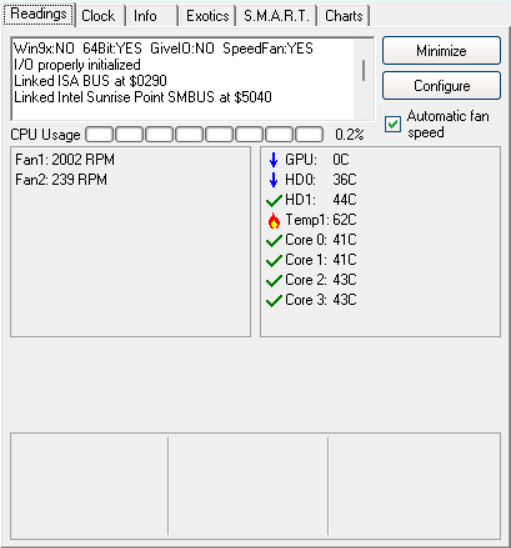
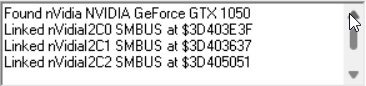
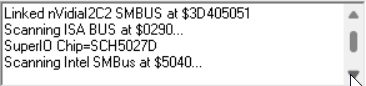
 I need the id for your Super I/O chip. You can find it with Speedfan. In the attached image, it shows my laptop's super I/O chip's model.
I've instaled SpeedFan, but superIO chip is not showing up. Is there another way of getting superI0 chip id?
I've instaled SpeedFan, but superIO chip is not showing up. Is there another way of getting superI0 chip id?
If you're running Linux, this might help. Sorry for the delayed reply I was occupied with something else

Config for i5 9300h is added?
Try the config I made it might work. If not, follow the process I've mentioned in the above comments and reply with your Super I/O chip model. I'll try making a config for your laptop model.
Hello. The theme sounds like Add config for HP Pavilion Gaming 15-ec0xxx(Risen 3550H + GTX 1650). Are we talking about this laptop here? I am extremely interested in the working configuration for this laptop, because I also have an excessive cooler operation. I am ready for all possible financial gratitude for the performance of this work! :-)

Hello. The theme sounds like Add config for HP Pavilion Gaming 15-ec0xxx(Risen 3550H + GTX 1650). Are we talking about this laptop here? I am extremely interested in the working configuration for this laptop, because I also have an excessive cooler operation. I am ready for all possible financial gratitude for the performance of this work! :-)
Yeah this config is for that laptop model.
PAVILION GAMING - 15-EC0101AX I have above laptop and this only controls one fan it seems, the other fan runs at its default speeds. When I set it to 100% only the fan that is at the farther end of the heat pipe starts spinning at full speed, the fan closer to the GPU and CPU spins at it's previous speed and is not getting controlled.

PAVILION GAMING - 15-EC0101AX I have above laptop and this only controls one fan it seems, the other fan runs at its default speeds. When I set it to 100% only the fan that is at the farther end of the heat pipe starts spinning at full speed, the fan closer to the GPU and CPU spins at it's previous speed and is not getting controlled.
I read the documentation for the SuperIO chip(SCH5027D) and tried messing with all PWM pins and I could only get one fan responding to the application. Here's the link for the document. If you can manage to get the other fan spinning too, let me know!