henrypp
allow windows defender
Privet tovarishch Henry, i can't get defender to update with simplewall, how is it done?

windefend service, wuauserv service Allow microsoft stuff in the settings - blocklist Personally I use and recommend kaspersky, though both are mostly unnecessary with simplewall just don't install bad apps and also use an adblocker like ublock origin

windefend service, wuauserv service Allow microsoft stuff in the settings - blocklist Personally I use and recommend kaspersky, though both are mostly unnecessary with simplewall just don't install bad apps and also use an adblocker like ublock origin
sadly doesn,'t work. you tried that yourself?
Years ago, I use kaspersky right now, which you only have to whitelist avp.exe, all of microsoft's software is too integrated, too many loopbacks/dependencies.... How about trying kaspersky? Uses much less ram, scans much faster... Much higher threat detection rating, on review sites...
Kaspersky has a free version, they hide it pretty well, and in many regions, but kaspersky cloud is available here https://www.kaspersky.com/free-antivirus
[old non-cloud version] https://products.s.kaspersky-labs.com/homeuser/kfa2019/19.0.0.1088/english-gb-0.57.0/kfa19.0.0.1088en_14173.exe [this is 2019, so there will be an additional upgrade necessary, but newer kfa is hidden as they now push security cloud...]
Man...stop selling this crap.
Defender has been good enough for many years now and paying (or accepting ads) for a 3rd party program which punches additional holes in your system or spys on you makes no sense at all.
Also you're not solving the issue here...

Man...stop selling this crap. Defender has been good enough for many years now and paying (or accepting ads) for a 3rd party program which punches additional holes in your system or spys on you makes no sense at all. Also you're not solving the issue here...
thanks for this, tbh fuck kaspersky. according to av test they are on the same level more or less and i prefer defender since it's less performance heavy and is also free. i'd appreciate people staying on topic here.
If you think windows defender is good enough, so is just using an adblock and not installing garbage from unofficial sites. AV is near pointless unless you're stupid. MSFT still does definition updates via windows update, they're still rather rare[a day or several] compared to most commercial AV, that receive definitions every hour if not more often and also have the option for "cloud protection". Further, if you want to use an application, but don't really trust it, kaspersky application control easily allows you to modify the applications permissions.
All these companies and government agencies getting ransomware, what AV do you think they use? These cheap AF agencies/companies trust Microsoft, and don't want to pay for anything else, especially from foreign countries. Got what they deserve as will you, if you're stupid and only use windows defender lol.
If it's so badly updated, why does it end up being so good in tests? .
And man, Defender has cloud protection as well as real-time protection. You seem to not even have the most basic knowledge about the product you try to shi.. on. So why are you doing it? Especially: why here? It wasn't the question OP had and you're still not helping. You're just reciting ads.
All these companies and government agencies getting ransomware, what AV do you think they use?
They use hardware firewalls and protection which comes along with it. They still have Defender left turned on.
And do you know what they surely would never use?
Kaspersky...
IK windows defender has real time, where did I say it doesn't? I didn't know of cloud protection implementation, I never would enable that spyware anyways. My whole point is kaspersky is easier, as you only need to whitelist the one exe, where in windows defender there's many exes and services that are mandatory for proper operation.
Anyways some other defender things are c:\programdata\microsoft\windows defender\platform\4.18.2105.5-0\msmpeng.exe c:\programdata\microsoft\windows defender\platform\4.18.2105.5-0\nissrv.exe Seems with the newest windows defender, some updates will move the installation directory to current build number, and as simplewall doesn't use wildcard it's more annoyances for you.
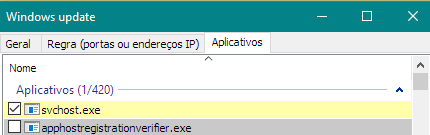
Hi, this work for me: Create a personal rule for svchost.exe like this:
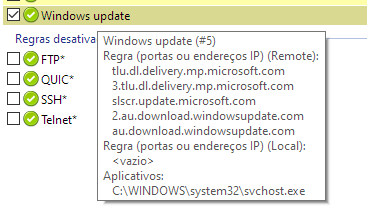
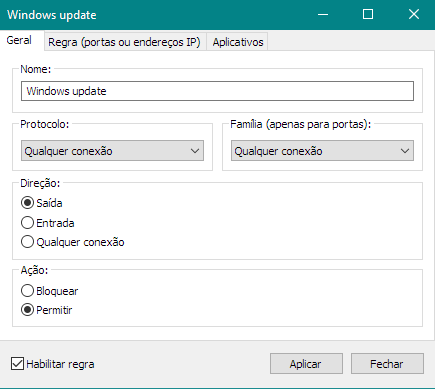
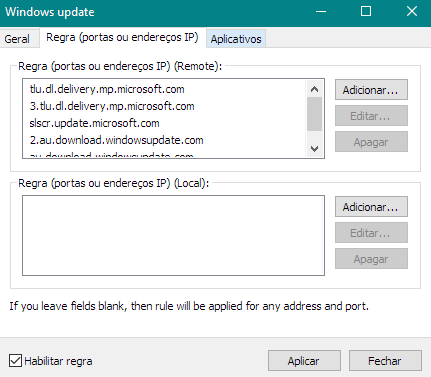
List of remote address:
- tlu.dl.delivery.mp.microsoft.com
- 3.tlu.dl.delivery.mp.microsoft.com
- slscr.update.microsoft.com
- 2.au.download.windowsupdate.com
- au.download.windowsupdate.com
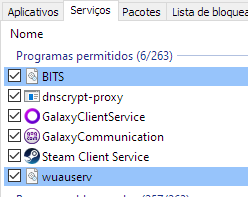
In services alow BITS and wuauserv:
Working in my windows 10 PC's. Versions tested:
- Windows 10 Education
- Windows 10 Pro

Hi, this work for me: Create a personal rule for svchost.exe like this:
List of remote address:
- tlu.dl.delivery.mp.microsoft.com
- 3.tlu.dl.delivery.mp.microsoft.com
- slscr.update.microsoft.com
- 2.au.download.windowsupdate.com
- au.download.windowsupdate.com
In services alow BITS and wuauserv:
Working in my windows 10 PC's. Versions tested:
- Windows 10 Education
- Windows 10 Pro
obrigado cara! vou tentar logo pq quite o defender por entao
List of remote address:
- tlu.dl.delivery.mp.microsoft.com
- 3.tlu.dl.delivery.mp.microsoft.com
- slscr.update.microsoft.com
- 2.au.download.windowsupdate.com
- au.download.windowsupdate.com
Another address to include:
- 2.tlu.dl.delivery.mp.microsoft.com
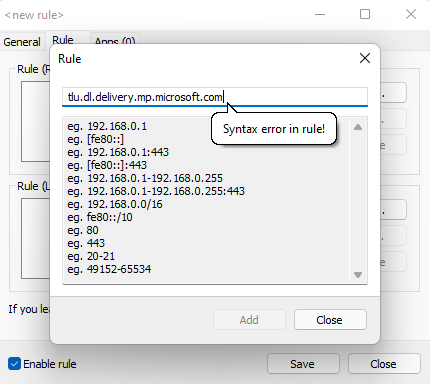
Hi, If I try to create a rule with the remote adresses for the exception I'm getting "Syntax error in rule!" I'm using version 3.6.1. So, how did you manage that?