

 henrypp
[Low Priority] Disabling the search bar using "View -> Show search bar" does not remove it from all windows.
Hi,
the search bar definitely has its uses, especially when analyzing the packets log or when searching for a target app or service.
However, it is rather annoying and looks out of place, at least in my opinion.
Example #1 (Apps Tab):
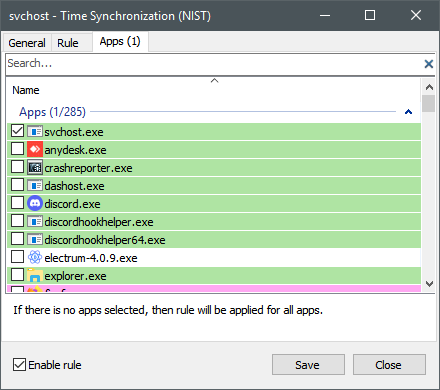
Example #2 (Rules Tab):
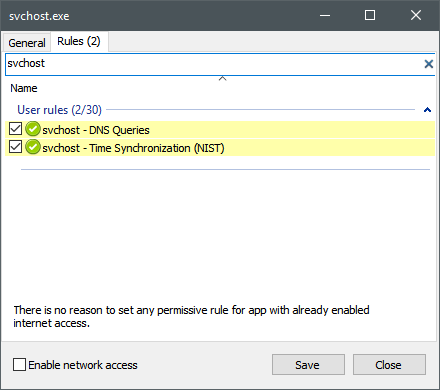
I suggest making the "View -> Show search bar" setting global, and respectively renaming it into "View -> Show search bars".
Alternatively, if people want to disable the main search bar, but keep the ones above the apps and rules lists, a second setting could be added below the existing one in the "View" drop-down menu, maybe named "Show search bars in pop-up windows"?
I find the second option unnecessary, people that aren't bothered by the search bar on the main app window likely won't be bothered by further search bars in other windows - plus, the entire string proposed above would likely not fit into the drop-down menu.
@henrypp What is your opinion on this?
Best Regards.

@henrypp First of all, Happy Holidays!
Can we get this option in the next stable branch?
You don't know how happy you would make me :-)
@henrypp Small reminder :)
Also, About and F1 still say "All rights reversed" )
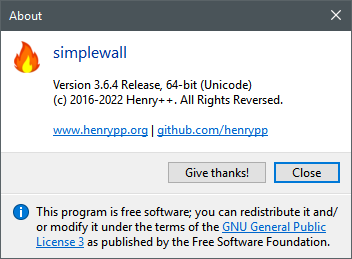
Correct string would be All rights reserved.
Come on @henrypp !!!
You can do it !!!!!!