

 hellzerg
13.7 Works fine but 13.9 won't open (event viewer below)
--Info from event viewer--
Fault bucket , type 0 Event Name: CLR20r3 Response: Not available Cab Id: 0
Problem signature: P1: Optimizer-13.9.exe P2: 0.0.0.0 P3: 63024243 P4: System.Drawing P5: 4.8.4395.0 P6: 60ad8367 P7: 323 P8: 54 P9: System.OutOfMemoryException P10:
Attached files:
These files may be available here: \?\C:\ProgramData\Microsoft\Windows\WER\ReportQueue\AppCrash_Optimizer-13.9.e_87a9ae8d996aca338ece2b919bcff790ac48a1df_0ad7405e_9301b90f-f18a-43ec-adb0-0fee28b30d4b
Analysis symbol: Rechecking for solution: 0 Report Id: 1ca7ff6d-75d1-456a-8ede-57b7451f85a0 Report Status: 4 Hashed bucket: Cab Guid: 0
--error from event viewer--
Faulting application name: Optimizer-13.9.exe, version: 0.0.0.0, time stamp: 0x63024243 Faulting module name: KERNELBASE.dll, version: 10.0.22000.918, time stamp: 0xb42fa627 Exception code: 0xe0434352 Fault offset: 0x000000000004474c Faulting process id: 0x3d80 Faulting application start time: 0x01d8c08a3a357e75 Faulting application path: C:\Users\kdmgr\Downloads\Optimizer-13.9.exe Faulting module path: C:\WINDOWS\System32\KERNELBASE.dll Report Id: 1ca7ff6d-75d1-456a-8ede-57b7451f85a0 Faulting package full name: Faulting package-relative application ID:
What I've tried
In safe mode 13.9 does open 13.9 does not open if I run as admin, clear the program data folder run with /restart=disabledefender or run with /disable=uwp
I ran task manager as I run optimizer and it shows the task for a sec then gets suspended Optimizer never gets past the checking for requirements screen even if program data folder cleared Thank you

unfortunatley i'm getting the same issue, program won't start 13.9
Faulting application name: Optimizer-13.9.exe, version: 0.0.0.0, time stamp: 0x63024243
Faulting module name: KERNELBASE.dll, version: 10.0.25193.1000, time stamp: 0x7f47a922
Exception code: 0xe0434352
Fault offset: 0x000000000007527c
Faulting process ID: 0x0x1638
Faulting application start time: 0x0x1D8C0F0194F2B40
Faulting application path: C:\Users\root\Desktop\Optimizer-13.9.exe
Faulting module path: C:\WINDOWS\System32\KERNELBASE.dll
Report ID: 58461685-c5c7-4a4e-bcbe-c55715702bd7
Faulting package full name:
Faulting package-relative application ID:
Application: Optimizer-13.9.exe
Framework Version: v4.0.30319
Description: The process was terminated due to an unhandled exception.
Exception Info: System.OutOfMemoryException
   at System.Drawing.Image.FromFile(System.String, Boolean)
   at Optimizer.MainForm.GetModernApps(Boolean)
   at System.Windows.Forms.CheckBox.OnCheckedChanged(System.EventArgs)
   at Optimizer.MoonCheck.OnCheckedChanged(System.EventArgs)
   at System.Windows.Forms.CheckBox.set_CheckState(System.Windows.Forms.CheckState)
   at System.Windows.Forms.CheckBox.set_Checked(Boolean)
   at Optimizer.MainForm..ctor(Optimizer.SplashForm, Boolean, Boolean, Boolean, Boolean, Boolean, Boolean, Boolean, Boolean)
   at Optimizer.Program.Main(System.String[])

unfortunatley i'm getting the same issue, program won't start 13.9
Faulting application name: Optimizer-13.9.exe, version: 0.0.0.0, time stamp: 0x63024243
Faulting module name: KERNELBASE.dll, version: 10.0.25193.1000, time stamp: 0x7f47a922
Exception code: 0xe0434352
Fault offset: 0x000000000007527c
Faulting process ID: 0x0x1638
Faulting application start time: 0x0x1D8C0F0194F2B40
Faulting application path: C:\Users\root\Desktop\Optimizer-13.9.exe
Faulting module path: C:\WINDOWS\System32\KERNELBASE.dll
Report ID: 58461685-c5c7-4a4e-bcbe-c55715702bd7
Faulting package full name:
Faulting package-relative application ID:
Application: Optimizer-13.9.exe Framework Version: v4.0.30319 Description: The process was terminated due to an unhandled exception. Exception Info: System.OutOfMemoryException at System.Drawing.Image.FromFile(System.String, Boolean) at Optimizer.MainForm.GetModernApps(Boolean) at System.Windows.Forms.CheckBox.OnCheckedChanged(System.EventArgs) at Optimizer.MoonCheck.OnCheckedChanged(System.EventArgs) at System.Windows.Forms.CheckBox.set_CheckState(System.Windows.Forms.CheckState) at System.Windows.Forms.CheckBox.set_Checked(Boolean) at Optimizer.MainForm..ctor(Optimizer.SplashForm, Boolean, Boolean, Boolean, Boolean, Boolean, Boolean, Boolean, Boolean) at Optimizer.Program.Main(System.String[])
It's something about creating Images from files in "GetModernApps" method

https://github.com/hellzerg/optimizer/blob/8c8fe41b297bd5fc491b51fffa6546a14c0f019d/Optimizer/Forms/MainForm.cs#L2288
Docs said:
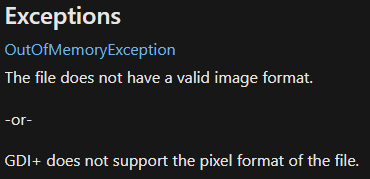
Maybe the second one I suppose.
I had this issue and resolved it by updating to NVIDIA driver 516.94. https://www.nvidia.com/download/index.aspx

I had this issue and resolved it by updating to NVIDIA driver 516.94. https://www.nvidia.com/download/index.aspx
I just tried it with 516.94 and still same thing
