helloSystem
Handle multi-monitor setups better
Traditionally, the Mac has shown he menu bar only on the main display. Recent versions seem to show the same menu bar on all desktops.

Possibly this could be achieved by setting
KWindowSystem::setOnDesktop(winId(), NET::OnAllDesktops);
Or not. The Dock has this but it also shows only on one desktop.
Was just about to open an issue for this but i guess it's better to keep it in one place.
Currently menu bar always displays on the first screen from the left to the right.
Initially I tought it should only display on the main screen that's set by the user but displaying it on both screens would be really useful because of the context menus.

Do we want to have it on both screens? I might look into this more as I use multimonitor very often.

On the screenshot, it appears like the width for the menu bar is calculated for the smaller of your screens and then applied to the larger of the screens.
This is clearly a bug in Menu.
(We want to have the Menu on the main screen, and we want the user to be able to select what the main screen is. Optionally, we possibly want one Menu instance per screen, which seems to be possible in very new versions of macOS but never was the case in the Classic ones. Ideally we can do away with arandr and use a tool in our native toolkit, Qt, instead)
Just looked into this, made some improvements:
The menu now opens on the main screen selected by the user.

The menu automatically sets the correct width for the correct screen.
(the bug in my previous screenshot no longer exists)

https://github.com/helloSystem/Menu/issues/52 is also fixed

Just opened a PR for this https://github.com/helloSystem/Menu/pull/55 What's still missing is a way to detect when the user changes the main screen but I haven't found a good way to do it in Qt. Orientation, position, and scaling changes should be automatic. Maybe there's a good way to do it via arandr but not sure yet if it stays because of https://github.com/helloSystem/Utilities/issues/41 Maybe in the future
Thanks a ton @PreyK. The next ISO build should have the improvement.
Do we want to have it on both screens? I might look into this more as I use multimonitor very often.
If yes, then it should be optional, e.g., only have it on both screens if a certain environment variable is set.
Sounds great @probonopd, can't wait to try it! Might take a look at the Dock too for some multimonitor improvements. Currently, It doesn't take the primary display into account. If it's the same-ish solution it should be pretty trivial but would improve the multi-monitor experience by a lot.
If yes, then it should be optional, e.g., only have it on both screens if a certain environment variable is set.
Possibly set from the screen settings application in like a checkbox?

Yes, this would be the natural place to put a checkbox. But before you spend time at the GUI please keep in mind that we want to replace that Gtk based legacy GUI with something native (Qt or PyQt) anyway. Hence I had suggested a simple environment variable for now - it should be easy to hook some GUI up later.
@grahamperrin can you please re-test with the latest ISO and let us know whether we can close this ticket, thanks.
@probonopd Of course, it was just a quick mockup
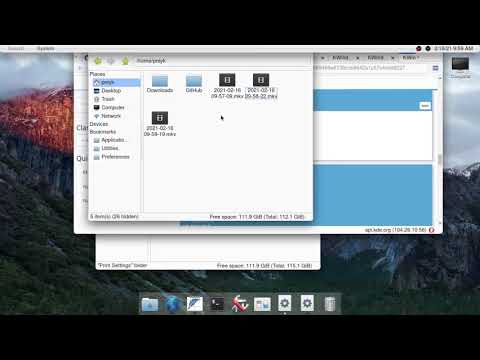
Also, I tested the new ISO and found some issues. The menu now draws on the correct display when it's set but it doesn't block window maximization when it's not on the first screen from left to right. (it works properly when using only one display or when the primary display is the first display on the left)
Video
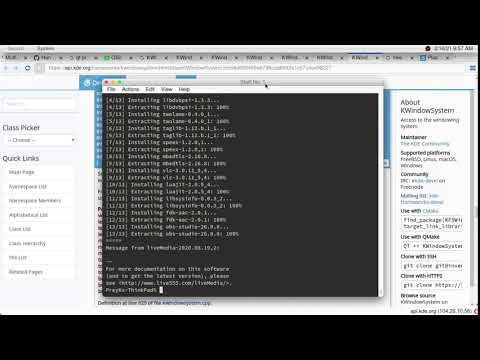
This happens because after we create the menu, we reserve an area for the menu through KWindowSystem from here: https://github.com/helloSystem/Menu/blob/cea947363a3f65e4d4ea2cf6b4d4f29ae53594a3/src/mainwindow.cpp#L143 It's essentially just saying to KWin that this is our place, not a usable place for app windows.
In theory, we'd just have to extend the above code to take the primary display dimensions into account. However, I haven't managed to make it work properly (the documentation on KWin is not the best IMO) because:
A) the reserved area gets stretched through the other display thus limiting the usable space when the main is our second display and their tops are not completely aligned
B) Can't quite grasp the documentation of how the reserved area gets defined, it kind of works but not really. https://api.kde.org/frameworks/kwindowsystem/html/classKWindowSystem.html#a669469a6738ccb8642a1c57c4ce08227 https://api.kde.org/frameworks/kwindowsystem/html/classKWindowSystem.html#af83b6d1db5390b191b5b9b0c061a1e03
We'd need to define the reserved area correctly
Or
Find a way to REALLY reserve a space for the menu because even though we reserve an area it doesn't have any effect when dragging windows.
We shouldn't be able to drag windows under the menu (And I don't know why we can, we've already told KWin no) but currently, we can.
If we find a fix for this we could possibly use it to block maximization also?
Video