

 heavyai
Is there a way to set the number of CPU cores (or threads) being used during query execution?
Hi there,
I'm benchmarking OmnisciDB. Is there a way to set the number of CPU cores (or threads) being used during query execution (on CPU)? Is num-executors the correct flag to set? I tried setting num-executors to 1, but it seemed like still all cores are being used during query execution.
Thanks so much, Dong

Hi,
Our engine allocates a thread for each "fragment" of the base table involved in the query with CPU executions.
By default, each fragment has 32 million records, so if you loaded 320 million records into a table and queried it, 10 threads would be allocated for the runtime. The mechanism is different with GPU and cannot be changed at the time of writing can not be changed, but you can reload the table using a bigger fragment_size.
you can do it several ways, but probably the CTAS is the more straightforward
https://docs-new.omnisci.com/sql/data-definition-ddl/tables#create-table-as-select
ALso sharding the table, in conjunction with fragment_size) could help you to control the number of CPU threads allocated at runtime. If needed I can give you directions ;)
Candido
Hi @cdessanti ,
Thanks for your prompt reply. I am a bit confused. I would like to run my benchmarks on my CPU with only one thread enabled at the time of query execution (no GPU for this benchmark). Could you please give more directions?
Thank you so much, Dong
Hi,
We are working on a more sophisticated and feature-rich path for the CPU, and it will land soon. There will be a parameter to specify the maximum number of cores that the system uses at runtime to execute queries in cpu-mode.
Right now, the only way to force the system to run the query on a single thread is to change the fragment_size of the table, so if you have a table with 60M records by default, the query has two fragments, so you have to re-create the table with a fragment size big enough to contain all the records.
The faster way is to create the new table with a ctas operation, e.g.,
create table1_new as select * from table1 with (fragment_size = 200000000);
The new table will be created with a fragment size of 200M so running a query against that table, assuming you have less than 200M records and just 1 shard, the CPU core used to run queries against the table will be 1.
Candido
Hi @cdessanti ,
Thanks a lot. I did this and using htop I still see all cores being used when executing the query. I was testing TPC-H Q1 which is a single-table query (scale factor 1) on a single machine and set fragment_size to 200000000 for table lineitem (which should be way more than enough). Any idea on why it was still using all cores?
Thanks, Dong
Hi,
Are you sure about that? I tried with tpch SF 10, and started the server with those parameters.
-data /opt/mapd_storage/data48 --allowed-import-paths=["/"] --allowed-export-path=["/"] --enable-debug-timer=true --verbose=true
so I simply activated the verbose output and the debug timer to have additional runtime details in the log, created the lineitem table with a fragment size of 302 million
omnisql> \d lineitem
CREATE TABLE lineitem (
  L_ORDERKEY INTEGER NOT NULL,
  L_PARTKEY INTEGER NOT NULL,
  L_SUPPKEY INTEGER NOT NULL,
  L_LINENUMBER INTEGER NOT NULL,
  L_QUANTITY DECIMAL(10,2) NOT NULL,
  L_EXTENDEDPRICE DECIMAL(18,2) NOT NULL,
  L_DISCOUNT DECIMAL(18,2) NOT NULL,
  L_TAX DECIMAL(18,2) NOT NULL,
  L_RETURNFLAG TEXT NOT NULL ENCODING DICT(8),
  L_LINESTATUS TEXT NOT NULL ENCODING DICT(8),
  L_SHIPDATE DATE NOT NULL ENCODING DAYS(16),
  L_COMMITDATE DATE NOT NULL ENCODING DAYS(16),
  L_RECEIPTDATE DATE NOT NULL ENCODING DAYS(16),
  L_SHIPINSTRUCT TEXT NOT NULL ENCODING DICT(8),
  L_SHIPMODE TEXT NOT NULL ENCODING DICT(8),
  L_COMMENT TEXT NOT NULL ENCODING DICT(32),
  dummy TINYINT)
WITH (FRAGMENT_SIZE=302000000);
then loaded the table with 60 million records, set CPU mode, and run the query
omnisql> select l_returnflag, l_linestatus, sum(l_quantity) as sum_qty, sum(l_extendedprice) as sum_base_price, sum(l_extendedprice * (1 - l_discount)) as sum_disc_price, sum(l_extendedprice * (1 - l_discount) * (1 + l_tax)) as sum_charge, avg(l_quantity) as avg_qty, avg(l_extendedprice) as avg_price, avg(l_discount) as avg_disc, count(*) as count_order from lineitem where l_shipdate <= '1998-09-02' group by l_returnflag, l_linestatus order by l_returnflag, l_linestatus;
l_returnflag|l_linestatus|sum_qty|sum_base_price|sum_disc_price|sum_charge|avg_qty|avg_price|avg_disc|count_order
A|F|377518399.00|566065727797.25|537759104278.0656|559276670892.116821|25.5009751030071|38237.15100895854|0.0500065745402432|14804077
N|F|9841637.00|14752382493.83|14014453718.5256|14575544455.125437|25.52192471765881|38256.7651513297|0.04997538996149008|385615
N|F|9977.00|15055905.34|14352073.6858|14946543.241302|26.04960835509138|39310.45780678851|0.04793733681462141|383
N|O|742306779.00|1113076497778.52|1057416325600.0160|1099725558024.609619|25.49812006753454|38234.00107290081|0.05000080859526462|29112216
N|O|818094.00|1225789123.36|1164596544.9478|1211442145.982150|25.45803640889995|38144.98594554224|0.05000373424614906|32135
R|F|377732830.00|566431054976.00|538110922664.7677|559634780885.086304|25.50838478968014|38251.21927355976|0.04999679231408742|14808183
6 rows returned.
Execution time: 555 ms, Total time: 557 ms
looking at the logs, the summary of the query is this one, and it's using just one thread
457ms total duration for executeRelAlgQuery
  457ms start(0ms) executeRelAlgQueryNoRetry RelAlgExecutor.cpp:347
    0ms start(0ms) Query pre-execution steps RelAlgExecutor.cpp:348
    457ms start(0ms) executeRelAlgSeq RelAlgExecutor.cpp:656
      457ms start(0ms) executeRelAlgStep RelAlgExecutor.cpp:786
        457ms start(0ms) executeSort RelAlgExecutor.cpp:2688
          457ms start(0ms) executeWorkUnit RelAlgExecutor.cpp:3036
            2ms start(0ms) compileWorkUnit NativeCodegen.cpp:2576
            0ms start(3ms) ExecutionKernel::run ExecutionKernel.cpp:125
            0ms start(3ms) fetchChunks Execute.cpp:2586
            0ms start(3ms) getQueryExecutionContext QueryMemoryDescriptor.cpp:777
            454ms start(3ms) executePlanWithGroupBy Execute.cpp:3228
              454ms start(3ms) launchCpuCode QueryExecutionContext.cpp:560
              0ms start(457ms) getRowSet QueryExecutionContext.cpp:158
            0ms start(457ms) collectAllDeviceResults Execute.cpp:1979
              0ms start(457ms) reduceMultiDeviceResults Execute.cpp:946
                0ms start(457ms) reduceMultiDeviceResultSets Execute.cpp:990
          0ms start(457ms) sort ResultSet.cpp:609
            0ms start(457ms) initPermutationBuffer ResultSet.cpp:687
            0ms start(457ms) createComparator ResultSet.h:692
            0ms start(457ms) topPermutation ResultSet.cpp:1049
running against the lineitem table with SF100, the output is like this one
1542ms total duration for executeRelAlgQuery
  1542ms start(0ms) executeRelAlgQueryNoRetry RelAlgExecutor.cpp:347
    0ms start(0ms) Query pre-execution steps RelAlgExecutor.cpp:348
    1542ms start(0ms) executeRelAlgSeq RelAlgExecutor.cpp:656
      1542ms start(0ms) executeRelAlgStep RelAlgExecutor.cpp:786
        1542ms start(0ms) executeSort RelAlgExecutor.cpp:2688
          1542ms start(0ms) executeWorkUnit RelAlgExecutor.cpp:3036
            1ms start(0ms) compileWorkUnit NativeCodegen.cpp:2576
            0ms start(2ms) ExecutionKernel::run ExecutionKernel.cpp:125
            0ms start(2ms) fetchChunks Execute.cpp:2586
            0ms start(2ms) getQueryExecutionContext QueryMemoryDescriptor.cpp:777
            294ms start(2ms) executePlanWithGroupBy Execute.cpp:3228
              294ms start(2ms) launchCpuCode QueryExecutionContext.cpp:560
                  New thread(10)
                    0ms start(0ms) ExecutionKernel::run ExecutionKernel.cpp:125
                    0ms start(0ms) fetchChunks Execute.cpp:2586
                    0ms start(0ms) getQueryExecutionContext QueryMemoryDescriptor.cpp:777
                    1539ms start(0ms) executePlanWithGroupBy Execute.cpp:3228
                      1539ms start(0ms) launchCpuCode QueryExecutionContext.cpp:560
                      0ms start(1539ms) getRowSet QueryExecutionContext.cpp:158
                  End thread(10)
                  New thread(14)
                    0ms start(0ms) ExecutionKernel::run ExecutionKernel.cpp:125
                    0ms start(0ms) fetchChunks Execute.cpp:2586
                    0ms start(0ms) getQueryExecutionContext QueryMemoryDescriptor.cpp:777
                    1401ms start(0ms) executePlanWithGroupBy Execute.cpp:3228
                      1401ms start(0ms) launchCpuCode QueryExecutionContext.cpp:560
                      0ms start(1401ms) getRowSet QueryExecutionContext.cpp:158
                  End thread(14)
                  New thread(16)
                    0ms start(0ms) ExecutionKernel::run ExecutionKernel.cpp:125
                    0ms start(0ms) fetchChunks Execute.cpp:2586
                    0ms start(0ms) getQueryExecutionContext QueryMemoryDescriptor.cpp:777
                    268ms start(0ms) executePlanWithGroupBy Execute.cpp:3228
                      268ms start(0ms) launchCpuCode QueryExecutionContext.cpp:560
                      0ms start(268ms) getRowSet QueryExecutionContext.cpp:158
                  End thread(16)
                  New thread(11)
                    0ms start(0ms) ExecutionKernel::run ExecutionKernel.cpp:125
                    0ms start(0ms) fetchChunks Execute.cpp:2586
                    0ms start(0ms) getQueryExecutionContext QueryMemoryDescriptor.cpp:777
                    1284ms start(0ms) executePlanWithGroupBy Execute.cpp:3228
                      1284ms start(0ms) launchCpuCode QueryExecutionContext.cpp:560
                      0ms start(1284ms) getRowSet QueryExecutionContext.cpp:158
                  End thread(11)
                  New thread(15)
                    0ms start(0ms) ExecutionKernel::run ExecutionKernel.cpp:125
                    0ms start(0ms) fetchChunks Execute.cpp:2586
                    0ms start(0ms) getQueryExecutionContext QueryMemoryDescriptor.cpp:777
                    1292ms start(0ms) executePlanWithGroupBy Execute.cpp:3228
                      1292ms start(0ms) launchCpuCode QueryExecutionContext.cpp:560
                      0ms start(1292ms) getRowSet QueryExecutionContext.cpp:158
                  End thread(15)
              0ms start(296ms) getRowSet QueryExecutionContext.cpp:158
            0ms start(1542ms) collectAllDeviceResults Execute.cpp:1979
              0ms start(1542ms) reduceMultiDeviceResults Execute.cpp:946
                0ms start(1542ms) reduceMultiDeviceResultSets Execute.cpp:990
          0ms start(1542ms) sort ResultSet.cpp:609
            0ms start(1542ms) initPermutationBuffer ResultSet.cpp:687
            0ms start(1542ms) createComparator ResultSet.h:692
            0ms start(1542ms) topPermutation ResultSet.cpp:1049
As you can see, more threads are spawned to run the query.
The logs are under the data-dir of Omnisci under the mapd_log dir. The log, you should look at the omnisci_server. INFO
Hi @cdessanti,
Thanks a lot! I appreciate all the help. Honestly, I am not very sure. I need to check the log.
Do you have any suggestions on how to import tpch scale factor 10 data? I created the tables via pyomnisci and tried to import via pyomnisci as well, and even the columnar method did not work, probably because the data is too large. I then tried importing the data using COPY from omniscisql and it is complaining that:
"2022-01-20T07:08:55.536081 E 30952 0 5 Importer.cpp:2299 Input exception thrown: Invalid TIMESTAMP string (1996-03-13). Row discarded. Data: (1 1551894 76910 1 17 33078.94 0.04 0.02 N O 1996-03-13 1996-02-12 1996-03-22 DELIVER IN PERSON TRUCK egular courts above the)".
I guess that the table creation via pyomnisci also requires me to import data via pyomnisci; otherwise, the data types are inconsistent. The reason is that it worked fine with scale factor 1 since I both created table and imported data via pyomnisci.
Do you have any suggestions on how to create tables and import tpch scale factor 10 data? I can write SQL to make it work but am just wondering if there are available resources from omnisci to load the data so that I can save some time?
Thanks again, Dong
Hi @cdessanti ,
I managed to import lineitem (SF 10) and tried run query 1 using python and pyomnisci. It gives me an error every time,
"Traceback (most recent call last):
File "/home/surakav/surakav/benchmarks/sql/queries/tpch_omnisci_1_thread.py", line 1077, in
And subsequently the omniscidb server crashed and auto-restarted (I guess).
When I run query 1 via omniscisql, it can give me the result; but after I tried running it via python and then run query 1 with omniscisql again , the server would give me some related error,
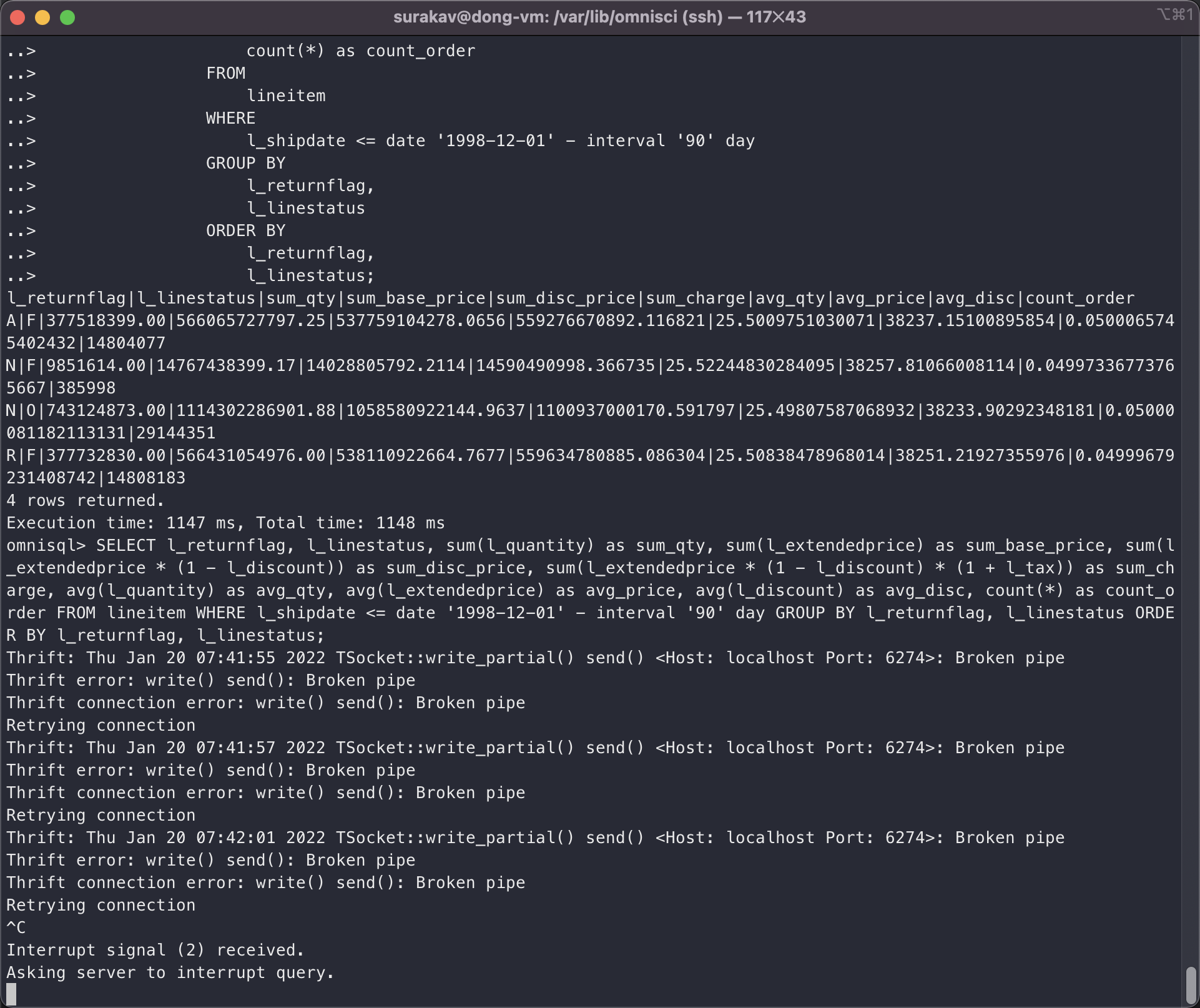
Do you have any idea on how to make python benchmarking work for SF 10 (it worked with SF 1)? I'm benchmarking tpch for multiple scale factors. Also, I would still appreciate it if there are available resources to guide loading the SF 10 data and executing the queries.
Thanks, Dong
Hi,
I'm using the copy command of omnisql because is faster than using pyomnisci or other API.
https://docs-new.omnisci.com/loading-and-exporting-data/command-line/load-data#copy-from
I also created the tables with omnisql using custom DDLs. Check this file
https://drive.google.com/file/d/1aWEsVU5oVdfT5afSCxeHxHnNYfbQ4QCV/view?usp=sharing
I shared orders and lineitem table because the script is optimized to run on 2 GPUs (if run on CPU the queries would use two cores)
Candido
I managed to import lineitem (SF 10) and tried to run query 1 using python and pyomnisci. It gives me an error every time,
The server crashes when you run the query, but you should look at server logs. It's not a normal thing. We run the TPCH benchmarks on SF40 on multiple GPU archs and CPUs as well, every night, and I just run the query with an SF100 on CPU without issues.
could you post the output of show table details lineitem; and the DDL of the table?
Candido
Thanks @cdessanti .
omnisql> show table details lineitem; table_id|table_name|column_count|is_sharded_table|shard_count|max_rows|fragment_size|max_rollback_epochs|min_epoch|max_epoch|min_epoch_floor|max_epoch_floor|metadata_file_count|total_metadata_file_size|total_metadata_page_count|total_free_metadata_page_count|data_file_count|total_data_file_size|total_data_page_count|total_free_data_page_count 2|lineitem|18|false|0|4611686018427387904|32000000|3|1|1|0|0|1|16777216|4096|NULL|10|5368709120|2560|NULL
omnisql> \d lineitem; CREATE TABLE lineitem ( l_orderkey INTEGER, l_partkey INTEGER, l_suppkey INTEGER, l_linenumber INTEGER, l_quantity DECIMAL(15,2), l_extendedprice DECIMAL(15,2), l_discount DECIMAL(15,2), l_tax DECIMAL(15,2), l_returnflag TEXT ENCODING DICT(32), l_linestatus TEXT ENCODING DICT(32), l_shipdate DATE ENCODING DAYS(32), l_commitdate DATE ENCODING DAYS(32), l_receiptdate DATE ENCODING DAYS(32), l_shipinstruct TEXT ENCODING DICT(32), l_shipmode TEXT ENCODING DICT(32), l_comment TEXT ENCODING DICT(32));
I ran Q1 successfully via omniscisql, but using pyomnisci the server just crashed. And then I ran Q1 with omniscisql again, the server would give me the error in the screenshot I shared. Is there any way to make pyomnisci work? I'm now checking the logs.
The log when I tried to run the query via pyomnisci,
omnisci_server.INFO:
2022-01-20T08:52:13.431685 I 28433 0 0 CommandLineOptions.cpp:1244 Max import threads 32
2022-01-20T08:52:13.431973 I 28433 0 0 CommandLineOptions.cpp:1247 cuda block size 0
2022-01-20T08:52:13.431991 I 28433 0 0 CommandLineOptions.cpp:1248 cuda grid size 0
2022-01-20T08:52:13.431998 I 28433 0 0 CommandLineOptions.cpp:1249 Min CPU buffer pool slab size 268435456
2022-01-20T08:52:13.432004 I 28433 0 0 CommandLineOptions.cpp:1250 Max CPU buffer pool slab size 4294967296
2022-01-20T08:52:13.432009 I 28433 0 0 CommandLineOptions.cpp:1251 Min GPU buffer pool slab size 268435456
2022-01-20T08:52:13.432015 I 28433 0 0 CommandLineOptions.cpp:1252 Max GPU buffer pool slab size 4294967296
2022-01-20T08:52:13.432020 I 28433 0 0 CommandLineOptions.cpp:1253 calcite JVM max memory 1024
2022-01-20T08:52:13.432026 I 28433 0 0 CommandLineOptions.cpp:1254 OmniSci Server Port 6274
2022-01-20T08:52:13.432032 I 28433 0 0 CommandLineOptions.cpp:1255 OmniSci Calcite Port 6279
2022-01-20T08:52:13.432037 I 28433 0 0 CommandLineOptions.cpp:1256 Enable Calcite view optimize true
2022-01-20T08:52:13.432043 I 28433 0 0 CommandLineOptions.cpp:1258 Allow Local Auth Fallback: enabled
2022-01-20T08:52:13.432049 I 28433 0 0 CommandLineOptions.cpp:1260 ParallelTop min threshold: 100000
2022-01-20T08:52:13.432055 I 28433 0 0 CommandLineOptions.cpp:1261 ParallelTop watchdog max: 20000000
2022-01-20T08:52:13.432060 I 28433 0 0 CommandLineOptions.cpp:1263 Enable Data Recycler: disabled
2022-01-20T08:52:13.432146 I 28433 0 0 CommandLineOptions.cpp:944 OmniSci started with data directory at '/var/lib/omnisci/data'
2022-01-20T08:52:13.432159 I 28433 0 0 CommandLineOptions.cpp:949 Server read-only mode is false
2022-01-20T08:52:13.432165 I 28433 0 0 CommandLineOptions.cpp:953 Threading layer: TBB
2022-01-20T08:52:13.432171 I 28433 0 0 CommandLineOptions.cpp:957 Watchdog is set to true
2022-01-20T08:52:13.432176 I 28433 0 0 CommandLineOptions.cpp:958 Dynamic Watchdog is set to false
2022-01-20T08:52:13.432182 I 28433 0 0 CommandLineOptions.cpp:962 Runtime query interrupt is set to true
2022-01-20T08:52:13.432188 I 28433 0 0 CommandLineOptions.cpp:964 A frequency of checking pending query interrupt request is set to 1000 (in ms.)
2022-01-20T08:52:13.432194 I 28433 0 0 CommandLineOptions.cpp:966 A frequency of checking running query interrupt request is set to 0.1 (0.0 ~ 1.0)
2022-01-20T08:52:13.432205 I 28433 0 0 CommandLineOptions.cpp:969 Non-kernel time query interrupt is set to true
2022-01-20T08:52:13.432210 I 28433 0 0 CommandLineOptions.cpp:972 Debug Timer is set to true
2022-01-20T08:52:13.432216 I 28433 0 0 CommandLineOptions.cpp:973 LogUserId is set to false
2022-01-20T08:52:13.432222 I 28433 0 0 CommandLineOptions.cpp:974 Maximum idle session duration 60
2022-01-20T08:52:13.432227 I 28433 0 0 CommandLineOptions.cpp:975 Maximum active session duration 43200
2022-01-20T08:52:13.432233 I 28433 0 0 CommandLineOptions.cpp:976 Maximum number of sessions -1
2022-01-20T08:52:13.432239 I 28433 0 0 CommandLineOptions.cpp:978 Allowed import paths is set to ["/opt/omnisci/data/mapd_import", "/home/surakav/"]
2022-01-20T08:52:13.432244 I 28433 0 0 CommandLineOptions.cpp:979 Allowed export paths is set to
2022-01-20T08:52:13.432307 I 28433 0 0 DdlUtils.cpp:822 Parsed allowed-import-paths: (/var/lib/omnisci/data/mapd_import /opt/omnisci/data/mapd_import /home/surakav)
2022-01-20T08:52:13.432319 I 28433 0 0 CommandLineOptions.cpp:1000 Cannot enable disk cache for fsi when fsi is disabled. Defaulted to disk cache disabled
2022-01-20T08:52:13.432326 I 28433 0 0 CommandLineOptions.cpp:1045 Vacuum Min Selectivity: 0.1
2022-01-20T08:52:13.432334 I 28433 0 0 CommandLineOptions.cpp:1047 Enable system tables is set to false
2022-01-20T08:52:13.432340 I 28433 0 0 MapDServer.cpp:375 OmniSciDB starting up
2022-01-20T08:52:13.434788 1 28433 0 1 MapDServer.cpp:307 heartbeat thread starting
2022-01-20T08:52:13.434817 I 28433 0 0 DBHandler.cpp:304 OmniSci Server 5.9.0-20211123-d294f1e842
2022-01-20T08:52:13.667342 I 28433 0 0 CudaMgr.cpp:368 Using 1 Gpus.
2022-01-20T08:52:13.667405 1 28433 0 0 CudaMgr.cpp:370 Device: 0
2022-01-20T08:52:13.667414 1 28433 0 0 CudaMgr.cpp:371 UUID: bd6eb21a-db8d-3a67-94d7-098da85ff232
2022-01-20T08:52:13.667422 1 28433 0 0 CudaMgr.cpp:372 Clock (khz): 1328500
2022-01-20T08:52:13.667427 1 28433 0 0 CudaMgr.cpp:373 Compute Major: 6
2022-01-20T08:52:13.667433 1 28433 0 0 CudaMgr.cpp:374 Compute Minor: 0
2022-01-20T08:52:13.667438 1 28433 0 0 CudaMgr.cpp:375 PCI bus id: 0
2022-01-20T08:52:13.667444 1 28433 0 0 CudaMgr.cpp:376 PCI deviceId id: 0
2022-01-20T08:52:13.667449 1 28433 0 0 CudaMgr.cpp:377 Per device global memory: 15.8993 GB
2022-01-20T08:52:13.667469 1 28433 0 0 CudaMgr.cpp:379 Memory clock (khz): 715000
2022-01-20T08:52:13.667475 1 28433 0 0 CudaMgr.cpp:380 Memory bandwidth: 366.08 GB/sec
2022-01-20T08:52:13.667482 1 28433 0 0 CudaMgr.cpp:383 Constant Memory: 65536
2022-01-20T08:52:13.667488 1 28433 0 0 CudaMgr.cpp:384 Shared memory per multiprocessor: 65536
2022-01-20T08:52:13.667493 1 28433 0 0 CudaMgr.cpp:386 Shared memory per block: 49152
2022-01-20T08:52:13.667499 1 28433 0 0 CudaMgr.cpp:387 Number of MPs: 56
2022-01-20T08:52:13.667504 1 28433 0 0 CudaMgr.cpp:388 Warp Size: 32
2022-01-20T08:52:13.667509 1 28433 0 0 CudaMgr.cpp:389 Max threads per block: 1024
2022-01-20T08:52:13.667515 1 28433 0 0 CudaMgr.cpp:390 Max registers per block: 65536
2022-01-20T08:52:13.667520 1 28433 0 0 CudaMgr.cpp:391 Max register per MP: 65536
2022-01-20T08:52:13.667526 1 28433 0 0 CudaMgr.cpp:392 Memory bus width in bits: 4096
2022-01-20T08:52:13.667531 I 28433 0 0 CudaMgr.cpp:67 Warming up the GPU JIT Compiler... (this may take several seconds)
2022-01-20T08:52:13.668195 1 28433 0 0 NvidiaKernel.cpp:77 CUDA JIT time to create link: 0.6399
2022-01-20T08:52:13.765863 1 28433 0 0 NvidiaKernel.cpp:84 CUDA JIT time to add RT fatbinary: 32.2612
2022-01-20T08:52:13.767683 I 28433 0 0 CudaMgr.cpp:70 GPU JIT Compiler initialized.
2022-01-20T08:52:13.767723 I 28433 0 0 ArrowForeignStorage.cpp:859 CSV backed temporary tables has been activated. Create table with (storage_type='CSV:path/to/file.csv');
2022-01-20T08:52:13.767735 I 28433 0 0 ArrowForeignStorage.cpp:1037 CSV backed temporary tables has been activated. Create table with (storage_type='CSV:path/to/file.csv');
2022-01-20T08:52:13.767765 1 28433 0 0 DataMgr.cpp:229 Detected 112705M of total system memory.
2022-01-20T08:52:13.767778 I 28433 0 0 DataMgr.cpp:238 Min CPU Slab Size is 256MB
2022-01-20T08:52:13.767785 I 28433 0 0 DataMgr.cpp:239 Max CPU Slab Size is 4096MB
2022-01-20T08:52:13.767792 I 28433 0 0 DataMgr.cpp:240 Max memory pool size for CPU is 90164.2MB
2022-01-20T08:52:13.767799 I 28433 0 0 DataMgr.cpp:262 Reserved GPU memory is 384MB includes render buffer allocation
2022-01-20T08:52:13.767811 I 28433 0 0 DataMgr.cpp:281 Min GPU Slab size for GPU 0 is 256MB
2022-01-20T08:52:13.767819 I 28433 0 0 DataMgr.cpp:283 Max GPU Slab size for GPU 0 is 4096MB
2022-01-20T08:52:13.767826 I 28433 0 0 DataMgr.cpp:285 Max memory pool size for GPU 0 is 15896.9MB
2022-01-20T08:52:13.767960 I 28433 0 0 FileMgr.cpp:230 Completed Reading table's file metadata, Elapsed time : 0ms Epoch: 0 files read: 0 table location: '/var/lib/omnisci/data/mapd_data/table_0_0'
2022-01-20T08:52:13.767995 I 28433 0 0 Calcite.cpp:371 Creating Calcite Handler, Calcite Port is 6279 base data dir is /var/lib/omnisci/data
2022-01-20T08:52:13.768271 I 28433 0 0 Calcite.cpp:279 Running Calcite server as a daemon
2022-01-20T08:52:14.282557 I 28433 0 0 Calcite.cpp:319 Calcite server start took 500 ms
2022-01-20T08:52:14.282613 I 28433 0 0 Calcite.cpp:320 ping took 9 ms
2022-01-20T08:52:14.287299 1 28433 0 0 Calcite.cpp:614 [{"name":"Truncate__","ret":"float","args":["float","i32"]},{"name":"area_triangle","ret":"double","args":["double","double","double","double","double","double"]},{"name":"box_contains_point","ret":"i1","args":["double*","i64","double","double"]},{"name":"Round__","ret":"float","args":["float","i32"]},{"name":"ST_YMax","ret":"double","args":["i8*","i64","i32","i32","i32"]},{"name":"ST_Intersects_Point_Point","ret":"i1","args":["i8*","i64","i8*","i64","i32","i32","i32","i32","i32"]},{"name":"distance_point_point_squared","ret":"double","args":["double","double","double","double"]},{"name":"centroid_add_polygon","ret":"i1","args":["i8*","i64","i32*","i64","i32","i32","i32","double*","double*","double*","double*","i64*","double*"]},{"name":"h3ToGeoPacked","ret":"i64","args":["i64"]},{"name":"perimeter_multipolygon","ret":"double","args":["i8*","i32","i8*","i32","i8*","i32","i32","i32","i32","i1"]},{"name":"ST_Distance_Polygon_MultiPolygon","ret":"double","args":["i8*","i64","i32*","i64","i8*","i64","i32*","i64","i32*","i64","i32","i32","i32","i32","i32","double"]},{"name":"downAp7","ret":"i1","args":["i32*"]},{"name":"ST_Centroid_MultiPolygon","ret":"void","args":["i8*","i32","i32*","i32","i32*","i32","i32","i32","i32","double*"]},{"name":"isNan_","ret":"i1","args":["float"]},{"name":"convert_meters_to_pixel_height","ret":"double","args":["double","i8*","i64","i32","i32","i32","double","double","i32","double"]},{"name":"_hex2dToGeo","ret":"i1","args":["double*","i32","i32","i32","double*"]},{"name":"tol_eq","ret":"i1","args":["double","double","double"]},{"name":"ST_YMin_Bounds","ret":"double","args":["double*","i64","i32","i32"]},{"name":"ST_Centroid_Polygon","ret":"void","args":["i8*","i32","i32*","i32","i32","i32","i32","double*"]},{"name":"square","ret":"double","args":["double"]},{"name":"Log10","ret":"double","args":["double"]},{"name":"ST_YMax_Bounds","ret":"double","args":["double*","i64","i32","i32"]},{"name":"ct_device_selection_udf_gpu__gpu","ret":"i32","args":["i32"]},{"name":"ST_DWithin_Point_Point","ret":"i1","args":["i8*","i64","i8*","i64","i32","i32","i32","i32","i32","double"]},{"name":"round_to_digit","ret":"double","args":["double","i32"]},{"name":"_ijkScale","ret":"i1","args":["i32*","i32"]},{"name":"rotate60cw","ret":"i32","args":["i32"]},{"name":"array_append__3","ret":"{double*, i64, i8}","args":["{double, i64, i8}","double"]},{"name":"array_append__2","ret":"{i8, i64, i8}","args":["{i8, i64, i8}","i8"]},{"name":"array_append__1","ret":"{i16, i64, i8}","args":["{i16, i64, i8}","i16"]},{"name":"_geoToFaceIjk","ret":"i1","args":["double","i32","i32*"]},{"name":"array_append__4","ret":"{float*, i64, i8}","args":["{float, i64, i8}","float"]},{"name":"ST_XMin_Bounds","ret":"double","args":["double","i64","i32","i32"]},{"name":"MapD_GeoPolyRenderGroup","ret":"i32","args":["i32"]},{"name":"ST_X_Point","ret":"double","args":["i8*","i64","i32","i32","i32"]},{"name":"ST_Distance_LineString_Polygon","ret":"double","args":["i8*","i64","i8*","i64","i32*","i64","i32","i32","i32","i32","i32","double"]},{"name":"array_append","ret":"{i64*, i64, i8}","args":["{i64, i64, i8}","i64"]},{"name":"ST_Length_LineString_Geodesic","ret":"double","args":["i8","i64","i32","i32","i32"]},{"name":"point_in_polygon_winding_number","ret":"i1","args":["i8*","i32","double","double","i32","i32","i32"]},{"name":"ST_cContains_MultiPolygon_Point","ret":"i1","args":["i8*","i64","i32*","i64","i32*","i64","double*","i64","i8*","i64","i32","i32","i32","i32","i32"]},{"name":"v2dMag","ret":"double","args":["double*"]},{"name":"neighbor","ret":"i1","args":["i32*","i32"]},{"name":"reg_hex_horiz_pixel_bin_y","ret":"float","args":["double","double","double","double","double","double","double","double","double","double","i32","i32"]},{"name":"reg_hex_horiz_pixel_bin_x","ret":"float","args":["double","double","double","double","double","double","double","double","double","double","i32","i32"]},{"name":"compressed_coord","ret":"i32","args":["i8*","i32"]},{"name":"ST_Distance_Point_LineString","ret":"double","args":["i8*","i64","i8*","i64","i32","i32","i32","i32","i32","double"]},{"name":"area_polygon","ret":"double","args":["i8*","i32","i8*","i32","i32","i32","i32"]},{"name":"ct_device_selection_udf_both__gpu","ret":"i32","args":["i32"]},{"name":"Log","ret":"double","args":["float"]},{"name":"ST_XMax","ret":"double","args":["i8*","i64","i32","i32","i32"]},{"name":"ST_DWithin_MultiPolygon_MultiPolygon","ret":"i1","args":["i8*","i64","i32*","i64","i32*","i64","double*","i64","i8*","i64","i32*","i64","i32*","i64","double*","i64","i32","i32","i32","i32","i32","double"]},{"name":"_ijkToHex2d","ret":"i1","args":["i32*","double*"]},{"name":"isNan","ret":"i1","args":["double"]},{"name":"ST_Perimeter_MultiPolygon_Geodesic","ret":"double","args":["i8*","i32","i8*","i32","i8*","i32","i32","i32","i32"]},{"name":"ST_Contains_Point_LineString","ret":"i1","args":["i8*","i64","i8*","i64","double*","i64","i32","i32","i32","i32","i32"]},{"name":"centroid_add_triangle","ret":"i1","args":["double","double","double","double","double","double","double","double*","double*"]},{"name":"distance_point_linestring","ret":"double","args":["i8*","i64","i8*","i64","i32","i32","i32","i32","i32","i1","double"]},{"name":"ST_Contains_Point_Polygon","ret":"i1","args":["i8*","i64","i8*","i64","i32*","i64","double*","i64","i32","i32","i32","i32","i32"]},{"name":"h3ToLat","ret":"double","args":["i64"]},{"name":"ST_Distance_Point_MultiPolygon","ret":"double","args":["i8*","i64","i8*","i64","i32*","i64","i32*","i64","i32","i32","i32","i32","i32","double"]},{"name":"ST_Distance_LineString_LineString","ret":"double","args":["i8*","i64","i8*","i64","i32","i32","i32","i32","i32","double"]},{"name":"OmniSci_Geo_PolyRenderGroup","ret":"i32","args":["i32"]},{"name":"_h3ToGeo","ret":"i1","args":["i64","double*"]},{"name":"_upAp7r","ret":"i1","args":["i32*"]},{"name":"Point_Overlaps_Box","ret":"i1","args":["double*","i64","double","double"]},{"name":"point_dwithin_box","ret":"i1","args":["i8*","i64","i32","i32","double*","i64","i32","i32","double"]},{"name":"Floor__2","ret":"i32","args":["i32"]},{"name":"ST_Distance_Point_ClosedLineString","ret":"double","args":["i8*","i64","i8*","i64","i32","i32","i32","i32","i32","double"]},{"name":"Floor__3","ret":"i64","args":["i64"]},{"name":"ST_Intersects_Point_MultiPolygon","ret":"i1","args":["i8*","i64","i8*","i64","i32*","i64","i32*","i64","double*","i64","i32","i32","i32","i32","i32"]},{"name":"transform_coor ....
2022-01-20T08:52:14.310039 I 28433 0 0 DBHandler.cpp:432 Started in GPU mode
2022-01-20T08:52:14.311110 I 28433 0 0 DBHandler.cpp:489 Overriding default geos library with 'libgeos_c.so'
2022-01-20T08:52:14.311135 I 28433 0 0 MapDServer.cpp:524 OmniSci server using unencrypted connection
[END] of omnisci_server.INFO
omnisci_server.ERROR: 2022-01-20T08:59:09.797529 F 29347 0 2 ArrowResultSetConverter.cpp:1135 Check failed: typed_builder
[END] of omnisci_server.ERROR
omnisci_server.FATAL: 2022-01-20T08:59:09.797529 F 29347 0 2 ArrowResultSetConverter.cpp:1135 Check failed: typed_builder
[END] of omnisci_server.FATAL
Hi,
everything looks, and the server is crashing on something that's arrow-related. The Fatal errors crashes the server, and probably the session of omnisql was lost when you retried to run the query.
you should try to run the query without using arrow with pyomnisci in rowmode.
Candido
Hi @cdessanti,
I'm using select_ipc_gpu() to execute the query. Do you know how I can execute queries in row mode?
Thanks, Dong
Hi @cdessanti,
I was using select_ipc_gpu() to run Q1 and then the server crashed. You suggested running the query without using arrow with pyomnisci in rowmode, do you know how exactly I can do that?
Thanks, Dong
Hi @cdessanti ,
Thanks! Do you know how to set omniscidb to use CPU or GPU when using Connection.execute()? I don't see anything from the pyomnisci docs. (I'm aware that with omniscisql I can use \cpu and \gpu but with pyomnisci I have no idea)
Thanks, Dong
Hi Todd,
No. The errors I pasted on the issue were all I saw.
Best regards, Dong He
On Thu, Jan 20, 2022 at 3:06 AM Todd Mostak @.***> wrote:
@dongheuw https://github.com/dongheuw was there any error messages or CHECK failures for the crash? Also what version are you on? We're about to push a number of fixes and performance optimizations for Arrow... specifically there could be issues around empty result sets and large dictionaries.
— Reply to this email directly, view it on GitHub https://github.com/omnisci/omniscidb/issues/718#issuecomment-1017380060, or unsubscribe https://github.com/notifications/unsubscribe-auth/AGRUIBTUDCFXLCPSY43J7C3UW7UCXANCNFSM5L3E7JDQ . Triage notifications on the go with GitHub Mobile for iOS https://apps.apple.com/app/apple-store/id1477376905?ct=notification-email&mt=8&pt=524675 or Android https://play.google.com/store/apps/details?id=com.github.android&referrer=utm_campaign%3Dnotification-email%26utm_medium%3Demail%26utm_source%3Dgithub.
You are receiving this because you were mentioned.Message ID: @.***>
Hi @cdessanti ,
Thanks a lot for your help.
So I recreated a database with fragment_size set to a large number. I ran the queries and checked the log.
For queries like Q1, indeed omniscidb only used 1 thread. For more complicated queries (that involve multiple tables), it seems like more threads were spawned, so it was not single-threaded. e.g., for Q13, the log contains,
102ms total duration for executeRelAlgQuery 102ms start(0ms) executeRelAlgQueryNoRetry RelAlgExecutor.cpp:327 0ms start(0ms) Query pre-execution steps RelAlgExecutor.cpp:328 102ms start(0ms) executeRelAlgSeq RelAlgExecutor.cpp:636 88ms start(0ms) executeRelAlgStep RelAlgExecutor.cpp:766 88ms start(0ms) executeCompound RelAlgExecutor.cpp:1854 87ms start(0ms) executeWorkUnit RelAlgExecutor.cpp:3014 57ms start(0ms) compileWorkUnit NativeCodegen.cpp:2575 55ms start(1ms) getInstance HashJoin.cpp:250 54ms start(1ms) reify PerfectJoinHashTable.cpp:327 0ms start(1ms) getOneColumnFragment ColumnFetcher.cpp:78 New thread(24) 17ms start(0ms) initHashTableForDevice PerfectJoinHashTable.cpp:536 0ms start(0ms) initHashTableOnCpuFromCache PerfectJoinHashTable.cpp:739 17ms start(0ms) initOneToOneHashTableOnCpu PerfectHashTableBuilder.h:212 End thread(24) New thread(25) 37ms start(0ms) initHashTableForDevice PerfectJoinHashTable.cpp:536 0ms start(0ms) initHashTableOnCpuFromCache PerfectJoinHashTable.cpp:739 37ms start(0ms) initOneToManyHashTableOnCpu PerfectHashTableBuilder.h:301 5ms start(0ms) Perfect Hash OneToMany: Init Hash Join Buffer PerfectHashTableBuilder.h:318 31ms start(5ms) fill_one_to_many_hash_table HashJoinRuntime.cpp:1456 31ms start(5ms) fill_one_to_many_hash_table_impl HashJoinRuntime.cpp:1396 End thread(25) 0ms start(58ms) ExecutionKernel::run ExecutionKernel.cpp:125 0ms start(58ms) fetchChunks Execute.cpp:2572 2ms start(58ms) getQueryExecutionContext QueryMemoryDescriptor.cpp:690 27ms start(60ms) executePlanWithGroupBy Execute.cpp:3214 27ms start(60ms) launchCpuCode QueryExecutionContext.cpp:559 0ms start(88ms) getRowSet QueryExecutionContext.cpp:156 0ms start(88ms) collectAllDeviceResults Execute.cpp:1965 0ms start(88ms) reduceMultiDeviceResults Execute.cpp:933 0ms start(88ms) reduceMultiDeviceResultSets Execute.cpp:979 14ms start(88ms) executeRelAlgStep RelAlgExecutor.cpp:766 14ms start(88ms) executeSort RelAlgExecutor.cpp:2685 13ms start(88ms) executeWorkUnit RelAlgExecutor.cpp:3014 9ms start(88ms) compileWorkUnit NativeCodegen.cpp:2575 7ms start(89ms) synthesize_metadata InputMetadata.cpp:136 0ms start(98ms) ExecutionKernel::run ExecutionKernel.cpp:125 3ms start(98ms) fetchChunks Execute.cpp:2572 3ms start(98ms) ColumnarResults ColumnarResults.cpp:64 0ms start(101ms) getQueryExecutionContext QueryMemoryDescriptor.cpp:690 0ms start(101ms) executePlanWithGroupBy Execute.cpp:3214 0ms start(102ms) launchCpuCode QueryExecutionContext.cpp:559 0ms start(102ms) getRowSet QueryExecutionContext.cpp:156 0ms start(102ms) collectAllDeviceResults Execute.cpp:1965 0ms start(102ms) reduceMultiDeviceResults Execute.cpp:933 0ms start(102ms) reduceMultiDeviceResultSets Execute.cpp:979 0ms start(102ms) sort ResultSet.cpp:506 0ms start(102ms) initPermutationBuffer ResultSet.cpp:584 0ms start(102ms) createComparator ResultSet.h:678 0ms start(102ms) topPermutation ResultSet.cpp:940
How does fragment_size impact the number of threads used on intermediate results (e.g. hash tables) during query execution?
Thanks, Dong
Hi,
I don't know why two threads are spawned to initialized the hash join index, but the execution is driven by the left table so at runtime the q13 it's using 1 thread as expected.
The fragment size can "limit" the core execution of the query, while other parts like sort or intermediate projections can use more than 1, while it's not the case.
Scarica Outlook per Androidhttps://aka.ms/AAb9ysg
From: Dong He @.> Sent: Friday, January 21, 2022 9:14:36 AM To: omnisci/omniscidb @.> Cc: Candido Dessanti @.>; Mention @.> Subject: Re: [omnisci/omniscidb] Is there a way to set the number of CPU cores (or threads) being used during query execution? (Issue #718)
Thanks a lot for your help.
So I recreated a database with fragment_size set to a large number. I ran the queries and checked the log.
For queries like Q1, indeed omniscidb only used 1 thread. For more complicated queries (that involve multiple tables), it seems like more threads were spawned, so it was not single-threaded. e.g., for Q13, the log contains,
102ms total duration for executeRelAlgQuery 102ms start(0ms) executeRelAlgQueryNoRetry RelAlgExecutor.cpp:327 0ms start(0ms) Query pre-execution steps RelAlgExecutor.cpp:328 102ms start(0ms) executeRelAlgSeq RelAlgExecutor.cpp:636 88ms start(0ms) executeRelAlgStep RelAlgExecutor.cpp:766 88ms start(0ms) executeCompound RelAlgExecutor.cpp:1854 87ms start(0ms) executeWorkUnit RelAlgExecutor.cpp:3014 57ms start(0ms) compileWorkUnit NativeCodegen.cpp:2575 55ms start(1ms) getInstance HashJoin.cpp:250 54ms start(1ms) reify PerfectJoinHashTable.cpp:327 0ms start(1ms) getOneColumnFragment ColumnFetcher.cpp:78 New thread(24) 17ms start(0ms) initHashTableForDevice PerfectJoinHashTable.cpp:536 0ms start(0ms) initHashTableOnCpuFromCache PerfectJoinHashTable.cpp:739 17ms start(0ms) initOneToOneHashTableOnCpu PerfectHashTableBuilder.h:212 End thread(24) New thread(25) 37ms start(0ms) initHashTableForDevice PerfectJoinHashTable.cpp:536 0ms start(0ms) initHashTableOnCpuFromCache PerfectJoinHashTable.cpp:739 37ms start(0ms) initOneToManyHashTableOnCpu PerfectHashTableBuilder.h:301 5ms start(0ms) Perfect Hash OneToMany: Init Hash Join Buffer PerfectHashTableBuilder.h:318 31ms start(5ms) fill_one_to_many_hash_table HashJoinRuntime.cpp:1456 31ms start(5ms) fill_one_to_many_hash_table_impl HashJoinRuntime.cpp:1396 End thread(25) 0ms start(58ms) ExecutionKernel::run ExecutionKernel.cpp:125 0ms start(58ms) fetchChunks Execute.cpp:2572 2ms start(58ms) getQueryExecutionContext QueryMemoryDescriptor.cpp:690 27ms start(60ms) executePlanWithGroupBy Execute.cpp:3214 27ms start(60ms) launchCpuCode QueryExecutionContext.cpp:559 0ms start(88ms) getRowSet QueryExecutionContext.cpp:156 0ms start(88ms) collectAllDeviceResults Execute.cpp:1965 0ms start(88ms) reduceMultiDeviceResults Execute.cpp:933 0ms start(88ms) reduceMultiDeviceResultSets Execute.cpp:979 14ms start(88ms) executeRelAlgStep RelAlgExecutor.cpp:766 14ms start(88ms) executeSort RelAlgExecutor.cpp:2685 13ms start(88ms) executeWorkUnit RelAlgExecutor.cpp:3014 9ms start(88ms) compileWorkUnit NativeCodegen.cpp:2575 7ms start(89ms) synthesize_metadata InputMetadata.cpp:136 0ms start(98ms) ExecutionKernel::run ExecutionKernel.cpp:125 3ms start(98ms) fetchChunks Execute.cpp:2572 3ms start(98ms) ColumnarResults ColumnarResults.cpp:64 0ms start(101ms) getQueryExecutionContext QueryMemoryDescriptor.cpp:690 0ms start(101ms) executePlanWithGroupBy Execute.cpp:3214 0ms start(102ms) launchCpuCode QueryExecutionContext.cpp:559 0ms start(102ms) getRowSet QueryExecutionContext.cpp:156 0ms start(102ms) collectAllDeviceResults Execute.cpp:1965 0ms start(102ms) reduceMultiDeviceResults Execute.cpp:933 0ms start(102ms) reduceMultiDeviceResultSets Execute.cpp:979 0ms start(102ms) sort ResultSet.cpp:506 0ms start(102ms) initPermutationBuffer ResultSet.cpp:584 0ms start(102ms) createComparator ResultSet.h:678 0ms start(102ms) topPermutation ResultSet.cpp:940
How does fragment_size impact the number of threads used on intermediate results (e.g. hash tables) during query execution?
Thanks, Dong
— Reply to this email directly, view it on GitHubhttps://emea01.safelinks.protection.outlook.com/?url=https%3A%2F%2Fgithub.com%2Fomnisci%2Fomniscidb%2Fissues%2F718%23issuecomment-1018277915&data=04%7C01%7C%7Cd0faee07d42e4ed42d1708d9dcb610ff%7C84df9e7fe9f640afb435aaaaaaaaaaaa%7C1%7C0%7C637783496787950202%7CUnknown%7CTWFpbGZsb3d8eyJWIjoiMC4wLjAwMDAiLCJQIjoiV2luMzIiLCJBTiI6Ik1haWwiLCJXVCI6Mn0%3D%7C3000&sdata=Dqvem%2FWQqZUb0GgBP%2FG5UQ%2FoQIpwOf0k2ZvHE1j6XGE%3D&reserved=0, or unsubscribehttps://emea01.safelinks.protection.outlook.com/?url=https%3A%2F%2Fgithub.com%2Fnotifications%2Funsubscribe-auth%2FAHLFBF7CRRQZJBTFBLCAXDDUXEIWZANCNFSM5L3E7JDQ&data=04%7C01%7C%7Cd0faee07d42e4ed42d1708d9dcb610ff%7C84df9e7fe9f640afb435aaaaaaaaaaaa%7C1%7C0%7C637783496787950202%7CUnknown%7CTWFpbGZsb3d8eyJWIjoiMC4wLjAwMDAiLCJQIjoiV2luMzIiLCJBTiI6Ik1haWwiLCJXVCI6Mn0%3D%7C3000&sdata=lK7%2FcM4QHxW6OKeEsVRhr8CMuQ9%2Bk31822LgpWJSwo0%3D&reserved=0. Triage notifications on the go with GitHub Mobile for iOShttps://emea01.safelinks.protection.outlook.com/?url=https%3A%2F%2Fapps.apple.com%2Fapp%2Fapple-store%2Fid1477376905%3Fct%3Dnotification-email%26mt%3D8%26pt%3D524675&data=04%7C01%7C%7Cd0faee07d42e4ed42d1708d9dcb610ff%7C84df9e7fe9f640afb435aaaaaaaaaaaa%7C1%7C0%7C637783496787950202%7CUnknown%7CTWFpbGZsb3d8eyJWIjoiMC4wLjAwMDAiLCJQIjoiV2luMzIiLCJBTiI6Ik1haWwiLCJXVCI6Mn0%3D%7C3000&sdata=BhRuVz0tCLJrhDPOZ4t4WVsozCq8q5m0jqlZkpmn7fQ%3D&reserved=0 or Androidhttps://emea01.safelinks.protection.outlook.com/?url=https%3A%2F%2Fplay.google.com%2Fstore%2Fapps%2Fdetails%3Fid%3Dcom.github.android%26referrer%3Dutm_campaign%253Dnotification-email%2526utm_medium%253Demail%2526utm_source%253Dgithub&data=04%7C01%7C%7Cd0faee07d42e4ed42d1708d9dcb610ff%7C84df9e7fe9f640afb435aaaaaaaaaaaa%7C1%7C0%7C637783496787950202%7CUnknown%7CTWFpbGZsb3d8eyJWIjoiMC4wLjAwMDAiLCJQIjoiV2luMzIiLCJBTiI6Ik1haWwiLCJXVCI6Mn0%3D%7C3000&sdata=jGj2f7V%2BEl7zGh7%2BuOh5oy57f0Ud2LtFNh4ZE01svu0%3D&reserved=0. You are receiving this because you were mentioned.Message ID: @.***>
Hi @cdessanti ,
Thanks! Do you know how to set omniscidb to use CPU or GPU when using Connection.execute()? I don't see anything from the pyomnisci docs. (I'm aware that with omniscisql I can use
\cpuand\gpubut with pyomnisci I have no idea)Thanks, Dong
Hi,
We will soon have an SQL command to switch the execution mode between the devices. I already did the job, but I haven't been able to do a good PR, because of personal problems.
The command will be something like ALTER SESSION SET CPU|GPU EXECUTOR.
Anyway, with pyomnisci, you can get the same results calling the st_execution_mode thrift call directly from the driver; all the thrift calls are available under connection._client (they aren't documented, but looking at the source, the usage is relatively straightforward).
To switch to CPU|GPU execution, you have to open a connection and run this
con._client.set_execution_mode(con._session,0)
The second argument is the kind of device the server will use, and it's 0 for CPU and 1 for GPU. If you are running on a system without a GPU or the server is started in CPU mode, switching to GPU mode will raise an exception.
I hope this will help you with your benchmarks.
Regards, Candido