

 harmonoid
[GNU/Linux] Harmonoid freezes my PC
Describe the bug App uses 32GB of RAM A clear and concise description of what the bug is. After I start playing a song, it takes ~ 5 Minutes until all my RAM is used and the PC freezes. There are ~ 20k songs indexed, stored locally on my NAS To Reproduce Start playing. Wait. Steps to reproduce the behavior:
- Start playing music
Expected behavior Play music without eating all my RAM A clear and concise description of what you expected to happen. Play Music without eating all my RAM Screenshots
If applicable, add screenshots to help explain your problem.
Platform (please complete the following information) Linux, Debian Sid App version 0.3.4-1 installed as .deb Please confirm that you're on the latest version available. yes
- Version: [e.g. v0.3.0]
- 0.3.4-1

Hi @fethomm!
Thanks for the report.
As far as I understand from your text, your music library has been indexed successfully by Harmonoid (the ~20k songs). Right? And, the RAM increase issue is due to audio playback & completely irrespective of indexing process?

... In other words, does RAM still increase if you just leave the app open (and interact with the UI) but don't play the music?
Indexing ended hours ago. I came back to the PC, started playing music while I was writing a review of Harmonoid and after 5-10 minutes my PC froze up. I could not reboot anymore, but going to a terminal outside X worked. There I briefly saw a message that the problem was memory related. So I rebooted, started playing and watched memory. Same thing happened again, RAM fills up until there is no more free RAM left. On a 2nd machine (same OS) with only ~ 20 songs everything is OK.
Thanks for the details... On your machine with ~20k songs:
- Is your music library indexed completely by Harmonoid?
- Is the RAM increasing as soon as you launch the app?
- Is the RAM increasing if you DON'T play any song & keep the app idle (i.e. navigate through UI etc.)?
To further clarily, Harmonoid by default indexes your music in the Music folder & caches it's metadata/album-arts on the storage (because parsing each and every file on every fresh start will be expensive).
You can click on REINDEX in the settings to re-start the indexing process & clear existing cache, it can tell whether the indexing process is causing memory leak. However, answer to above questions is more important.
I have had users with large music libraries, I'm kinda confused.
The RAM does not increase after opening the app or navigating the UI. I just purged and reinstalled the app and re-indexed the collection, which did not show a large increase in RAM usage either. I should mention, I have ~ 12 - 15 instances of Chrome with 300 - 400 tabs open at all times, which use ~ 12 GB of my RAM.
After indexing was completely done, I started playing music, watching htop and journalctl -f. For ~ 8 minutes everything was fine, then available RAM started decreasing by ~ 100MByte per second. I killed the process before it started to freeze up.
The only thing relevant shown by journalctl are multiple lines like:
plasmashell[9252]: kde.dataengine.mpris: "org.mpris.MediaPlayer2.harmonoid.instance13569" does not implement org.freedesktop.DBus.Properties correctly
Hi! I just wanted to reply back on the issue. I have had users with similarly large music libraries (over ~20k songs) & they had no issues at all. Not that I'm very confident of my software engineering skills but it should work fine. Project surely had issues in past, but no major issues like this exist anymore.
Harmonoid uses libmpv internally for media playback, so it could be a memory leak in it (in that very specific version you have)? I'm not super sure. If you are willing to take a look yourself, I'm fine with sharing organization access.
Thanks so far. I can do some extended testing over the holidays. Maybe I can get to the bottom of it. Will keep you posted. Happy holidays.
Hi, I've been getting a similar issue with experiencing system crashes with the X server killing itself and exiting into the login screen. For the record, I am on arch linux with BSPWM as my desktop environment. I have done some testing with btop opened on my second monitor in its own workspace:
When i open harmonoid and start playing songs, everything works just fine, the ram is normal. However, as soon as i enter the fullscreen mode with animated pixel-arts and switch to another workspace, the ram starts going up relatively fast.
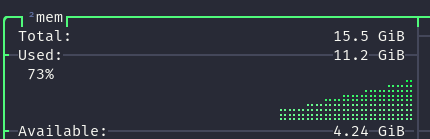 Funny thing is that on the processes part, nothing seems out of place, there is no indication of the incoming disaster.
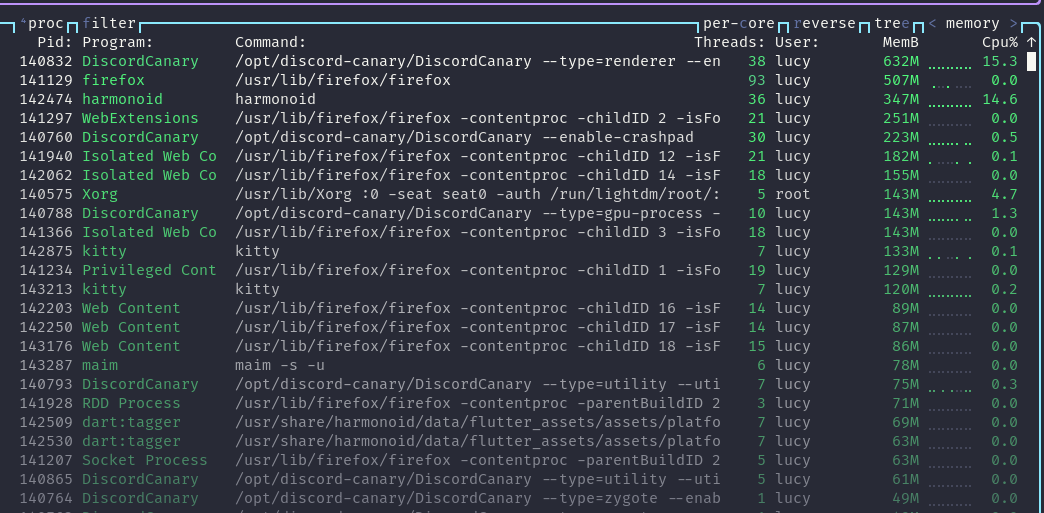 As soon as I switch back to the workspace with harmonoid, the ram flushes, goes back to the values before and pretends like it just didn't try to convince my system to commit suicide.
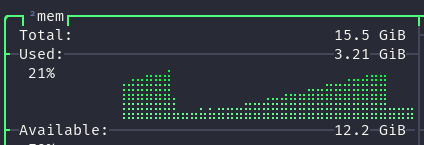 This never happened when i left harmonoid in the screen where it launches into (the track/artist list).
I have no idea what can cause this or how to fix it, but I hope that this report will narrow the issue down and that it will help you (or someone else ofc) resolve the issue.

Also if that helps, I have only 277 files in the library folder.
From observation so far, I believe this has nothing to do with the music library size. It could be a bug in Flutter itself (the framework Harmonoid uses to target all 3 platforms).
Rendering those backgrounds over large area could be causing this issue of steadily increasing RAM. I will observe on my machine & tell better. Indeed, I have previously seen issues caused by Flutter itself. Flutter's performance isn't that good either on Linux yet. In personal usage experience of Harmonoid, Windows build feels way more snappier & smoother, even though Windows itself is a piece of ... in terms of performance. Many organizations use Flutter to target Windows & macOS customers, likely they have optimized things more there.
I seek for any alternative work-arounds or update Flutter itself to get any fixes.
However, was O/P's solution also related to this NowPlayingScreen?
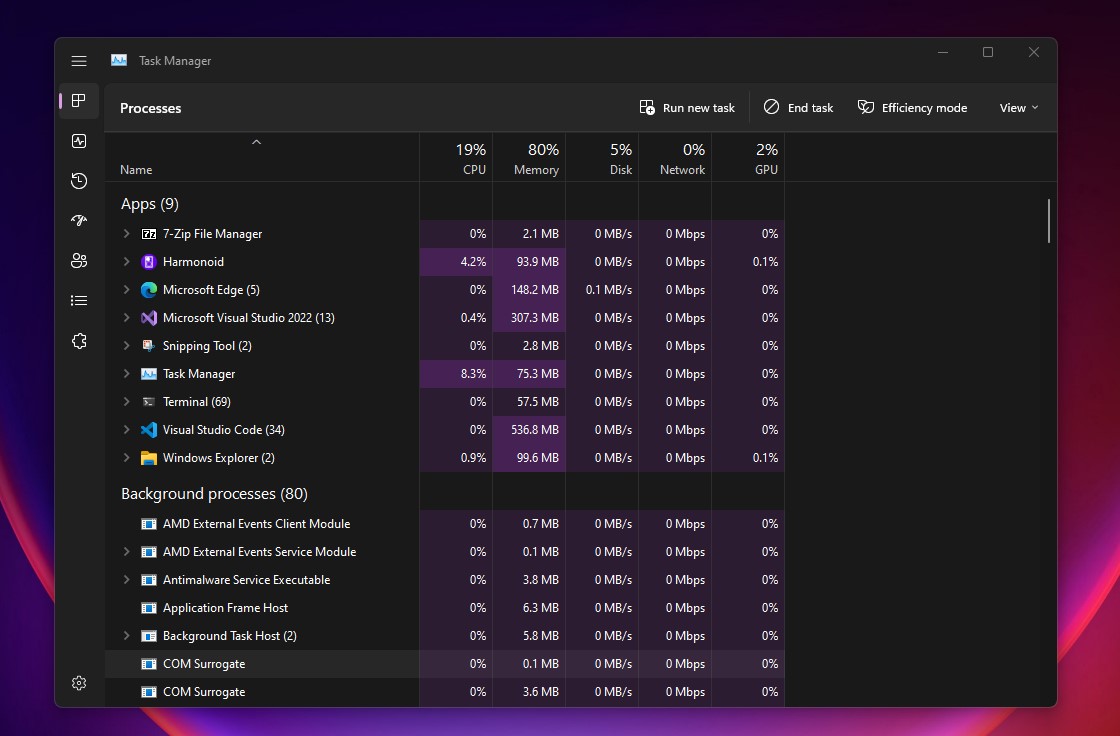
Same for memory usage, as you can see Harmonoid on Windows always floats under or around 100 MB, which I think is REALLY GOOD, considering that rendering of many album arts on same screen (which get decoded in memory) is quite common, a mpv backend & other processes etc. also exist. Comparing to electron.js, it is just awesome.
However, I see a RAM usage of 350 MB on your screenshot, I experience nearly same on my elementaryOS. Currently, there is no clear explanation or reasoning to this except Flutter or Dart's own optimization. Windows & Linux implementations are almost identical, compile from same code-base, use same audio backend, same framework, same business logic etc. etc.