

 haosulab
sapien on not the first GPU reports errors
System:
- OS version: [e.g. Ubuntu 20.04]
- Python version (if applicable): [e.g. Python 3.8]
- SAPIEN version (pip freeze | grep sapien): 2.1
Describe the bug
When I run sapien on not the first GPU, it reports errors:
python -c "import sapien as sapien; print(sapien.__version__); sapien.core.VulkanRenderer(device='cuda:1')"

I also find that CUDA_VISIBLE_DEVICES is not working for sapien since when I train mainskill2-learn with different CUDA_VISIBLE_DEVICES it always uses the first GPU for rendering. For example, when I set CUDA_VISIBLE_DEVICES=1, it will use GPU 0 for rendering and GPU 1 for training. When I set CUDA_VISIBLE_DEVICES=2, it will use GPU 0 for rendering and GPU 2 for training.
Is there any way to force mask GPU for sapien so I can run several independent jobs on a single server with 4 GPUs? Thanks.

CUDA_VISIBLE_DEVICES and the device argument of the renderer should not be set together. When CUDA_VISIBLE_DEVICES is 1, your GPU 1 becomes cuda:0. Also you may disregard any GLFW error. If you do not want to see them, set the offscreen_only argument to true. Another important thing to check is that it is CUDA_VISIBLE_DEVICES instead of CUDA_VISIBLE_DEVICE (the S is crucial).
If the above does not solve your issue, can you provide a script that reproduces your issue with SAPIEN only? If the problem is introduced by ManiSkill_learn, you should post an issue to their repo.

I just realized that you should keep the offscreen_only=True all the time. If it is false, it means you want on-screen rendering, and the GPU selection may override your preferred CUDA device. I hope this will help.
Thanks! Setting offscreen_only = True does not work for me. My environment is: 4 V100 GPUs and CUDA_VISIBLE_DEVICES not set.
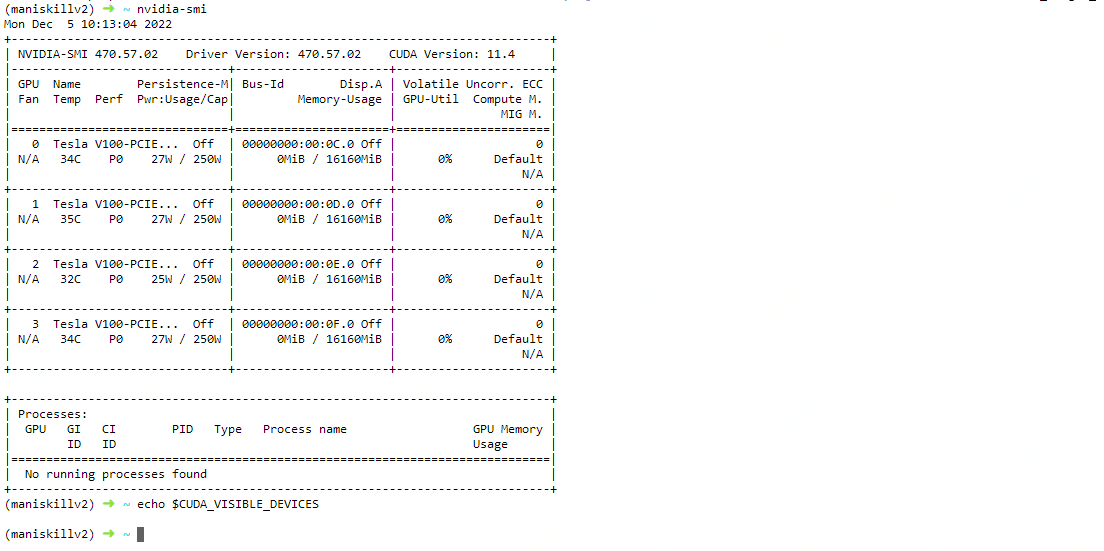 When the script is:
import sapien
print(sapien.__version__)

sapien.core.VulkanRenderer(device = "cuda:1", offscreen_only = True)
print("success")

When the script uses cuda:0, it works fine:
import sapien
print(sapien.__version__)

sapien.core.VulkanRenderer(device = "cuda:0", offscreen_only = True)
print("success")

Can you run sapien.core.VulkanRenderer.set_log_level("info") before creating the renderer and show the result? This should provide detailed logs for GPU selection.
Hi, I met a similar problem when I tried to use KuafuRenderer in Sapien 2.1.0.

My script is:
import sapien.core as sapien

renderer_config = sapien.KuafuConfig()
renderer_config.use_viewer = False
renderer_config.spp = 64
renderer_config.max_bounces = 8
renderer_config.use_denoiser = True
renderer = sapien.KuafuRenderer(renderer_config)

print("done well?")
And the result is like the following: CUDA_VISIBLE_DEVICES=1 python clean_code.py
[2023-01-17 18:46:36.089] [kuafu] [info] Camera is not yet usable due to uninitialized context!
[2023-01-17 18:46:36.089] [kuafu] [info] Offscreen mode enabled.
[2023-01-17 18:46:36.089] [kuafu] [warning] Denoiser ON! You must have an NVIDIA GPU with driver version > 470 installed.
Segmentation fault (core dumped)
python clean_code.py
[2023-01-17 18:49:25.984] [kuafu] [info] Camera is not yet usable due to uninitialized context!
[2023-01-17 18:49:25.984] [kuafu] [info] Offscreen mode enabled.
[2023-01-17 18:49:25.984] [kuafu] [warning] Denoiser ON! You must have an NVIDIA GPU with driver version > 470 installed.
done well?
A new version 2.2.0 has been released and KuafuRenderer is now deprecated. The ray tracer is merged into SapienRenderer (previously named VulkanRenderer). Please follow the updated documentation here to set up ray tracing. https://sapien.ucsd.edu/docs/2.2/tutorial/rendering/raytracing_renderer.html