

 h2qutc
Can't bind to 'ngxMatDatetimePicker' @4.0.7
Hi guys, Since the project is really legacy, I must use the 4.0.7 version of this. Sincerely I do not know what is the issue here... Using Angular 10.2.3. I included all Angular Material modules and FormModule, also ReactiveFormModule which is needed. I am using the input in this container:
<mat-form-field class="field" flex-gt-xs>
  <input matInput format="yyyy-MM-dd" [ngxMatDatetimePicker]="value" [min]="minDate" />
  <mat-datepicker-toggle matSuffix [for]="value"></mat-datepicker-toggle>
  <ngx-mat-datetime-picker #value [showSpinners]="false"></ngx-mat-datetime-picker>
</mat-form-field>
Unfortunately I get this error and have no idea how to solve since for me, everything seems fine:
error NG8002: Can't bind to 'ngxMatDatetimePicker' since it isn't a known property of 'input'.
<input matInput format="yyyy-MM-dd" [ngxMatDatetimePicker]="value" [min]="minDate" />


Hi guys, Since the project is really legacy, I must use the 4.0.7 version of this. Sincerely I do not know what is the issue here... Using Angular 10.2.3. I included all Angular Material modules and FormModule, also ReactiveFormModule which is needed. I am using the input in this container:
<mat-form-field class="field" flex-gt-xs>
  <input matInput format="yyyy-MM-dd" [ngxMatDatetimePicker]="value" [min]="minDate" />
  <mat-datepicker-toggle matSuffix [for]="value"></mat-datepicker-toggle>
  <ngx-mat-datetime-picker #value [showSpinners]="false"></ngx-mat-datetime-picker>
</mat-form-field>
Unfortunately I get this error and have no idea how to solve since for me, everything seems fine:
error NG8002: Can't bind to 'ngxMatDatetimePicker' since it isn't a known property of 'input'.
<input matInput format="yyyy-MM-dd" [ngxMatDatetimePicker]="value" [min]="minDate" />
did you get a solution for this matter? Im facing the same issue,
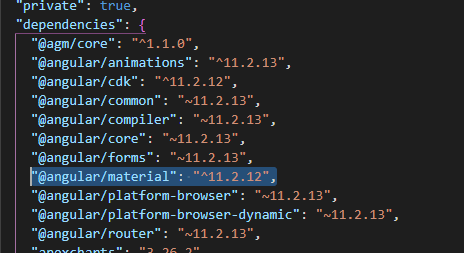

Hi guys, Since the project is really legacy, I must use the 4.0.7 version of this. Sincerely I do not know what is the issue here... Using Angular 10.2.3. I included all Angular Material modules and FormModule, also ReactiveFormModule which is needed. I am using the input in this container:
<mat-form-field class="field" flex-gt-xs>
  <input matInput format="yyyy-MM-dd" [ngxMatDatetimePicker]="value" [min]="minDate" />
  <mat-datepicker-toggle matSuffix [for]="value"></mat-datepicker-toggle>
  <ngx-mat-datetime-picker #value [showSpinners]="false"></ngx-mat-datetime-picker>
</mat-form-field>
Unfortunately I get this error and have no idea how to solve since for me, everything seems fine:
error NG8002: Can't bind to 'ngxMatDatetimePicker' since it isn't a known property of 'input'.
<input matInput format="yyyy-MM-dd" [ngxMatDatetimePicker]="value" [min]="minDate" />
did you get a solution for this matter? Im facing the same issue,
Unfortunately not, no solving so far :/
Hi,
I've realized that I had to put the import in my secondary model component as it was the main component for that screen. So I suggest you to check if your are using a king of infrastructure like this:
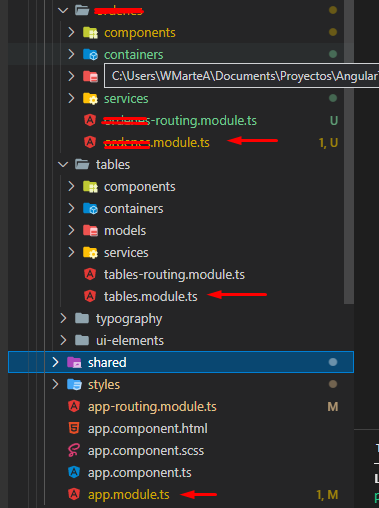
Do the import in the child module "secondary.module", not in the main one "app.module"
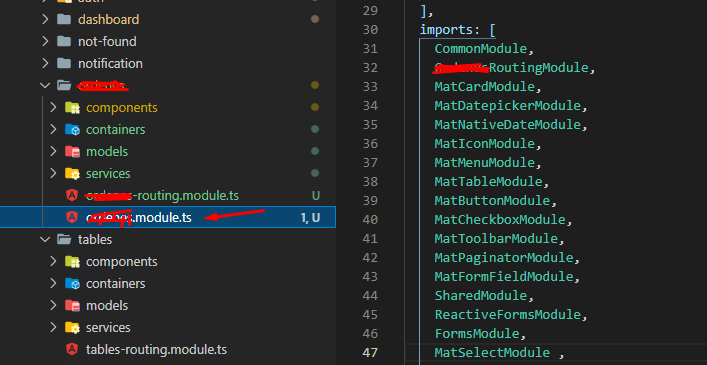
hope this works for you, regards.

