

 grumpycoders
Linux Xbox One S Controller works wired but not via bluetooth (xpadneo)
Describe the bug
Manjaro Linux, xpadneo, bluetooth, Xbox One S Controller, recognized by system but not available to PCSX-Redux
Expected behavior
SDL controller should be recognized by PCSX-Redux if it is recognized by the computer, regardless of the connection method (USB, dongle, bluetooth). In this case, both sdl-jstest and sdl2-jstest recognize the device (SDL/SDL2 backends) even without a gamecontrollerdb.txt loaded.
sdl-jstest -l
Found 1 joystick(s)

Joystick Name:     'Xbox One S Controller'
Joystick Number:    0
Number of Axes:     7
Number of Buttons: 12
Number of Hats:     1
Number of Balls:    0

sdl2-jstest -l
error: failed to read gamecontrollerdb.txt: Invalid RWops
Found 1 joystick(s)

Joystick Name:     'Xbox One S Controller'
Joystick GUID:     050000005e040000e002000003090000
Joystick Number:    0
Number of Axes:     7
Number of Buttons: 12
Number of Hats:     1
Number of Balls:    0
GameControllerConfig:
  Name:    'Xbox One Wireless Controller'
  Mapping: '050000005e040000e002000003090000,Xbox One Wireless Controller,a:b0,b:b1,back:b6,dpdown:h0.4,dpleft:h0.8,dpright:h0.2,dpup:h0.1,guide:b10,leftshoulder:b4,leftstick:b8,lefttrigger:a2,leftx:a0,lefty:a1,rightshoulder:b5,rightstick:b9,righttrigger:a5,rightx:a3,righty:a4,start:b7,x:b2,y:b3,platform:Linux'
Steps to reproduce the bug
Connect controller, launch either Linux Appimage or build from source. Both exhibit same issue. Logitech F710 controller is recognized but it has dedicated USB dongle. Bluetooth connection shouldn't be an issue.
Operating System
Manjaro Linux (Arch-like) Sikaris 22.0.0
PCSX-Redux version
Rolling build from Arch with custom PKGBUILD that produces same install layout as AppImage, as well as latest AppImage.
CPU model
i7-7700HQ
GPU model
Nvidia GeForce GTX 1060 Mobile
BIOS version
OpenBios, scph-5501
CPU emulation mode
Recompiler
Additional information
Controller status is unrelated to game/re-compiler/etc.

When using the Arch build with the PKGBUILD, can you try upgrading the file gamecontrollerdb.txt by downloading it from this link? If this solves your issue, we just need to package a more recent version of this database.

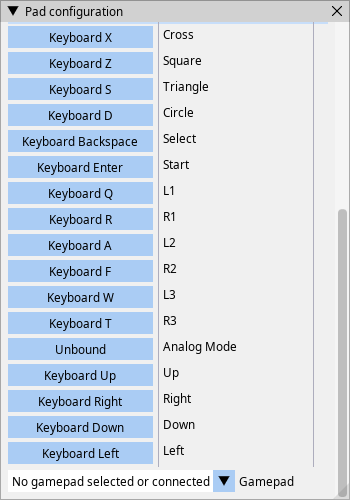
I wish it were that easy. As you can see the controller is present in both. The program doesn't appear to be reading it for some reason.
This is the file structure of the install:
ls /usr/share/pcsx-redux/
fonts  i18n  pcsx-redux  pcsx-redux.sh  resources

ls /usr/share/pcsx-redux/resources/
gamecontrollerdb.txt  LICENSE  openbios.bin  pcsx-redux.ico

grep -Pi 050000005e040000e002000003090000 /usr/share/pcsx-redux/resources/gamecontrollerdb.txt
050000005e040000e002000003090000,Xbox One Wireless Controller,a:b0,b:b1,back:b6,dpdown:h0.4,dpleft:h0.8,dpright:h0.2,dpup:h0.1,guide:b10,leftshoulder:b4,leftstick:b8,lefttrigger:a2,leftx:a0,lefty:a1,rightshoulder:b5,rightstick:b9,righttrigger:a5,rightx:a3,righty:a4,start:b7,x:b2,y:b3,platform:Linux,
This is the extracted AppImage:
grep -Pi 050000005e040000e002000003090000 ~/Downloads/squashfs-root/usr/share/pcsx-redux/resources/gamecontrollerdb.txt
050000005e040000e002000003090000,Xbox One Wireless Controller,a:b0,b:b1,back:b6,dpdown:h0.4,dpleft:h0.8,dpright:h0.2,dpup:h0.1,guide:b10,leftshoulder:b4,leftstick:b8,lefttrigger:a2,leftx:a0,lefty:a1,rightshoulder:b5,rightstick:b9,righttrigger:a5,rightx:a3,righty:a4,start:b7,x:b2,y:b3,platform:Linux,
Connection info:
[ 2766.179589] input: Xbox Elite Wireless Controller as /devices/pci0000:00/0000:00:14.0/usb1/1-1/1-1.4/1-1.4:1.0/bluetooth/hci1/hci1:4/0005:045E:0B05.000E/input/input64
[ 2766.180135] input: Xbox Elite Wireless Controller Consumer Control as /devices/pci0000:00/0000:00:14.0/usb1/1-1/1-1.4/1-1.4:1.0/bluetooth/hci1/hci1:4/0005:045E:0B05.000E/input/input65
[ 2766.180487] input: Xbox Elite Wireless Controller Keyboard as /devices/pci0000:00/0000:00:14.0/usb1/1-1/1-1.4/1-1.4:1.0/bluetooth/hci1/hci1:4/0005:045E:0B05.000E/input/input67
[ 2766.180897] xpadneo 0005:045E:0B05.000E: input,hidraw10: BLUETOOTH HID v9.03 Gamepad [Xbox Elite Wireless Controller] on 00:e0:4c:23:99:87
[ 2767.168624] xpadneo 0005:045E:0B05.000E: Xbox Elite Wireless Controller [44:16:22:44:01:ef] connected
I wouldn't know, really, then. I'm using several gamepads, one being an original XBox USB controller - all of my gamepads work properly on Linux and Windows for me.
I don't have an XBox One Wireless controller to test with at the moment. I can add some more logging into Redux in order to display a bit more what's going on with the controllers, so to help you with debugging a bit on your end, but that'd be it. The backend for joypads is https://github.com/glfw/glfw, which may be the source of the problem too? Do you have other gamepads to test with? Maybe a wired one?
Okay so it's not an issue with Redux and joypads on your system in general, really only this one in particular. I'll see to add some logging for the joypad enumeration and filtering.
Man that's weird, it works wired (direct USB). Just seems to me that if the proggy is using gamecontrollerdb.txt which is associated with SDL and SDL sees the controller, there shouldn't be an issue. This is actually the first program I've had trouble with.
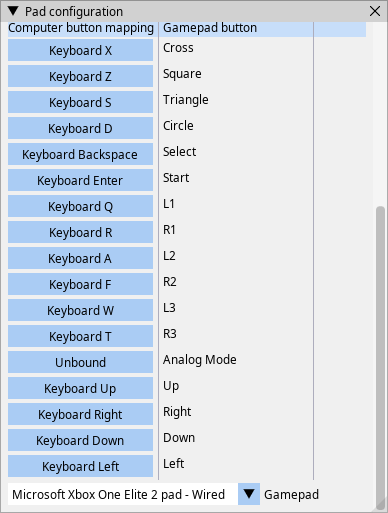
Right so it might be an issue with glfw3 here. Redux isn't using SDL directly. This test might be relevant to try: https://github.com/glfw/glfw/blob/master/tests/joysticks.c
Should the trouble report be relabeled as something like "GLFW doesn't fully support SDL gamepad interface"?
Maybe - it's relevant to mention that bluetooth fails while wired works fine. This may be a different enumeration in the Linux joystick API.