

 grid-js
Values are not rendered when keys are in upper case
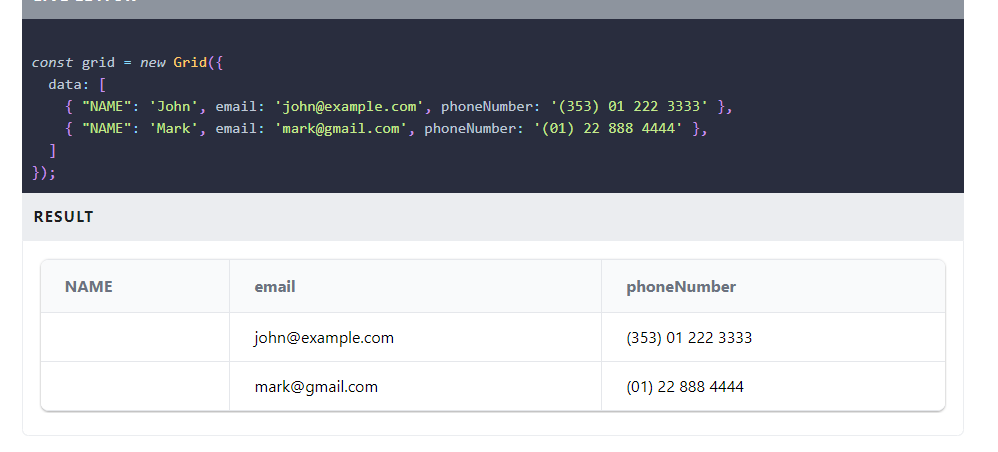
Describe the bug Values are not rendered when key are in upper case. Example: const grid = new Grid({ data: [ { "NAME": 'John', email: '[email protected]', phoneNumber: '(353) 01 222 3333' }, { "NAME": 'Mark', email: '[email protected]', phoneNumber: '(01) 22 888 4444' }, ] });
In this value of keys "NAME are not rendered.
To Reproduce Steps to reproduce the behavior:
- Try to keep keys in uppercase, Values will not render
Expected behavior Values should me render even if keys are in uppercase
Screenshots
Desktop (please complete the following information):
- OS: Windows
- Browser : brave, chrome
- Version [e.g. 22]
Smartphone (please complete the following information):
- Device: [e.g. iPhone6]
- OS: [e.g. iOS8.1]
- Browser [e.g. stock browser, safari]
- Version [e.g. 22]
Additional context Fix this issue or guide me if I am missing something.

Hey, I'm seeing this same behavior. Did you find a solution?
I was able to get the data to render by passing columns: [{ id: "Type", name: "Type" }]. Interestingly, columns: ["Type"] doesn't work. But it seems like the library should be able to handle upper case keys.

Hi, I'm wondering why this issue has been closed. I still encounter this behaviour. It's hard to see a rationale it being intentional, so I assume it's a bug.

Hey, I'm seeing this same behavior. Did you find a solution?
I was able to get the data to render by passing
columns: [{ id: "Type", name: "Type" }]. Interestingly,columns: ["Type"]doesn't work. But it seems like the library should be able to handle upper case keys.
According to the documentation, 'Grid.js tries to guess the ID of columns by camelCasing them if the column ID is not defined.' So, if we are not defining the IDs of columns, our key should be in camelCasing, which means the first letter should be lowercase.
Documentation link: link
However, I believe this behavior is incorrect, so I am reopening this issue.