

 goauthentik
403 Forbidden when using Traefik
Describe the bug When using Authentik behind traefik as a reverse proxy, and using Bitwarden as an SAML2 application, when I initiate a sign in from Bitwarden, I get a 403
To Reproduce Steps to reproduce the behavior:
- Setup authentik behind traefik.
- Setup Bitwarden SAML2 with authentik
- Initiate sign on from Bitwarden
Expected behavior A clear and concise description of what you expected to happen. Authentik would redirect and log into Bitwarden
Screenshots
If applicable, add screenshots to help explain your problem.
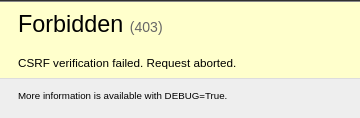
Logs
Output of docker-compose logs or kubectl logs respectively
server_1 | {"event": "/application/saml/bitwarden/sso/binding/init/", "host": "sso.company", "level": "info", "logger": "authentik.asgi", "method": "POST", "pid": 22450, "remote": "client-ip", "request_id": "0fb403c63ce34338b2994a74bbf9ff42", "runtime": 43, "scheme": "https", "status": 403, "timestamp": "2022-08-15T07:12:28.122808", "user": "akadmin", "user_agent": "Mozilla/5.0 (X11; Linux x86_64) AppleWebKit/537.36 (KHTML, like Gecko) Chrome/103.0.0.0 Safari/537.36"}
Version and Deployment (please complete the following information):
- authentik version: 2022.7.3
- Deployment: Docker-compose
Additional context Add any other context about the problem here. I can still access the Authentik dashboard fine. I also may have not configured SAML for bitwarden correctly, as I cannot initiate from Authentik either but I just get a 404 from Bitwarden, and so I do not think it is related to this error.

Could you share some more of your configuration? Traefik routes etc. Are you accessing bitwarden through a browser page, or trying to access it through e.g. the bitwarden app on a phone?

My traefik labels for Authentik are:
- traefik.enable=true - traefik.docker.network=proxy - traefik.http.routers.authentik.entryPoints=https - traefik.http.routers.authentik.rule=Host("sso.company") - traefik.http.routers.authentik.tls=true - traefik.http.routers.authentik.tls.certresolver=cloudflare - traefik.http.services.authentik.loadbalancer.server.port=9000 - traefik.http.services.authentik.loadbalancer.passhostheader=true
I am using Bitwarden through the webpage.
This issue has been automatically marked as stale because it has not had recent activity. It will be closed if no further activity occurs. Thank you for your contributions.
![stale[bot] avatar](https://avatars.githubusercontent.com/in/1724?v=4 "Published by a pub.dev verified publisher")