

 goauthentik
Account not provisioned - Nextcloud
Followed Nextcloud setup to the T on the website. https://goauthentik.io/integrations/services/nextcloud/
I'm getting Account not provisioned errors on nextcloud when trying to create a new user
 .
.

Are you able to login with any other existing user?
I was setting up a nextcloud saml yesterday the step I glossed over that caused the same error:
- Public X.509 certificate of the IdP: Copy the PEM of the Selected Signing Certificate
Download it from Admin interface -> System -> Certificates -> authentik Self-signed Certificate -> Download Certificate
Enter the contents of this into the Identity Provider Data section.

I'm only able to login directly into nextcloud, not with authentik
-----BEGIN CERTIFICATE----- contents of cert -----END CERTIFICATE-----
This is how you are entering it into the IDP section?
I'll have to start fresh, I had someone in Ibracorp's discord push me in the same direction and still getting the provisioning issue. I ran through all of the directions again, I must be missing something....What do you have for this section?

I don't have that populated. One thing I did do with Nextcloud was to run the occ command /usr/bin/docker exec -u www-data nextcloud_app_1 php occ saml:config:delete 1 to properly delete the saml settings.
I've only populated 8 fields:
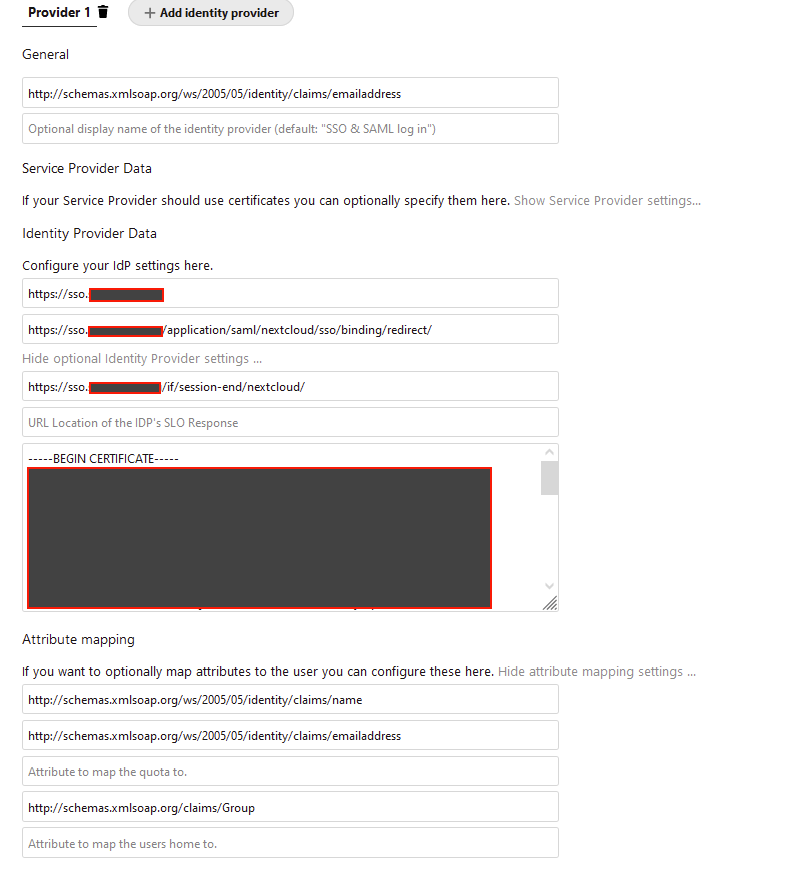
Output of sudo /usr/bin/docker exec -u www-data nextcloud_app_1 php occ saml:config:get
  - 1:
    - general-uid_mapping: http://schemas.xmlsoap.org/ws/2005/05/identity/claims/emailaddress
    - idp-entityId: https://sso.example.tld
    - idp-singleSignOnService.url: https://sso.example.tld/application/saml/nextcloud/sso/binding/redirect/
    - idp-singleLogoutService.url: https://sso.example.tld/if/session-end/nextcloud/
    - saml-attribute-mapping-displayName_mapping: http://schemas.xmlsoap.org/ws/2005/05/identity/claims/name
    - saml-attribute-mapping-email_mapping: http://schemas.xmlsoap.org/ws/2005/05/identity/claims/emailaddress
    - saml-attribute-mapping-group_mapping: http://schemas.xmlsoap.org/claims/Group
    - idp-x509cert: -----BEGIN CERTIFICATE-----
**contents of cert**
-----END CERTIFICATE-----
Under General I see you are using something different than in the documentation also.
I'm using Attribute to map the UID to.: http://schemas.goauthentik.io/2021/02/saml/username
Deleted, repopulated the 8 field here, opened a new browser, provisioning issue again. I'd have to wonder if it's something else I have setup outside of authentik thats inside of nextcloud.
Under General I see you are using something different than in the documentation also.
I'm using
Attribute to map the UID to.: http://schemas.goauthentik.io/2021/02/saml/username
That's just because my users were setup using their email addresses originally before I switched to using Authentik
My Authentik settings:
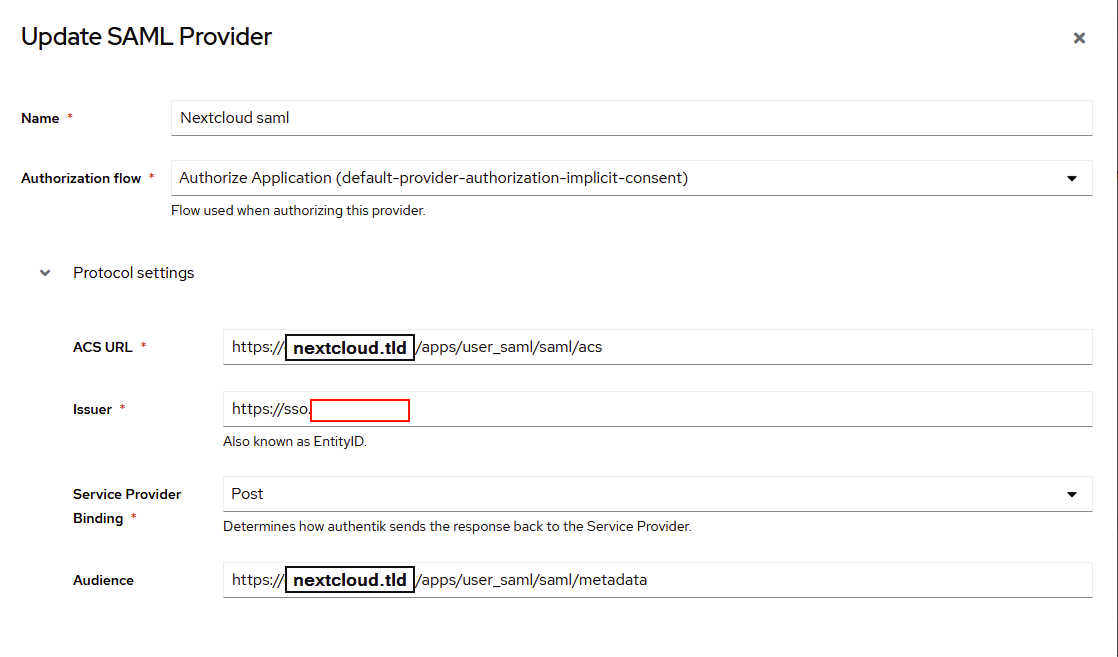
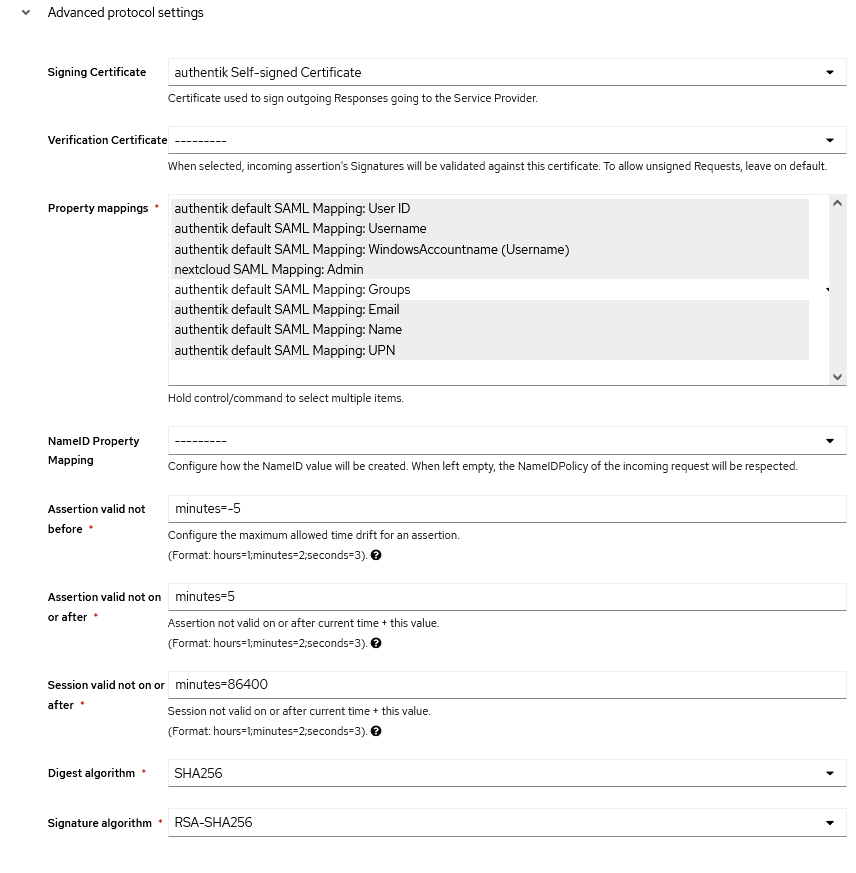
Another suggestion from Ibracorp discord was to make sure that the email/user was the same in both if it was a current name I'm using. I went ahead and created a new user/email. Still getting provisioning issue. Checking through some nextcloud logs to see what I can come up with
Tried using SAML Metadata in authentik for the provider and uploaded the metadata over from nextcloud, provisioning issue. I then went into the provider info and made sure that the cert was there as well as the audience was missing and re added that. Still provisioning issue.
{"reqId":"YRKYWPglLlPmmcYMYT7D","level":1,"time":"2022-08-12T13:10:00+00:00","remoteAddr":"172.19.0.1","user":"--","app":"user_saml","method":"POST","url":"/index.php/apps/user_saml/saml/acs","message":"Auth failed","userAgent":"Mozilla/5.0 (Macintosh; Intel Mac OS X 10_15_7) AppleWebKit/605.1.15 (KHTML, like Gecko) Version/15.6 Safari/605.1.15","version":"23.0.0.10","id":"62f653181d4b3"}
Well seeing as the auth failed it would have to be some setting is messed up. I would suggest posting your configs (with sensitive bits hidden). One issue I did have once was the certificate getting messed up due to the editor I opened it with.
I am running into this as well. @slimshizn did you get to the bottom of it in the end?

I'm working on it on my off time. Once I get it working I'll close with comment on my fix.
I got it working the other day. I replicated @dugite-code settings to the T but encountered 2 further issues:
- The certificate had
\nthat Nextcloud didn't like. I manually reformatted until the whole cert was displayed on one line - In Nextcloud SAML config, despite none of the checkboxes in the Security Settings section at the bottom was not checked, the settings I got with the occ command (something like
sudo docker exec -u www-data nextcloud php occ saml:config:get) showed one value was set. I suspect this is due to the fact I didn't wait long enough for Nextcloud SAML to save it but it may very well be a more subtle bug.
I still don't like not having a Service Provider cert but I'll tackle that separately.
@giacomo-zanichelli Line endings are always an issue when switching between operating systems, copying and pasting certificates can be hit and miss and like I suggested to @slimshizn can really depend on the editor used. I use the Atom editor, Ditto clipboard manager and Firefox to configure the Authentik UI. I believe ATOM converts the line endings to the windows native CLRF rather than LF on copy and the the browser converts it back. My understanding is there can be some issues if you paste LF line endings into a browser, but I'm not 100% clear on that front. Piping the cert file into the OCC command would probably be the most reliable method.
As far as the SAML app goes, it's honestly not very high quality and horrendously buggy if you modify any settings. Also there was a recent change to how it stores the data in the NC database and they added more complex OCC commands so it may take a while for these kinks to be sorted out.
I've decided to let it go until further notice. I agree with the it(NC SAML)being horrendously buggy. Seems like a lot of the implementations NC pushes are kind of forgotten about. Makes me wonder what the enterprise version looks like. Thanks @dugite-code and @giacomo-zanichelli for trying to get me up and running.
Was able to get custom OIDC working instead of using SAML. Much smoother experience.
Was able to get custom OIDC working instead of using SAML. Much smoother experience.
Hey @slimshizn would you be willing to share your solution with the class? I'm also having the same issue with SAML and Nextcloud, another issue I face is that the users I have were originally provisioned using LDAP and have a long UID but they still logon using their actual username

@slimshizn @dugite-code did you guys got to the bottom of this? @slimshizn did any of the solutions work for you? it would be really helpful I'm scratching my head off since November 22 with the same issues which you stated just today I got this GitHub thread that actually has a similar issue. A very thank you in advance.

@giacomo-zanichelli are you able to configure authentik for nextcloud? thank you in advance
I managed to get nextcloud to stop provision if an account doesn't exist using authentik using OIDC rather than SAML, I'll post my setup here shortly
Update:
Found the setup I used, follow this blog post, extremely helpful! https://blog.cubieserver.de/2022/complete-guide-to-nextcloud-oidc-authentication-with-authentik/