glutanimate
Anki 2.1.41 Frozen Fields makes the "Add" section boxes very small
Problem description
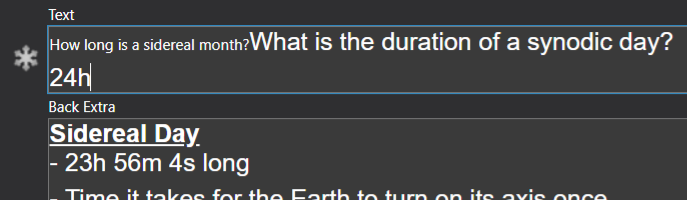
In the new update Anki 2.1.41, frozen fields makes the boxes in the "Add" tab smaller. I have tried disabling the add on and it resolves the problem. Below is a screenshot of how it looks with the add-on and without the add on respectively.


Checklist
Please replace the space inside the brackets with an x if the following items apply:
- x I've restarted Anki to see if it helps
- x I've verified that I use the latest version of the add-on by redownloading it from AnkiWeb
- x I've verified that I use the latest version of Anki by checking at https://apps.ankiweb.net#download
- x I've tried to disable other add-ons to see if there are any interactions present
- x My issue disappears when I hold shift while starting Anki.
- x I've checked if anyone else reported this problem before by looking through the issue reports. I also checked to see if there is a section about known issues in the add-on description, documentation, or README.
Information about your Anki set-up
Please fill out the section corresponding with your Anki version:
If you are using Anki 2.1
Please open Anki, go to Help → About, click on "Copy Debug Info", and paste the result between the backticks below (if the button does not appear you are using an older version of Anki 2.1 and will need to update first):
If you are using Anki 2.0
ONLY IF YOU ARE USING ANKI 2.0: Please open Anki, go to Help → About, find the two lines starting with Version: and Qt, and copy-paste them between the backticks below:
Please fill in details about your operating system (Windows/macOS/Linux, which version):
- OS: macOS
- version: 11.2.2
Please open Anki, go to Tools → Add-ons, take a screenshot of your installed add-ons, and paste it below:


I also had this problem. Now add-on is incompatible with new Anki versions. Version 2.1.43 (0fbae6bc) Python 3.8.1 Qt 5.15.1 PyQt 5.15.1 Linux version from anki-2.1.43-linux.tar.bz2

Same problem here
- Anki Version 2.1.43
- Windows 10 20H2 19042.928
It might be a CSS error because I noticed the text touches the text. This lead me to believe that there is no padding, or the code for the padding is not functioning (I've never created an anki addon but I'm just forwarding my idea 😅)

I've also noticed the text that's typed is smaller than the usual Anki font size. The first set of text is typed while the second was pasted before installing the addon. I hope this helps!