

 glin
glin
Aggregate row to inherit the style of the column
Hi Greg, first of all let me say what a great package {reactable} is!! Amazing job.
One thing I am struggling with is to add style to the aggregate row. In particular, I would like the aggregate row to inherit the style of the column.
See the function below, as an example:
DefineCol <- function(name, ...) {
  colDef(
    name = name,
    aggregate = "sum",
    format = colFormat(
      separators = TRUE,
      digits = 0,
      locales = "en-IE"
    ),
    style = function(value) {
      if (value > 0) {
        color <- "#000000"
      } else if (value < 0) {
        color <- "#e00000"
      } else {
        color <- "#000000"
      }
      list(color = color, fontFamily = "monospace")
    }
  )
}
It looks to me like there is not an easy "R" way of doing it - maybe in JS, but I don't know how to code in JS.
Cheers, Davide

Hi,
You're right, there's no easy way to do it in R. Row aggregation is done completely on the client (browser), so you do have to write JavaScript to style aggregated rows. The syntax is fairly similar though, so you might be able to adapt some of the examples in the docs. In particular, check out the R vs. JS conditional styling example in https://glin.github.io/reactable/articles/examples.html#cell-styling
Here's a slightly modified version of the JS styling example, but with aggregated rows:
reactable(
  sleep,
  groupBy = "group",
  columns = list(
    extra = colDef(
      aggregate = "mean",
      # JS style function that gets applied to both regular and aggregated cells.
      # rowInfo.row['extra'] contains the value of the cell in the "extra" column.
      style = JS("function(rowInfo) {
        var value = rowInfo.row['extra']
        if (value > 0) {
          var color = '#008000'
        } else if (value < 0) {
          var color = '#e00000'
        } else {
          var color = '#000000'
        }
        return { color: color, fontFamily: 'monospace' }
      }")
    )
  )
)
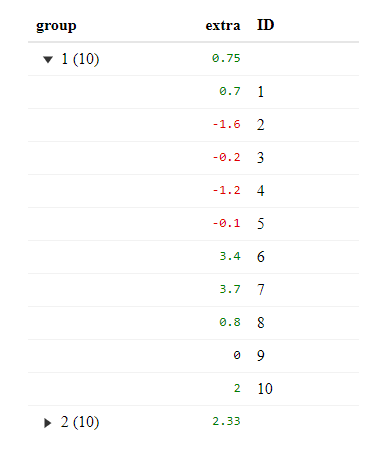
Also, I've realized that the docs don't mention how to style aggregated rows, so I'll probably add this example in there.
