

 gitpod-io
Cannot deploy Gitpod
Bug description
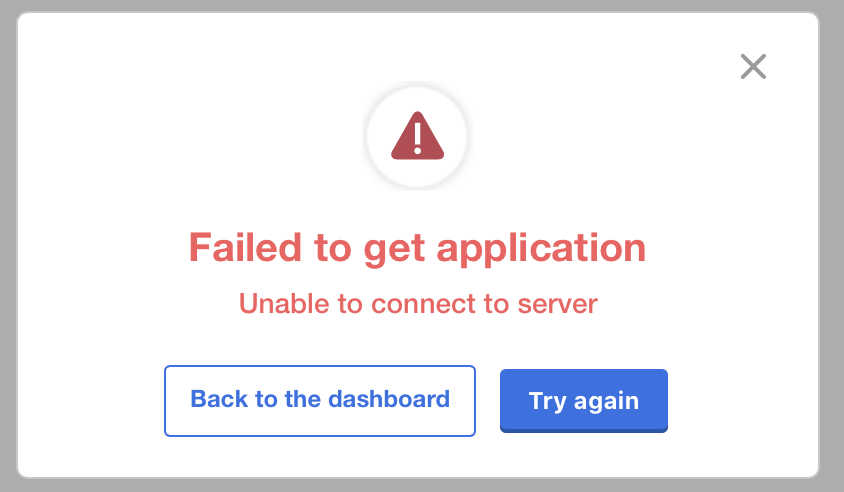
Trying to deploy Gitpod application and got this error. UI logs are empty
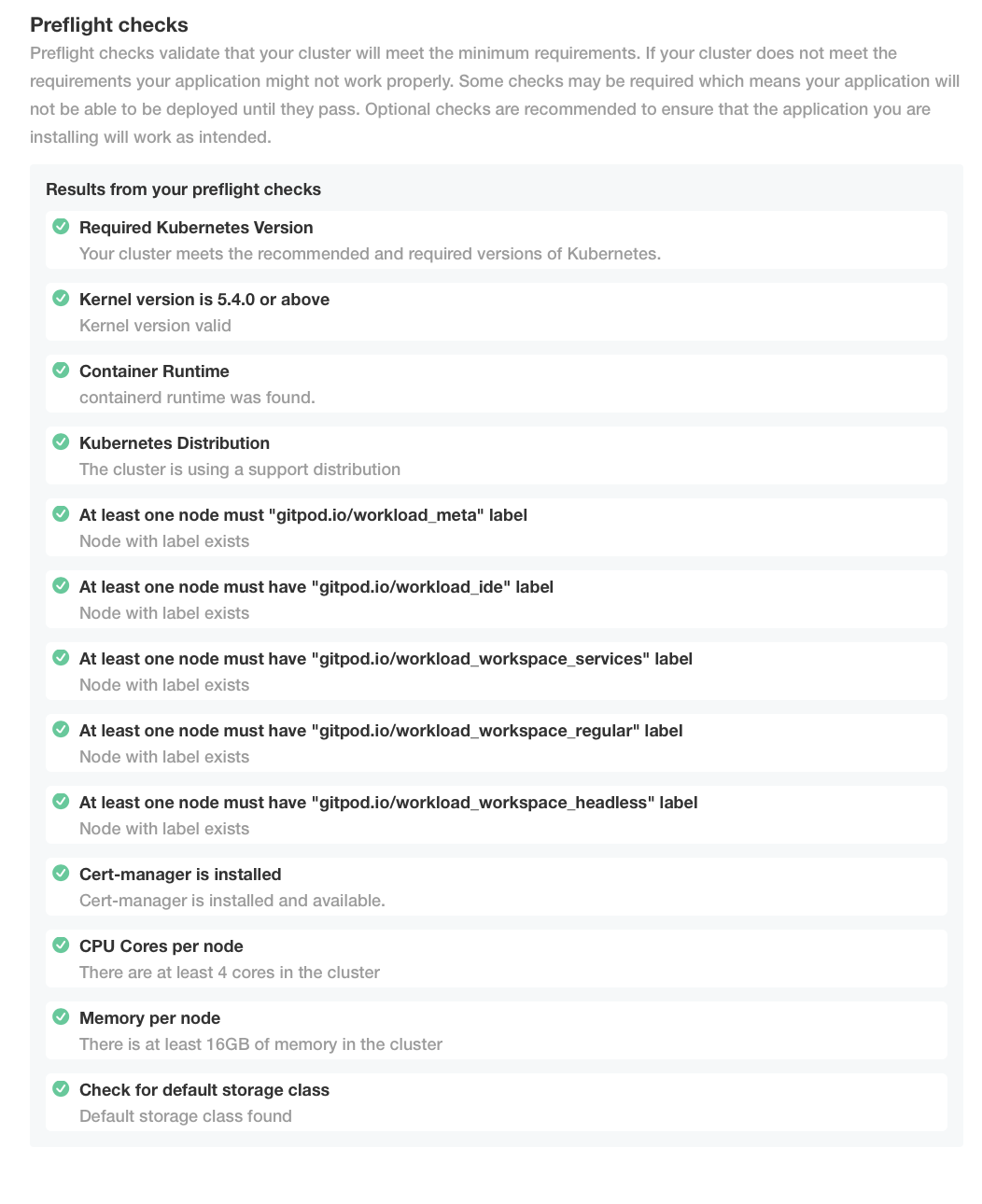
preflight checks are ok:
kotsadm pod is failing with error:
kubectl -n gitpod logs --previous kotsadm-646b7fb94-rzqrb
Defaulted container "kotsadm" out of: kotsadm, schemahero-plan (init), schemahero-apply (init), restore-db (init), restore-s3 (init)
2022/06/22 22:41:32 kotsadm version v1.72.0
{"level":"info","ts":"2022-06-22T22:41:32Z","msg":"Found kubectl binary versions [v1.23 v1.22 v1.21 v1.20 v1.19 v1.18 v1.17 v1.16 v1.14 ]"}
{"level":"info","ts":"2022-06-22T22:41:32Z","msg":"Found kustomize binary versions [3 ]"}
2022/06/22 22:41:32 Starting monitor loop
Starting Admin Console API on port 3000...
{"level":"info","ts":"2022-06-22T22:43:17Z","msg":"method=GET status=404 duration=5.425907ms request=/api/v1/pendingapp"}
{"level":"info","ts":"2022-06-22T22:43:38Z","msg":"deploying app version[{appId 15 0 2AcwVmygdMsxcenkXTMUWQdjLuS <nil>} {sequence 11 2  <nil>}]"}
panic: runtime error: invalid memory address or nil pointer dereference
[signal SIGSEGV: segmentation violation code=0x1 addr=0x20 pc=0x25894ff]

goroutine 389 [running]:
github.com/replicatedhq/kots/pkg/operator.DeployApp({0xc000beb5a0, 0x1b}, 0x2)
	/home/runner/work/kots/kots/pkg/operator/operator.go:228 +0xaff
created by github.com/replicatedhq/kots/pkg/version.DeployVersion
	/home/runner/work/kots/kots/pkg/version/version.go:83 +0x38d
root@pui-gitpod-lnx:/users/amaratka# Timeout, server 172.24.77.100 not responding.
I've also run Gitpod-installer checks, but I'm not sure this should fail at all
 gitpod-installer validate cluster --kubeconfig ~/.kube/config --config gitpod.config.yaml
{
  "status": "ERROR",
  "items": [
    {
      "name": "Linux kernel version",
      "description": "all cluster nodes run Linux \u003e= 5.4.0-0",
      "status": "OK"
    },
    {
      "name": "containerd enabled",
      "description": "all cluster nodes run containerd",
      "status": "OK"
    },
    {
      "name": "Kubernetes version",
      "description": "all cluster nodes run kubernetes version \u003e= 1.21.0-0",
      "status": "OK"
    },
    {
      "name": "affinity labels",
      "description": "all required affinity node labels [gitpod.io/workload_meta gitpod.io/workload_ide gitpod.io/workload_workspace_services gitpod.io/workload_workspace_regular gitpod.io/workload_workspace_headless] are present in the cluster",
      "status": "OK"
    },
    {
      "name": "cert-manager installed",
      "description": "cert-manager is installed and has available issuer",
      "status": "WARNING",
      "errors": [
        {
          "message": "no cluster issuers configured",
          "type": "WARNING"
        }
      ]
    },
    {
      "name": "Namespace exists",
      "description": "ensure that the target namespace exists",
      "status": "OK"
    },
    {
      "name": "https-certificates is present and valid",
      "description": "ensures the https-certificates secret is present and contains the required data",
      "status": "ERROR",
      "errors": [
        {
          "message": "secret https-certificates not found",
          "type": "ERROR"
        }
      ]
    }
  ]
}
Steps to reproduce
- setup Kubectl
- run
kubectl kots install gitpod - click
deploy
Workspace affected
No response
Expected behavior
Gitpod is running
Example repository
No response
Anything else?
No response

Hey @maratkanov-a - thanks for raising this and providing so much detail. In order to be able to help you a bit better - is this a persistent issue? I.e. have you tried this multiple times? The error you are seeing is from a third party (kots) we are using to help with the installation. As such we don't have full control here - my thought is that this is a temporary error (e.g. due to your network connection) that might resolve itself. But please do let me know if this problem persists.

hi, tried multiple times with empty k8s cluster. maybe something is missing after the installation
kubectl -n gitpod get all
NAME                          READY   STATUS    RESTARTS        AGE
pod/kotsadm-646b7fb94-rzqrb   1/1     Running   4 (2d23h ago)   4d19h
pod/kotsadm-minio-0           1/1     Running   0               4d19h
pod/kotsadm-postgres-0        1/1     Running   0               4d19h

NAME                       TYPE           CLUSTER-IP      EXTERNAL-IP   PORT(S)                         AGE
service/kotsadm            LoadBalancer   10.97.84.63     <pending>     8800:30000/TCP,3000:32493/TCP   4d19h
service/kotsadm-minio      ClusterIP      10.98.231.29    <none>        9000/TCP                        4d19h
service/kotsadm-postgres   ClusterIP      10.101.69.138   <none>        5432/TCP                        4d19h

NAME                      READY   UP-TO-DATE   AVAILABLE   AGE
deployment.apps/kotsadm   1/1     1            1           4d19h

NAME                                DESIRED   CURRENT   READY   AGE
replicaset.apps/kotsadm-646b7fb94   1         1         1       4d19h

NAME                                READY   AGE
statefulset.apps/kotsadm-minio      1/1     4d19h
statefulset.apps/kotsadm-postgres   1/1     4d19h
@maratkanov-a the panic you've recorded from the kotsadm deployment is particularly interesting, which version does kubectl kots version report?

kubectl kots version
Replicated KOTS 1.72.0

Version v1.73.0 is available for kots. To install updates, run
  $ curl https://kots.io/install | bash
@maratkanov-a I have a few thoughts:
- can you try upgrading to the latest version of KOTS (instructions are in
kubectl kots version)? Thispanicseems to be in the KOTS side of things and not one that I've seen before. I was using 1.72.0 without issue, but maybe there's something on your systems that's not on mine - The reason your
gitpod-installer validate cluster --kubeconfig ~/.kube/config --config gitpod.config.yamlis failing is probably because you've not specified the--namespace gitpodoption. - Can you reconnect to the KOTS dashboard using
kubectl kots admin-console --namespace gitpod? - When you reconnect to the KOTS dashboard, do you see any "DEPLOY" or "REDEPLOY" button (see below)? What happens when you click those?
- If you can get into the KOTS dashboard, can you generate us a support bundle under the "Troubleshoot" heading in the menu? Please send it to [email protected]

A couple of questions that would be good to know
- What cloud are you on?
- What Kubernetes distribution are you using?
- What Kubernetes version are you using?
- What Gitpod license are you using
I'm going to raise a support ticket with Replicated and see if they can advise anything further

The backtrace from the kots segmentation points to this line. The line in question is as follows:
cmd := exec.Command(kustomizeBinPath, "build", filepath.Join(deployedVersionArchive, "overlays", "downstreams", d.Name))
The only thing that jumps out at me as a potential nil dereference is d.Name, which is a Downstream struct, but there should be a nil check before that struct is used.
Apologies if you've already tried this, but have you tried deleting the entire gitpod namespace and restarting from scratch?
Quote replying @maratkanov-a comment (with attachments removed)
so, I;ve updated lots, removed everything related to the Gitpod via
kubectl delete all --all -n gitpodand runkubectl kots install gitpod. Same error as before
- updated
kubectl kots version
Replicated KOTS 1.73.0
- added namespace option
gitpod-installer validate cluster --kubeconfig ~/.kube/config --config gitpod.config.yaml --namespace gitpod
{
  "status": "ERROR",
  "items": [
    {
      "name": "Linux kernel version",
      "description": "all cluster nodes run Linux \u003e= 5.4.0-0",
      "status": "OK"
    },
    {
      "name": "containerd enabled",
      "description": "all cluster nodes run containerd",
      "status": "OK"
    },
    {
      "name": "Kubernetes version",
      "description": "all cluster nodes run kubernetes version \u003e= 1.21.0-0",
      "status": "OK"
    },
    {
      "name": "affinity labels",
      "description": "all required affinity node labels [gitpod.io/workload_meta gitpod.io/workload_ide gitpod.io/workload_workspace_services gitpod.io/workload_workspace_regular gitpod.io/workload_workspace_headless] are present in the cluster",
      "status": "OK"
    },
    {
      "name": "cert-manager installed",
      "description": "cert-manager is installed and has available issuer",
      "status": "WARNING",
      "errors": [
        {
          "message": "no cluster issuers configured",
          "type": "WARNING"
        }
      ]
    },
    {
      "name": "Namespace exists",
      "description": "ensure that the target namespace exists",
      "status": "OK"
    },
    {
      "name": "https-certificates is present and valid",
      "description": "ensures the https-certificates secret is present and contains the required data",
      "status": "ERROR",
      "errors": [
        {
          "message": "secret https-certificates not found",
          "type": "ERROR"
        }
      ]
    }
  ]
}
- yes, I can
kubectl kots admin-console --namespace gitpod
  • Press Ctrl+C to exit
  • Go to http://localhost:8800 to access the Admin Console
- it fail simultaneously with screenshot I've posted above with panic
kubectl -n gitpod logs --previous kotsadm-c58885475-b9x74
Defaulted container "kotsadm" out of: kotsadm, schemahero-plan (init), schemahero-apply (init), restore-db (init), restore-s3 (init)
2022/06/30 19:09:16 kotsadm version v1.73.0
{"level":"info","ts":"2022-06-30T19:09:16Z","msg":"Found kubectl binary versions [v1.23 v1.22 v1.21 v1.20 v1.19 v1.18 v1.17 v1.16 v1.14 ]"}
{"level":"info","ts":"2022-06-30T19:09:16Z","msg":"Found kustomize binary versions [3 ]"}
2022/06/30 19:09:16 Starting monitor loop
Starting Admin Console API on port 3000...
{"level":"info","ts":"2022-06-30T19:11:52Z","msg":"method=GET status=404 duration=8.320326ms request=/api/v1/pendingapp"}
{"level":"info","ts":"2022-06-30T19:11:59Z","msg":"preflight progress: {run/kernel running 0 3 map[cluster-info:{pending} cluster-resources:{pending} run/kernel:{running}]}"}
{"level":"info","ts":"2022-06-30T19:12:03Z","msg":"preflight progress: {run/kernel completed 1 3 map[cluster-info:{running} cluster-resources:{pending} run/kernel:{completed}]}"}
{"level":"info","ts":"2022-06-30T19:12:03Z","msg":"preflight progress: {cluster-info running 1 3 map[cluster-info:{running} cluster-resources:{pending} run/kernel:{completed}]}"}
{"level":"info","ts":"2022-06-30T19:12:03Z","msg":"preflight progress: {cluster-info completed 2 3 map[cluster-info:{completed} cluster-resources:{running} run/kernel:{completed}]}"}
{"level":"info","ts":"2022-06-30T19:12:03Z","msg":"preflight progress: {cluster-resources running 2 3 map[cluster-info:{completed} cluster-resources:{running} run/kernel:{completed}]}"}
W0630 19:12:06.203455       1 warnings.go:70] batch/v1beta1 CronJob is deprecated in v1.21+, unavailable in v1.25+; use batch/v1 CronJob
W0630 19:12:06.205517       1 warnings.go:70] batch/v1beta1 CronJob is deprecated in v1.21+, unavailable in v1.25+; use batch/v1 CronJob
W0630 19:12:06.206934       1 warnings.go:70] batch/v1beta1 CronJob is deprecated in v1.21+, unavailable in v1.25+; use batch/v1 CronJob
W0630 19:12:06.208412       1 warnings.go:70] batch/v1beta1 CronJob is deprecated in v1.21+, unavailable in v1.25+; use batch/v1 CronJob
W0630 19:12:06.209912       1 warnings.go:70] batch/v1beta1 CronJob is deprecated in v1.21+, unavailable in v1.25+; use batch/v1 CronJob
W0630 19:12:06.211346       1 warnings.go:70] batch/v1beta1 CronJob is deprecated in v1.21+, unavailable in v1.25+; use batch/v1 CronJob
I0630 19:12:08.211683       1 request.go:601] Waited for 1.196889276s due to client-side throttling, not priority and fairness, request: GET:https://10.96.0.1:443/api/v1
I0630 19:12:18.212009       1 request.go:601] Waited for 4.397476431s due to client-side throttling, not priority and fairness, request: GET:https://10.96.0.1:443/apis/discovery.k8s.io/v1beta1
{"level":"info","ts":"2022-06-30T19:12:24Z","msg":"preflight progress: {cluster-resources completed 3 3 map[cluster-info:{completed} cluster-resources:{completed} run/kernel:{completed}]}"}
{"level":"info","ts":"2022-06-30T19:12:50Z","msg":"deploying app version[{appId 15 0 2AcwVmygdMsxcenkXTMUWQdjLuS <nil>} {sequence 11 3  <nil>}]"}
panic: runtime error: invalid memory address or nil pointer dereference
[signal SIGSEGV: segmentation violation code=0x1 addr=0x20 pc=0x2640268]

goroutine 3703 [running]:
github.com/replicatedhq/kots/pkg/operator.DeployApp({0xc000794400, 0x1b}, 0x3)
	/home/runner/work/kots/kots/pkg/operator/operator.go:228 +0xb28
created by github.com/replicatedhq/kots/pkg/version.DeployVersion
	/home/runner/work/kots/kots/pkg/version/version.go:83 +0x38d
- Downloaded and sent to the email (additional it also here)
Additional info: I'm using community Gitpod version, k8s is installed via kubeadm manually
kubectl version
WARNING: This version information is deprecated and will be replaced with the output from kubectl version --short.  Use --output=yaml|json to get the full version.
Client Version: version.Info{Major:"1", Minor:"24", GitVersion:"v1.24.0", GitCommit:"4ce5a8954017644c5420bae81d72b09b735c21f0", GitTreeState:"clean", BuildDate:"2022-05-03T13:46:05Z", GoVersion:"go1.18.1", Compiler:"gc", Platform:"linux/amd64"}
Kustomize Version: v4.5.4
Server Version: version.Info{Major:"1", Minor:"24", GitVersion:"v1.24.2", GitCommit:"f66044f4361b9f1f96f0053dd

The backtrace from the kots segmentation points to this line. The line in question is as follows:
cmd := exec.Command(kustomizeBinPath, "build", filepath.Join(deployedVersionArchive, "overlays", "downstreams", d.Name))The only thing that jumps out at me as a potential nil dereference is
d.Name, which is aDownstreamstruct, but there should be a nil check before that struct is used.Apologies if you've already tried this, but have you tried deleting the entire
gitpodnamespace and restarting from scratch?
yes, I've tried cleaning entire namespace
Hi @maratkanov-a, can you have a look at the questions in https://github.com/gitpod-io/gitpod/issues/10912#issuecomment-1171306601 please - that's what I need to get you up and running
Hi @maratkanov-a, can you have a look at the questions in #10912 (comment) please - that's what I need to get you up and running
this was my response for all 5 steps
Hi @maratkanov-a, apologies for the delay - we accidentally lost this issue in the backlog!
In an earlier comment I dug into the kotsadm source code where the segmentation fault originated. This fault is deep within the internals of kots, and neither @MrSimonEmms nor I have been able to reproduce this issue within our clusters. The line generating the fault makes a number of assumptions about the state of the cluster that typically hold within one of our supported platforms (k3s, GKE, EKS, and AKS); since you mention that you've hand-built your cluster one of these assumptions may not hold.
In the interest of debugging this issue, are you able to create a temporary k3s cluster to test the Gitpod installation on one of our supported platforms?
Edit: @MrSimonEmms noted that users behind national firewalls have experienced issues similar to what you're experiencing. Where are you running your Kubernetes cluster?
Hi @adrienthebo, k3s worked better: some pods are trying to start, but some failed. Is this related with wildcard domain stuff?
NAME                                   READY   STATUS              RESTARTS         AGE
kotsadm-postgres-0                     1/1     Running             0                4d
kotsadm-dbb59b9fd-zw9tq                1/1     Running             0                4d
fluent-bit-lhcv8                       2/2     Running             0                3d23h
kotsadm-minio-0                        1/1     Running             0                4d
installer-17-szk6x                     1/1     Running             0                4m49s
registry-facade-pkwzv                  0/3     Init:0/1            0                4m42s
agent-smith-hcr9v                      2/2     Running             0                4m42s
proxy-7569c656bd-fhplj                 0/2     Init:0/1            0                4m41s
dashboard-6dd9b747f7-vfz8l             1/1     Running             0                4m41s
ws-proxy-6877b968d-jbhll               0/2     ContainerCreating   0                4m41s
image-builder-mk3-7648b55f74-p5wpf     2/2     Running             0                4m41s
blobserve-5cdc86b546-w8bqs             1/2     Running             0                4m41s
content-service-67b9f56554-lmm2r       1/1     Running             0                4m41s
ide-proxy-69fd874cd5-5l7gq             1/1     Running             0                4m41s
openvsx-proxy-0                        2/2     Running             0                4m41s
ws-manager-5c6fb6f898-v8fzn            2/2     Running             0                4m41s
ws-daemon-lmdxz                        3/3     Running             0                4m41s
registry-7f7b79d9cf-4rg6f              1/1     Running             0                4m41s
mysql-0                                1/1     Running             0                4m41s
minio-c9dcd67df-qs2hw                  1/1     Running             0                4m41s
messagebus-0                           1/1     Running             0                4m41s
ws-manager-bridge-d7bbdfb8f-bqh79      2/2     Running             0                4m41s
server-766f5897dd-cjzp2                2/2     Running             0                4m41s
installation-status-646496f5d5-4wzt6   0/1     CrashLoopBackOff    19 (2m53s ago)   22m
cert manager is installed at another namespace
k3s kubectl -n cert-manager get pods
NAME                                       READY   STATUS    RESTARTS   AGE
cert-manager-cainjector-6d6bbc7965-p9vlz   1/1     Running   0          4d
cert-manager-6868fddcb4-l8mgt              1/1     Running   0          4d
cert-manager-webhook-59f66d6c7b-28tg2      1/1     Running   0          4d
logs from pod
k3s kubectl -n gitpod logs installation-status-646496f5d5-4wzt6
Checking installation status
Error: release: not found
Gitpod: Installation not complete
Glad to hear that k3s worked better! With respect to the certificates issue I believe you're correct; the registry-facade, proxy, and ws-proxy pods won't be able to start without the https-certificates certificate. You can use the following to check the signing status of the certificate:
kubectl --namespace gitpod get certificate https-certificates
cmctl can typically provide more information as to why a certificate isn't installed; you can check on the cert status with cmctl with the following:
cmctl status certificate https-certificates --namespace gitpod
will I be able to run Gitpod without *.ws.gitpod.your-domain.com domains?
@maratkanov-a no. It's a hard requirement that the cert requires three domains configured - $DOMAIN, *.$DOMAIN and *.ws.$DOMAIN.
As Simon mentioned DNS records are a requirement for Gitpod, as are TLS certificates. If you're able to create DNS records as mentioned above but if can't use Let's Encrypt to issue certificates you can use a self-signed certificate.
This issue has been automatically marked as stale because it has not had recent activity. It will be closed if no further activity occurs. Thank you for your contributions.
![stale[bot] avatar](https://avatars.githubusercontent.com/in/1724?v=4 "Published by a pub.dev verified publisher")