

 github
Add documentation for how to get ssh signed commits verified
Code of Conduct
- [X] I have read and agree to the GitHub Docs project's Code of Conduct
What article on docs.github.com is affected?
https://docs.github.com/en/authentication/managing-commit-signature-verification/displaying-verification-statuses-for-all-of-your-commits
What part(s) of the article would you like to see updated?
Something needs to be added to explain how to resolve:
This user has not yet uploaded their public key. SSH Key Fingerprint: P8OCkGjK4RVgw9dkdMDS8nTDaG9qfKX2JD2ZA6vdXyo Learn about vigilant mode.
Additional information
If you visit https://github.com/smallstep/cli/pull/768#issuecomment-1270476417 and scroll down to https://github.com/smallstep/cli/pull/768/commits/4afe4cfb73e61bdcd4385840bf918b309bd7906a
You'll see:

If you click Unverified, you'll see:

This user has not yet uploaded their public key. SSH Key Fingerprint: P8OCkGjK4RVgw9dkdMDS8nTDaG9qfKX2JD2ZA6vdXyo Learn about vigilant mode.
I've visited https://github.com/settings/keys, and it lists a key:
SHA256:P8OCkGjK4RVgw9dkdMDS8nTDaG9qfKX2JD2ZA6vdXyo

I clicked the link and got sent to: https://docs.github.com/en/authentication/managing-commit-signature-verification/displaying-verification-statuses-for-all-of-your-commits#about-vigilant-mode
Which has this table:
| Status | Description |
|---|---|
| Verified | The commit is signed, the signature was successfully verified, and the committer is the only author who has enabled vigilant mode. |
| Partially verified | The commit is signed, and the signature was successfully verified, but the commit has an author who: a) is not the committer and b) has enabled vigilant mode. In this case, the commit signature doesn't guarantee the consent of the author, so the commit is only partially verified. |
| Unverified | Any of the following is true:- The commit is signed but the signature could not be verified.- The commit is not signed and the committer has enabled vigilant mode.- The commit is not signed and an author has enabled vigilant mode. |
It is not remotely obvious to me what I need to do. I am the only author of the commit, I think. I control the only key involved in the commit. I committed it on my mac. I pushed it to github using the very same ssh key as the one I used to sign the commit. And GitHub acked that I was able to use that key.
To prove half a point, here's a conversation between me and GitHub which shows that if I use this key, it will allow me in:
% ssh -i ~/.ssh/id_rsa -v [email protected] 2>&1|grep id_rsa
debug1: identity file /Users/jsoref/.ssh/id_rsa type 0
debug1: identity file /Users/jsoref/.ssh/id_rsa-cert type -1
debug1: Will attempt key: /Users/jsoref/.ssh/id_rsa RSA SHA256:P8OCkGjK4RVgw9dkdMDS8nTDaG9qfKX2JD2ZA6vdXyo explicit
debug1: Offering public key: /Users/jsoref/.ssh/id_rsa RSA SHA256:P8OCkGjK4RVgw9dkdMDS8nTDaG9qfKX2JD2ZA6vdXyo explicit
debug1: Server accepts key: /Users/jsoref/.ssh/id_rsa RSA SHA256:P8OCkGjK4RVgw9dkdMDS8nTDaG9qfKX2JD2ZA6vdXyo explicit
I may have other keys, but this is the only key used within the last week, and the repository is configured to use ssh and not https for access, so that should rule out PATs and most other variables.


👋 @jsoref Any chance you checked in with our lovely friends over it support? If not, could you? Then we can take whatever they say and consider incorporating it into the docs!
Thanks so much for opening a thorough issue 💖

Ok, support explained that the Key ui magically grows an extra SSH section when you add an SSH key again and choose to mark it as a signing key instead of an authentication key:
🆕 Add SSH Key option lets you pick the kind now:
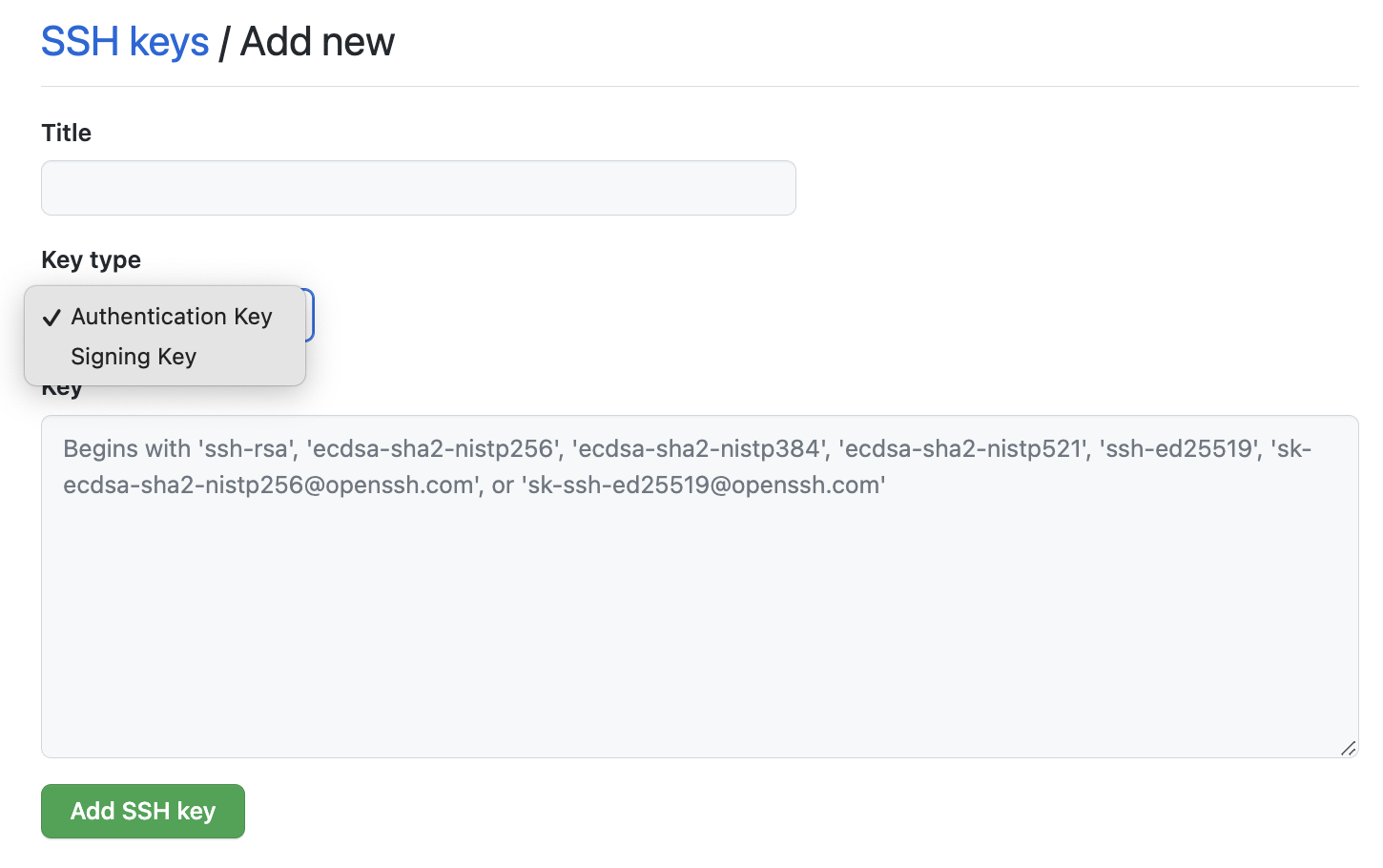
🆕 There's a new section once you've added it:

This is technically included in "6️⃣ Select the type of key, either authentication or signing. For more information about commit signing, see About commit signature verification." https://docs.github.com/en/authentication/connecting-to-github-with-ssh/adding-a-new-ssh-key-to-your-github-account#adding-a-new-ssh-key-to-your-account
Frankly, the fact that there are two nearly identical flows for two incredibly unrelated tasks does not justify using a single instruction set for both.
It's ok to use reusables for the shared portions, but these two different flows belong in different pages. One should be able to link to a page that is about adding an ssh signing key and the instructions should only cover adding an ssh signing key. That page can say "do note that an ssh signing key is not the same as an ssh authentication key, although you can add the same key for both purposes if you so choose, and you would have to if you want to use the same key for both purposes" -- conveniently this text could even be in the reusable portion.
Note that the current circular flow is unhelpful:
- SSH commit signature verification 3️⃣ Add a SSH signing key to your GitHub account 6️⃣ Select the type of key, either authentication or signing. For more information about commit signing, see "About commit signature verification." -- You somehow have to remember ~8️⃣ steps down that you need to select signing.
Anyway, that's the first problem:
- The add ssh thing needs to be refactored to have a reusable (or two or three) and distinct parent pages for the two tasks
The second problem is that
-
The commit is signed but the signature could not be verified.should have a link to a page with explanations of things one could do. - Check the commit signature type (instructions on how to do this)
- If it's an ssh signature -- is it possible that it's only registered in your account for authentication and not for signing? If so, see new page from previous section for how to add the key for use for signing in github
- If it's a gpg signature -- dunno
- if it's an s/mime signature -- dunno (I haven't dealt w/ s/mime signature
Thanks for opening an issue! We've triaged this issue for technical review by a subject matter expert :eyes:
![github-actions[bot] avatar](https://avatars.githubusercontent.com/in/15368?v=4 "Published by a pub.dev verified publisher")
This is a gentle bump for the docs team that this issue is waiting for technical review.
This is a gentle bump for the docs team that this issue is waiting for technical review.
This is a gentle bump for the docs team that this issue is waiting for technical review.
This is a gentle bump for the docs team that this issue is waiting for technical review.
This is a gentle bump for the docs team that this issue is waiting for technical review.
This is a gentle bump for the docs team that this issue is waiting for technical review.
This is a gentle bump for the docs team that this issue is waiting for technical review.
This is a gentle bump for the docs team that this issue is waiting for technical review.
This is a gentle bump for the docs team that this issue is waiting for technical review.
👋 @jsoref, I'm re-examining this issue as it's been a few months since it was opened, and several docs updates have been made in the meantime. Following your last comment with helpful details about the problems you've encountered with the docs when adding an SSH key:
This is technically included in "6️⃣ Select the type of key, either authentication or signing. For more information about commit signing, see About commit signature verification."
I agree that we can do more to add clarity about choosing the type of SSH key, and I propose that we add a couple of sentences to the beginning of the "Adding a new SSH key to your account" section, something like:
You can add an SSH key and use it for authentication, or commit signing, or both. If you want to use the same SSH key for both authentication and signing, you need to upload it twice.
- You or anyone else is welcome to open a PR at any time to make this change.
Note that the current circular flow is unhelpful:
It looks like the circular flow aspect concerning the article "About commit signature verification" has since be resolved (that is, the step 6 about selecting the type of key has been removed), so we won't take any further action on this point.
Anyway, that's the first problem:
I believe our docs have since been sufficiently updated to address the problem you mentioned here.
The second problem is that
When considering how to help our users troubleshoot situations where The commit is signed but the signature could not be verified, we've decided to continue the discussion about possibly creating this content internally, as we'd like to undertake research around the most commonly reported SSH key issues first. Thanks so much for sharing your explanations and experience ✨. I have copied those particular details to an internal issue.
I think that covers everything raised here, although do let me know if I've overlooked or misunderstood any other docs changes you've suggested previously or following your interaction with our support team.
We can leave this issue open to address the one docs update I mentioned at the beginning of my comment: adding the two sentences about the key type.

Closing this issue following the merge of https://github.com/github/docs/pull/28384.