

 github
Provide a unified page that talks about the pull request bottom box
Code of Conduct
- [X] I have read and agree to the GitHub Docs project's Code of Conduct
What article on docs.github.com is affected?
https://docs.github.com/en/repositories/configuring-branches-and-merges-in-your-repository/defining-the-mergeability-of-pull-requests/troubleshooting-required-status-checks https://docs.github.com/en/pull-requests/collaborating-with-pull-requests/addressing-merge-conflicts/about-merge-conflicts https://docs.github.com/en/pull-requests/collaborating-with-pull-requests/collaborating-on-repositories-with-code-quality-features/about-status-checks https://docs.github.com/en/code-security/code-scanning/automatically-scanning-your-code-for-vulnerabilities-and-errors/triaging-code-scanning-alerts-in-pull-requests#code-scanning-results-check-failures https://docs.github.com/en/actions/managing-workflow-runs/approving-workflow-runs-from-public-forks#approving-workflow-runs-on-a-pull-request-from-a-public-fork
What part(s) of the article would you like to see updated?
There's no single page that talks about the bottom box. I don't even know if it has a name.
(Sample bottom box)
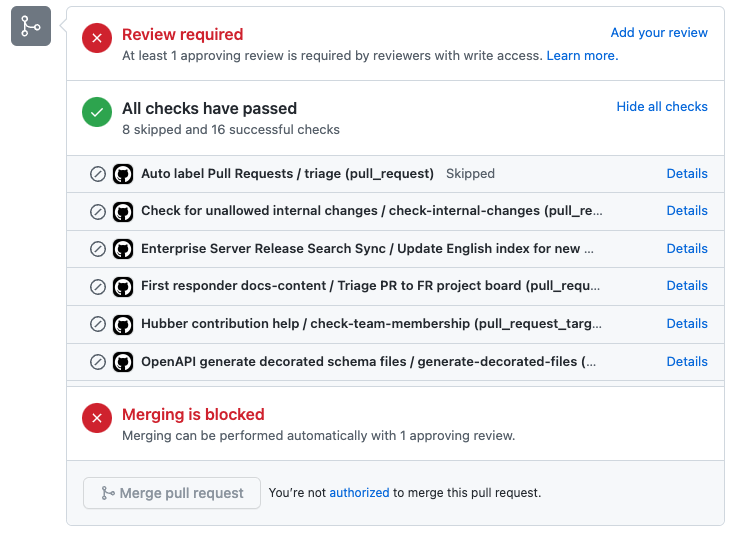
There are pages that talk about merge conflicts, and pages that talk about status checks, and more pages about status checks.
There isn't a page that explains what happens if you had a status on a commit and then pushed a new commit that had a merge conflict with the base branch. It appears that when this happens, the previous status will remain displayed in the bottom box, but the individual commit will get its own current status run.
There isn't a page that says "before you spend time worrying about status checks, you should really check to see if you have merge conflicts, because, if you do, your status checks really aren't worth looking at -- you'll get new status checks when you resolve those conflicts."
I'd like to see a page that talks about the box in general.
- Explains how things are named/presented in the box.
- Especially if one has a reusable workflow
- Explains that if you have required status, which things can be safely renamed w/o breaking the required status checks and which things would break them.
- Explains how items can come from third parties
- That if there's an outage, they might not come, and if there's an outage, if there's a way to poke things to get them to come).
- Explains which icons one can see (running? skipped? canceled? succeeded? failed?) and which statuses one won't see, or which statuses will be mapped to other statuses (I don't know the answer).
- Links to a page that talks about statuses and explains how a workflow can trigger the various statuses (I'm still looking for a way for a workflow to trigger a "skipped" status after it has done a bit of work -- e.g. for the case where a workflow determines there's a conceptual merge conflict and thus can't usefully give a 👍 / 👎 answer.
- Generally talks about how Code scanning interacts with these things (I really don't know anything about it, and am planning to investigate, which is what led to this current spree).
- Talks about required reviews -- from the perspective of an end user (as opposed to an admin)
- Talks about workflows requiring approval -- again, from the perspective of an end user (but w/ a link to the docs for maintainers)
Additional information
No response

👋 @jsoref Thanks so much for opening an issue! I'll triage this for the team to take a look :eyes:

Thank you so much @jsoref for this excellent idea! Agree that the boxes within PRs can be confusing, and an explanation of them could help new users in particular.
We're going to consider this in the context of other improvements in the coming months, so I'll go ahead and assign this to myself as part of that work — thank you so much for raising this.
Adding some fact-finding notes here for future consideration:
- The box summarizes the mergability of the pull request
- The contents of the box vary by repository, according to what tests (checks) are set up, any branch protection rules, and the permissions of the user. This example displays the current status of the pull request and:
- Reports that this branch requires an approving review from a contributor with write access
- Reports on the status of the checks that are run automatically on pull requests in this repository

A stale label has been added to this issue becuase it has been open for 60 days with no activity. To keep this issue open, add a comment within 3 days.
![github-actions[bot] avatar](https://avatars.githubusercontent.com/in/15368?v=4 "Published by a pub.dev verified publisher")
Not stale — keeping in the backlog as part of my content-design engagement.
👋🏻 @jsoref, we don't document the UI so I don't think we'd want to frame this article about being about the merge box specifically, but I think I see the use case you're coming from: needing to merge a pull request and wanting a one-stop shop of all the reasons you might be blocked from doing so. We can add a new article for this information called "Troubleshooting the mergeability of your pull request" to "Incorporating changes from a pull request." We should largely link to the articles about specific feature for details that are already documented, but it would be useful to have a central location that will direct folks to those articles and discuss how the features interact.
You or anyone else is welcome to open a PR adding that article!

Hi @jsoref Thanks for opening this and for your enthusiasm for making PRs clearer! I could not agree more that this bottom box can be confusing, especially since it can look quite different from repo to repo. I recently did some user research that confirmed that pull requests can be confusing for new users — so well done noting this as an area for improvement.
With that said, I've looked this issue over again and am going to close this out for these reasons:
- We have an issue open to look more holistically at the pull requests documentation
- Pull requests documentation is already extensive, so adding another article may cause further confusion — perhaps counter-intuitively, adding more content to explain confusing things can make the documentation more confusing as a whole because there are more things to choose from and read
- Pull requests are undergoing some UX changes, so it makes sense to reassess this in the future, rather than now/soon
Thanks again for pointing this out and highlighting areas of confusion in our docs! 👏
thanks @meowius.
Indeed, I'm well aware that too many pages hurt.
For things where I'm confident the right answer is for me to write a change, I'm happy to do it, but for things like this, I'm much happier with it triggering a holistic rethink -- and for someone else to write the content.
And, I'm definitely in favor of not wasting effort documenting things that are about to change (it's really annoying watching cities rebuild roads only for another contractor to come in and rip up the road again a week later).