

 gildas-lormeau
Remove unused images in SVG sprite definitions
To reproduce: Save the Tweet section of (say) https://twitter.com/paul_hammant/status/1211995077620441089 shown in red here :-
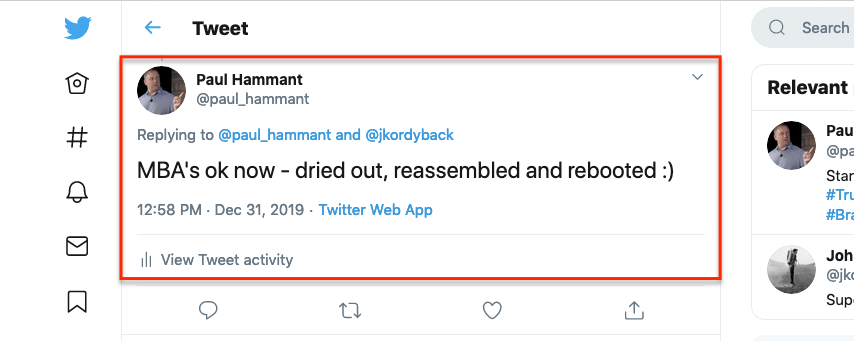
Notice that the icons on the left are not shown in the resulting page. There are in the source though - eight or so of them.
I'd hope for a new pref/setting - "remove invisible elements" :)

Thanks for having reported the issue. SVG images are more or less ignored when saving selected contents because a SVG image can be reused in a page. The optimization you're proposing, which is specific to SVG images, would not need a new option though. As far as I know, this issue does not exist with "pure" HTML elements.

I guess I would write a user script (https://github.com/gildas-lormeau/SingleFile/wiki/How-to-execute-a-user-script-before-a-page-is-saved) to delete these SVGs before they're saved? It could be crude for me - say I know I'm scraping my own tweets, I already pretty much know which parts of the DOM I want to nix. I've some Python/Curl that scrapes my tweets today. I'd shift, I think, to a SingleFile + Sikuli + Selenium version. I'm Selenium 1.0 co-creator, and have used Sikuli in automation before - https://paulhammant.com/2015/02/21/playing-with-sikuli-for-desktop-automation - so this all feels very doable. The processing would super-slow down, but who cares how long it takes when you can be doing other things at the time.
A more sophisticated user-script could traverse the DOM looking for elements that are not used. Of course I'm talking about the creation of a save of a "section" of the page. Question: The userscript(s) kicks in on the source page? or the smaller/clipped one in this case?
Sorry, I almost forgot to reply to your question.
The more sophisticated "user-script" you're referring to already exists. It's implemented mainly via the options "remove hidden elements" and "remove unused styles". Combined to the "save selection" feature, this tends to remove a lot of content. It's just not sophisticated enough for SVG sprites (https://css-tricks.com/svg-sprites-use-better-icon-fonts/). The support of SVG in SingleFile is not great to be honest. I make sure they are embedded correctly but I do not optimize them.
Until I make the code more sophisticated, I think the userscript is indeed a good approach to solve your issue. The userscript kicks on the source page.
BTW, thank you a lot for having created Selenium, it helped me multiple times!
Since you know Selenium :), you could alternatively fork the selenium script of SingleFile which is not very long (and contains a lot of "boilerplate" code), cf. https://github.com/gildas-lormeau/SingleFile/blob/master/cli/back-ends/webdriver-gecko.js. That would give you more power, I guess.
Super nice. While I'd normally use Python and WebDriver for such things, SingleFile is written in JS, so its more natural to stay in Node-land. From a WebDriver point of view SingleFile is usable without launching with a browser profile. Good work, sir.
I might be wrong but it looks like the issue cannot be reproduced on twitter anymore.
Hi, I am not expert , did you solve "remove invisible elements"? I need to delete blank area in html page, are any solution?

@orientune Note that this issue is not related to the one you created (https://github.com/gildas-lormeau/SingleFile/issues/447). The current issue does not have any impact on the display of the page. It just makes it a little bit larger (in terms of bytes) than it should, in very particular cases.