

 getsentry
Error using "pip install RSeQC"
Hi!
I am using python version 3.8.5 on windows 10. Have been all day trying to excecute the comand "pip install" to install "RSeQC" module and the following error keeps appearing: Command errored out with exit status 1: python setup.py egg_info Check the logs for full command output.
According to similar issues from other people, I have tried all these commands already but the problem is not solved yet:
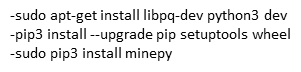
Here is the complete error so you can see it in detail
ERROR: Command errored out with exit status 1:
 command: 'c:\users\santi\appdata\local\programs\python\python38\python.exe' -c 'import sys, setuptools, tokenize; sys.argv[0] = '"'"'C:\\Users\\santi\\AppData\\Local\\Temp\\pip-install-asjskfsy\\pysam\\setup.py'"'"'; __file__='"'"'C:\\Users\\santi\\AppData\\Local\\Temp\\pip-install-asjskfsy\\pysam\\setup.py'"'"';f=getattr(tokenize, '"'"'open'"'"', open)(__file__);code=f.read().replace('"'"'\r\n'"'"', '"'"'\n'"'"');f.close();exec(compile(code, __file__, '"'"'exec'"'"'))' egg_info --egg-base 'C:\Users\santi\AppData\Local\Temp\pip-pip-egg-info-xflj54ps'
     cwd: C:\Users\santi\AppData\Local\Temp\pip-install-asjskfsy\pysam\
Complete output (23 lines):
# pysam: no cython available - using pre-compiled C
# pysam: htslib mode is shared
# pysam: HTSLIB_CONFIGURE_OPTIONS=None
"." no se reconoce como un comando interno o externo,
programa o archivo por lotes ejecutable.
"." no se reconoce como un comando interno o externo,
programa o archivo por lotes ejecutable.
Traceback (most recent call last):
  File "<string>", line 1, in <module>
  File "C:\Users\santi\AppData\Local\Temp\pip-install-asjskfsy\pysam\setup.py", line 240, in <module>
    htslib_make_options = run_make_print_config()
  File "C:\Users\santi\AppData\Local\Temp\pip-install-asjskfsy\pysam\setup.py", line 68, in run_make_print_config
    stdout = subprocess.check_output(["make", "-s", "print-config"])
  File "c:\users\santi\appdata\local\programs\python\python38\lib\subprocess.py", line 411, in check_output
    return run(*popenargs, stdout=PIPE, timeout=timeout, check=True,
  File "c:\users\santi\appdata\local\programs\python\python38\lib\subprocess.py", line 489, in run
    with Popen(*popenargs, **kwargs) as process:
  File "c:\users\santi\appdata\local\programs\python\python38\lib\subprocess.py", line 854, in __init__
    self._execute_child(args, executable, preexec_fn, close_fds,
  File "c:\users\santi\appdata\local\programs\python\python38\lib\subprocess.py", line 1307, in _execute_child
    hp, ht, pid, tid = _winapi.CreateProcess(executable, args,
FileNotFoundError: [WinError 2] El sistema no puede encontrar el archivo especificado
# pysam: htslib configure options: None
----------------------------------------
ERROR: Command errored out with exit status 1: python setup.py egg_info Check the logs for full command output.
I have also tried to install homebrew using the following code: /bin/bash -c "$(curl -fsSL https://raw.githubusercontent.com/Homebrew/install/master/install.sh)" but another error appears:
C:\Users\santi>python Python 3.8.5 (tags/v3.8.5:580fbb0, Jul 20 2020, 15:57:54) [MSC v.1924 64 bit (AMD64)] on win32 Type "help", "copyright", "credits" or "license" for more information.
/bin/bash -c "$(curl -fsSL https://raw.githubusercontent.com/Homebrew/install/master/install.sh)" File "
", line 1 /bin/bash -c "$(curl -fsSL https://raw.githubusercontent.com/Homebrew/install/master/install.sh)" ^ SyntaxError: invalid syntax
(I am really new on this programming world so It's very hard for me to find solutions for this kind of problems)
Can anyone suggest a solution for this whole thing? Someone who can understand the main error in more detail to realize which is the exact problem?
Thank you very much!
