

 getgrav
[UX issue] Non intuitive way to create translations of page / "Page has not been translated" and no way to handle it.
Solved in second comment.
Issue
I can't create new page with translation for existing page. Trying to edit admin panel shows (1):
This page has not been translated to English language yet! Falling back to Polski language.
The language switcher on editing page (it is language switcher?) does nothing (2).
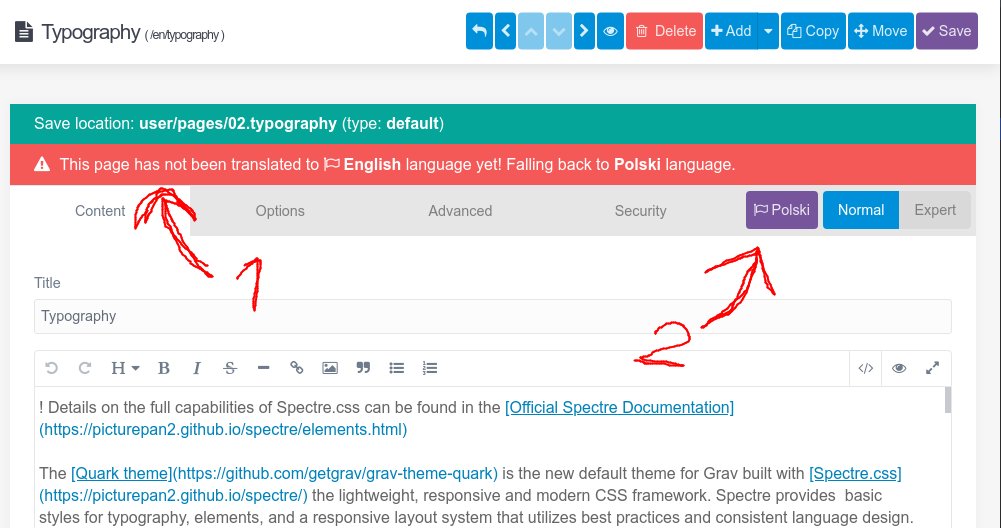
Whatever which not yet translated language I'm gonna choose in drop-menu there's same behaviour.
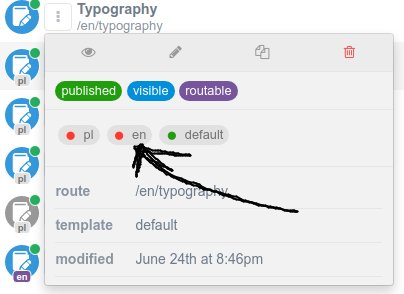
Reproduce
- Enable multilang
- Create new page on your context - whatever it finally would be the "default" language or first supported
- Try to edit translation page (any red dot in second screenshot)
or
- Edit any page with only one translation
- Play with language URL section of that page:
- http://localhost/en/admin/pages/home
- http://localhost/pl/admin/pages/home
- http://localhost/XY/admin/pages/home
Config
languages:
  supported:
    - pl
    - en
  default_lang: pl
  include_default_lang: true
  include_default_lang_file_extension: false
  translations: true
  translations_fallback: true
  session_store_active: false
  http_accept_language: false
  override_locale: false
  pages_fallback_only: false
Admin account config
language: en
content_editor: default
Admin plugin conf
route: '/somewhere'
What I tried
- Change user context / relogin -- same issue
- Playing with almost all settings from
languagessection. - Default admin plugin conf (ommit route confi)
Workaround
Manually create file for specified translation eg. default.en.md. After that you can edit both languages.
~~Could not find workaround without server access / using Admin panel.~~
Some more info
- Looks like admin panel improperly failing back with language - should allow to create file if it not exists for specified language
- Even if I have two files
default.mdanddefault.en.mdthe default file is in lang switcher interpreted as first language (Polish) - cannot choose "default" instead of first language. That should be also fixed IMO - to be able to manage default language in case having more than overall two.
Versions
Grav: latest 1.7.17 Grav admin: latest 1.10.17

Oh boy...
That's not a bug but... UX issue.
I've found finally how it works.
- You need to open content that already you have created in specified language.
- Translate it.
- Use little dropdown and "Save as ..."
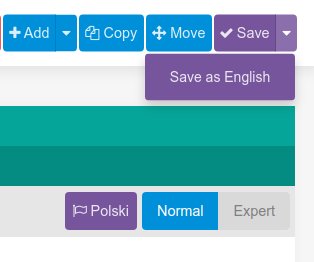
Not fully intuitive. I've spent hour jumping around it and creating issue... :cry:
+1 for fixing this 'bug'.
I came here to file the same bug report, although thanks to @dexterxx-pl I now have the work around :-)
