

 geosolutions-it
BIL Terrain layer improvements or alternatives
Description
This is a list of improvements or alternatives that we could investigate:
- investigate on caching server side of BIL terrain
- investigate the use of images instead of buffer array (see Mapbox Terrain-DEM v1)
- serve terrain with static quantized-mesh tiles (see https://github.com/tum-gis/cesium-terrain-builder-docker)
Other useful information


![octo-reminder[bot] avatar](https://avatars.githubusercontent.com/in/161108?v=4 "Published by a pub.dev verified publisher")
Test with cesium-terrain-builder-docker
Followed the steps described in the readme under the Cesium Terrain Builder usage section changing only the mounted data folder location. Main issues I found while testing this library are:
- the
.tiffile needed to be adjusted by converting the -32767 values to 0 to avoid glitchy cliffs (maybe there is a better approach) - once the tiles are generated they have the
.terrainextension. The server hosting the terrain tiles needs to add the headerContent-Encodingequal togzipto all the.terrainfile responses in this way the Cesium library is able to read them correctly. If this header is missing the terrain is not rendered by the client (below a simple test server example)
Additional information
-
area
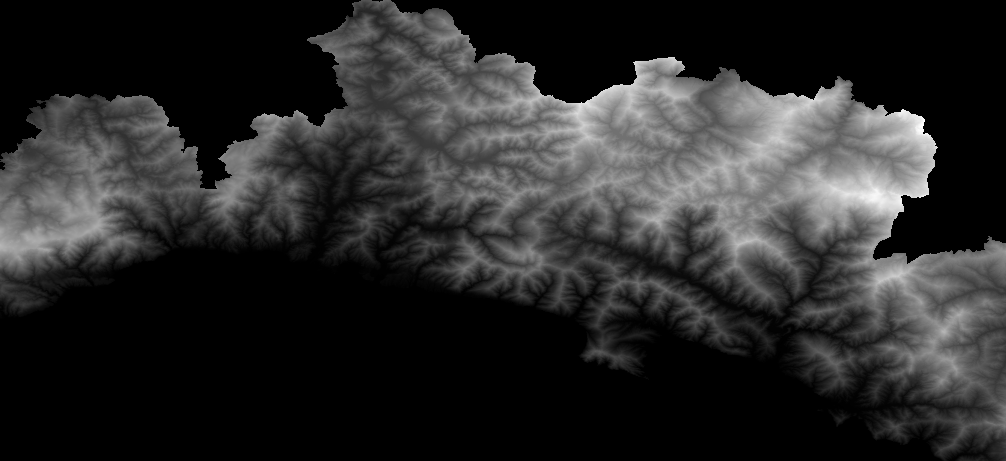
-
tools:
- Docker version 20.10.22, build 3a2c30b
- cesium-terrain-builder-docker
- node v14.17.0 (only for demo server)
- npm 6.14.13 (only for demo server)
-
static server demo application that provides the correct header to the
.terrainfiles
app/
├─ statics/
│  ├─ terrain-folder
├─ server.js
// server.js file

const express = require('express');
const app = express();
const cors = require('cors')
const port = 3000;

app.use(cors());

app.use(express.static('./statics', {
    setHeaders: (res, path, stat) => {
        if(/\.terrain$/.test(path)) {
            res.setHeader("Content-Encoding", "gzip");
        }
    }
}));

app.listen(port, () => {
    console.log("app is listening on port 3000");
});
- layer configuration in mapstore
{
    "type": "terrain",
    "provider": "cesium",
    "url": "http://localhost:3000/terrain-folder",
    "visibility": true
}
- test in mapstore v2023.01.00
https://user-images.githubusercontent.com/19175505/231393957-eb743e75-85d8-4499-af05-f35a133e8098.mp4
@allyoucanmap let's proceed moving processed tiles into our server to start evaluating performances and to be able to evaluate further steps. @randomorder we will need your support for this eg:
-
Where we can put processed tiles
-
The setting of the header for served tiles as specified above by @allyoucanmap
once the tiles are generated they have the .terrain extension. The server hosting the terrain tiles needs to add the header Content-Encoding equal to gzip to all the .terrain file responses in this way the Cesium library is able to read them correctly. If this header is missing the terrain is not rendered by the client (below a simple test server example)

Is there private / sensitive data in these tiles @allyoucanmap ? I need to understand if it's feasible to put the tiles in an S3 bucket. If private -> it will require authentication

Is there private / sensitive data in these tiles @allyoucanmap ? I need to understand if it's feasible to put the tiles in an S3 bucket. If private -> it will require authentication
@randomorder I think we need also @tdipisa to answer this. Anyway I would like to start with just a bucket without authentication just to test the requests performances on a small subset of tiles. Probably we will need to work more on the client if the authentication is required. Just a though: it will be possible to restrict the use of this bucket to specific urls?
I had a quick test. The content encoding header seems to be doable:
$ aws s3 cp  ./ s3://gs-terrain/  --content-encoding="gzip" --recursive
upload: 1\2\1.terrain to s3://gs-terrain/1/2/1.terrain
upload: 8\269\190.terrain to s3://gs-terrain/8/269/190.terrain
upload: 8\268\190.terrain to s3://gs-terrain/8/268/190.terrain
upload: 9\536\381.terrain to s3://gs-terrain/9/536/381.terrain
upload: 7\134\95.terrain to s3://gs-terrain/7/134/95.terrain
upload: 5\33\23.terrain to s3://gs-terrain/5/33/23.terrain
upload: 8\269\191.terrain to s3://gs-terrain/8/269/191.terrain
upload: 8\268\191.terrain to s3://gs-terrain/8/268/191.terrain
upload: 6\67\47.terrain to s3://gs-terrain/6/67/47.terrain
upload: 4\16\11.terrain to s3://gs-terrain/4/16/11.terrain
upload: 9\536\382.terrain to s3://gs-terrain/9/536/382.terrain
upload: 9\536\383.terrain to s3://gs-terrain/9/536/383.terrain
upload: 9\537\381.terrain to s3://gs-terrain/9/537/381.terrain
upload: 9\537\383.terrain to s3://gs-terrain/9/537/383.terrain
upload: 9\538\381.terrain to s3://gs-terrain/9/538/381.terrain
upload: 9\537\382.terrain to s3://gs-terrain/9/537/382.terrain
upload: 9\538\383.terrain to s3://gs-terrain/9/538/383.terrain
upload: 9\539\382.terrain to s3://gs-terrain/9/539/382.terrain
upload: 9\539\381.terrain to s3://gs-terrain/9/539/381.terrain
upload: 9\538\382.terrain to s3://gs-terrain/9/538/382.terrain
upload: 9\539\383.terrain to s3://gs-terrain/9/539/383.terrain
upload: .\layer.json to s3://gs-terrain/layer.json
upload: 0\0\0.terrain to s3://gs-terrain/0/0/0.terrain
upload: 2\4\2.terrain to s3://gs-terrain/2/4/2.terrain
upload: 3\8\5.terrain to s3://gs-terrain/3/8/5.terrain
upload: 0\1\0.terrain to s3://gs-terrain/0/1/0.terrain

$aws s3 cp  ./layer.json s3://gs-terrain/
Quick CURL test
$ curl -v https://gs-terrain.s3.eu-central-1.amazonaws.com/0/0/0.terrain -o ./0.terrain
  % Total    % Received % Xferd  Average Speed   Time    Time     Time  Current
                                 Dload  Upload   Total   Spent    Left  Speed
  0     0    0     0    0     0      0      0 --:--:-- --:--:-- --:--:--     0*   Trying 52.219.47.140:443...
* Connected to gs-terrain.s3.eu-central-1.amazonaws.com (52.219.47.140) port 443 (#0)
...
< Content-Encoding: gzip
...
For reference this is the bucket policy that allows public access
{
    "Version": "2012-10-17",
    "Statement": [
        {
            "Sid": "AddPerm",
            "Effect": "Allow",
            "Principal": "*",
            "Action": "s3:GetObject",
            "Resource": "arn:aws:s3:::gs-terrain/*"
        }
    ]
This is the CORS policy applied to both the buckets
[
    {
        "AllowedHeaders": [
            "*"
        ],
        "AllowedMethods": [
            "GET"
        ],
        "AllowedOrigins": [
            "*"
        ],
        "ExposeHeaders": []
    }
]
@allyoucanmap please install AWSCLI : https://docs.aws.amazon.com/cli/latest/userguide/getting-started-install.html
Then run aws configure using the provided Access Key and Secret:
$ aws configure
AWS Access Key ID [****************TX7C]:
AWS Secret Access Key [****************dVX6]:
Default region name [eu-west-1]:
Default output format [json]:
The command used for the upload is the one at the top of this comment
Also created another bucket called "3d-layers" in the same region with same configuration. CORS confirmed working
@allyoucanmap ws able to autonomously update the content on both buckets
Suggested improvement for the future @tdipisa:
- Use a custom domain
*..geosolutionsgroup.comthat requires enabling Web site hosting on the bucket, condfiguring SSL Certs and so on. it would take about 1 hour - Look for performance improvements by changing the bucket configuration and adding a caching layer on top. Client side and Server side
Upload steps (we are assuming a bucket with a terrain folder):
- navigate to the local folder with the terrain tiles
cd ./<name-of-terrain>/
- run the upload command
aws s3 cp ./ s3://<bucket-name>/terrain/<name-of-terrain> --content-encoding="gzip" --recursive
- replace the layer.json file to get the correct content encoding
aws s3 cp ./layer.json s3://<bucket-name>/terrain/<name-of-terrain>/