

 geosolutions-it
Correct the scale alignment for the Print Preview Map
Description
As pointed out by the support issue https://github.com/geosolutions-it/support/issues/2222 Raised by the client Cleveland Metroparks.
When using the printing module in MapStore and using the geodetic option on the plugin configuration. See here, although
- the print results are aligned with the display scale of the map
- the print preview map, that shows the print area on the printing plugin component, is largely misaligned with the display map.
See below
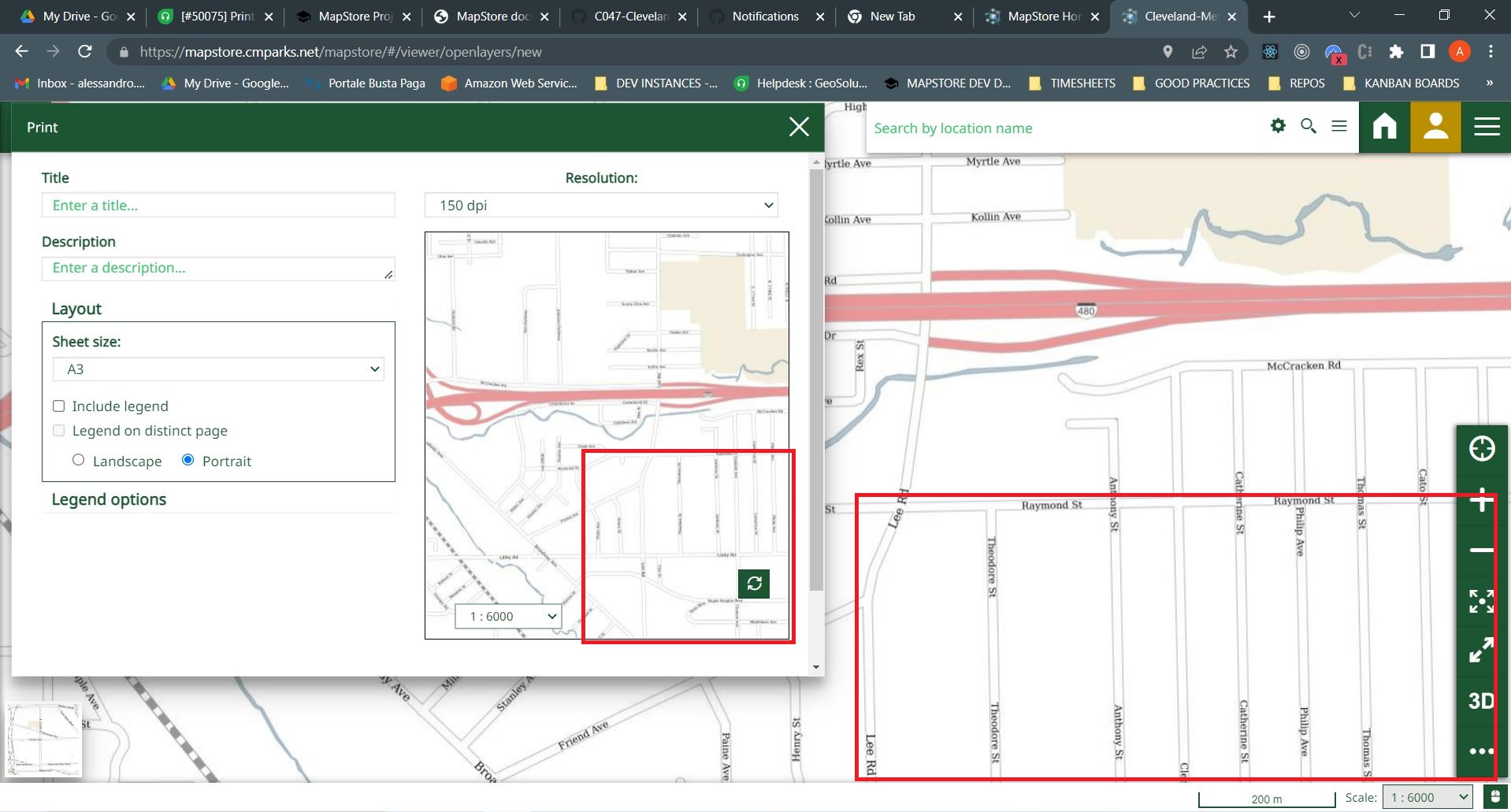
The issue has been known in MapStore for long time, and as @tdipisa confirmed this is a consequence of a different map setting in the map preview, which is not using the same geodetic system as the main map. A solution for this issue can be applied, changing the map preview setting. This has always been considered and now time has come investigate the enhancement, as requested by the client
What kind of improvement you want to add? (check one with "x", remove the others)
- [ ] Minor changes to existing features
- [ ] Code style update (formatting, local variables)
- [ ] Refactoring (no functional changes, no api changes)
- [ ] Build related changes
- [ ] CI related changes
- [ ] Other... Please describe:
Other useful information
N.B this ticket is created to start an investigation on the enhancement of the printing map preview. At the end of the investigation we should be able to have an estimation of the time it takes to change the preview map to use the same geodetic projection of the main map and solve the misalignment.

@ale-cristofori @offtherailz @tdipisa
There are a few things to check here:
scale misalignement
I was trying to replicate this problem locally with configs coming from datadir and some changes to proxy to point to production geoserver/geostore etc,
but I was not able to replicate this behaviour locally, basically on prod the scale of the print map and the one of viewer map are always aligned when the one in map changes
https://user-images.githubusercontent.com/11991428/184372319-1c2db5ae-1613-4047-82bc-4b9d0c2554b3.mp4
this is not the case locally
https://user-images.githubusercontent.com/11991428/184372351-bea6feaf-6f45-4904-a760-9a40da06f0f7.mp4
I noticed that in here we are not passing mapScales to the GetNearestZoom function https://github.com/geosolutions-it/MapStore2/blob/master/web/client/plugins/Print.jsx#L585
and that function takes three parameters where the third are mapScales which when missing are the default ones see https://github.com/geosolutions-it/MapStore2/blob/36ee6e57d4cd7f567fe5e3a4b767cf7392684683/web/client/utils/PrintUtils.js#L183-L188
By passing also MapScales locally the behaviour change const scaleZoom = getNearestZoom(newMap.zoom, scales, scalesProp);
This solves the alignement but causes the following problem in print scale not affecting sometimes the map preview
scale not affecting print preview
In this case the scale changed in print preview map sometimes does not affect the print preview map https://user-images.githubusercontent.com/11991428/184372652-32e7204f-c81c-4736-ad7a-e5681d1422b3.mp4
More generally I think we should clarify the correct behaviour of print pdf, print preview&scale and map scale

Client reported this is no longer a issue for them, closing. Might reopen if required later