

 geopython
Admin Panel
This is a work in progress implementation of (#728) for an Admin GUI and form of the /pygeoapi/local.config.yaml file. As per @ksonda's idea, this represents the begining of such interface implemented with vue/vueify.js and flask-login. The admin page is a recursive table based GUI with related forms to allow for yaml configuration from a docker-compose version of pygeoapi with minimal direct text editing. The workflow has been implemented except for the re-upload of the JSON/dictionary-like representation configuration file into pygeoapi.
I hope I have implemented enough of this to be able to receive more feedback. This is my first front-end project, so I am eager to hear any and all thoughts. I tried to be as lightweight as possible & still plan to clean up a lot of this, specifically the resources configuration section (eventually adding all CRUD actions) as well as the scope of each component.
For those interested in exploring themselves, the docker-compose file in inside of of the docker example, is the best place to get started. The login requirement to access the admin page is currently disabled for ease of debugging, but can be added back by commenting in line 93 of flask_admin.py. Let me know if you have any questions!

Hi Ben, this looks really nice!
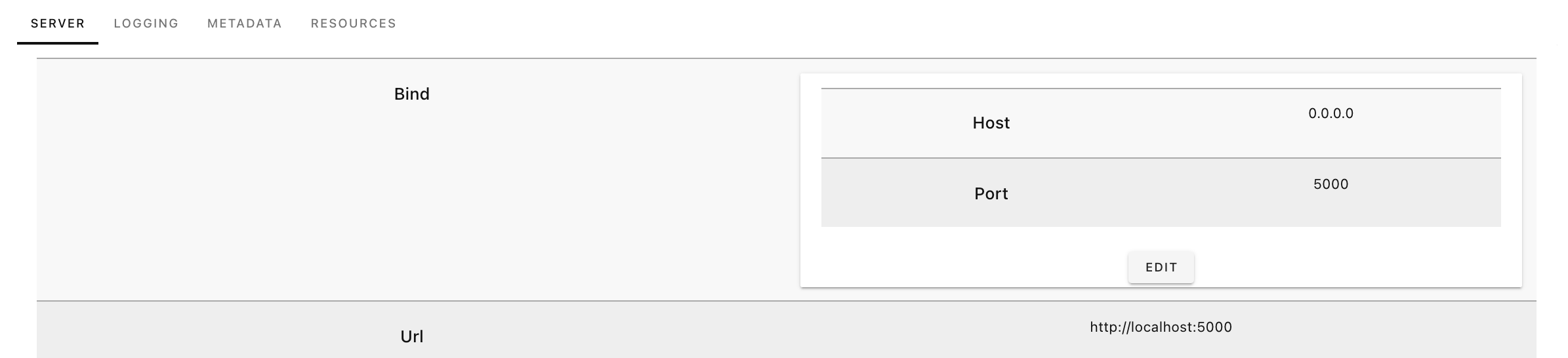
What are your thoughts on persisting the changed configuration (requires an api method?) and effectuating it on a running instance. Does pygeoapi already has some 'reload-configuration' method?
I know this is early, but some comments:
- close button on edit panel didn't work for me (but clicking outside the panel closes it)
- is it possible to create a 'add resource' button to the resource-listing
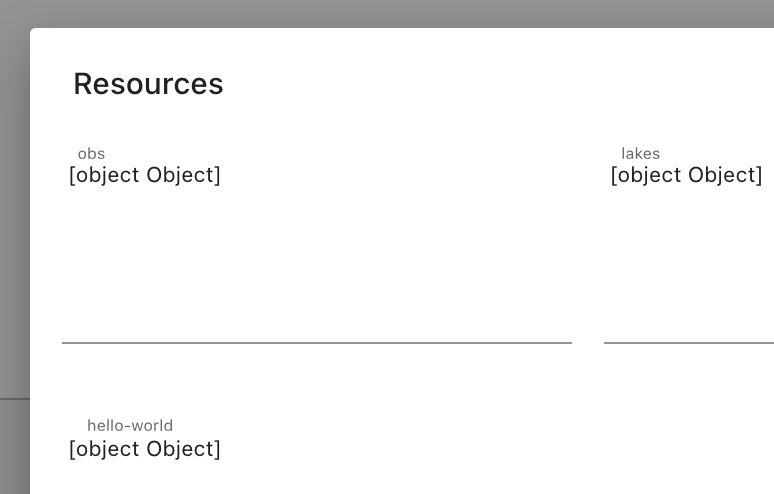
- editing the resource list returns [object] as string

Paul, Thanks for your thoughts!
To my knowledge, there is no reload-configuation within the api. My tentative plan was to have the gunicorn server watch the local.config.yaml file and reload the server on an update. That being said, I believe that @justb4 expressed some interest in reformating the configuration file to be more loosely coupled.
All three of your comments were on my to-do list, but I am glad you mentioned them because I think some of them highlight a couple of questions I have myself. I am specifically interested in the last point surrounding the editable sections of the form. I am not exactly sure how l10n translation works and how to best code for it. The GUI blocks should be softcoded, but I started hardcoding the editable block, which is why the resource list returns a form of object Objects.
For better or worse, after the most recent merge to pygeoapi, I am having trouble passing the config to the Vue app. Which I believe is because I am trying to pass the untranslated configuration file. This worked so long as the config only had one language configured. How are you envisioning this to play out? I am happy to adapt as much as is needed.
Thanks again!
Having made many of the changes that @ksonda and @pvgenuchten suggested, I would be interested in hearing new thoughts on the state of the admin GUI. Specifically, all of the GUI and form blocks render correctly, new feature collections are able to be added to the configuration, and the changes made are persistent in server config. The capacity to add a resource providers other than feature collections is also on the horizon. I think there are also improvements that can be made in the UI/UX sphere, but am having trouble sussing them out.
@webb-ben sorry for the delay here. I took a quick look -- impressive work here!
Is it possible to have this working as a separate Python package (i.e. pygeoapi-admin) or web front end? Options:
- via Python/Flask, has write access to local configuration YAML. pygeoapi configuration would have a config option like
admin: true, which would trigger inclusion of routes and functionality inpygeoapi_admin - pure web frontend (say Vue.js) with only API access. This would mean extending the pygeoapi API to include management functions, i.e.:
-
/admin/configuration(GET/POST/PUT/DELETE). pygeoapi would need a secure setup and an admin password
-

@tomkralidis I think this currently is a bit closer to the former of the two. Adding to the pygeoapi config is smart! At the moment there is a handshake with an encrypted password using flask-login, but i'm pretty sure the password remains unencrypted in the system environment. The authentication is disabled because there is really bad session protection at the moment which makes navigating the pages difficult. There are definitely better setups for authentication and i am happy to think through some of them.