

 garris
"Test" rendering is different than reference even when pointed to the same site
I'm trying to build backstop testing into our gitlab cicd pipelines and I've come across an oddity that I can not debug: when running backstop from the backstopjs docker image, the test always fails at least one scenario even if the reference and test scenarios point to the same domain (ie reference = identity.missouri.edu, test = identity.missouri.edu). And more confusing is that it is not the same scenario(s) that fails during each run.
Running the exact same commands locally produces a successful test.
I'm using the docker image backstopjs/backstopjs:latest backstop version is 5.3.0 After starting the image (which ships with node v10), I updated node to v15.12.0 to match what our developers are working with locally.
The project contains a package-lock.js. I then do npm ci to ensure we get a clean install of all node dependencies.
I have verified that node, backstop, Chromium, etc are all running the exact same versions in the docker image as local.
When it fails, the "test" rendering appears to be shifted down by 1px and the text all appears to have adopted different tracking. It is VERY similar to the image you have here: https://github.com/garris/BackstopJS#using-docker-for-testing-across-different-environments except that I'm generating both the reference bitmaps and the test bitmaps in the same docker container, one right after the other.
backstop_config.js is below. I've tried it with both the docker: true and that property removed.
Happy to provide any additional information you need to debug this one.
/**
 * @file
 * Backstop configuration.
 */

const args = require('minimist')(process.argv.slice(2));
const {scenarios,storagepath} = require(`./backstop_scenarios`);
const path = require('path');
const site = args.site ? args.site+'/' : '';

module.exports = {
  id: 'visual_test',
  viewports: [
    {
      label: 'phone',
      width: 320,
      height: 480,
    },
    {
      label: 'tablet-portrait',
      width: 700,
      height: 1024,
    },
    {
      label: 'tablet-landscape',
      width: 1024,
      height: 768,
    },
    {
      label: 'desktop',
      width: 1280,
      height: 1024,
    },
    {
      label: 'desktop-wide',
      width: 2000,
      height: 1024,
    },
  ],
  onBeforeScript: 'puppet/onBefore.js',
  onReadyScript: 'puppet/onReady.js',
  scenarios: scenarios,
  paths: {
    bitmaps_reference: path.resolve(storagepath,'backstop_data',site,'bitmaps_reference'),
    bitmaps_test: path.resolve(storagepath,'backstop_data',site,'bitmaps_test'),
    engine_scripts: path.resolve(__dirname,'backstop_data','engine_scripts'),
    html_report: path.resolve(storagepath,'backstop_data',site,'html_report'),
    ci_report: path.resolve(storagepath,'backstop_data',site,'ci_report'),
  },
  report: ['CI'],
  engine: 'puppeteer',
  engineOptions: {
    args: ['--no-sandbox'],
  },
  asyncCaptureLimit: 1,
  asyncCompareLimit: 50,
  debug: false,
  debugWindow: false,
  docker: true,
};


Didnt expect you to respond so fast! I'm out of town today but can try tomorrow. Thanks!
I work with @gilzow and while he's out I ran the tests again, this time with a single scenario. Each time returned different results:
Test 1 3 passed, 2 fails ✅ visual_test_Home_0_document_0_phone.png ❌ visual_test_Home_0_document_1_tablet-portrait.png ❌ visual_test_Home_0_document_2_tablet-landscape.png ✅ visual_test_Home_0_document_3_desktop.png ✅ visual_test_Home_0_document_4_desktop-wide.png
Test 2
4 passed, 1 fail ✅ visual_test_Home_0_document_0_phone.png ❌ visual_test_Home_0_document_1_tablet-portrait.png ✅ visual_test_Home_0_document_2_tablet-landscape.png ✅ visual_test_Home_0_document_3_desktop.png ✅ visual_test_Home_0_document_4_desktop-wide.png
Test 3
2 passed, 3 fail ✅ visual_test_Home_0_document_0_phone.png ❌ visual_test_Home_0_document_1_tablet-portrait.png ❌ visual_test_Home_0_document_2_tablet-landscape.png ✅ visual_test_Home_0_document_3_desktop.png ❌ visual_test_Home_0_document_4_desktop-wide.png
Test 4
4 passed, 1 fail ✅ visual_test_Home_0_document_0_phone.png ❌ visual_test_Home_0_document_1_tablet-portrait.png ✅ visual_test_Home_0_document_2_tablet-landscape.png ✅ visual_test_Home_0_document_3_desktop.png
Attached is an example image of the diff we're looking at. Is it possible we should be delaying the screenshot? The buttons are reacting like the screens aren't exactly the same pixel width and height but I can't really be sure.

✅ visual_test_Home_0_document_4_desktop-wide.png

Thanks @Webslung . I'll add that the reference+test urls are pointed to the same domain, nothing changed code-wise between each test, and that the same tests if run locally always pass (which is the expectation). The failures jason mention only occur when running the reference+tests from within docker images.
I'll also add that after submitting the issue initially, I also switched to a different docker image that contained just node+chromium and the same failures occurred that were happening with the backstopjs docker image.
Just checking, are you comparing a docker-generated image with a local-generated image?
Just checking, are you comparing a docker-generated image with a local-generated image?
No, the reference images are created in the same docker container as the test images, one right after the other, hence our complete confusion as to why any of the tests fail.
Also tried breaking the creation of the references and the tests into two stages+jobs in the gitlab pipeline. Meaning that gitlab will bring up the backstop docker container, run the command to create the references, save the references, bring down the container. Then it brings up the backstop docker container again, restores the reference file that it saved, and runs the tests.
But those tests fail as well.
It happens to our tests as well. We don't use dockerised version locally. For one of our co-workers everything works perfectly and they get 52/52 passing tests every time they compare local to local without any code changes. They're on the latest MacOS.
While for me it breaks every time and I get sometimes just 3 fails, sometimes up to 12. Same thing, no code changes, no nothing, test locally without docker. Though I'm on Linux (Ubuntu 20.04).
We have the same node/npm versions ensured through nvm (I think the latest of 12.x branch not sure now).
EDIT: Seems to be related to #820 ?

Hmm. Unfortunately I don't know enough about what is happening here to provide troubleshooting direction.
Does this still happen when you leave the reference url field empty (i.e. just use test url for all operations)?
Does this still happen when you leave the reference url field empty (i.e. just use test url for all operations)?
Haven't tried it that way. Let me remove the referenceURL and try again.
Uh, all the tests pass. Is there a reason why using refernceURL when creating a reference would cause a difference?
I've tried your suggestion (I wasn't expecting for it to work as I was also using approve command). There's no change for me.
Slight layout shifts, wrong colours and so on. All seems to be related to taking a full page screenshot just after resizing the browser (like mentioned in the 820 issue).
Good that at lest it has fixed @gilzow issues.
Good that at lest it has fixed @gilzow issues.
The tests pass, but this "fix" now requires that I use a set of scenarios for creating the reference and then a different set for running the test, vs one set of scenarios for doing both. Hopefully @garris can clarify why not using referenceUrl "fixes" this issue, or at least clarify when one should use referenceUrl
#Hi @gilzow -- looks like you found a straight-up bug. The referenceURL flow is slightly different than the test flow -- i am suspecting that the reference is not actually calling docker to make the screenshots. I won't be able to take a look at this for a bit so feel free to compare codepaths if you get a chance. Cheers.
@garris looks like I spoke too soon. I went back and rewrote everything so we only use url and now the tests are failing inconsistently.
Testing https://hes.missouri.edu/ against itself with a single scenario of just the home page and two viewports: (from the first post) phone and desktop. Bring up the docker image and run our script that has
backstop reference --config=path/to/config
and then
backstop test --config=path/to/config
And the test will pass. Rerun it again without changing anything and the test will fail.
On the site @Webslung mentioned , we added a few more scenarios, and each run of the test, different pages will pass/fail, again without anything changing between runs of the test.
So in order to ensure this is not something we've introduced, i created a brand new repo, and set up backstop via backstop init. I altered the default backstop.json to change the viewport section to only have phone and desktop and adjusted desktop to be
     {
      "label": "desktop",
      "width": 1280,
      "height": 1024
    }
I created four scenarios using only url and label. The only other change I made to backstop.json is to add docker:true.
I then created a gitlab-ci.yml file so I can run the reference+tests from inside the docker backstop container in a pipeline. The gitlab-ci.yml file contains (beyond the stuff needed for gitlab to run it):
    - npm cache clean -f
    - npm install -g [email protected]
    - npm install -g n
    - n 15.12.0
    - npm install [email protected] -g && backstop -v
    - echo "Running backstop tests"
    - backstop reference
    - backstop test
Each run of the pipeline sees different scenarios fail. So scenarios 2 might fail in one run, while the others all pass. The next run will see scenario 3 fail (even though it passed previously) while all the others passed.
Then to rule out any issues with gitlab, I ran the backstop docker container locally, logged in and manually ran the reference and tests. Again, each run of reference+test resulted in different scenarios failing.
So something weird is definitely going on with backstop when running from inside a docker container.
Oy. So, if you just run point to backstop.org, is it still inconsistent? You can just use the default init config to test this.
I forgot to mention that if I run the same set up + scenarios locally they pass every single run.
Oy. So, if you just run point to backstop.org, is it still inconsistent? You can just use the default init config to test this.
With just the default domain, no. I ran it 5 times, and it passed all 5 times.
I would like to rule out that this is not a timing problem or some weird content problem. Can you try to test a simple webpage on your domain? Something that just loads and displays -- no transitions or fancy CSS. Just to see if there is some weird interaction happening with the content?
I might also need to see the logs for your runs. Can you post a gist? In particular -- at the beginning of the runs for your reference, and a passed and a failed test.
so far I haven't been able to get
    {
      "label": "president",
      "url": "https://president.missouri.edu/"
    },
To fail.
I might also need to see the logs for your runs.
Just the console output during the run? Or do you need the output after adding debug:true ?
backstop.js Console output from running backstop against backstop.js inside docker container Console output from running backstop against backstop.js locally.
And just for good measure, here is the second run of reference+test inside of Docker that I ran immediately after the one I posted above. Console output from 2nd run of backstop inside docker container.
The first run had three failures, the second run had one failure, no matter how many times I run it locally, none of the scenarios fail.
-
I think it's relevant that you haven't gotten
presidentto fail. But also more importantly... -
It looks like you are mounting the docker container and manually running backstop directly from there as opposed to using the built-in integration -- this is not the intended use of the docker container. see here for instructions on the intended usage... https://github.com/garris/BackstopJS#using-docker-for-testing-across-different-environments. I haven't tested the docker container in the way you are using it -- you might try implementing it as directed in the doc (you can even do this locally at first) and see if this helps to resolve the consistency issue.
It looks like you are mounting the docker container and manually running backstop directly from there as opposed to using the built-in integration
Understood, but I'm doing it this way to simulate the scenario that is occurring when it is being run from the gitlab pipeline.
However, for completeness, I've run it the way you indicated in #2 and created another gist: Console output from running backstop --docker
Same thing happens: each run produces different failures (first one was 3 failures, second was 1, third was 2 failures).
Ok. Just noticed this in the log...
ERROR { requireSameDimensions: false, size: isDifferent, content: 16.12%, threshold: 0.1% }: HES backstop_default_HES_0_document_1_desktop.png
size: isDifferent suggests that we don't have GPU issue. Instead-- there is some inconsistency with how your pages are rendering.
In the browser report, on a failed test -- if you hover over the "filename" field backstop will show the size difference of the images that were captured. What is it? Can you screenshot this?
An experiment to validate this may be to select some smaller areas of the screen (maybe the header or some block of content using selectors property) -- to see if those might render consistently.
In the browser report, on a failed test -- if you hover over the "filename" field backstop will show the size difference of the images that were captured. What is it? Can you screenshot this?
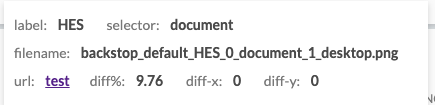
I assume this is the screen shot you're asking for?
I don't disagree with you that this may just be a css bug except that there are no animations on these pages and we have been unable to recreate the versions backstop is creating for references in order to debug. And given the scenario/viewport that fails isn't consistent in the same site from run-to-run, it makes it hard to say definitively it's a css issue.
I forgot to mention one other thing we noticed that makes me think this isn't entirely related to css issues. We noticed that most of the failures were with the tablet-portrait viewport. Since we were unable to replicate those failures, as a temporary work-around we decided to simply remove that viewport setting since the other viewports weren't failing as consistently. When we did, the next viewport (tablet-landscape) started to be the one that failed most often, where previously we had never seen that viewport fail. We then tried removing that one and the most consistent failure moved to the next in the viewport list (desktop).
I'm getting similar random errors after upgrading from 5.0.7 to 5.3.0
Looks like css media queries sometimes don't update correctly.

For anyone else who is seeing the same issue, see the comments in issue #1303 .
for me it was related to font rendering and to fix it had to add tests/backstop/backstop_data/engine_scripts/puppet/onReady.js
module.exports = async (page, scenario, vp) => {
  await page.waitFor(() => {
    return document.fonts.ready.then(() => {
      console.log('Fonts loaded');
      document.getElementsByTagName('body')[0].style['-webkit-font-smoothing'] = 'none';
      return true;
    });
  });
};

-
Use
--font-render-hinting=noneand do not use--disable-font-antialiasing. Pixelmatcher underhood of jest-image-snapshot detects antialiasing very well (includeAA: false). But if you disable AA that sometime kerning becomes unregular (see Behdad Esfahbod, 2012, High-DPI, Subpixel Text Positioning, Hinting ). -
In some situation i could see in my practice fonts.ready is not enough. The way with creation of text element in DOM and remove it after resize changed is more reliable. The case was related on external library that calculates fonts metrics and use them in formulas to layout svg elements. It gave sometimes different result and finally was fixed with fonfaceobserver + create-text/wait-size-change/delete-text
-
You can make local wsl distro from docker image that will give you the same result on local machine: https://learn.microsoft.com/en-us/windows/wsl/use-custom-distro
