

 fwextensions
Feature request: dark theme (on Linux/Gnome)
Thanks for making QuicKey, it's pretty useful!
I'm using a dark theme in Chrome, in my OS, and in every app that supports it (most that I use do). So, the bright white of QuicKey kind of clashes with everything else.
Even better than a dark theme, would be custom theming with CSS, so I could match QuicKey's colors to the colors of my Chrome theme.

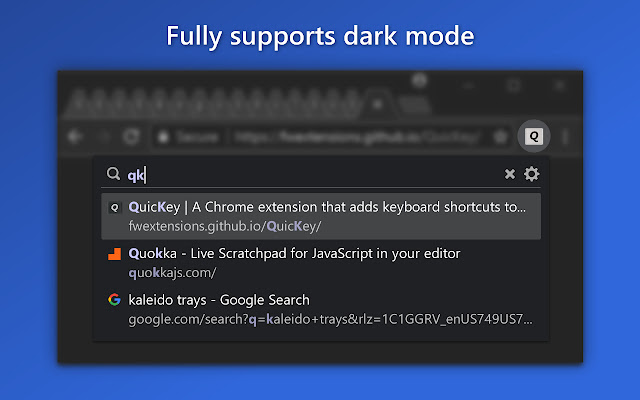
Glad you're finding it useful! QuicKey actually got dark mode support with 1.4.0 back in March. Which version of the extension and Chrome are you using? And which OS?
If you switch your OS to dark mode, Chrome should automatically show a dark mode UI, which should also trigger a switch in QuicKey (though, right now, only after a reload of the browser or extension). If you're talking about just loading a dark theme in Chrome, there doesn't seem to be any way for an extension to know you've done that. QuicKey uses a @media (prefers-color-scheme: dark) CSS media query to detect the OS-level switch to dark mode, and to swap in the same colors used by Chrome menus in dark mode.

Versions:
- QuicKey 1.5.1
- Chrome 87.0.4280.88
- OS:
- Ubuntu 20.10 (Pop!_OS 20.10, really, but it's based on Ubuntu)
- Gnome 3.38.2
I'm using the default dark theme in my OS (in fact I believe it's the default theme, a light theme is available as an option).
I'm using the GTK+ theme in Chrome (the only options are "Classic" which is a light theme, and "GTK+", which follows the OS theme). Chrome's menus are dark, and so is everything else.
Enabling the experimental flag at chrome://flags/#enable-force-dark seems to make QuicKey enter dark mode, but there should probably be a manual toggle for it? Most apps have a system/light/dark theme selection.
Thanks for the info. I'll admit I haven't tested the extension on Linux, and haven't used a Unix GUI since early in this century. when I built a MythTV box.
In Chrome, can you switch back to the Classic theme? It's possible that that will now switch the browser to be in sync with the OS. At least on Windows and macOS, there's no option in the UI to change the colors, and the browser just follows the OS setting, which is why I never added a specific setting for dark mode.
The classic theme is Chrome's "classic" theme, and it's always the light themed one. GTK+ follows the OS/Gnome theme, and I have my OS set to a dark theme. But apparently that only makes Chrome change the theme to a dark one.
Setting the experimental flag in Chrome to force dark mode on seems to work okay (for example Chrome's own settings page is now in dark mode), but it makes some things look a bit broken (white text on white background on some sites). So, a system/dark/light option would be nice.
I suspect that Chrome on Linux isn't reliably passing the OS dark mode setting to web pages/extensions. If you've set dark mode at the OS level and then open devtools on any page in Chrome, executing window.matchMedia('(prefers-color-scheme: dark)').matches in the console should return true if Chrome is informing the pages and extensions that dark mode is set. If it returns false, the default light view may be shown. It's not clear how to enforce the dark mode setting.
Even with the experimental flag, window.matchMedia('(prefers-color-scheme: dark)').matches is false.
Apparently that flag does something something else: https://www.zdnet.com/article/how-to-forcibly-enable-dark-mode-in-on-every-website-with-google-chrome/
The flag forces everything into dark mode, even sites that don't have a dark mode. It works surprisingly well, but some things have really bad contrast (including white text on a white background). Gradients that are supposed to be black are white.
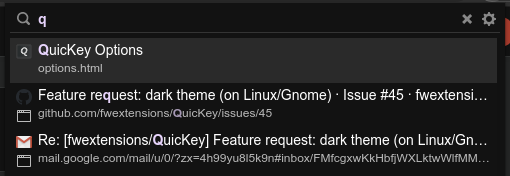
So, apparently it's not triggering QuicKey's dark mode, it just inverts all colors so that it looks very similar. The screenshot you posted looks a bit different to what I'm seeing, but it's very close (the background has a slight blue tint in your screenshot, it's plain dark gray for me):
Yeah, if the matchMedia() call doesn't return true, then Chrome doesn't know the OS is in dark mode. Probably there isn't a consistent way across distros yet to report that. I guess the GTK+ theme is doing something special to get the setting that Chrome itself isn't doing.
QuicKey does have a full dark mode theme, and isn't just a simple inversion. I'm guessing the Options page looks different, too:
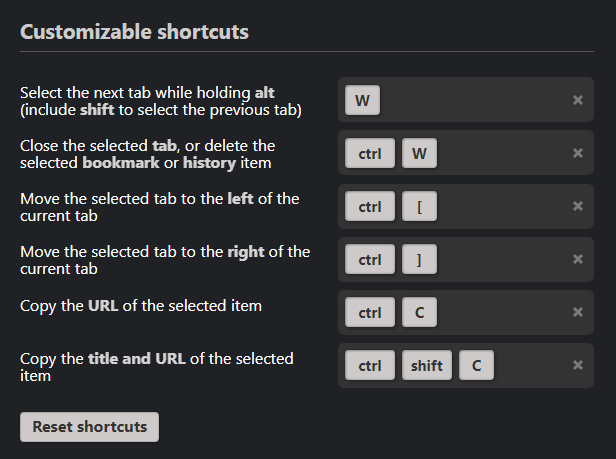
If you wanted to monkeypatch the extension's CSS, there's only a couple of lines that would need to change to force it into dark mode. Let me know if you're interested in pointers. Otherwise, I guess I could add a setting for Linux.