

 fsprojects
Packages are not extracted properly to .nuget cache
Description
Almost every time we update our packages (private) in our solution our build server fails to download+extract them properly to the .nuget cache folder when running paket restore. In the log you can only see "Something went wrong ==> Trying again". It then detects that the package is already installed, but actually only got partially extracted. The build then fails, because the package assemblies are not found.
The packages are from a private source. During the build you can see that msbuild/nuget identifies that they are incomplete and attempts to restore them, but nuget.exe neither has the appropriate nuget sources nor credentials.
Here are the essential sections from the log on the build server with verbose output:
.paket\paket.exe restore --verbose
Paket version 7.1.5+e2fe7c693356a5e70a74cc01501f7dc5f8996695

....
Downloading HiliteData 19.6.5
Starting request to 'https://vrvis.myget.org/F/hilite/api/v3/registration1/hilitedata/index.json'
Starting request to 'https://vrvis.myget.org/F/hilite/api/v3/registration1/hilitedata/page/19.5.0/19.6.5.json'
Downloading directly from DownloadLink: https://vrvis.myget.org/F/hilite/api/v2/package/HiliteData/19.6.5
Downloading from https://vrvis.myget.org/F/hilite/api/v2/package/HiliteData/19.6.5 to C:\Users\gitlab.ITISO\.nuget\packages\hilitedata\19.6.5\hilitedata.19.6.5.nupkg
Download of HiliteData 19.6.5 done in 773 milliseconds. (15960 kbit/s, 1 MB)
Acquiring lock for the installation of HiliteData 19.6.5
Acquired lock for the installation of HiliteData 19.6.5
Something went wrong while downloading HiliteData 19.6.5
Message: One or more errors occurred.
  ==> Trying again
Downloading HiliteData 19.6.5
Downloading directly from DownloadLink: https://vrvis.myget.org/F/hilite/api/v2/package/HiliteData/19.6.5
Downloading from https://vrvis.myget.org/F/hilite/api/v2/package/HiliteData/19.6.5 to C:\Users\gitlab.ITISO\.nuget\packages\hilitedata\19.6.5\hilitedata.19.6.5.nupkg
Download of HiliteData 19.6.5 done in 261 milliseconds. (47209 kbit/s, 1 MB)
HiliteData 19.6.5 already extracted
...
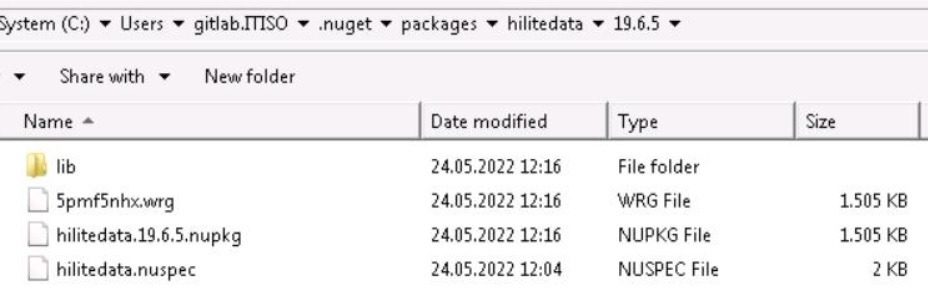
When we inspect the .nuget cache content of this package, the "net48" lib folder is missing (the assemblies of netcoreapp3.1 got extracted). Also the ".nupkg.metadata" and the "hilitedata.19.6.5.nupkg.sha512" were not created, and we see a temp-file with the size of the .nupkg file:
Repro steps
- Install new packages (not in the cache yet)
- run
paket restore
We cannot reproduce this on our developer machines, but experience the issue for at least a year on the build server.
Expected behavior
- Logging the actual error instead of "One or more errors occurred"
- A "clear cache content" step when there is an error during the extraction
- Proper validation of package "already extracted"
Known workarounds
To resolve the issue, we manually delete the broken packages from the cache and retry.
Another workaround that we have not tested yet is to also register our private nuget feed with nuget.exe and let it repair the broken packages during the build.
It sounds similar to this issue, but it is already resolved: https://github.com/fsprojects/Paket/issues/3763
