

 formulahendry
Cannot run java files in code runner.
Cannot run java files, it says incurred Class name, when the class name and the package is correct.
to reproduce :
- create a new java project in vs code, and declare the package and class name.
- Then run using code runner.
Also . I have set vs code to use integrated console , and these are my code runner settings.


Currently, in Code-runner this Functionality is not present.
Steps to run these Files
- You can use the run | debug as shown above the main function
- I have also added the feature in code runner just waiting for approval if you can wait that's fine or if you want it now in code runner you can download that extension here https://github.com/YaduAhuja/vscode-code-runner/blob/main/code-runner-0.11.4.vsix and manually install that (Read the readme file if you are installing this extension on how to setup classPath)

Okay I figured out the error. When I do not write the package location (first line of code for any java file), code runner is able to run it properly.
Although if I write the package location code runner is not able to run it.
Is there a way , you can also make a global debugger (that debugs all the file types)for vs code. I think I have to use vs code debugger each time , and that will require me to add the package location. Just a lot of hassle to debug a file, when we have to do it a 100 times a day.
Also could you explain the steps of installation in detail for the above file, you recommended.
Also how long do you think Microsoft , will take to approve your update request. Will I be able to run java code, with the package declared after ?
Thanks.
I didn't understand what kind of debugger you are requesting is it for all Java files or for all types of programming languages source files.
Installation steps
- Remove the existing code runner extension & download the extension given in the comment below (Download the latest version as this extension was updated today )
- clear settings.json file of the previous executor Map
- Copy downloaded extension to any workspace and open that workspace in vs code
- right-click on the extension package in explorer and click on 'Install Extension VSIX'

- open your java project in vs code and select the source files root folder (Normally it is the src folder) using the
Ctrl+Alt+P(you can check the settings modification forcode-runner.classPathin the .vscode folder in your workspace ) - Make sure that in settings.json the executorMap for java is
cd $dir && javac $fileName && java -cp $classPath $qualifiedName - select the play button as you would in code runner to run the files.
Note:
This method only works for a Single Project and if you want to extend this functionality to another Project then you will have to perform step 5 again for that project.
Microsoft will not approve my request, the owner of the extension Jun Han will approve my request to merge the feature with code runner but I don't think it will happen any time soon because the last request which was merged was made on Jun 30, 2020. after that, no requests have been merged yet.
The problem still persists. I made sure to :
- download the latest version.
- Follow the instructions gives.
I still get the following error :
 I am running the latest macOS version too.
I mean, since code runner allows us to press cmd+r(or the shortcut to run file) to run any file, is there a way it can also be set to debug any file. What I noticed is to do so the code runner, opens a seperate terminal, so for a universal debug option (to debug all file types), can a universal debug option be added or something.
Basically used this IDE, code runner 4, which lets me simply run any code by pressing cmd+r , and to debug(I still cannot figure out how to debug properly) I just had to set breakpoints, and do cmd+r. (It was so simple as a beginner). With Vs code, I have been dedicating 30 + hours to just setup the cmd+r button, and have failed persistently. If this problem can be solved, VS code, can be made easier for new users. Specially who have just started to learn to code.
Also would you know a way , to hide the file path, when the file runs in terminal. And only display the output message, sometimes files paths are too long.
Also since , code runner is able to run the file easily without the package info , can we just simply tell code-runner to ignore the package command ? just a thought. This way if we use an another way to run the the java file (through another extension) that requires the package command, they will be able to do so smoothly.
You have selected the wrong classPath Folder you should have selected the 'Test Projects' folder for classPath because that is the folder from which your package declarations emerge.
The Universal debugger can be created but I will have to study the debugger workflow and all to create the debugger. Luckily language-specific debuggers are currently available for almost every language and all of them are activated with the F5 key.
Here is the Page for Java Debugging in VSCode https://code.visualstudio.com/docs/java/java-debugging.
Package info is a feature in Java and code runner has nothing to do with that. The Class Not Found Exception is raised by JVM because JVM is not able to find the class files to run which is Fixed by providing a ClassPath to look for class Files(which is provided by -cp <CLASSPATH> after java command ). what my features do is if you provide it the ClassPath then it can run every File within that project without any issue but the ClassPath is to be set first manually.
As of now The feature to Hide the file Path is not present in Code Runner If you are debugging files then this feature is present in the Java debugger where you can select the debug console and file paths will not be shown to you.
There are extensions that are able to resolve the ClassPaths automatically (Java Debugger is also able to resolve ClassPath) and that is the smoothest way to run Java files in VSCode but there are some problems with Java Debugger :
- It is slower than code runner
- It does not support automatic IO Redirection which is heavily used in Competitive Programming.
Note
The Code runner extension does not provide the functionality to debug the code. It is just used to run the code.
The error still persists. This is the notification I got after changing the class path to Test Projects.
 Also here are my code-runner settings.

If you could create the universal debugger that will be great. It would really help a lot of new users , to learn coding with vs code.
Also how did you know which folder I should declare as my class file path.
Change your Executor Map in settings.json of java to "cd $dir && javac $fileName && java -cp \"$classPath\" $qualifiedName" and remove extra whitespace Characters after Test Projects see if that helps.
ClassPath is the folder from which your package declaration starts for e.g. in your case Package was declared as demo_project.java.src so the parent folder to demo_project which is Test Projects should be the ClassPath.
I still am getting the same error. I searched source path in my settings and got this.
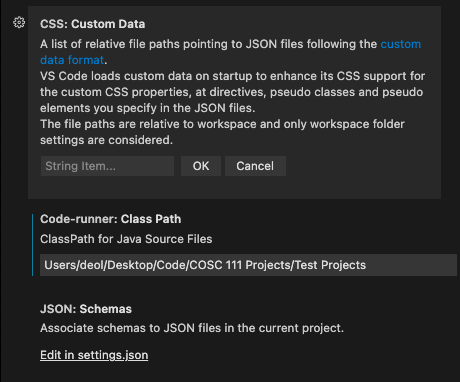 And I think this time the file name in the error changed.
 Also the code runs fine in other IDE , and even when I use Microsofts java run and debug.
Bro you have hardcoded the ClassPath and have not changed the executor map in the Settings.
Steps to Fix it :
- Reset the setting of classPath and executorMap from code runner settings

- Open command Pallete and search for
Set Class Path for Java Source Filesand when you will select this command a Folder picker will open and then select yourTest ProjectsFolder (When you will select the Test Projects folder a .vscode folder will show up in explorer)

- Open the Code runner settings and select Executor Map and go into its Settings and change java executor to
"cd $dir && javac $fileName && java -cp \"$classPath\" $qualifiedName"

Note :
To run Your file the Java command should be java -cp "Users/deol/Desktop/Code/COSC 111 Projects/Test Projects" demo_project/Java/src/App3 please ensure that the final command generated by code runner is similar to this. If this is not Similar to the command generated by the code runner then I would like you to post your settings.json from .vscode Folder generated when classPath was set.
Hey man unfortunately still getting the error: I even tried with a different file , and this time the terminal command for the location of the file is right. Although there is a an extra " point in the address I think that might be the reason.
Here is the picture, for the previous file path we were trying to solve, and my settings are updated as you told.

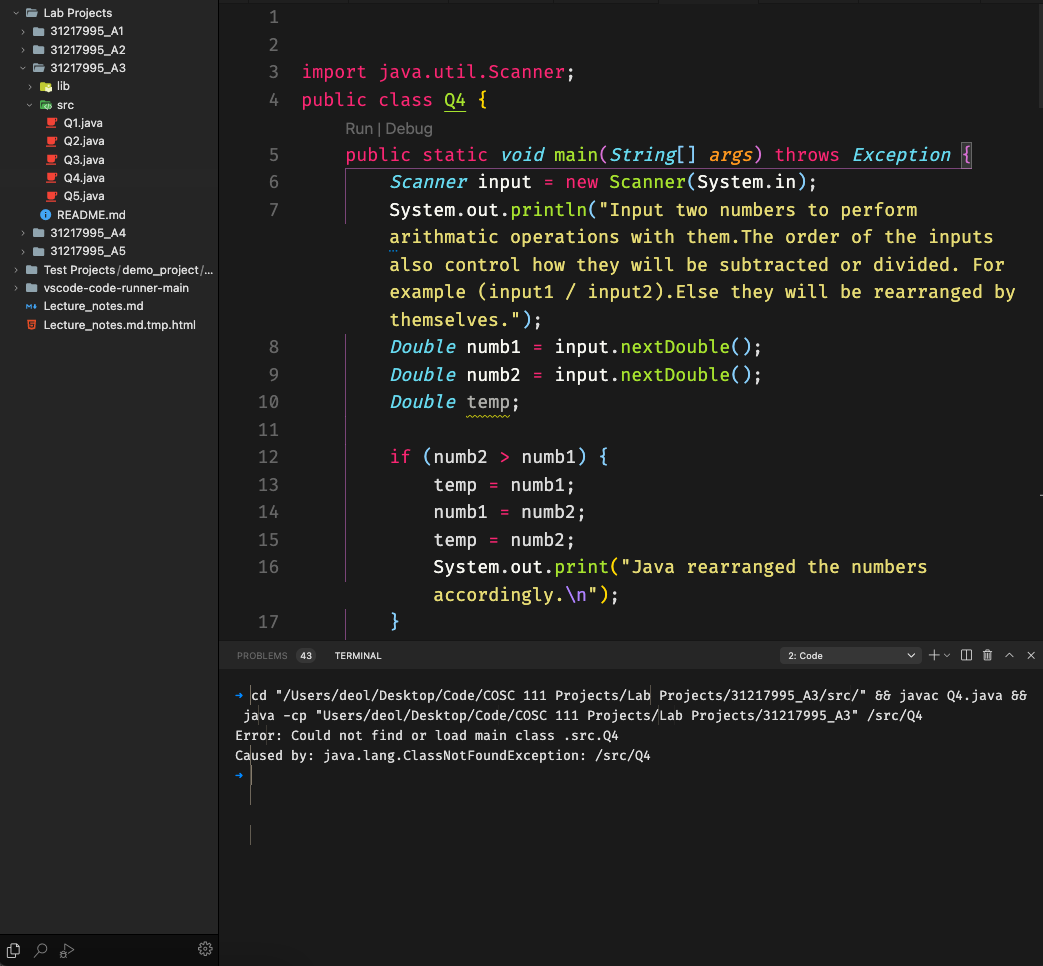
This was a UNIX Terminal bug and now it is fixed I would like you to download the latest package from https://github.com/YaduAhuja/vscode-code-runner/blob/main/code-runner-0.11.4.vsix and install it. Then check if the problem is fixed or not.
It worked !!! Thanks for helping me with this.
Also if you could find a way to hide the file path, so that we just get the output that will be great too.. Other than that thanksss.
Also one question, once the file path is set for a project. And I have to run a different project file, do I have to recharge the file path again (considering I had already configured it before ) ?
Although when I try to run the debugger, the package name now gives me an error(It gives me a compile error)(Java extension pack debuggur). This is what I meant by creating a global debugger for code-runner. I will have to change the code each time , while switching btw run and debug.
I am currently working on a way to hide file paths.
If the project is the same then you will not have to set classPath. if the project is different then you will have to set classPath again.
Java Debugger is sometimes not able to resolve classPath that is why you are having that error. To fix this error you will have to manually add classPath for Java Debugger which can be added by right-clicking on the folder that you want to select as a classpath then you can select the option to add folder to java source Path.

Okay , thanks for all the future updates to this add on . I will close this issue now.
Hey there mate , I found this solution to clear the console , after the command to run or compile has been sent to the terminal. In java this regex clears the console , perhaps we can pass this to clear the console too. After the command has been given. System.out.print("\033[H\033[2J");
I have already found a better solution regarding this problem and currently, I am finding a way to implement it in code runner settings but you can implement that solution right now.
We can use the terminal clear commands to clear the console just after the compilation of java files and chain them with &&.
cls is for Windows Command Prompt and clear is for Unix Shell, Windows PowerShell.
To Implement this just replace your executor map for java in code runner settings with cd $dir && javac $fileName && clear && java -cp \"$classPath\" $qualifiedName and check if the expected behaviour is achieved or not.
Yes it worked, thanks.
Although it did not work the same way for my python files, I tried adding the && clear, but it gave a syntax error.

Do you think it will be updated to work for all other file types ?
Also do you think opening the terminal at the current working directory , will eliminate the need to set the class path for java files.
The terminus package does, the same thing quite smoothly. https://packagecontrol.io/packages/Terminus
You can change the Executor Map of Python to clear && python $fileName to clear the console.
About Terminus Package, I don't think it will remove the need to set classPath for java files as the problem is with the JVM's class Mapping structure but I would like to test it out if the terminus has a feature for automated classPath detection or something else.
I want that you should try to run a Java file with Package declaration in Sublime with terminus package if it gets compiled and runs successfully then inform me so that I can test it out and try to build a system like terminus.
For python the following settings worked "python": "clear && python3 -u",.
And the terminus package was unable to run, when the package was declared. It gave an error about the incorrect class path.
But the terminus package is quite similar to code runner I believe, it requires us to declare the shell command, and then simply executes it. Here are my build settings for java, in sublime text 4, if you want to try it out for yourself. You just have to :
- Download Sublime Text 4(also called ST4).
- Download terminus , using the command palette > install package > terminus.
- create new build system with the settings below.
- Open a executable java file , select the build system you just created.
- Click on build.
{
"target": "terminus_exec",
"cancel":"terminus_cancel_build",
"focus":true,


"shell_cmd": "javac \"$file\" && java \"$file_base_name\"",
"working_dir": "$file_path",
"selector": "source.java",
"file_regex": "^(...*?):([0-9]*):?([0-9]*)",
}
Hey Do you think it is possible for us to run commands directly from vs code, to the Mac terminal app ? Like if I press run, the command gets executed in the terminal app.
Actually, it is possible as in VSCode's settings there is an option to turn on the external terminal, Option's name is Terminal.explorerKind.
Do you think code runner can send the execution command to the external terminal though.
Like if I click run code(code-runner command) it runs it in the Mac terminal app(and if Mac terminal app is not open, it opens it), rather than taking up the bottom of my screen or even the right.
Nope, code-runner cannot send commands to external terminal. although, referring to your previous comments of automatic ClassPath detection for java files i have created a feature like that but it is currently unstable. if you want to check it out ping me.
I launched an extension with that feature check out this link https://marketplace.visualstudio.com/items?itemName=YaduAhuja.code-builder
Enable the useAutoClassPath feature to try automatic class Path detection.
It works like a charm 👍 .
Looking forward to when you can add :
-
Clear previous output in settings.
-
Send cursor Focus to terminal , after build.
-
Do you think it is possible for it to only open one terminal(or limit the amount of terminals at least). Each time I build and run, a new terminal seems to open. Which may limit the resources on some machines.
-
My computer really warms up when more than 5 terminal have opened.lol.
Also your apps, runtime is literarily 4ms as compared to 300 ms for code runner. This would optimize vs code a lot.
I have added those features in 0.0.6. Please check if the terminal issue is fixed or not.
I checked every feature out, and all of them seem to be working great.
Thanks again. And hope other people using vscode, can use this soon too.
The only thing, that I think is a bug , is when we try to re run the code, before finishing the previous codes inputs. Then for some reason , the terminal thinks we are giving the command to re run as an input for previous run.
Also do you think, you can add a keybinding option to cancel a build or stop run.
Hey man unfortunately still getting the error: I even tried with a different file , and this time the terminal command for the location of the file is right. Although there is a an extra " point in the address I think that might be the reason.
Here is the picture, for the previous file path we were trying to solve, and my settings are updated as you told.
name theme ?
