

 formio
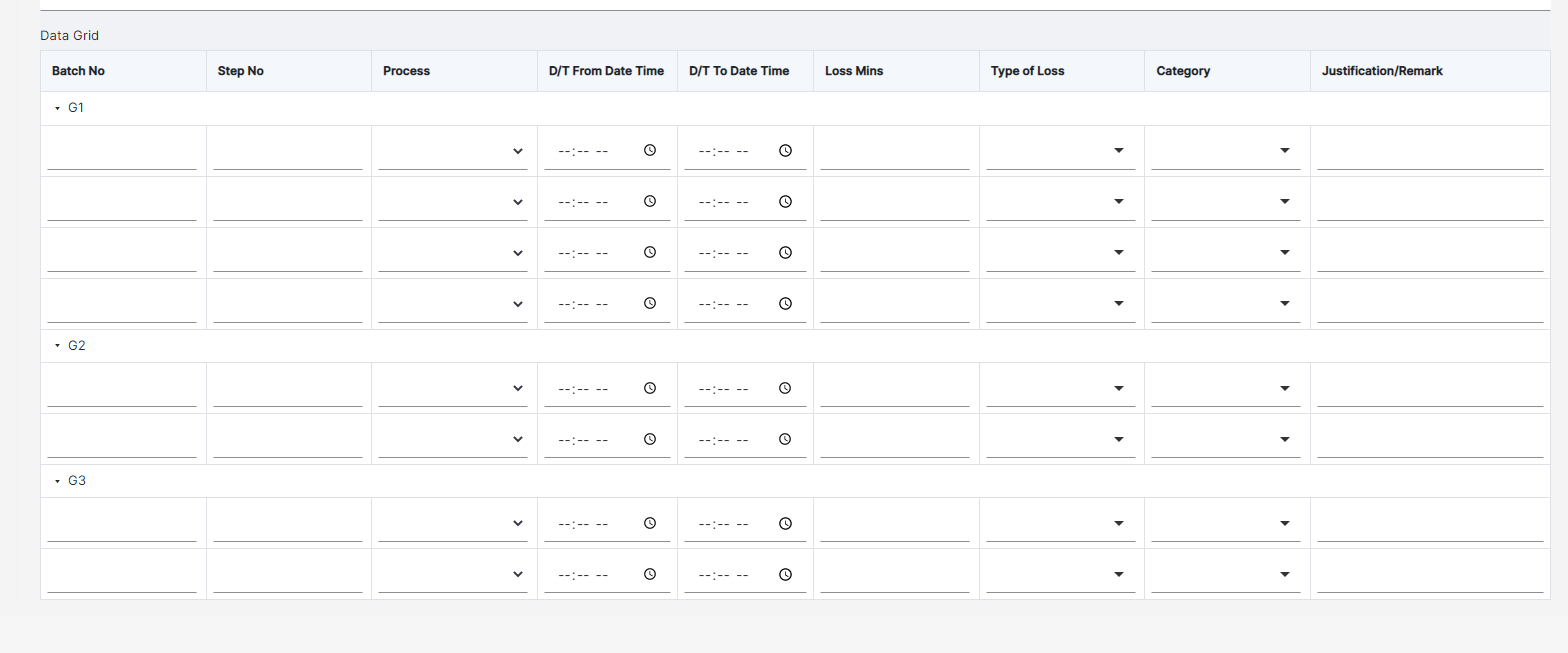
Hide and show of row groups is not working in Datagrid.
Environment
Please provide as many details as you can:
-
Hosting type
- Form.io
-
Formio.js version: 4.13.1
-
Frontend framework: Angular 11
-
Browser: Chrome
-
Browser version: 99.0.4844.82
Steps to Reproduce
- Drag and drop a data grid component.
- Enable row grouping and groups with row number to it. Enable Hide Group on Header Click.
- Drag and drop components inside data grid.
Expected behavior
On click of each group header label, it is expected all the rows under that group will be hidden and on another click, rows will be shown.
Observed behavior
On click of group header label, there is no change in display of rows. Only the icon changes from down to right and vice-versa
Example

{ "label": "Data Grid", "disableAddingRemovingRows": true, "reorder": false, "addAnotherPosition": "bottom", "layoutFixed": false, "enableRowGroups": true, "initEmpty": false, "tableView": false, "defaultValue": [ { "bBatchNoB": "", "bBatchNoB6": "", "select": "", "date1": "", "date2": "", "bBatchNoB2": "", "bBatchNoB3": "", "bBatchNoB4": {}, "bBatchNoB5": "" } ], "key": "dataGrid", "type": "datagrid", "rowGroups": [ { "label": "G1", "numberOfRows": 4 }, { "label": "G2", "numberOfRows": 2 }, { "label": "G3", "numberOfRows": 4 } ], "groupToggle": true, "input": true, "components": [ { "label": "<b>Batch No</b>", "customClass": "w-150px", "tableView": true, "clearOnHide": false, "key": "bBatchNoB", "customConditional": "show = true;", "type": "textfield", "properties": { "manual_entry": "true" }, "input": true } ] }
