

 forge-ext
bug: forge always focus the bottom window when switch focus in 2 different stacked group
Description
Having 2 splitted stack group of windows side by side. Focusing on 1 side and switch to another side using shortcut will always switch the focus back to the top window.
Problem Explanation
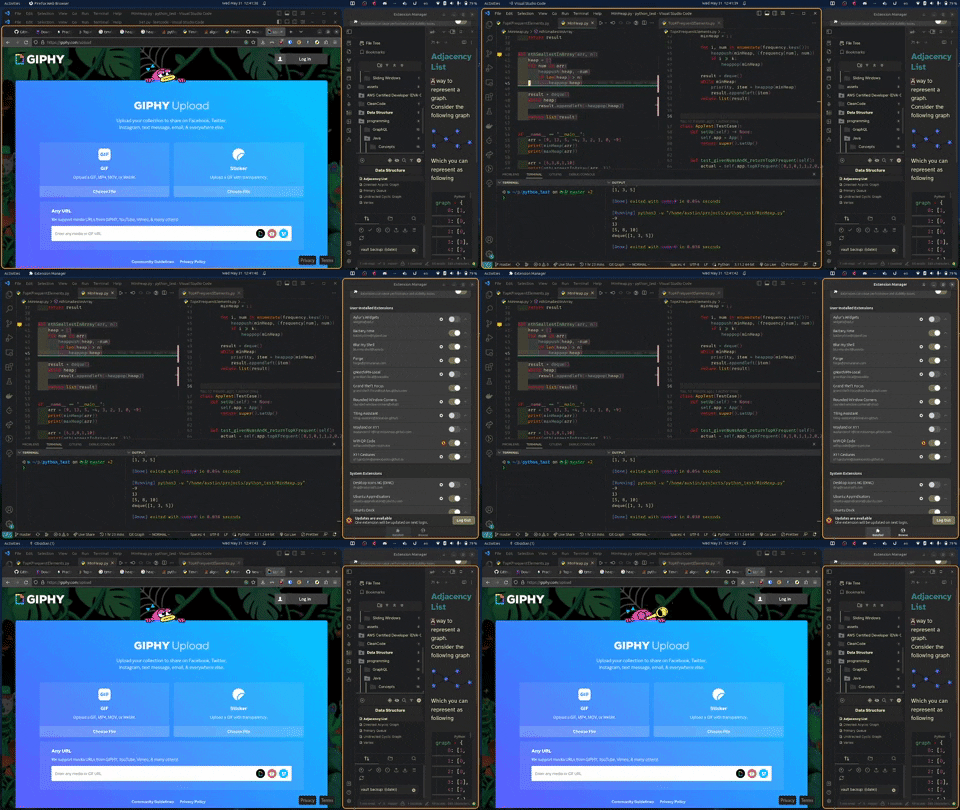
Expected Behavior
When switching windows it should just focus back on the current window of the other group
Reprodution
How one can find the bug?
Steps To Reproduce
Steps to reproduce, if applicable:
- Create 2 stacked group of windows
- on one group, focus up by using
<super> k - on the second group, focus up by using
<super> k - use
<super> lor<super> rto switch focus to the other group, the window get reset to a different window
Details
Mark with [ ] all that applies:
It happens with any application?
- [x] Yes, it applies to any application.
- [ ] No. Only with the following applications:
- VSCode, Terminal, ...
- [ ] It works with the following applications that I have tried:
- Fill in a list with any application that applies
It happens only on one computer?
- [x] I don't know.
- [ ] No. I have tried it on more than one computer.
It happens only with some specific gnome configuration?
- [x] I don't think that the configuration matters.
- [ ] Yes. Only if the following config is set up:
- Fill in a list with any configuration tha applies.
It happens only with some specific extension installed?
- [x] I don't think that the installed extensions affect the bug/behavior.
- [ ] Yes. Only if the following gnome extension is installed:
- Fill in a list with any extension tha applies.
- Fill in also any detail about the extensions that applies.
Diagnostics
Under what conditions does it happen?
Fill in all information that applies:
Environment
-
Distro version : Linux thonkpad 6.2.0-20-generic #20-Ubuntu SMP PREEMPT_DYNAMIC Thu Apr 6 07:48:48 UTC 2023 x86_64 x86_64 x86_64 GNU/Linux
-
GNOME Shell version: 44
-
Forge source : extensions.gnome.org
-
Forge version : Version: 68
Display Setup
Displays:
- Notebook 1920x1080
Screenshots
Extension Configuration
Command: dconf dump /org/gnome/shell/extensions/forge/
$ dconf dump /org/gnome/shell/extensions/forge/
...
[/]
css-last-update=uint32 37
css-updated='1684751139126'
focus-border-toggle=true
showtab-decoration-enabled=false
tiling-mode-enabled=true
workspace-skip-tile=''

[keybindings]
window-focus-right=['<Super>l']
Enabled Extensions
Command: gnome-extensions list --enabled --details
$ gnome-extensions list --enabled --details
...
[email protected]
  Name: X11 Gestures
  Description: Enable GNOME Shell multi-touch gestures on X11.
Requires Touchégg https://github.com/JoseExposito/touchegg#readme
  Path: /home/austin/.local/share/gnome-shell/extensions/[email protected]
  URL: https://github.com/JoseExposito/gnome-shell-extension-x11gestures
  Version: 17
  State: ENABLED

[email protected]
  Name: Battery time
  Description: Show battery estimated remaining time.

Note: This extension may not work with some of extensions tweaking quick setting menu. If you encounter any problem like this, open a GitHub issue and put a list of enabled extensions.
  Path: /home/austin/.local/share/gnome-shell/extensions/[email protected]
  URL: https://github.com/pomoke/battery_time
  Version: 2
  State: ENABLED

[email protected]
  Name: Grand Theft Focus
  Description: Removes the 'Window is ready' notification and brings the window into focus instead.
  Path: /home/austin/.local/share/gnome-shell/extensions/[email protected]
  URL: https://github.com/zalckos/GrandTheftFocus
  Version: 3
  State: ENABLED

[email protected]
  Name: Wifi QR Code
  Description: This extension add a switch to the WiFi menu, in the GNOME system menu, that show a QR Code of the active connection.

This can be useful for quickly connecting devices capable of reading QR Code and applying the settings to the system, without having to type in the name and the password of the WiFi. (e.g. Android Smartphone).

From version 4 added a functionality to copy the QR Code to clipboard with right click on it.
  Path: /home/austin/.local/share/gnome-shell/extensions/[email protected]
  URL: https://gitlab.gnome.org/glerro/gnome-shell-extension-wifiqrcode
  Version: 8
  State: ENABLED

[email protected]
  Name: Forge
  Description: Tiling and window manager for GNOME

Please report bugs/issues on https://github.com/jmmaranan/forge/issues
  Path: /home/austin/.local/share/gnome-shell/extensions/[email protected]
  URL: https://github.com/jmmaranan/forge
  Version: 68
  State: ENABLED

rounded-window-corners@yilozt
  Name: Rounded Window Corners
  Description: Add rounded corners for all windows
  Path: /home/austin/.local/share/gnome-shell/extensions/rounded-window-corners@yilozt
  URL: https://github.com/yilozt/rounded-window-corners
  Version: 11
  State: ENABLED

blur-my-shell@aunetx
  Name: Blur my Shell
  Description: Adds a blur look to different parts of the GNOME Shell, including the top panel, dash and overview.

You can support my work by sponsoring me on:
- github: https://github.com/sponsors/aunetx
- ko-fi: https://ko-fi.com/aunetx

Note: if the extension shows an error after updating, please make sure to restart your session to see if it persists. This is due to a bug in gnome shell, which I can't fix by myself.
  Path: /home/austin/.local/share/gnome-shell/extensions/blur-my-shell@aunetx
  URL: https://github.com/aunetx/gnome-shell-extension-blur-my-shell
  Version: 46
  State: ENABLED

[email protected]
  Name: Ubuntu AppIndicators
  Description: Support app indicators and legacy tray icons in top panel, as the default Ubuntu experience. System update of AppIndicator and KStatusNotifierItem Support extension.
  Path: /usr/share/gnome-shell/extensions/[email protected]
  URL: https://github.com/ubuntu/gnome-shell-extension-appindicator
  State: ENABLED

[email protected]
  Name: Ubuntu Dock
  Description: A dock for the Gnome Shell, default Ubuntu experience. This extension is a modified version of Dash To Dock with different defaults. Dash To Dock can be installed to replace it and give more (but unsupported) configuration options.
  Path: /usr/share/gnome-shell/extensions/[email protected]
  URL: https://micheleg.github.io/dash-to-dock/
  Original author: [email protected]
  Version: 79
  State: ENABLED
Graphics information
Command: lshw -C display
$ lshw -C display
...
WARNING: you should run this program as super-user.
  *-display
       description: VGA compatible controller
       product: Barcelo
       vendor: Advanced Micro Devices, Inc. [AMD/ATI]
       physical id: 0
       bus info: pci@0000:07:00.0
       logical name: /dev/fb0
       version: d1
       width: 64 bits
       clock: 33MHz
       capabilities: vga_controller bus_master cap_list fb
       configuration: depth=32 driver=amdgpu latency=0 resolution=1920,1080
       resources: irq:32 memory:d0000000-dfffffff memory:e0000000-e01fffff ioport:1000(size=256) memory:fd300000-fd37ffff
WARNING: output may be incomplete or inaccurate, you should run this program as super-user.
Monitor information
Command: xrandr --properties | grep -vE '(x|\s|\.|\d)+$'
$ xrandr --properties | grep -vE '(x|\s|\.|\d)+$'
...
Screen 0: minimum 320 x 200, current 1920 x 1080, maximum 16384 x 16384
eDP connected primary 1920x1080+0+0 (normal left inverted right x axis y axis) 309mm x 173mm
		00ffffffffffff000dae061400000000
		251d0104a51f11780228659759548e27
		1e505400000001010101010101010101
		010101010101363680a0703820403020
		350035ad10000018000000fe004e3134
		304843412d4535420a20000000fe0043
		4d4e0a202020202020202020000000fe
		004e3134304843412d4535420a20009a
		range: (0, -1)
		range: (0, -1)
		range: (0, 65535)
		range: (0, 65535)
		supported: off, on, auto
		supported: HDCP Type0, HDCP Type1
		range: (0, 1)
		range: (0, 4)
		range: (8, 16)
		range: (0, 128)
		range: (0, 128)
		supported: off, on, auto
		supported: None, Full, Center, Full aspect
		supported: 78
		range: (0, 1)
   1920x1080     60.00*+
HDMI-A-0 disconnected (normal left inverted right x axis y axis)
		range: (0, -1)
		range: (0, -1)
		range: (0, 65535)
		range: (0, 65535)
		supported: off, on, auto
		supported: HDCP Type0, HDCP Type1
		range: (0, 1)
		range: (8, 16)
		range: (0, 128)
		range: (0, 128)
		supported: off, on, auto
		supported: None, Full, Center, Full aspect
		supported: 85
		range: (0, 1)
DisplayPort-0 disconnected (normal left inverted right x axis y axis)
		range: (0, -1)
		range: (0, -1)
		range: (0, 65535)
		range: (0, 65535)
		supported: off, on, auto
		supported: Unknown, VGA, DVI-D, HDMI, DP, Wireless, Native
		supported: HDCP Type0, HDCP Type1
		range: (0, 1)
		range: (8, 16)
		range: (0, 128)
		range: (0, 128)
		supported: off, on, auto
		supported: None, Full, Center, Full aspect
		supported: 89
		range: (0, 1)
DisplayPort-1 disconnected (normal left inverted right x axis y axis)
		range: (0, -1)
		range: (0, -1)
		range: (0, 65535)
		range: (0, 65535)
		supported: off, on, auto
		supported: Unknown, VGA, DVI-D, HDMI, DP, Wireless, Native
		supported: HDCP Type0, HDCP Type1
		range: (0, 1)
		range: (8, 16)
		range: (0, 128)
		range: (0, 128)
		supported: off, on, auto
		supported: None, Full, Center, Full aspect
		supported: 94
		range: (0, 1)

Hi @rockmanvnx6 - I can replicate this. Looks like the stack update layout has been broken and it does not update putting the focused window in front.
