

 forge-ext
Partially Off Screen Apps
Hi all,
so while auto tiling works very well with modern GNOME apps, for some legacy apps with too large minimum width already with only two windows the close button goes off screen, see the screen shot below with
- gnome-console opened first
- signal opened second, partially off screen
on the same workspace

However slightly decreasing manually the width of gnome-console to the left we get a satisfying result
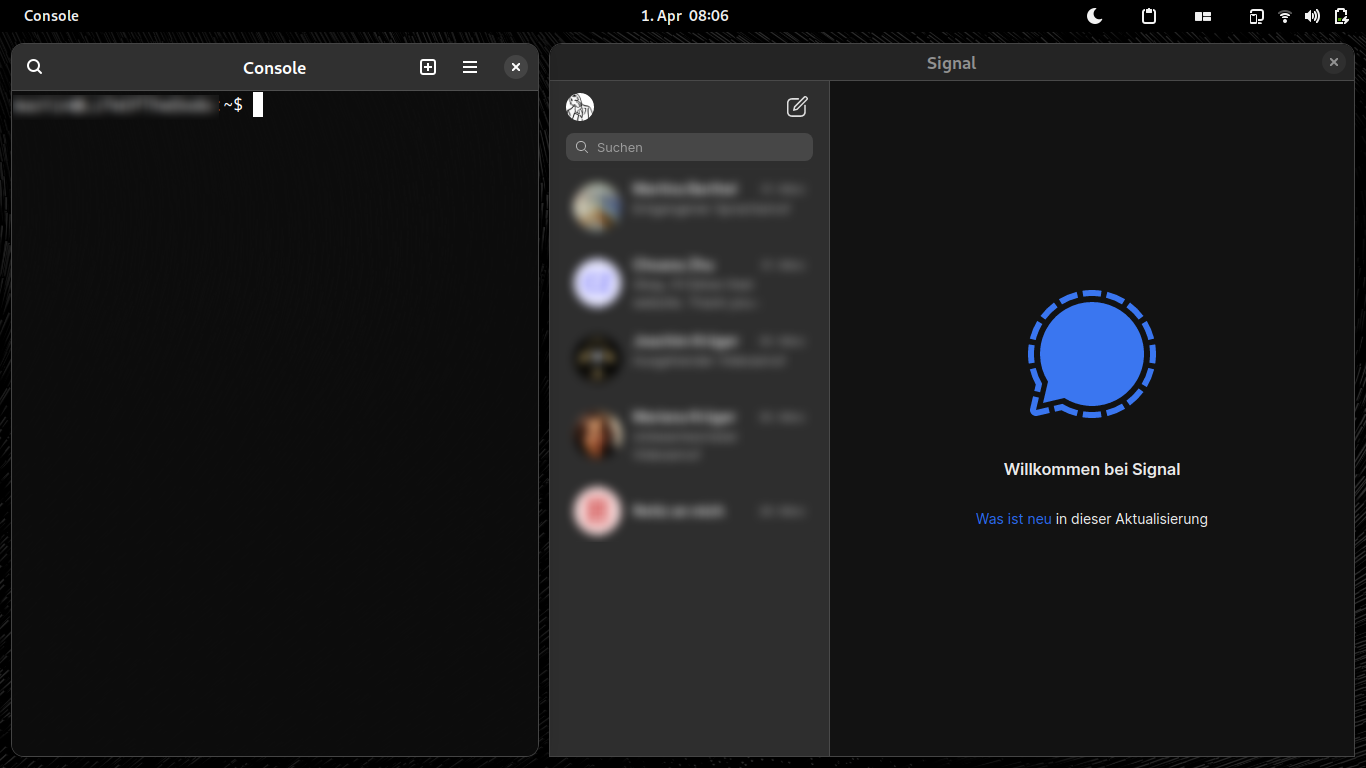
So the question is: is it feasible to obtain the latter situation automatically or have a heuristic to cover many such situations?
This is on
- a 12'' screen netbook
- debian sid, GNOME 42

@maymage - I'll see if I can do something about it - I think these are the other options:
- Stack/Tab the windows automatically when the screen is too small (the screen size can be configurable when it starts doing this)
- Auto adjust the windows that's fallen off the active monitor/screen (this is a bit tricky)

I think, at some point coming back stacking/tabbing is necessary, when too many windows are opened on a work space.
Also it can get somewhat unfair to penalise adaptive applications for e.g. electron ones. However, there's for sure a small window of opportunity to get a better experience out of the box.
Thanks for your work to bring auto tiling on GNOME!