

 forem
forem
Add ability to copy comment permanent link
The dev.to app is my default viewer for dev.to urls. It is possible to select the permanent link for viewing in the app but not copy for sharing.

Hi @JesseKPhillips thanks a lot for the report! I just looked into what you mention and I I can't find a way to copy the permalink either.
It's a valuable feature to have IMO. We'll hope to report back here in the future if/when we decide to work on it.
My first impression is that we could tackle this using webkit message handlers (if possible), similar to other features implemented in the iOS app for web <-> native bridging. This would use a native API to make sure the link is copied to clipboard on Android (OS level). This being said, there's an open issue related to clipboard fuctionality that might be good to look into as well when/if working on this.


Since this is resolved, can the issue be closed please? Or will it get closed with the next release?

Revisiting this now: I made a mistake by referencing this from #70. They are related but not resolved by it.
We do have the copy to clipboard feature available thanks to this PR in the web repo, but this is only used on Article URLs & Copy to Clipboard when uploading an image to an Article. This feature request refers to the permalink of individual comments.
Tagging this for the Web App because the solution here is to bypass the permalink option (see image below) with JS. Instead of following the link we should execute AndroidBridge.copyToClipboard(permalinkURL); which makes use of the Native Copy to Clipboard API exposed.
I can't work on this at the moment but happy to guide anyone who's interested in giving it a try. Otherwise I'll send in a PR whenever I can circle back to this.
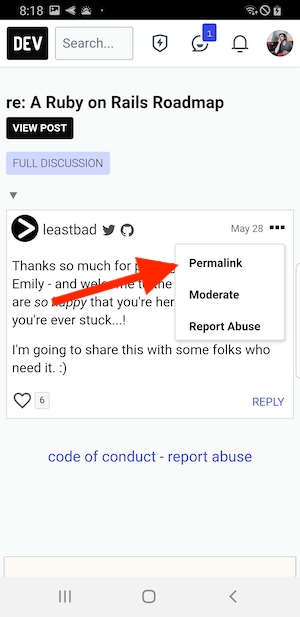
@fdoxyz I can figure out the change on the web app once I know how to navigate my way through the web app files. I know my javascript, but I don't know ruby or the structure of the projects or where to find what.
If there's something I also need to do on android, let me know so I can also do it. But from what I understood, all I need to do is call the android bridge to copy to clipboard, and if the copy to clipboard in the android bridge isn't already done, to do it. Sounds simple, just need to manage my way through the web app's structure.
If anything, I can learn a bit of ruby and try to contribute accordingly. You'll have a pull request coming your way by Monday, if nothing goes wrong.
Sounds great @nizarmah thank you! I'll assign the issue to you then. My suggested next steps since you're giving this a try:
- Setup your local development by following docs.dev.to
- Make sure your local develpment works using a browser on
localhost:3000 - From the Android project, change your
chrome.baseUrl&chrome.baseHostnamefromgradle.propertiespoints tohttp://localhost:3000instead ofhttps://dev.to - Add
"localhost:3000"to theoverrideUrlListlist in theCustomWebViewClient - Run the app in the emulator to make sure it's working with the local web server
A real device will require some more networking config since it won't be able to access localhost. If you get stuck or need any help let me know! 🙂
@fdoxyz sorry for the late reply. Docker compose makes everything so much easier. I used my local ip address and will be testing it on a real device, I got it to work. Anyway, I'll let you know when I have something. I won't directly start working on it, but it should be done by Monday, for sure.
Just to be clear, instead of opening the comment's permalink, you want to copy it? Or once you are inside the thread, you want to copy it?
That's great @nizarmah. I think you're in luck because the Docker configs have just recently been overhauled to work better than before, happy to hear it wasn't difficult to spin things up.
Just to be clear, instead of opening the comment's permalink, you want to copy it? Or once you are inside the thread, you want to copy it?
Yes, I'd say it would be better to avoid the redirect from the link and instead copy the URL when browsing with the Android app.
For reference you can check out this function checks to see if the device is the native app (and also the native bridge has been initialized). And then this line is how the native "copy to clipboard" API is executed.
@fdoxyz I added the code, and I checked if it works. The android device is copying the comment's url. However, there's a slight problem. event.preventDefault() or event.stopPropagation() isn't stopping the url's propagation.
Do you know exactly what is happening? Seems like the propagation isn't being done through the normal events. Please let me know, when possible.
Interesting... I'm not sure I can really tell what could be happening but it may have something to do with InstantClick?
If you still can't figure it out feel free to open up a PR on the web repo and tag me in it. With a look at the code I may be able think of why this is happening or come up with an alternative solution 🙂
Yeah, you might be right, it might be related to InstantClick. I'll open a draft pull request tomorrow. I'll tag you in it. It's been long since I did web development :sweat_smile:.
I'll also do my best at figuring out where the InstantClick is being called. Sadly, the issue is that I'm not good at navigating my way through web apps anymore :disappointed:
I do have an alternative solution in mind. It is simply adding a Copy URL for the comment. It could then also be useful on web. I'll suggest it in the pull request. :smile:
It's been long since I did web development 😅.
Haha no worries. Really appreciate the effort put into working this out! I'll definitely chime in on the PR whenever I get a chance 👍🏼
I do have an alternative solution in mind. It is simply adding a Copy URL for the comment. It could then also be useful on web. I'll suggest it in the pull request. 😄
That is indeed a very interesting idea. However in that case it would be good to implement a more complete function similar to this copyText(), because the button will be visible from both web & mobile and it's important it works for both. I'd say go for it if it feels easier!
@fdoxyz I believe I'll go with the Copy Comment URL thing. I will definitely create a function simialr to the copyText(). It will have to be a bit later than monday. I just started a new job (didn't expect that to happen that quickly sry about that) and I'm trying to catch up with them. Once I have a bit of free time I'll open a PR.
No need to apologize @nizarmah I'm happy to hear about the new job, congratulations!
Sounds great to me, try to remember to ping me whenever you do have that PR ready for review or if you need any other help with this at all 👍🏼
@fdoxyz I mentioned this issue in the PR on the Web App. I also added some screenshots there. Whenever you can, let me know if there are any tests for the files I editted. I personally wasn't able to find the tests related to what I editted, which makes me think that no tests were even present for the first copyText.
