

 forcedotcom
Rebase Error
Describe the bug Rebase error and cannot move ahead with promotion to next stage. DevOps tells me I need to address the conflicts manually and gave me the commands, that I need to manually add but where/how do I add those commands? How to fix the rebase error so I can continue promotion to the next stage? Is there any option directly available in DevOps or any set of instructions on how to address this issue in GitHub? Added below is one of the rebase errors, I have multiple work items in the HCAMerge project that has the same set of error messages and that is blocking me to move ahead with promotion to the next stage.
"CONFLICT (modify/delete): force-app/main/default/layouts/Account-Medical Account.layout-meta.xml deleted in HCAStagingFY21Q4 and modified in HEAD~0. Version HEAD~0 of force-app/main/default/layouts/Account-Medical Account.layout-meta.xml left in tree. CONFLICT (modify/delete): force-app/main/default/layouts/Account-Medical Account - Existing Customer.layout-meta.xml deleted in HCAStagingFY21Q4 and modified in HEAD~0. Version HEAD~0 of force-app/main/default/layouts/Account-Medical Account - Existing Customer.layout-meta.xml left in tree. Resolve all conflicts manually, mark them as resolved with "git add/rm <conflicted_files>", then run "git rebase --continue". You can instead skip this commit: run "git rebase --skip". To abort and get back to the state before "git rebase", run "git rebase --abort". "
Expected behavior Promote to next stage without conflicts
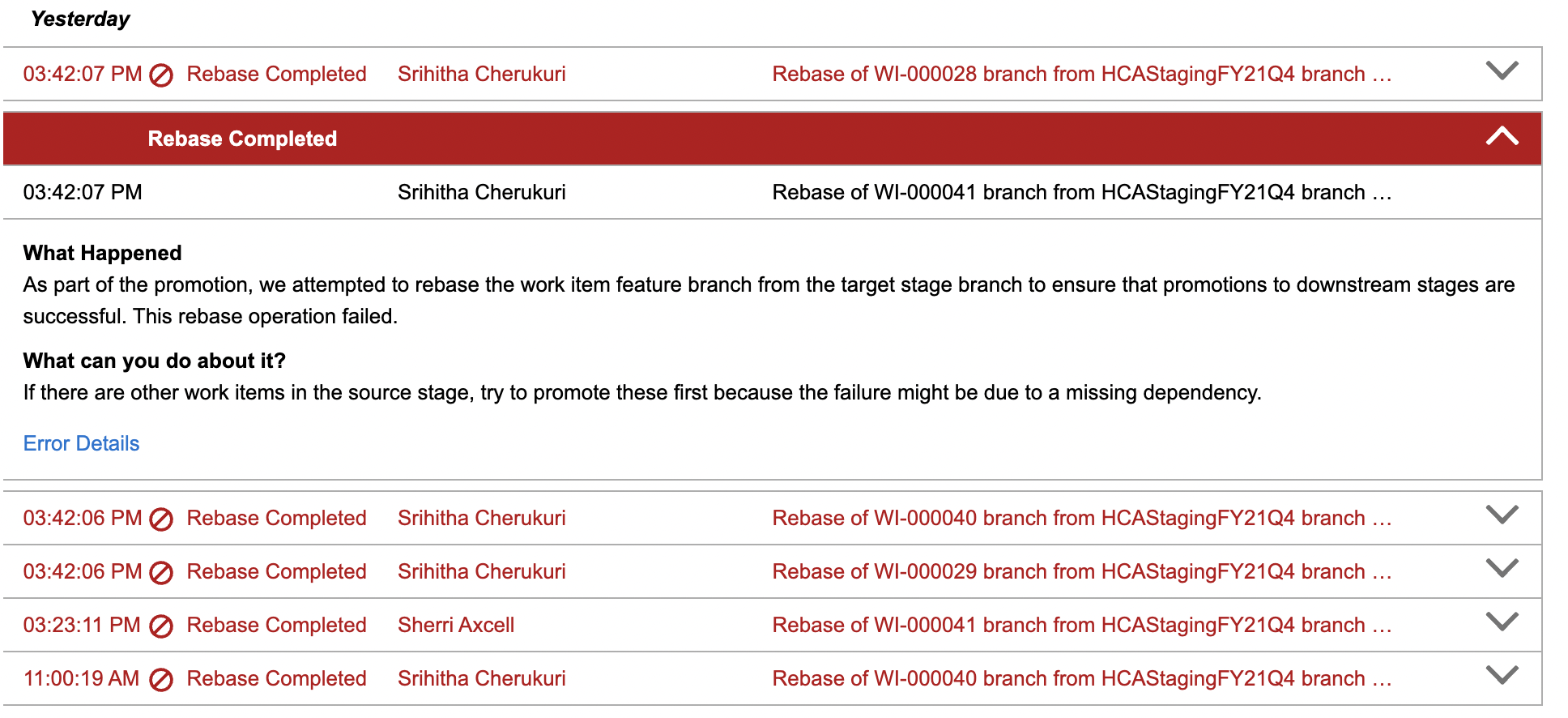
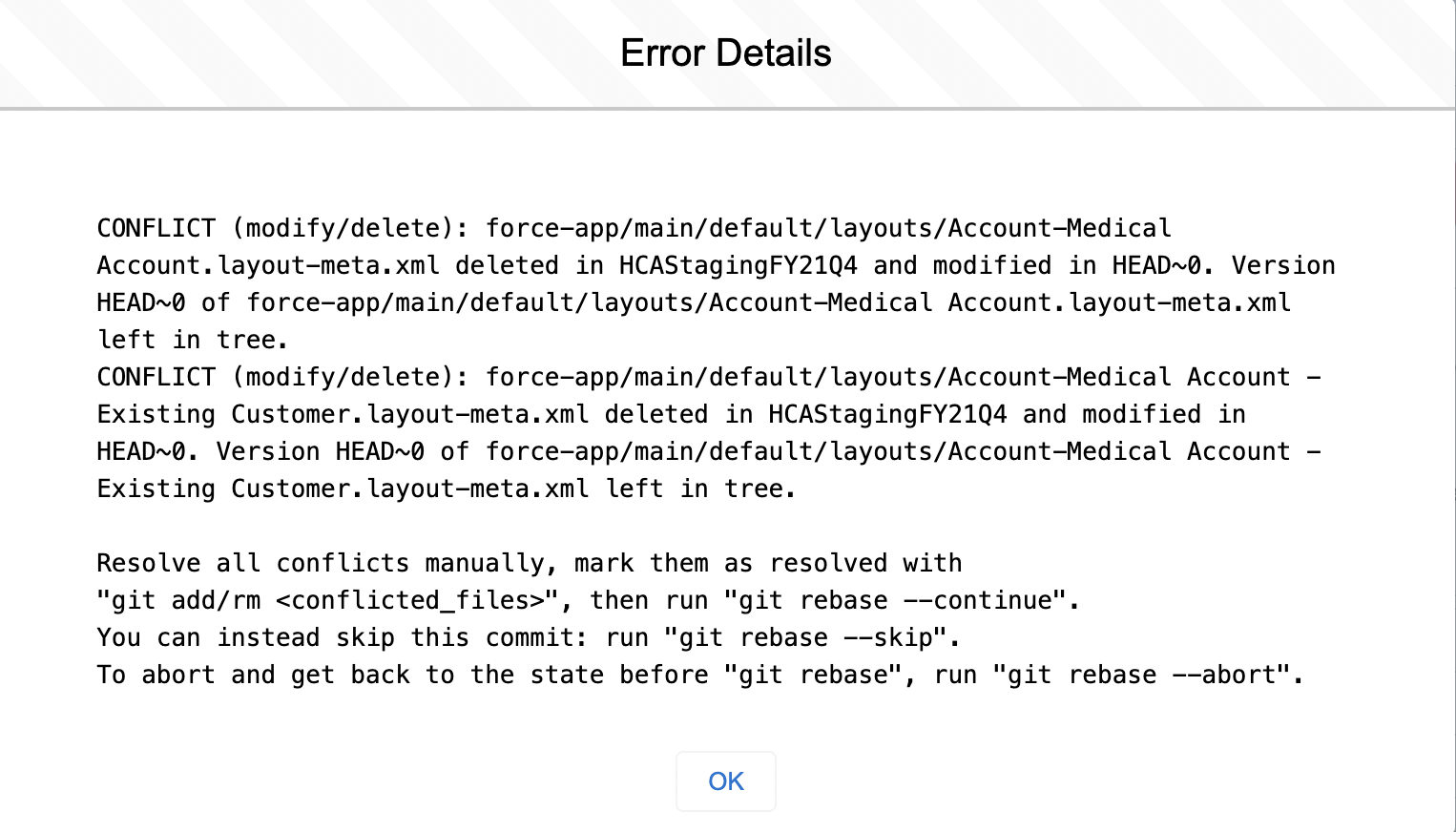

Hello @srihithacherukuri14, it appears that there is some sort of conflict in the rebase process happening during promotion which is holding up your changes in the pipeline. The error message giving you the git commands ('git add/rm

@kylewalke I work with @srihithacherukuri14, and I wanted to provide you with some additional information on the issue we are experiencing. As stated above, DevOps Center shows the rebase error and gives the commands to fix it. However, there is no instructions on how we can connect to a command line to run these commands.
Since we cannot do the rebase in the DevOps center, I downloaded the GitHub desktop application. I tried to do the rebase of the WI into our Validation branch with that instead. However, it is saying that our validation branch is already up to date with the work item branch.
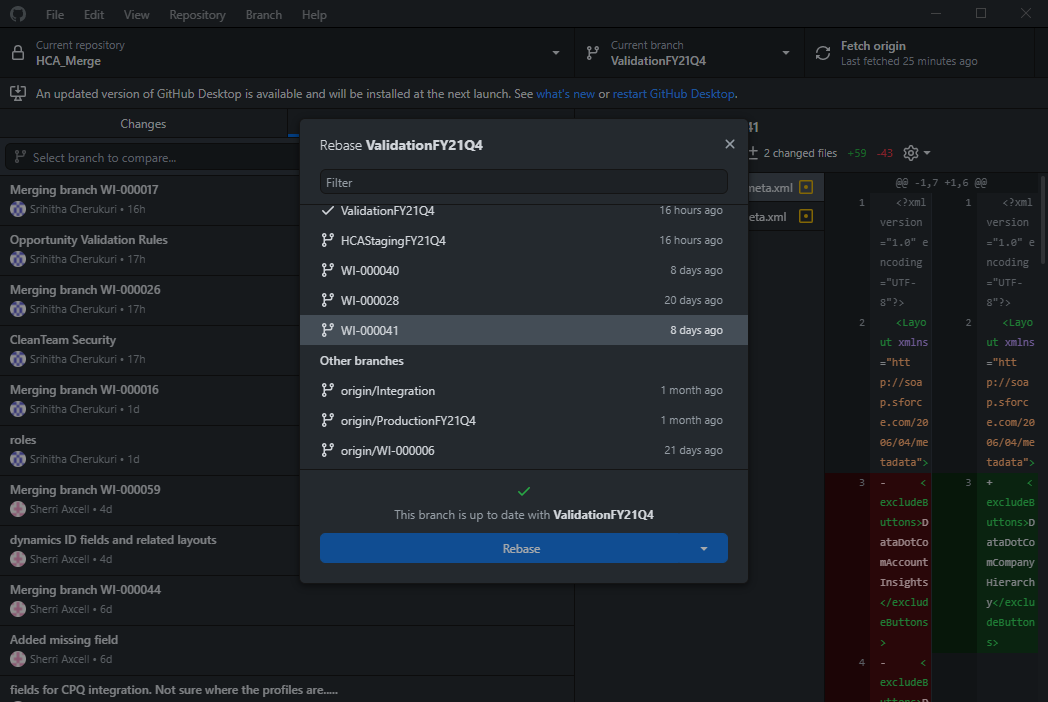
We make sure that our dev org is synced with the validation org, and it is showing as being up to date now. So I don't think the issue is with being out of sync now. The problem now seems to be that there is no way to tell the DevOps center to continue the rebase.
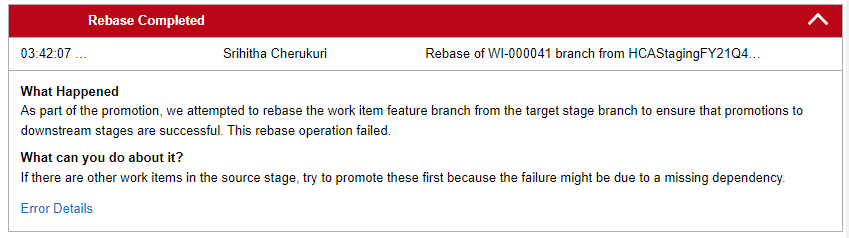
If we had instructions for running the "git rebase --continue" command, I believe this should clear up the error that we see in the DevOps center. Since it looks like the validation branch is actually up to date, we should be able to perform our validation work, but we will not be able to promote the work items to staging until the errors are cleared.
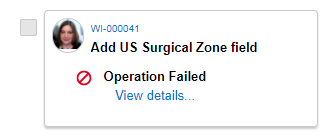

@StreckerCM and @srihithacherukuri14 We are looking into our backend logs for this to see if we can determine what's going on as well. Thank you for the additional details and sitting tight while we investigate.
@StreckerCM @srihithacherukuri14 We have been able to reproduce the error and were able to fix the issue with the following steps.
- Promote all currently non-promoted stories currently located on the target Pipeline Stage from the Pipeline Stage that is currently blocked to the bundling stage.
- Retry promoting the failing rebase story to the Pipeline Stage in question.
The idea is to clear all other stories out of the pipeline stage that is having rebase failures, and to then push the problematic story as the dependencies will be resolved by the time they reach the bundling stage.
Please let us know if this works.
Additionally, getting a developer to download GitHub and the repository and manually resolve rebase conflicts (as recommended by the VCS error messages) is a perhaps a possibility but at the moment, not recommended. This is because manually performing the rebase on the target branch from the feature branch for the merge is not currently an expected workflow from within DOCe so avoiding that will be optimal.
This happens if the workitem includes a new metadata item (not existing in the pipeline already). Promote one workitem with the new metadata item and then create another workitem with the same metadata item and promote it, then the error occurs. You can solve this by promoting the first metadata item and then the next. This will note happen if the metadata item already exists in the pipeline.

@kylewalke, we don't currently have a bundling stage because it gave us dependency problems when we tried to use it. Will that be an issue, or can we promote all the ones we have in Validation to Staging and then retry those in error?
@StreckerCM You should be ok without a bundling stage as it is not absolutely required. Promoting all of the Work Items in Validation to Staging and then retrying to push the errored Work Item should work, yes.
@johp-lb-dk Ah, yes so it sounds like an issue with dependencies and order of operations for deployment. Thank you for the additional details!
@kylewalke, so I thought we had figured out all the issues, but I moved one of our dev work items to validation. It moved and didn't give me any errors, and it shows in the correct pipeline column, but it shows an operation failed error on the tile.
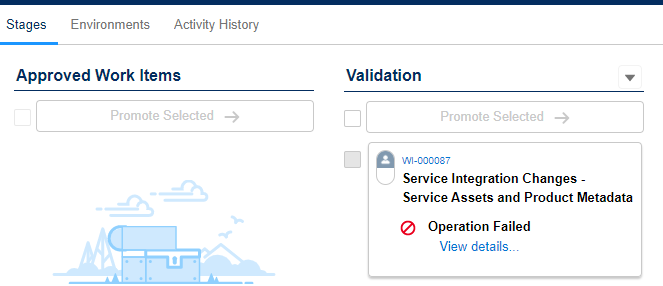
When you open and review the error, it says that the rebase from the WI to staging failed, but we haven't moved it to staging yet.
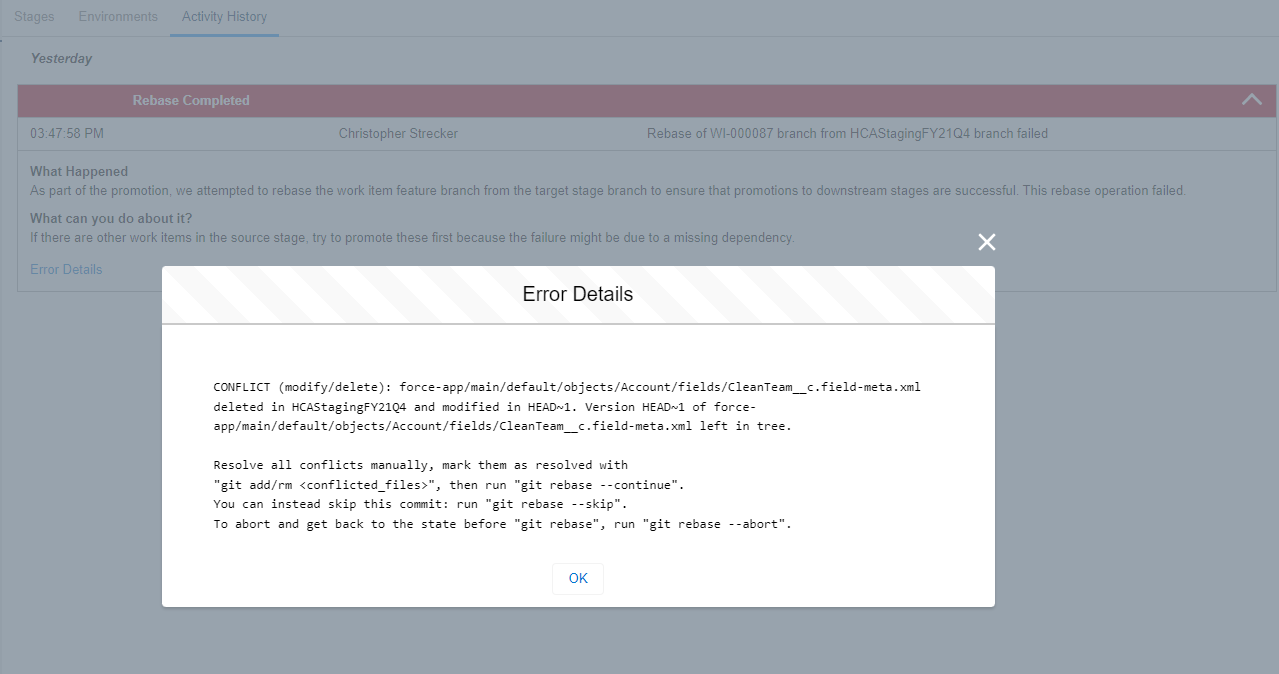
When I checked the associated pull request on GitHub, the work item moved to validation without errors. So why is DevOps Center showing that there was an error rebasing to staging before we have even promoted it to staging?
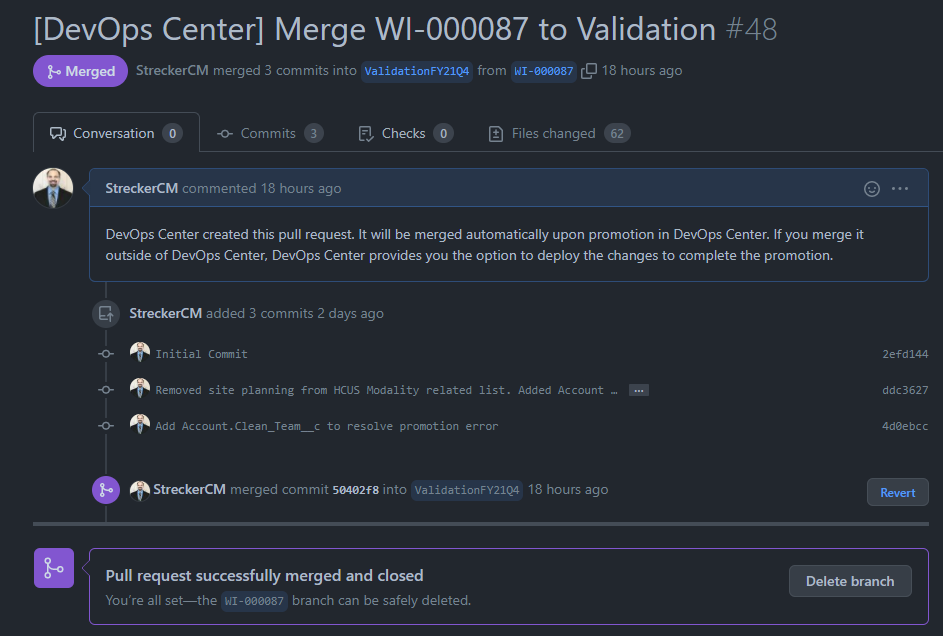
Hi @StreckerCM , With the new patch we have released a couple of days ago this issue of showing rebase errors before trying to promote into next stage has been solved. Hope to hear the feedback on this. Thank you.

Hello @franciscoperezsammartino, This is still an issue we run into time to time. Is there any way to get past this?

Hi Adarsh!
Can you please specify which issue is affecting you? Thank you!
On Thu, Nov 14, 2024 at 3:31 AM Adarsh Singh @.***> wrote:
Hello @franciscoperezsammartino https://github.com/franciscoperezsammartino, This is still an issue we run into time to time. Is there any way to get past this?
— Reply to this email directly, view it on GitHub https://github.com/forcedotcom/devops-center-feedback/issues/138#issuecomment-2475518917, or unsubscribe https://github.com/notifications/unsubscribe-auth/AT4BRHARWAHWNQY7PE3B6632AQ7UHAVCNFSM6AAAAABRYEJKF2VHI2DSMVQWIX3LMV43OSLTON2WKQ3PNVWWK3TUHMZDINZVGUYTQOJRG4 . You are receiving this because you were mentioned.Message ID: @.***>
-- FRANCISCO PÉREZ SAMMARTINO Software Engineering SMTS | Salesforce Mobile: (+54) 9 11 4098-3690
Hello @franciscoperezsammartino,
The rebase error. Some times it occurs out of nowhere. My pipeline is Feature branch -> UAT -> PreProduction (bundling) -> Production. Recently a work item was promoted to UAT branch which had some items that were deleted, the rebase kept failing saying that the deleted the file in WI is modified in preProduction, I believe it would require a manual intervention to fix that issue. Sometimes, when there are obvious dependencies, we are able to resolve by either promoting the work items or combining them, but in this case there were no dependencies. Is there a way to manually fix this rebase issue? Like if I run similar rebase commands in my local repo and push the changes to the branch?
Hi Adarsh,
Sorry for the issue you are facing. So that error happens when the file was deleted but on another work item modified. So it is basically asking do you really want to delete because an unexpected modification happened.
Probably there has been another modification of that file on another Work Item.
My first recommendation is to promote all the work items on UAT. If this is possible for you it could be a solution. When all work items are selected, instead of using their individual Pull Requests we use a pull request between the stages branch, which moves all the work items together.
Sorry for taking some time to reply, but we were having some urgent cases to give support.
Thanks!
On Thu, Nov 14, 2024 at 9:53 AM Adarsh Singh @.***> wrote:
Hello @franciscoperezsammartino https://github.com/franciscoperezsammartino,
The rebase error. Some times it occurs out of nowhere. My pipeline is Feature branch -> UAT -> PreProduction (bundling) -> Production. Recently a work item was promoted to UAT branch which had some items that were deleted, the rebase kept failing saying that the deleted the file in WI is modified in preProduction, I believe it would require a manual intervention to fix that issue. Sometimes, when there are obvious dependencies, we are able to resolve by either promoting the work items or combining them, but in this case there were no dependencies. Is there a way to manually fix this rebase issue? Like if I run similar rebase commands in my local repo and push the changes to the branch?
— Reply to this email directly, view it on GitHub https://github.com/forcedotcom/devops-center-feedback/issues/138#issuecomment-2476284617, or unsubscribe https://github.com/notifications/unsubscribe-auth/AT4BRHDCRGVA47YKA5HKMLD2ASMOLAVCNFSM6AAAAABRYEJKF2VHI2DSMVQWIX3LMV43OSLTON2WKQ3PNVWWK3TUHMZDINZWGI4DINRRG4 . You are receiving this because you were mentioned.Message ID: @.***>
-- FRANCISCO PÉREZ SAMMARTINO Software Engineering SMTS | Salesforce Mobile: (+54) 9 11 4098-3690
Hi @franciscoperezsammartino,
Thanks for the response. This is something we have tried in the past and it works sometimes and sometimes it does not. There have been instances where due to these issues not getting resolved, we have hidden the project in Devops center and started off with a fresh project with new pipeline branches to get past such issues.
But tbh, this is not always viable for us, as sometimes there might be work items that we don't want to promote for several reasons (UAT taking time/deadline has been postponed etc.), in such cases trying out the resolution mentioned is not possible. It would be really helpful if there is some sort of manual resolution we can do here in order to achieve this. Like maybe some way of rebasing manually and fixing the merge conflict or some other steps that we could perform in github to resolve. Like in this case, the file was not present in any other work item. But it was still blocked so had to do changes in the other environments manually. I tried rebasing it manually but that also did not resolve the issues.
Appreciate your attention to help me out here!
Thanks!
Thanks for the feedback, and understand that its not always viable to do. I'll create a story internally for the team to see how we can provide documentation or something for this situation.
Thanks again!
On Tue, Nov 19, 2024 at 4:02 PM Adarsh Singh @.***> wrote:
Hi @franciscoperezsammartino https://github.com/franciscoperezsammartino ,
Thanks for the response. This is something we have tried in the past and it works sometimes and sometimes it does not. There have been instances where due to these issues not getting resolved, we have hidden the project in Devops center and started off with a fresh project with new pipeline branches to get past such issues.
But tbh, this is not always viable for us, as sometimes there might be work items that we don't want to promote for several reasons (UAT taking time/deadline has been postponed etc.), in such cases trying out the resolution mentioned is not possible. It would be really helpful if there is some sort of manual resolution we can do here in order to achieve this. Like maybe some way of rebasing manually and fixing the merge conflict or some other steps that we could perform in github to resolve. Like in this case, the file was not present in any other work item. But it was still blocked so had to do changes in the other environments manually. I tried rebasing it manually but that also did not resolve the issues.
Appreciate your attention to help me out here!
Thanks!
— Reply to this email directly, view it on GitHub https://github.com/forcedotcom/devops-center-feedback/issues/138#issuecomment-2486513781, or unsubscribe https://github.com/notifications/unsubscribe-auth/AT4BRHAANTBOTRRXAR4OWED2BODLHAVCNFSM6AAAAABRYEJKF2VHI2DSMVQWIX3LMV43OSLTON2WKQ3PNVWWK3TUHMZDIOBWGUYTGNZYGE . You are receiving this because you were mentioned.Message ID: @.***>
-- FRANCISCO PÉREZ SAMMARTINO Software Engineering SMTS | Salesforce Mobile: (+54) 9 11 4098-3690
For tracking purposes this is the Id of the story we logged: W-17274278
On Tue, Nov 19, 2024 at 4:16 PM Francisco Pérez Sammartino < @.***> wrote:
Thanks for the feedback, and understand that its not always viable to do. I'll create a story internally for the team to see how we can provide documentation or something for this situation.
Thanks again!
On Tue, Nov 19, 2024 at 4:02 PM Adarsh Singh @.***> wrote:
Hi @franciscoperezsammartino https://github.com/franciscoperezsammartino,
Thanks for the response. This is something we have tried in the past and it works sometimes and sometimes it does not. There have been instances where due to these issues not getting resolved, we have hidden the project in Devops center and started off with a fresh project with new pipeline branches to get past such issues.
But tbh, this is not always viable for us, as sometimes there might be work items that we don't want to promote for several reasons (UAT taking time/deadline has been postponed etc.), in such cases trying out the resolution mentioned is not possible. It would be really helpful if there is some sort of manual resolution we can do here in order to achieve this. Like maybe some way of rebasing manually and fixing the merge conflict or some other steps that we could perform in github to resolve. Like in this case, the file was not present in any other work item. But it was still blocked so had to do changes in the other environments manually. I tried rebasing it manually but that also did not resolve the issues.
Appreciate your attention to help me out here!
Thanks!
— Reply to this email directly, view it on GitHub https://github.com/forcedotcom/devops-center-feedback/issues/138#issuecomment-2486513781, or unsubscribe https://github.com/notifications/unsubscribe-auth/AT4BRHAANTBOTRRXAR4OWED2BODLHAVCNFSM6AAAAABRYEJKF2VHI2DSMVQWIX3LMV43OSLTON2WKQ3PNVWWK3TUHMZDIOBWGUYTGNZYGE . You are receiving this because you were mentioned.Message ID: @.***>
-- FRANCISCO PÉREZ SAMMARTINO Software Engineering SMTS | Salesforce Mobile: (+54) 9 11 4098-3690
-- FRANCISCO PÉREZ SAMMARTINO Software Engineering SMTS | Salesforce Mobile: (+54) 9 11 4098-3690
No, it is just for us, but whenever someone from Salesforce reads this thread they can map it to the work item. Also if you ask for status, having it here will make it easier to find it.
On Tue, Nov 19, 2024 at 4:22 PM Adarsh Singh @.***> wrote:
Thanks! Where can I track it?
— Reply to this email directly, view it on GitHub https://github.com/forcedotcom/devops-center-feedback/issues/138#issuecomment-2486564646, or unsubscribe https://github.com/notifications/unsubscribe-auth/AT4BRHFPURO5NNUM2UVJVHT2BOFY7AVCNFSM6AAAAABRYEJKF2VHI2DSMVQWIX3LMV43OSLTON2WKQ3PNVWWK3TUHMZDIOBWGU3DINRUGY . You are receiving this because you were mentioned.Message ID: @.***>
-- FRANCISCO PÉREZ SAMMARTINO Software Engineering SMTS | Salesforce Mobile: (+54) 9 11 4098-3690