
neodev.nvim
 neodev.nvim copied to clipboard
 folke
folke
💻 Neovim setup for init.lua and plugin development with full signature help, docs and completion for the nvim lua API.
💻 lua-dev
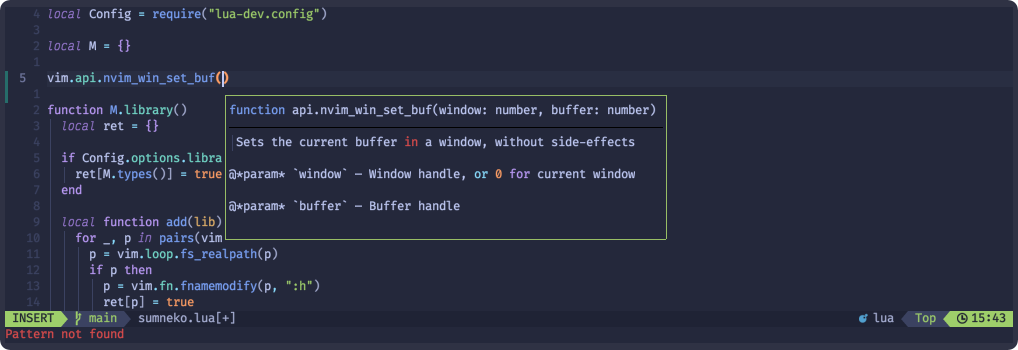
Dev setup for init.lua and plugin development with full signature help, docs and completion for the nvim lua API.

✨ Features
- Automatically configures sumneko_lua for your Neovim config, Neovim runtime and plugin directories
- EmmyLua
library for the nvim lua API for:
- completion
- hover docs
- function signatures
- properly configures the
requirepath withlua/?.luaandlua/?/init.lua. - adds all plugins in
optandstartto the workspace so you get completion for all installed plugins - properly configure the vim runtime
⚡️ Requirements
- Neovim >= 0.5.0
- completion plugin like nvim-cmp
📦 Installation
Install the plugin with your preferred package manager:
packer
use "folke/lua-dev.nvim"
vim-plug
Plug 'folke/lua-dev.nvim'
⚙️ Configuration
lua-dev comes with the following defaults:
{
  library = {
    enabled = true, -- when not enabled, lua-dev will not change any settings to the LSP server
    -- these settings will be used for your Neovim config directory
    runtime = true, -- runtime path
    types = true, -- full signature, docs and completion of vim.api, vim.treesitter, vim.lsp and others
    plugins = true, -- installed opt or start plugins in packpath
    -- you can also specify the list of plugins to make available as a workspace library
    -- plugins = { "nvim-treesitter", "plenary.nvim", "telescope.nvim" },
  },
  setup_jsonls = true, -- configures jsonls to provide completion for project specific .luarc.json files
  -- for your Neovim config directory, the config.library settings will be used as is
  -- for plugin directories (root_dirs having a /lua directory), config.library.plugins will be disabled
  -- for any other directory, config.library.enabled will be set to false
  override = function(root_dir, options) end,

}
🚀 Setup
lua-dev will ONLY change the sumneko_lua settings for:
- your Neovim config directory
- your Neovim runtime directory
- any plugin directory (this is an lsp root_dir that contains a
/luadirectory)
For any other root_dir, lua-dev will NOT change any settings.
-- IMPORTANT: make sure to setup lua-dev BEFORE lspconfig
require("lua-dev").setup({
  -- add any options here, or leave empty to use the default settings
})

-- then setup your lsp server as usual
local lspconfig = require('lspconfig')

-- example to setup sumneko and enable call snippets
lspconfig.sumneko_lua.setup({
  settings = {
    Lua = {
      completion = {
        callSnippet = "Replace"
      }
    }
  }
})
Example for setting up lua-dev that overrides the settings for /etc/nixos
-- You can override the default detection using the override function
-- EXAMPLE: If you want a certain directory to be configured differently, you can override its settings
require("lua-dev").setup({
  override = function(root_dir, library)
    if require("lua-dev.util").has_file(root_dir, "/etc/nixos") then
      library.enabled = true
      library.plugins = true
    end
  end,
})
❓ How?
Neovim includes a script to generate the nvim docs. That script also creates message pack files containing all the API metadata in a structured way. Unfortunately these files are not packaged in the releases.
Using the message pack files, I converted all the API data to EmmyLua annotations and make them available for the Sumneko LSP as a workspace library.
🗒️ Limitations
- [x]
vim.fnfunctions are currently not part of the EmmyLua library since no message pack files are generated. Implemented using vim-lsp - function return types are always
any, since that information is missing
⭐ Acknowledgment
- docs for options and functions are based on the work of vim-lsp
 folke
folke