

 flutter
Web: Flutter does not fill out entire screen in landscape on iOS Safari iPhone XS Max
I am running a Flutter web app in a browser on an iOS 13.7 Safari browser on an iPhone XS Max .
When I turn the phone into Landscape orientation, the top widget does not fill out the entire browser window, but leaves empty stripes on the left and right sides. Here is a photo, where the top widget is just an empty blue container:
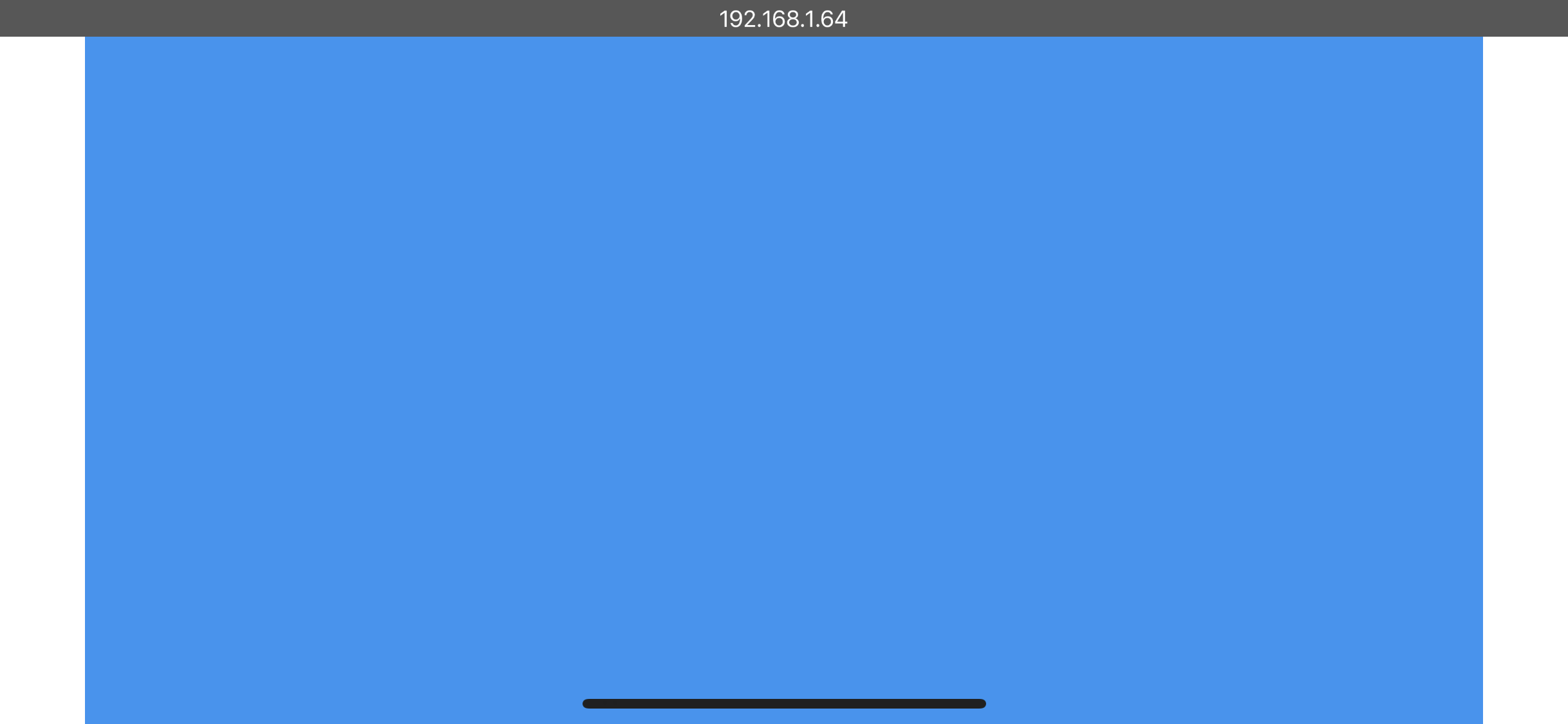
I am using the following flutter version: Flutter (Channel beta, 1.24.0-10.2.pre, on Mac OS X 10.15.7 19H2 darwin-x64, locale en-GB) • Flutter version 1.24.0-10.2.pre at /Users/stevenobua/flutter • Framework revision 022b333a08 (8 days ago), 2020-11-18 11:35:09 -0800 • Engine revision 07c1eed46b • Dart version 2.12.0 (build 2.12.0-29.10.beta)
And the code is just that:
// @dart=2.9
import 'package:flutter/material.dart';

class TestApp extends StatelessWidget {

  Widget build(BuildContext context) {
    return Container(color: Colors.blue);
  }

}

void main() {
  runApp(TestApp());
}

@phlegmaticprogrammer Can you elaborate on how are you running the web app on iphone browser ?

I am serving the web app from a server embedded in my iPad App. But I tried it now also via running python3 -m http.server --cgi 8080 from the build/web directory (on macOS Catalina), and I get exactly the same phenomenon.
I just tested it with Firefox on the phone, same behaviour. With Chrome on the phone, the behaviour is the worst: In landscape it stretches all the way from left to right, but this time the bottom part of the screen is empty. On refresh, the right part only is empty. On turning it to portrait, now long empty stripes left and right appear.
Accessing the web app not from the iPhone XS max, but from an iPad, I don't have any problems like that using Safari. Accessing the web app from an iPhone 7 is also without problems using Safari. I guess it is somehow iPhone notch related?
@phlegmaticprogrammer Did you find a solution ? I have the exact same problem for flutter web.

@0xAMPS no, I think this is just a bug that needs to be fixed in Flutter. But let me know if you find a solution / workaround, I would be interested in that as well!
Adding steps to replicate for reference:
- flutter create safe_area_issue
- flutter build web
- Go to build/web path and run python3 -m http.server 8000
- Open iOS simulator / device that has a notch and open Safari browser.
- Note IPv4 address.
- In safari iOS browser, type http://8000
- Rotate device.
flutter doctor -v
[✓] Flutter (Channel beta, 1.24.0-10.2.pre, on Mac OS X 10.15.4 19E2269
    darwin-x64, locale en-IN)
    • Flutter version 1.24.0-10.2.pre at /Users/dhs/documents/Fluttersdk/flutter
    • Framework revision 022b333a08 (12 days ago), 2020-11-18 11:35:09 -0800
    • Engine revision 07c1eed46b
    • Dart version 2.12.0 (build 2.12.0-29.10.beta)

[✓] Android toolchain - develop for Android devices (Android SDK version 30.0.0)
    • Android SDK at /Users/dhs/Library/Android/sdk
    • Platform android-30, build-tools 30.0.0
    • Java binary at: /Applications/Android
      Studio.app/Contents/jre/jdk/Contents/Home/bin/java
    • Java version OpenJDK Runtime Environment (build
      1.8.0_242-release-1644-b3-6222593)
    • All Android licenses accepted.

[✓] Xcode - develop for iOS and macOS (Xcode 12.0.1)
    • Xcode at /Applications/Xcode.app/Contents/Developer
    • Xcode 12.0.1, Build version 12A7300
    • CocoaPods version 1.9.3

[✓] Chrome - develop for the web
    • Chrome at /Applications/Google Chrome.app/Contents/MacOS/Google Chrome

[✓] Android Studio (version 4.0)
    • Android Studio at /Applications/Android Studio.app/Contents
    • Flutter plugin version 46.0.2
    • Dart plugin version 193.7361
    • Java version OpenJDK Runtime Environment (build
      1.8.0_242-release-1644-b3-6222593)

[✓] VS Code (version 1.50.1)
    • VS Code at /Applications/Visual Studio Code.app/Contents
    • Flutter extension version 3.15.1

[✓] Connected device (4 available)
    • sdk gphone x86 arm (mobile)         • emulator-5554
      • android-x86    • Android 11 (API 30) (emulator)
    • iPhone SE (2nd generation) (mobile) • 6C85835D-FBFD-4AB3-8DE8-B4FAD35E5367
      • ios            • com.apple.CoreSimulator.SimRuntime.iOS-14-0 (simulator)
    • Web Server (web)                    • web-server
      • web-javascript • Flutter Tools
    • Chrome (web)                        • chrome
      • web-javascript • Google Chrome 87.0.4280.67

• No issues found!
A quick fix that I found by accident and that works for me is to change the background color of the body element in web/index.html. This way the stripes don't stand out if you make the background color the same color as your main content.
Update: @phlegmaticprogrammer good advice as a quick fix. We are working on a fix that sets viewport scale of meta tag by default. The issue is that SafeArea widget still needs to correctly work in that case so we are adding code on the engine side to read from browser and adjust window insets if the SafeArea widget is used (It is part of MaterialApp/Scaffold so most users should not experience change at all).

Update/Note: Tested env(safe-area-insert-) to resolve this. Even on iOS 14.1 it is not reliable, when browser page is refreshed viewport shifts. Chrome is in worse state https://bugs.chromium.org/p/chromium/issues/detail?id=1094366. When we do add support for full screen (instead of browser handling padding for notches), it should be stable enough for MaterialApp with SafeArea widget to continue rendering correctly.
@ferhatb any idea if fullscreen is supported yet or planned to be? Also since iOS 15 is in BETA, will env(safe-area-insert-)be reliable?

Any update ? I am also facing the same issue while I'm running the webapp on an android browser.

Any update, I am still facing this issue while I'm running the web-app on iOS devices.


Related to https://github.com/flutter/flutter/issues/84833
Add to your index.html
        return appRunner.runApp().then((_) => {
          document.querySelector('meta[name="viewport"]').setAttribute('content', "width=device-width, initial-scale=1.0, maximum-scale=1.0, user-scalable=no, viewport-fit=cover");
        })

Related to #84833
Add to your index.html
        return appRunner.runApp().then((_) => {
          document.querySelector('meta[name="viewport"]').setAttribute('content', "width=device-width, initial-scale=1.0, maximum-scale=1.0, user-scalable=no, viewport-fit=cover");
        })
Doesn't fix the issue.

Related to #84833
Add to your index.html
        return appRunner.runApp().then((_) => {
          document.querySelector('meta[name="viewport"]').setAttribute('content', "width=device-width, initial-scale=1.0, maximum-scale=1.0, user-scalable=no, viewport-fit=cover");
        })
it working for me but does it effect something?

We're drowning in flutter triage bot traffic. Resetting the triage bot timer.

The issue persists on the latest Flutter stable and master channels. Reproduced this on iPhone XS Max (has Notch) and iPhone 15 (has Dynamic Island) whilst it doesn't happen on iPhone 7 (no cutout area)
Demo
- iPhone XS Max
| landscape | portrait |
|---|---|
flutter doctor -v (stable and master)
[✓] Flutter (Channel stable, 3.19.5, on macOS 14.1 23B74 darwin-x64, locale en-VN)
    • Flutter version 3.19.5 on channel stable at /Users/huynq/Documents/GitHub/flutter
    • Upstream repository https://github.com/flutter/flutter.git
    • Framework revision 300451adae (8 days ago), 2024-03-27 21:54:07 -0500
    • Engine revision e76c956498
    • Dart version 3.3.3
    • DevTools version 2.31.1

[✓] Android toolchain - develop for Android devices (Android SDK version 34.0.0)
    • Android SDK at /Users/huynq/Library/Android/sdk
    • Platform android-34, build-tools 34.0.0
    • ANDROID_HOME = /Users/huynq/Library/Android/sdk
    • Java binary at: /Applications/Android Studio.app/Contents/jbr/Contents/Home/bin/java
    • Java version OpenJDK Runtime Environment (build 17.0.9+0-17.0.9b1087.7-11185874)
    • All Android licenses accepted.

[✓] Xcode - develop for iOS and macOS (Xcode 15.2)
    • Xcode at /Applications/Xcode.app/Contents/Developer
    • Build 15C500b
    • CocoaPods version 1.15.2

[✓] Chrome - develop for the web
    • Chrome at /Applications/Google Chrome.app/Contents/MacOS/Google Chrome

[✓] Android Studio (version 2023.2)
    • Android Studio at /Applications/Android Studio.app/Contents
    • Flutter plugin can be installed from:
      🔨 https://plugins.jetbrains.com/plugin/9212-flutter
    • Dart plugin can be installed from:
      🔨 https://plugins.jetbrains.com/plugin/6351-dart
    • android-studio-dir = /Applications/Android Studio.app/
    • Java version OpenJDK Runtime Environment (build 17.0.9+0-17.0.9b1087.7-11185874)

[✓] VS Code (version 1.87.2)
    • VS Code at /Applications/Visual Studio Code.app/Contents
    • Flutter extension version 3.84.0

[✓] Connected device (2 available)
    • macOS (desktop) • macos  • darwin-x64     • macOS 14.1 23B74 darwin-x64
    • Chrome (web)    • chrome • web-javascript • Google Chrome 123.0.6312.106

[✓] Network resources
    • All expected network resources are available.

• No issues found!
[!] Flutter (Channel master, 3.22.0-9.0.pre.17, on macOS 14.1 23B74 darwin-x64, locale en-VN)
    • Flutter version 3.22.0-9.0.pre.17 on channel master at /Users/huynq/Documents/GitHub/flutter_master
    ! Warning: `flutter` on your path resolves to /Users/huynq/Documents/GitHub/flutter/bin/flutter, which is not inside your current Flutter SDK checkout at /Users/huynq/Documents/GitHub/flutter_master. Consider adding /Users/huynq/Documents/GitHub/flutter_master/bin to the front of your path.
    ! Warning: `dart` on your path resolves to /Users/huynq/Documents/GitHub/flutter/bin/dart, which is not inside your current Flutter SDK checkout at /Users/huynq/Documents/GitHub/flutter_master. Consider adding /Users/huynq/Documents/GitHub/flutter_master/bin to the front of your path.
    • Upstream repository https://github.com/flutter/flutter.git
    • Framework revision a34086a573 (3 hours ago), 2024-04-11 18:07:20 -0700
    • Engine revision 6b37b17099
    • Dart version 3.5.0 (build 3.5.0-47.0.dev)
    • DevTools version 2.34.1
    • If those were intentional, you can disregard the above warnings; however it is recommended to use "git" directly to perform update checks and upgrades.

[✓] Android toolchain - develop for Android devices (Android SDK version 34.0.0)
    • Android SDK at /Users/huynq/Library/Android/sdk
    • Platform android-34, build-tools 34.0.0
    • ANDROID_HOME = /Users/huynq/Library/Android/sdk
    • Java binary at: /Applications/Android Studio.app/Contents/jbr/Contents/Home/bin/java
    • Java version OpenJDK Runtime Environment (build 17.0.9+0-17.0.9b1087.7-11185874)
    • All Android licenses accepted.

[✓] Xcode - develop for iOS and macOS (Xcode 15.3)
    • Xcode at /Applications/Xcode15.3.app/Contents/Developer
    • Build 15E204a
    • CocoaPods version 1.15.2

[✓] Chrome - develop for the web
    • Chrome at /Applications/Google Chrome.app/Contents/MacOS/Google Chrome

[✓] Android Studio (version 2023.2)
    • Android Studio at /Applications/Android Studio.app/Contents
    • Flutter plugin can be installed from:
      🔨 https://plugins.jetbrains.com/plugin/9212-flutter
    • Dart plugin can be installed from:
      🔨 https://plugins.jetbrains.com/plugin/6351-dart
    • android-studio-dir = /Applications/Android Studio.app/
    • Java version OpenJDK Runtime Environment (build 17.0.9+0-17.0.9b1087.7-11185874)

[✓] VS Code (version 1.88.0)
    • VS Code at /Applications/Visual Studio Code.app/Contents
    • Flutter extension version 3.86.0

[✓] Connected device (2 available)
    • macOS (desktop) • macos  • darwin-x64     • macOS 14.1 23B74 darwin-x64
    • Chrome (web)    • chrome • web-javascript • Google Chrome 123.0.6312.123

[✓] Network resources
    • All expected network resources are available.

! Doctor found issues in 1 category.
