
google_ml_kit_flutter

google_ml_kit_flutter copied to clipboard
 flutter-ml
Barcode and Face recognition not recognized on some Xiaomi devices
Overview
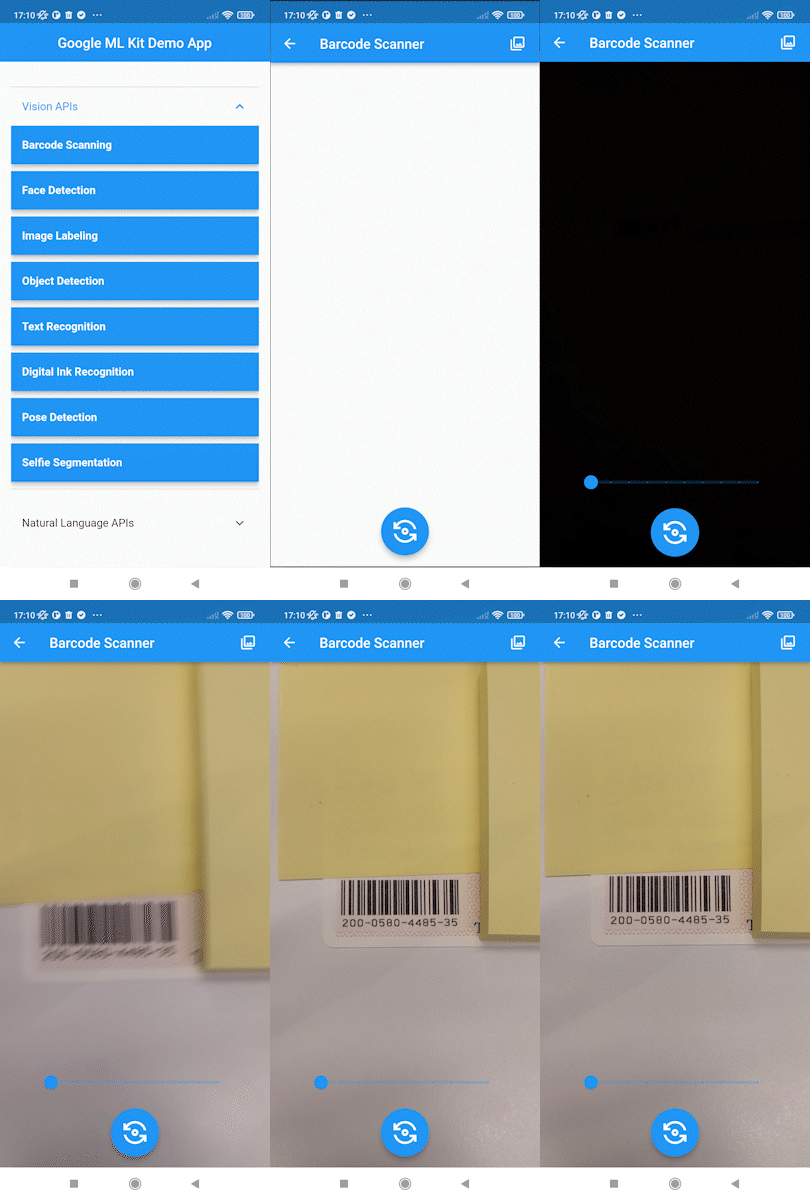
I can't to scan barcode and recognize face on some Xiaomi devices with google_ml_kit's example app. The Xiamoi devices that can't recognize are as follows:
- Redmi Note 10 JE (Android 12)
- Redmi 9T (Android 10)
Other android devices and IOS devices can scan barcodes as expected. The same goes for facial recognition.
Steps to Reproduce
- Execute
flutter runon the code sample - tap "Vision APIs"
- tap "Barcode Scanning" or "FaceDetection"
- If you tap "Barcode Scanning", hold the barcode over the camera. If you tap "Face Detection", capture your face on the camera.
Expected results: Barcode scanning and facial recognition results by google_ml_kit should be displayed on the screen.
Actual results: Nothing responds when you hold up a barcode or your face to the camera.
Code sample I use example of google_ml_kit, commit hash is 19a31d731eaa890bcde49192f707192f8f39d6b4.
Logs
[✓] Flutter (Channel stable, 3.0.1, on macOS 12.4 21F79 darwin-arm, locale ja-JP)
    • Flutter version 3.0.1 at /Users/genki.takeyoshi/fvm/versions/3.0.1
    • Upstream repository https://github.com/flutter/flutter.git
    • Framework revision fb57da5f94 (6 weeks ago), 2022-05-19 15:50:29 -0700
    • Engine revision caaafc5604
    • Dart version 2.17.1
    • DevTools version 2.12.2

[✓] Android toolchain - develop for Android devices (Android SDK version 32.1.0-rc1)
    • Android SDK at /Users/genki.takeyoshi/Library/Android/sdk
    • Platform android-32, build-tools 32.1.0-rc1
    • ANDROID_HOME = /Users/genki.takeyoshi/Library/Android/sdk
    • Java binary at: /Applications/Android Studio.app/Contents/jre/Contents/Home/bin/java
    • Java version OpenJDK Runtime Environment (build 11.0.12+0-b1504.28-7817840)
    • All Android licenses accepted.

[✓] Xcode - develop for iOS and macOS (Xcode 13.4.1)
    • Xcode at /Applications/Xcode.app/Contents/Developer
    • CocoaPods version 1.11.2

[✓] Chrome - develop for the web
    • Chrome at /Applications/Google Chrome.app/Contents/MacOS/Google Chrome

[✓] Android Studio (version 2021.2)
    • Android Studio at /Applications/Android Studio.app/Contents
    • Flutter plugin can be installed from:
      🔨 https://plugins.jetbrains.com/plugin/9212-flutter
    • Dart plugin can be installed from:
      🔨 https://plugins.jetbrains.com/plugin/6351-dart
    • Java version OpenJDK Runtime Environment (build 11.0.12+0-b1504.28-7817840)

[✓] VS Code (version 1.68.1)
    • VS Code at /Applications/Visual Studio Code.app/Contents
    • Flutter extension version 3.42.0

[✓] Connected device (3 available)
    • M2101K6R (mobile) • 75046e77 • android-arm64  • Android 11 (API 30)
    • macOS (desktop)   • macos    • darwin-arm64   • macOS 12.4 21F79 darwin-arm
    • Chrome (web)      • chrome   • web-javascript • Google Chrome 103.0.5060.53

[✓] HTTP Host Availability
    • All required HTTP hosts are available

• No issues found!

