hexo-theme-fluid

hexo-theme-fluid copied to clipboard
 fluid-dev
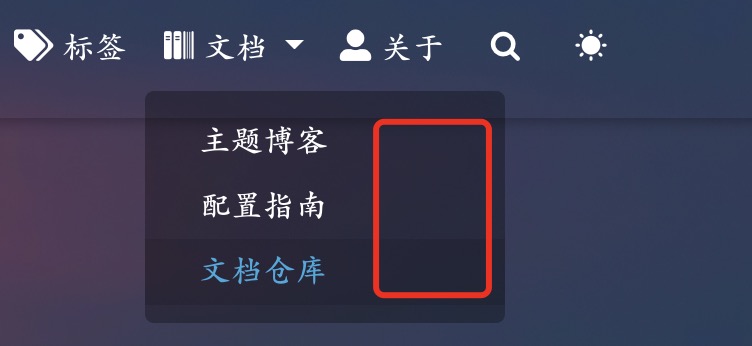
导航栏定义下拉菜单时出现多余阴影区域
请确认
- [ yes] 是当前最新的 Release 版本
- [ yes] 浏览器不属于 IE 等非主流浏览器
- [ yes] 本地
hexo clean && hexo s,并且清除浏览器缓存,仍可复现 - [ yes] 已经排除是其他 Hexo 插件影响
Bug 描述
按配置指南在导航栏中添加下拉菜单,出现多余阴影区域。
复现步骤
该 Bug 复现步骤如下:
- 按配置指南在导航栏中添加二级菜单,配置如下:
menu: - { key: "home", link: "/", icon: "iconfont icon-home-fill" } - { key: "archive", link: "/archives/", icon: "iconfont icon-archive-fill" } - { key: "category", link: "/categories/", icon: "iconfont icon-category-fill" } - { key: "tag", link: "/tags/", icon: "iconfont icon-tags-fill" } - { key: "文档", icon: "iconfont icon-books", submenu: [ { key: "主题博客", link: 'https://hexo.fluid-dev.com/' }, { key: "配置指南", link: 'https://hexo.fluid-dev.com/docs/guide/' }, { key: "文档仓库", link: "/download/" } ] } - { key: "about", link: "/about/", icon: "iconfont icon-user-fill" } - 博客根目录下运行
hexo clean && hexo serve - 打开谷歌浏览器 4000 端口
截图