

 florentbr
SeleniumBasic, How to Know an Alert Pop-Up Has Occurred
I am automating a website. I am using SeleniumBasic in Excel VBA. I am having a problem with a simple Pop-Up, or Alert, with only an OK button. Here's the Pop_Up:
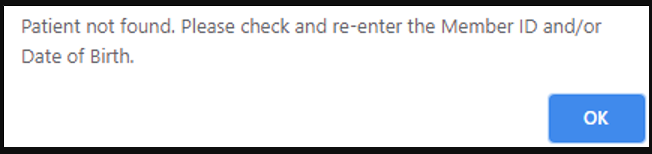 I cannot access the Pop_Up by using Inspect so I have no HTML to show.
When the Pop-Up occurs, if I respond with this code Driver.SwitchToAlert.Accept it goes away, just as desired. However, I don't know how to check grammatically if the Pop-Up is present. (As silly as this my sound, if I assume that the Pop-Up MAY have occurred and use this code on a just-in-case basis, i.e. use the code without the Pop-Up actually existing, the program simply stops without any error message.)
Is there a way to check if the Pop-Up window exists before I respond with Driver.SwitchToAlert.Accept? Of course, any help is greatly appreciated.

I cannot remember where I got the code from but it solved a similar problem for me in the past. It may actually have been in one of the example XLS files that come with the SeleniumBasic install... kudos to whoever came up with it :-)
'Returns true if an alert is present, false otherwise Private Function AlertIsPresent() As Boolean Dim T As String On Error Resume Next T = Driver.Title ' This will raise error 26 if an alert popup is currently displayed AlertIsPresent = (26 = Err.Number) End Function
If function returns true, I use the Driver.SwitchToAlert.Accept to close it.

That worked! Awesome! Did I say awesome? 'Cause I meant to say AWESOME! :-) Yes, kudos to whoever came up with it. And, thank you soo much for sharing that bit of genius with me.