

 florapdx
Support for onChange event?
First off let me say WOW this is amazing! The draft-js ecosystem is so fragmented right now and this brings everything together so nicely. Well done!!
Is there support for on an onChange event or similar?
The use case being to pass the content through props to a "live" preview component as the user types or inserts an image for example.... something like this:
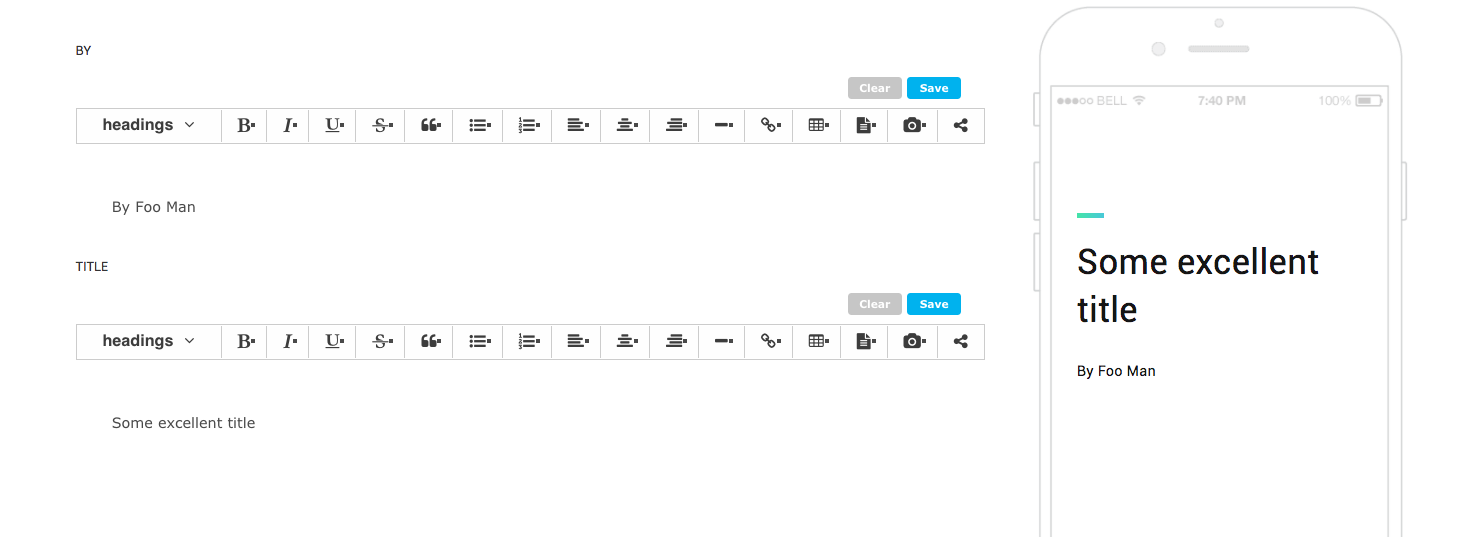
Another question (I don't want to bombard your repo with issues that aren't really issues)... Is there a way to set the initial content of the editor based on props? Use case being editing a pre-existing bit of content.

Hi @jforaker! Hey, thanks so much for the feedback -- very nice to hear :)
Yeah, so let me start with your second question: yes, you can absolutely pass content into the editor via the content prop to seed the editor with initial content for further editing, etc. The content prop takes an html string (or stringified JSON if you're saving content in "raw" DraftJS format), which is then converted by the editor into DraftJS contentState. You can see this in action on the demo page at https://crossfield.github.io/react-drafts/ if you type into the editor, hit "save", and refresh the page. Follow the code path starting here for an example:
https://github.com/crossfield/react-drafts/blob/master/demo/demo-editor.js#L56.
On your second question, no, there's no public onChange method currently, but I pushed up a branch that I think supports what you're asking for. Would you mind taking a look and confirming that this is what you want? Let me know if you have any questions/feedback!

Omg you are awesome! Thank you so much! Confirming that is definitely what I wanted.
Some initial thoughts: it works beautifully and I fully think you should publish this version :)
But for my specific use case - I am having some issues.
I think the async nature of the save method is causing problems in my chain because I am using redux and redux-form, both of which intentionally discourage the use of promises (without adding extra libs like thunk etc).
Maybe I am not implementing it correctly, but it seems like when I involve redux or redux-form, things get a little hairy. Sometimes the cursor position gets set at the first character while you are typing and does not return to the end, so your typing gets jumbled. Its hard to pinpoint why or when, but my hunch is it has to do with the promise/resolution. Is there a reason it has to be async?
Heres how I added it:
  onChange(val) {
    /* regardless of redux, this seems to log everything except the last character typed (unless you blur)
    this.editor.save().then(content => {
      console.log('content', content);
    });
    */

    // my workaround to the above issue - is it okay?
    Promise.resolve(val).then(content => {
      // this logs perfectly :)
      console.log('content: ', content);
      // BUT redux-form is not happy :(
      // this.props.input.onChange(content);
    })
  }

  render() {
    return (
      <div className="demo-editor">
        <ReactDrafts
          ref={editor => this.editor = editor}
          content={this.props.input.value || ''}
          exportTo="html"
          onChange={this.onChange}
        />
      </div>
    );
  }
My component gets rendered in redux-form land via its Field component:
  <Field
    name={field}
    component={ReactDraftsComponent}
    label={field.toUpperCase()}
    multiLine
  />
Hey @jforaker! First, let me say that it's been awhile since using redux-form so forgive me if I misremember how that works, but I can say that there shouldn't be any issue using the editor with redux itself (ie, if you're just trying to push editor content out to your store or post via an api layer or etc). The behavior you're seeing with the cursor is happening because a new EditorState object is created when the editor receives a new content prop, and so we lose the old EditorState with its cursor position state. (Aside: I'll push a fix for the "everything logging but the last letter" issue -- that onChange call should be in a setState() callback).
I definitely need to make this clear in the docs, but ReactDrafts currently does not support being used as a controlled component (the underlying DraftJS Editor component is controlled, of course). There are a couple of reasons for this -- 1) the editor was developed in the context of a Rails project where we were rendering React components in an ad-hoc fashion (no client-side global state management), and I wanted to preserve the flexibility to use in this way; 2) because we have to do a lot of work to parse editor state into and out of html and it doesn't make sense to me to do that work on every change event.
I'd have to think about what it would mean to add support for using ReactDrafts as a controlled component, and I can't get to it right away, but if you want to take a stab at a PR you're more than welcome! Otherwise/until then, here is how I would approach using the editor with your setup:
For your current project, I would render the editor outside of that redux-form Field wrapper, and either fire an action to update your reducer on user "save" button click or blur event, or write-out to a hidden input Field so that redux-form will track the state and only write from the editor to that input (ie, don't pass that input back into the editor via content - only use the content prop for redux-form initialValue value if the user is returning to edit an existing post/blurb/whatever).
Does that all make sense?
Thanks for the info @florapdx. Super helpful. I'm on vacation for a few days, and will definitely look when I'm back on the grid. And thanks again for being so helpful, great stuff! 😀