

 fleetdm
Add ability to see MDM information for Windows hosts
Problem
As an engineer managing thousands of hosts and I'm overwhelmed with tracking these goals:
- Know which Windows hosts are enrolled to mobile device management (MDM).
- Know which Windows hosts are enrolled to which MDM solution.
This makes is hard to understand how my organization is doing in our effort to enroll all Windows hosts to MDM.
This also makes is hard to understand how my organization is doing in our effort to move from one MDM solution to another.
Goal
Add ability to see to see MDM information for Windows hosts.
Parent Epic
- #397
Requirements
-
User can see the number of Windows hosts (hosts count) that match the following criteria.
- Enrolled (automatic) to MDM
- Enrolled (manual) to MDM
- Unenrolled to MDM. Servers are not included.
-
User can see the number of hosts (macOS + Windows) that match the above criteria. Servers are not included.
-
User can navigate to the Hosts page to view and filter a list of hosts that are filtered by the above criteria. Windows and macOS hosts can appear in the same list.
-
The user can see the number of hosts (count) that are enrolled to a specific MDM solution. A unique MDM solution is determined by the MDM's "Server URL."
-
User can navigate to the Hosts page to view and filter a list of hosts filtered by a specific MDM solution. Windows and macOS hosts that are enrolled to the same MDM solution appear in the same list.
Figma
https://www.figma.com/file/hdALBDsrti77QuDNSzLdkx/%F0%9F%9A%A7-Fleet-EE-(dev-ready%2C-scratchpad)?node-id=9244%3A307803
Child issues
- #7860
- #7861

Posibly relevant: https://www.powershellgallery.com/packages/ModernWorkplaceClientCenter/0.1.3/Content/Functions%5CInvoke-AnalyzeMDMEnrollmentStatus.ps1

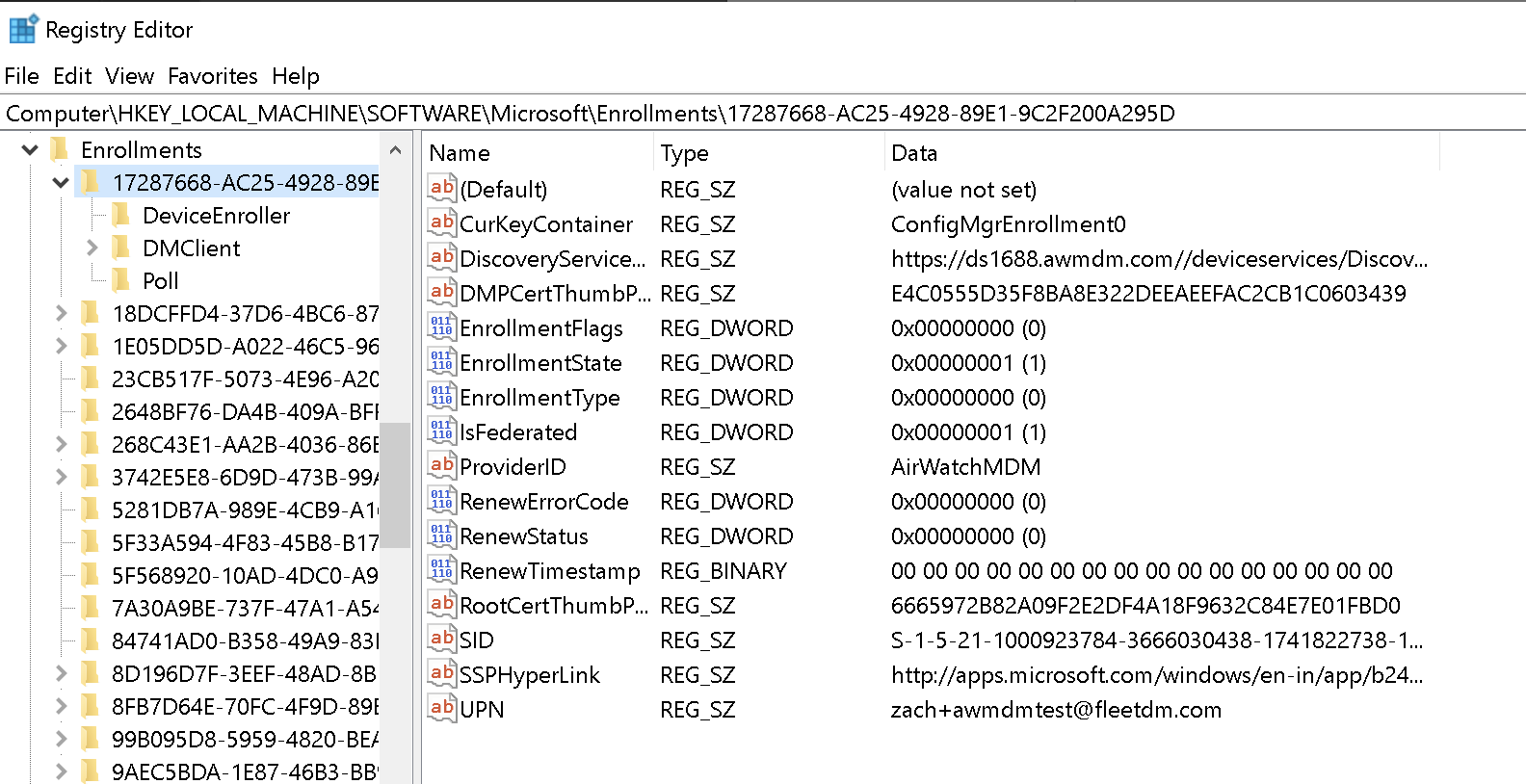
Problem: How to distinguish between Windows workstations and servers? Do we need to to achieve the goal?
Nice!
Lots of good info in the registry
@zwass can you tell if there's a piece of info that would let us know this is the 1 MDM solution that the Windows device is currently enrolled to?
In your screenshot, it looks like there's several MDM solutions under Enrollments.
@defensivedepth tagging you here. I think you might be able to give us some leads to help answer my question.
When I looked, the other "Enrollments" seemed to be empty. I think we probably just pick the first one that has data for ProviderID.
Yes, I think something like this would work:
select key,data from registry where path like 'HKEY_LOCAL_MACHINE\Software\Microsoft\Enrollments\%\ProviderID';


I should mention that when I disconnected the test system from MiradoreMDM and reran that query, there were no results.
when I disconnected the test system from MiradoreMDM and reran that query, there were no results.
Great. Thank you for testing this.
@defensivedepth does the MDM's server URL (ex. https://miradore.test.com) exist in the registry ? If so, what would the osquery query look like to get this information.
We'd Fleet to create a report of all the Windows hosts talking to a specific MDM server. This way, an organization migrating from one MiradoreMDM server A to to MiradoreMDM server B can see how many Windows hosts are still enrolled in A.
Today, for macOS, we're using the server_url column in the mdm table included in the macadmins osquery extension. This extension uses Kolide Launcher's mdm table: https://github.com/kolide/launcher/blob/master/pkg/osquery/table/mdm.go#L19
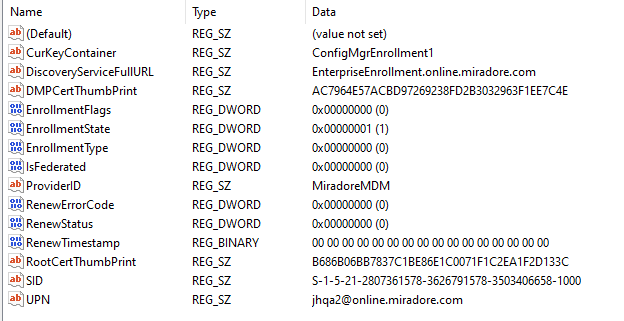
I think the DiscoveryServiceFullURL is what you would be looking for:
select key,data from registry where path like 'HKEY_LOCAL_MACHINE\Software\Microsoft\Enrollments\%\DiscoveryServiceFullURL';

Here is what else is available to query:
@defensivedepth is Windows Autopilot used every time a device enrolls to MDM? Or, is there another enrollment method? I think Apple has 2 enrollment methods (DEP and manual/user enrollment).
For devices enrolled using Windows Autopilot, is there a way to determine if the the device was registered manually or automatically?
Here are some Microsoft docs on each of these methods: https://docs.microsoft.com/en-us/mem/autopilot/automatic-registration
No, Windows Autopilot is not used very time a device enrolls to MDM. There are multiple ways that a device can be enrolled -
In the above miradore example, I used the manual process outlined here: https://www.miradore.com/knowledge/windows/enrolling-windows-10-devices-full-enrollment/
You can also also auto-enroll devices that are connected to Azure AD - as an example, that process for miradore is outlined here: https://www.miradore.com/knowledge/windows/configuring-azure-ad-enrollment/
You can also use Windows Autopilot, which automates things even further.
At this point, it's not clear to me that there is an easy way to differentiate the automated vs. manual enroll. (You can certainly infer some things...) What is the intent for trying to find this out?
@defensivedepth thank you for digging into this.
What is the intent for trying to find this out?
If it's valuable, we'd like to tell users which Windows devices were enrolled to MDM automatically v. manually. It's unclear whether or not this is valuable yet.
For macOS, an admin may have more control/more features (ex. non-removable MDM) for devices enrolled automatically (via what Apple calls DEP). I'm not sure if this is similar for Windows. Do you know?
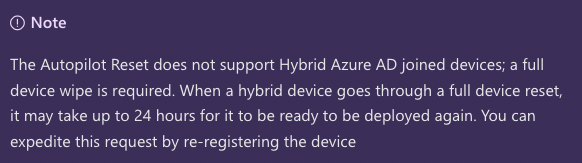
@defensivedepth here's one feature. It appears that users can only use the Autopilot reset feature for Windows devices that are Azure AD joined (not Hybrid Azure AD joined): https://docs.microsoft.com/en-us/mem/autopilot/windows-autopilot-reset
Notes for Noah:
- AutoPilot docs: https://docs.microsoft.com/en-us/mem/autopilot/windows-autopilot
- Do devices enrolled with Autopilot have more features?
- Azure AD devices docs: https://docs.microsoft.com/en-us/azure/active-directory/devices/overview
- Is AD required for devices that enroll with Autopilot?
If it's valuable, we'd like to tell users which Windows devices were enrolled to MDM automatically v. manually. It's unclear whether or not this is valuable yet.
@defensivedepth it looks like admins have a higher level of control over hosts enrolled to MDM and joined to Azure AD. The Autopilot reset feature is only supported on these hosts.
Admins have less control over hosts enrolled to MDM and hybrid joined. Autopilot reset is not supported.
Is there a way to detect if a host is joined v. hybrid joined?
Here's the latest iteration of UI changes in Fleet:

The ntdomains table gives info on non-Azure domain-connected status:
Not connected:

Connected to a non-Azure AD domain:

The following registry location stores Azure Domain info:
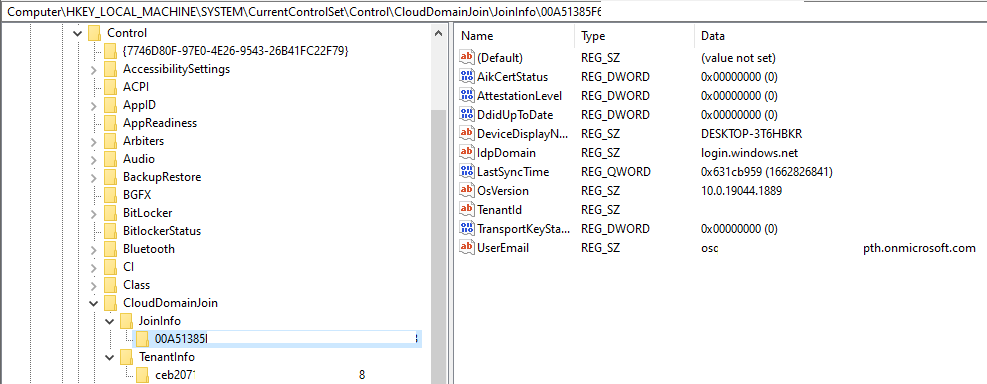
So something like this would tell us that it is joined to Azure AD:
select data as TenantID from registry where path like 'HKEY_LOCAL_MACHINE\system\CurrentControlSet\Control\CloudDomainJoin\JoinInfo\%\Tenantid';

That should be enough to construct a query / set of queries to determine if it is hybrid or not.
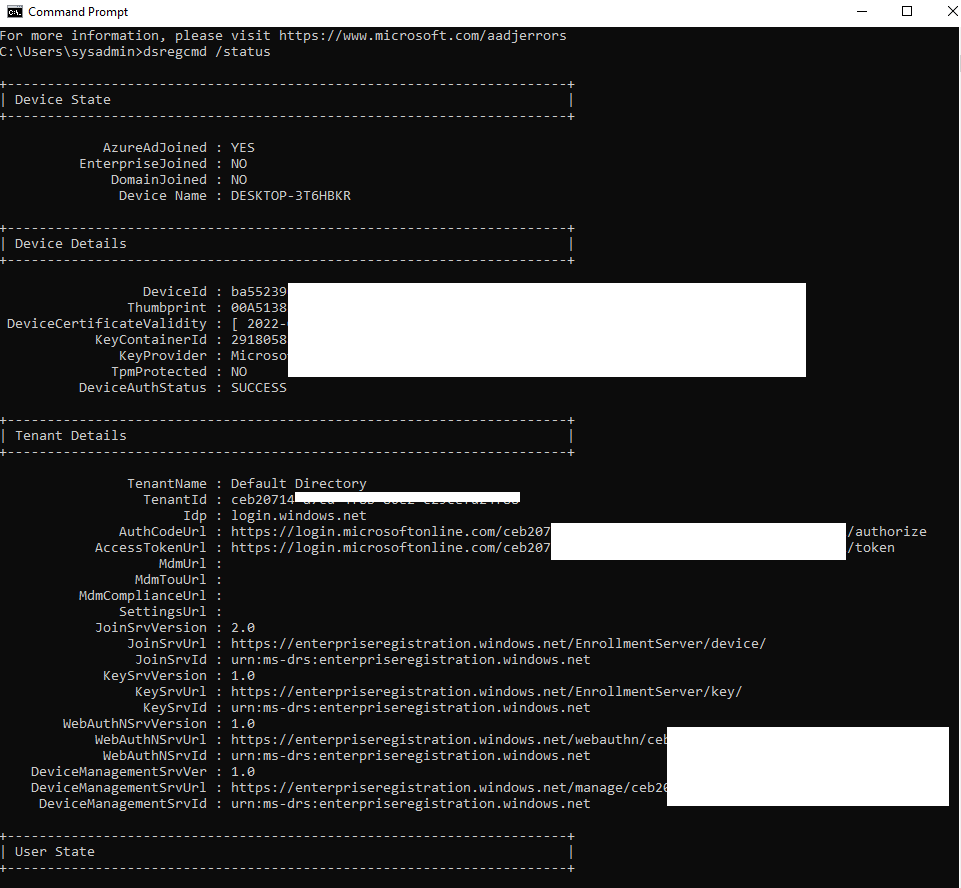
I should mention that a cli utility dsregcmd /status gives this info as well:

How should Fleet bucket Windows hosts in the context of MDM enrollment?
Decision:
Use "Enrolled (automatic)," "Enrolled (manual)," and "Unenrolled" buckets.
Options:
- Use "Enrolled (automatic)," "Enrolled (manual)," and "Unenrolled" buckets.
- Use "Enrolled (joined)," "Enrolled (hybrid joined)," and "Unenrolled" buckets.
- Use "Enrolled (autopilot + joined)," "Enrolled (autopilot + hybrid joined)," "Enrolled (joined)," "Enrolled (hybrid joined)," and "Unenrolled" buckets.
Reasoning:
- Hypothesis is that the most important distinction between the above buckets is that Windows Autopilot allows the admin to block users from unenrolling from MDM.
- Apple DEP enrollment provides the same "block users from unenrolling" feature.
- The Fleet UI currently displays "Enrolled (automatic)," "Enrolled (manual)," and "Unenrolled" buckets for macOS hosts. Fleet can bring Windows hosts into the same counts/list.
- Later, we can add a separate "Azure active directory" table for just Windows if being able to see which hosts are joined v. hybrid joined is valuable. It may be because only joined josts can use the Windows Autopilot reset feature: https://docs.microsoft.com/en-us/mem/autopilot/windows-autopilot-reset
@lukeheath here's the Fleet API updates we discussed to accomplish the goal:
- Expand the
GET /host_summaryAPI route to include MDM data. Expected behavior forGET /host_summaryAPI route becomes...- "Call this route and get all the data you see on the Home page."
- Call this route with a specific team and/or platform and get back the data that's available for that team and/or platform.
- We'll iterate towards this expected behavior.
- Expand the
GET /host/{id}endpoint to include MDM data. Expected behavior forGET /hosts/{id}API route becomes- "Call this route and get all the data you see on the Host details page."
- If data is not available then the data is not included.
- Sunset
GET /macadminsandGET /host/{id}/macadminsAPI routes.
@lukeheath I assigned you this issue and moved it to the designed column.
@defensivedepth curious to get your feedback when you get the chance!
The current plan is the include both Windows and macOS hosts in the following tables:

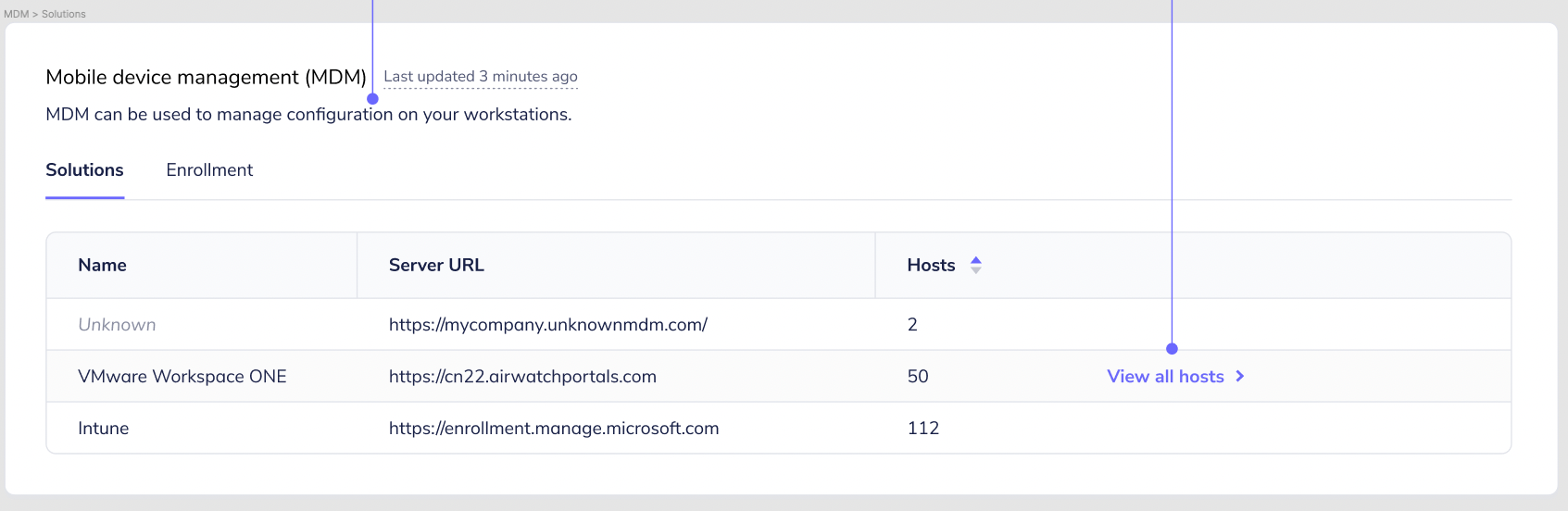
Goals:
- How many hosts, and which hosts, are enrolled in an MDM?
- How many hosts, and which hosts, can be unenrolled from an MDM by the user?
- How many hosts, and which hosts, are enrolled in a specific MDM solution?
Engineering note: Assigned engineer should schedule call with Noah to discuss this ticket and knowledge transfer the research Noah has already done.

@noahtalerman After some thought, a better API design approach will be separate smaller endpoints instead of moving towards large /host_summary and /host/{id} endpoints. This is because we can provide a better user experience by loading data as soon as it is available.
Some data operations take longer to return than others. If we go the single big response route, we can't load any data on the page until the slowest operation finishes. That could add up to 2 seconds or more to page load times. With smaller individual requests, we can load the fast data as soon as it comes back.
For this ticket, that means adding this data at a new /hosts/mdm endpoint instead of inside the /host_summary endpoint.
provide a better user experience by loading data as soon as it is available.
Got it. Makes sense.
new
/hosts/mdmendpoint
@lukeheath what do you think about naming the API route /host_summary/mdm?
This way, we can add future API routes behind the /host_summary namespace. This communicates to the user that the information returned by these API routes will be summary data (aggregate data, host counts, etc.).
In addition, we'll soon design API routes for MDM features in Fleet./hosts/mdm has the potential to conflict with these API routes.
@noahtalerman Good point re: conflicting with future endpoints. I think the endpoint /hosts/summary/ would accomplish the same goal and be more RESTy. I'll update the specs.
@lukeheath /hosts/summary shares a similar but slightly different name/path from existing /host_summary route. Calling this out to double check that you're aware.