

 firebase
[Bug] Storage GetBytesAsync crash for gzip-encoded file
[REQUIRED] Please fill in the following fields:
- Unity editor version: 2019.4.14f1
- Firebase Unity SDK version: 6.15.2 (also tried 7.1.0)
- Source you installed the SDK: Unity Package Manager
- Problematic Firebase Component: Storage
- Other Firebase Components in use: Auth, Database, RemoteConfig, Messaging
- Additional SDKs you are using: none
- Platform you are using the Unity editor on: Mac
- Platform you are targeting: Android
- Scripting Runtime:IL2CPP
[REQUIRED] Please describe the issue here:
Android client crashes when calling GetBytesAsync for a Storage reference that points to a gzip-encoded file. In editor, the method works fine and provides the compressed stream bytes.
Steps to reproduce:
What happened? How can we make the problem occur?
- Upload and gzip-encode a file to Firebase storage with e.g.
gsutil cp -Z <local-file> <gs://remote-file> - Call
FirebaseStorage.DefaultInstance.GetReference(<remote-file>).GetBytesAsync(1000000)
On Android device, the call will always crash, even when the file is much, much smaller than the provided limit:
2021/03/09 10:16:11.359 6904 7586 Error StorageException StorageException has occurred.
2021/03/09 10:16:11.359 6904 7586 Error StorageException An unknown error occurred, please check the HTTP result code and inner exception for server response.
2021/03/09 10:16:11.359 6904 7586 Error StorageException  Code: -13000 HttpResult: 200
2021/03/09 10:16:11.359 6904 7586 Error StorageException The maximum allowed buffer size was exceeded.
2021/03/09 10:16:11.359 6904 7586 Error StorageException java.lang.IndexOutOfBoundsException: The maximum allowed buffer size was exceeded.
2021/03/09 10:16:11.359 6904 7586 Error StorageException 	at com.google.firebase.storage.internal.cpp.CppByteDownloader.doInBackground(CppByteDownloader.java:55)
2021/03/09 10:16:11.359 6904 7586 Error StorageException 	at com.google.firebase.storage.StreamDownloadTask.run(com.google.firebase:firebase-storage@@19.1.1:179)
2021/03/09 10:16:11.359 6904 7586 Error StorageException 	at com.google.firebase.storage.StorageTask.lambda$getRunnable$7(com.google.firebase:firebase-storage@@19.1.1:1072)
2021/03/09 10:16:11.359 6904 7586 Error StorageException 	at com.google.firebase.storage.StorageTask$$Lambda$12.run(Unknown Source:2)
2021/03/09 10:16:11.359 6904 7586 Error StorageException 	at java.util.concurrent.ThreadPoolExecutor.runWorker(ThreadPoolExecutor.java:1162)
2021/03/09 10:16:11.359 6904 7586 Error StorageException 	at java.util.concurrent.ThreadPoolExecutor$Worker.run(ThreadPoolExecutor.java:636)
2021/03/09 10:16:11.359 6904 7586 Error StorageException 	at java.lang.Thread.run(Thread.java:784)
My suspicion is that the Android client allocates the byte buffer based on file size in storage. However, the fetch fails to send accepts: gzip to the server, which should cause automatic decompression in Google Cloud Storage and the resulting uncompressed stream is too big to fit the buffer, whose size may be based on the compressed size.

Hi, Thanks for creating this issue. I just tried this real quick in our Unity storage quickstart example and could not reproduce it. Here are the steps I tried,
- Unity 2020.1.7f1 and FirebaseStorage 7.1.0
- Uploaded "test.txt", "test.zip" and "test.gz" (created with
gzip -c test.txt > test.gz) to storage bucket via the Firebase console web interface. - Downloaded bytes for each of them in Editor and on my Android 8.0 device and I didn't see any crashes.
Could you verify if our quickstart example crashes for you on Android too? If yes, could you try enabling debug logging and running once again,
Firebase.LogLevel logLevel = Firebase.LogLevel.Debug;

Thank you for the reply! Did you also set the content encoding metadata to gzip for the gz stream? To be clear, it is the (correct) metadata that causes SDK to crash, there is no problem per se in storing gzipped streams without encoding metadata. I'm not sure if that can be done via the console web interface, hence I used gsutil cp -Z, which is the documented way of uploading gzip-encoded content to cloud storage. I will check the quickstart next week. Thanks again!
I see. I didn't try setting the content encoding metadata though the file type is identified as "application/x-gzip " in the console. It will be quicker for us to debug if we can reproduce this easily in our quickstarts.
Hi @vimanyu ,
Instructions for reproducing the crash with the quickstart-unity project. You do not need to make any changes.
- Upload file to storage with gzip encoding. One way to do this is to use
gsutil cp -Z <local-file> <remote-file>. - You can verify that the file opens from Firebase console. In this instance the compressed file is automatically decompressed.
- Launch quickstart-unity storage sample
- Enter
<remote-file>to the quickstart "Storage Location" field. - Press "Download Bytes"
- Expected result: get the gzip-encoded bytestream
This works as expected in Editor, but produces a crash as shown on the top of this thread on Android. Tested with trunk on this repo and the linked Firebase SDK 7.1.0 for XCode 12 and dotnet4. Unity 2019.4.14f1. gsutil is from https://cloud.google.com/storage/docs/gsutil .
If you omit -Z from the gsutil upload command, the file is not encoded or compressed, and the setup works on both platforms. Gzip encoding is mandatory for us because it reduces some storage file sizes by a factor of 50:1, but because of this bug we cannot use the correct encoding metadata, and have to communicate encoding out-of-band.
Hi @vnorilo, I followed your repro steps, use gsutil with -Z to upload a file, and download bytes with no issue. Is there any other steps that I should pay attention to? How big is your file?

Hi Cynthia! Thanks for picking this up. Perhaps it results from a combination of Firebase SDK and Android system. As I speculated on top of this thread, Google Cloud will automatically decompress bytestreams when the http request doesn't have accepts: gzip . If Firebase SDK allocates the buffer based on file size but receives an uncompressed stream, that would explain this behavior.
At this point all I can really do is to try to make sure all the details are correct. Here I've got two files, gs://musopia-donotuse/readme.md and gs://musopia-donotuse/readme-identity.md. The former is uploaded with -Z, the latter not. The files are in a public-readable sandbox bucket, so you could even try these urls on your end.
Metadata as per gsutil
gs://musopia-donotuse/readme.md:
    Creation time:          Wed, 17 Mar 2021 13:34:30 GMT
    Update time:            Wed, 17 Mar 2021 13:34:43 GMT
    Storage class:          REGIONAL
    Cache-Control:          no-transform
    Content-Encoding:       gzip
    Content-Length:         251
    Content-Type:           application/octet-stream
    Metadata:
        firebaseStorageDownloadTokens:defce827-c865-4ad4-974d-5cacb0c1134d
    Hash (crc32c):          vMMJYw==
    Hash (md5):             8qD9Edh2x6aA9aC+AV6/Fg==
    ETag:                   CIaejNe4t+8CEAI=
    Generation:             1615988070223622
    Metageneration:         2
gs://musopia-donotuse/readme-identity.md:
    Creation time:          Wed, 17 Mar 2021 13:35:28 GMT
    Update time:            Wed, 17 Mar 2021 13:35:53 GMT
    Storage class:          REGIONAL
    Content-Length:         374
    Content-Type:           application/octet-stream
    Metadata:
        firebaseStorageDownloadTokens:fea51e87-425a-45f9-8ab1-8762a6aa6d29
    Hash (crc32c):          F4i+2w==
    Hash (md5):             3tXAmpXvDTWnVfcuy6AM2g==
    ETag:                   CPGc5/K4t+8CEAI=
    Generation:             1615988128337521
    Metageneration:         2
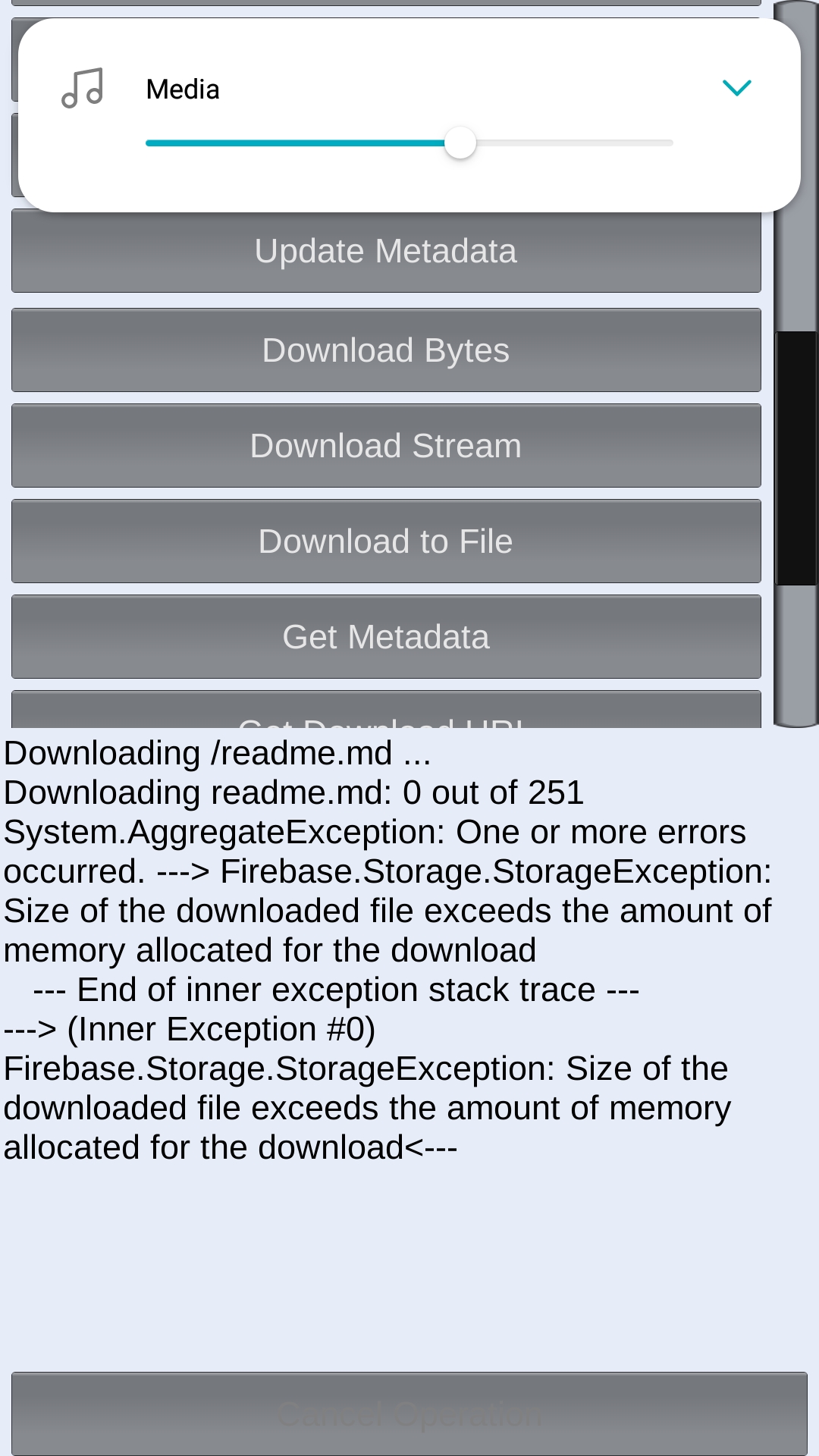
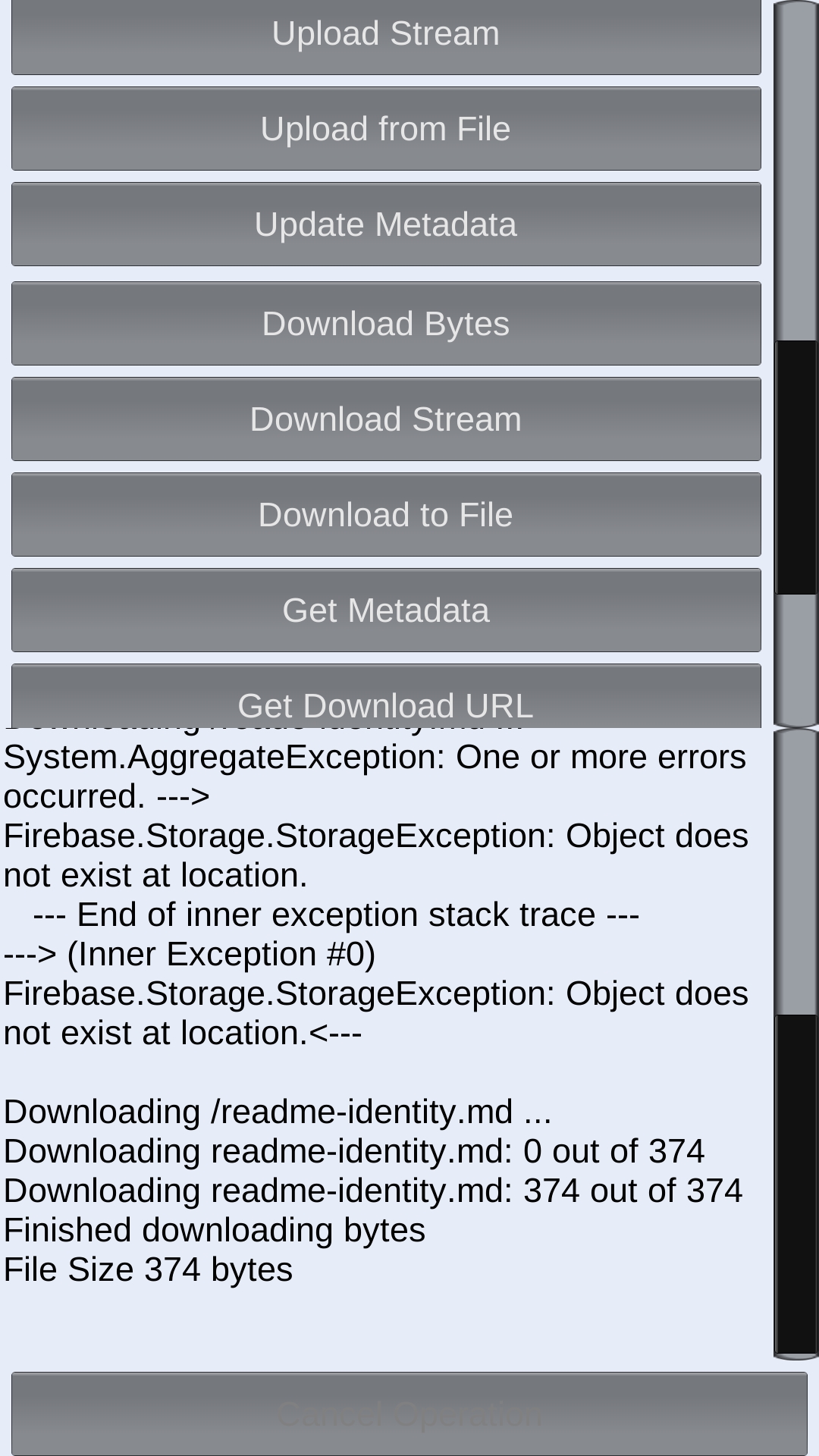
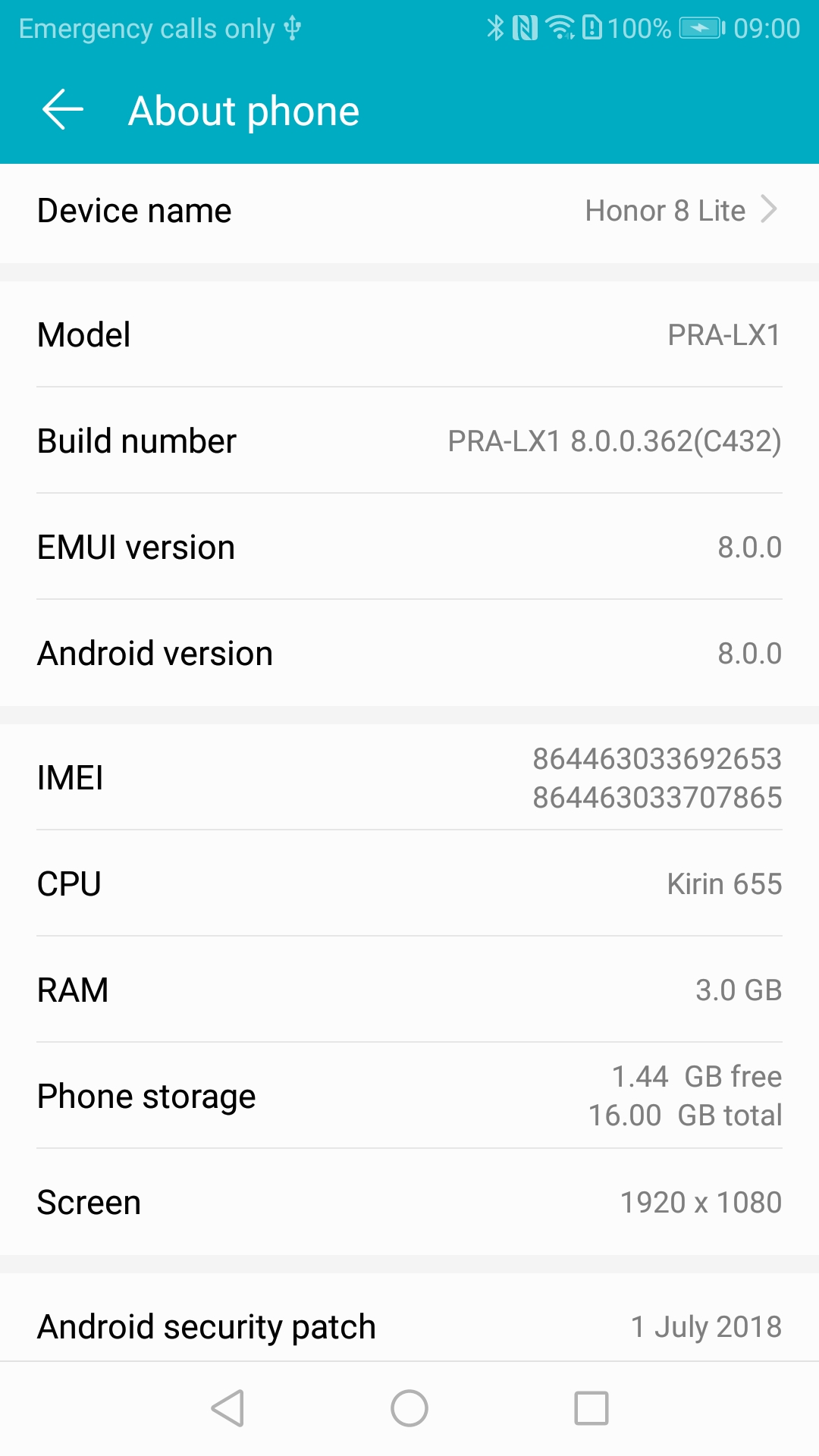
I've attached screenshots of the quickstart app on the crashing device and the device system info screen.
Crash downloading readme.md
Success downloading readme-identity.md
(after correcting typoed url :P )
Device
Thanks again!
Hi @vnorilo, I managed to repro the issue both with our unity testapp and android testapp, our team will be looking into solve the issue.
Update: in the next release of firebase-storage:19.2.2 will contain a potential fix for the issue. Let's wait for the release to get out and check whether it's fixed. Thanks for being patient.
This might not need a fix in the Android Storage SDK, but we need to fix our documentation to state that -1 is a valid return value: https://github.com/firebase/firebase-android-sdk/pull/2618

@schmidt-sebastian
Unity StorageReference.GetBytesAsync() API is calling into StorageReference.getStream(StreamDownloadTask.StreamProcessor processor) through C++ API
C++ code did not check StreamDownloadTask.getTotalByteCount() at all to throw any exception.
Judge by the user's callstack, this seem to be thrown from native Android SDK.
2021/03/09 10:16:11.359 6904 7586 Error StorageException java.lang.IndexOutOfBoundsException: The maximum allowed buffer size was exceeded.
2021/03/09 10:16:11.359 6904 7586 Error StorageException 	at com.google.firebase.storage.internal.cpp.CppByteDownloader.doInBackground(CppByteDownloader.java:55)
2021/03/09 10:16:11.359 6904 7586 Error StorageException 	at com.google.firebase.storage.StreamDownloadTask.run(com.google.firebase:firebase-storage@@19.1.1:179)
2021/03/09 10:16:11.359 6904 7586 Error StorageException 	at com.google.firebase.storage.StorageTask.lambda$getRunnable$7(com.google.firebase:firebase-storage@@19.1.1:1072)
2021/03/09 10:16:11.359 6904 7586 Error StorageException 	at com.google.firebase.storage.StorageTask$$Lambda$12.run(Unknown Source:2)
2021/03/09 10:16:11.359 6904 7586 Error StorageException 	at java.util.concurrent.ThreadPoolExecutor.runWorker(ThreadPoolExecutor.java:1162)
2021/03/09 10:16:11.359 6904 7586 Error StorageException 	at java.util.concurrent.ThreadPoolExecutor$Worker.run(ThreadPoolExecutor.java:636)
2021/03/09 10:16:11.359 6904 7586 Error StorageException 	at java.lang.Thread.run(Thread.java:784)
Perhaps it works with StorageReference.getBytes() and StorageReference.getStream() but not StorageReference.getStream(StreamDownloadTask.StreamProcessor processor) ?

Further dig:
The exception is thrown from this code, which is indeed part of C++/Unity SDK. However, judged by the code, it does not seem to be an issue in C++/Unity SDK. Here is the reason:
The user specified the maxDownloadSizeBytes is 1,000,000 byts = 1Mb. That is, this.cppBufferSize is 1,000,000.
FirebaseStorage.DefaultInstance.GetReference(<remote-file>).GetBytesAsync(1000000)
The gzip file provided by the user is 251 bytes, which is much less than 1,000,000.
This implies that stream.read(bytes, 0, bytes.length) still return non--1 value after the file is downloaded, and cause the total downloaded byte size to exceed maxDownloadSizeBytes specified by the user. This implies the issue is in StreamProcessor, a Firebase Android API.
This does not seem to be the same issue to firebase/firebase-android-sdk#2618
@schmidt-sebastian also mentioned that the backend does not provide the file size of gzip encoded file to the client API. Could that be the issue?
Update:
Tried Android testapp and it does not seems like anything odd about the value in bytesDownloaded. getTotalByteCount() returns -1 as @schmidt-sebastian mentioned in https://github.com/firebase/firebase-android-sdk/pull/2618. But that should not cause the exception to be thrown in C++ SDK
The seems to plague both FirebaseStorage.GetBytesAsync() and FirebaseStorage.GetStreamAsync() but not FirebaseStorage.GetFileAsync().
The only workaround for this probably is to download the file to Android device using FirebaseStorage.GetFileAsync(), then read the file afterward.
Will need to further investigate into the issue.