

 firebase
[firestore-bigquery-export] Value for argument "limit" is not a valid integer
[REQUIRED] Step 2: Describe your configuration
- Extension name: [email protected]
- Extension version: 0.1.21
[REQUIRED] Step 3: Describe the problem
Hi guys,
Today I followed the import existing documents guideline but this problem occurred

Any idea on what's causing it?
PS: There is another issue, for some reason every time I run the script I have to introduce the values 2x (as it's also seen in the picture above)

Further investigation shows an issue when using the multi-thread option that will need to be fixed.
As a temporary solution, users should select no for this prompt.

Hi, I'm getting the same result even when selecting No when prompted with the question of multiple threads. I tried every configuration that I could think of, but it always resulted in this same error message. I'm following the steps shown here https://github.com/firebase/extensions/blob/master/firestore-bigquery-export/guides/IMPORT_EXISTING_DOCUMENTS.md.
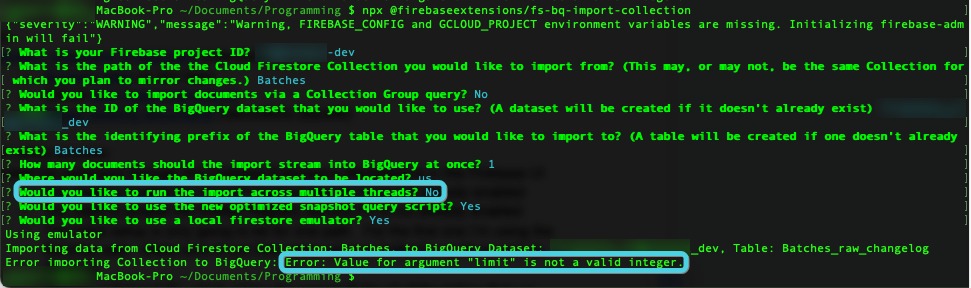

still getting same error even set 'No' for the multiple threads :( any other solution?

Hi, I'm getting the same result even when selecting No when prompted with the question of multiple threads. I tried every configuration that I could think of, but it always resulted in this same error message. I'm following the steps shown here https://github.com/firebase/extensions/blob/master/firestore-bigquery-export/guides/IMPORT_EXISTING_DOCUMENTS.md.
still getting same error even set 'No' for the multiple threads :( any other solution?
You can use this
npx @firebaseextensions/fs-bq-import-collection \
  --non-interactive \
  --project=[your_project] \
  --source-collection-path=[your_collection] \
  --query-collection-group=false \
  --dataset=[your_dataset] \
  --table-name-prefix=[your_table] \
  --batch-size=300 \
  --dataset-location=us \
  --multi-threaded=false \
  --use-new-snapshot-query-syntax=false \
  --use-emulator=false

Yes, for anyone confused about this (I was stuck for like an hour). This will work if you run the script non-interactively. Just use all the required flags all in one command. Here is an example
➜  ~ npx @firebaseextensions/fs-bq-import-collection \
--non-interactive \
--project {GCP PROJECT_ID} \
--source-collection-path {FIRESTORE COLLECTION PATH NAME} \
--query-collection-group {FALSE} \
--dataset {USER FRIENDLY NAME FOR THE BQ DATASET} \
--table-name-prefix {TABLE NAME PREFIX} \
--dataset-location us
If the table is called data_table_raw_changelog, just put data_table for table-name-prefix
