

 firebase
[firestore-bigquery-change-tracker] Can't partition table on schema's `timestamp` column
[READ] Step 1: Are you in the right place?
Yes
[REQUIRED] Step 2: Describe your configuration
- Extension name:
firestore-bigquery-export - Extension version:
0.1.24 - Configuration values (redacted all other values unrelated to partitioning):
-
TABLE_PARTITIONING=MONTH -
TIME_PARTITIONING_FIELD=timestamp -
TIME_PARTITIONING_FIELD_TYPE=TIMESTAMP -
TIME_PARTITIONING_FIRESTORE_FIELDis left empty on purpose
-
Note I want to use the
timestampcolumn, which is already part of the BigQuery schema (and which contains the date and time of the function event). I don't want to extract some field from the Firestore document itself.
[REQUIRED] Step 3: Describe the problem
Steps to reproduce:
- Deploy the extension with the above partitioning configuration.
Expected result
I expect the extension to create a partitioned table.
Actual result
The extensions creates a table without partitioning applied.
Here is the extension logs of the first invocation (which created the table):

(One thing to note: We had the extension already installed without partitioning enabled. I updated the extension and its configuration and deleted only the table (not the view) from BigQuery)
Hypothesis
I think the bug lays in the fact, that the firestore-bigquery-change-tracker either expects all or none of the custom partitioning options to be set. Even though I would expect it to also work with one of the other columns, that are already part of the schema (in my use case the timestamp column) and don't need to be extracted from the document data.
https://github.com/firebase/extensions/blob/f053443834d5ef4521100966d16367799e8340b8/firestore-bigquery-export/firestore-bigquery-change-tracker/src/bigquery/partitioning.ts#L93-L97

HI @bergold. There is also a scenario where we cannot partition an already existing table.
We are currently tracking this related issue https://github.com/firebase/extensions/issues/796 included are instructions on how to manually get around the issue.

Hey! Thanks for your response!
I just revalidated the issue I'm having with a completely fresh Firebase project.
The steps I took are:
- Create a new Firebase project
- Create a Firestore database therein
- In a fresh directory on my machine:
- Run
firebase init - Setup
firestorewith default options - Run
firebase ext:install firebase/firestore-bigquery-export - Run
firebase deployand wait for it to finish
- Run
- Trigger a write to the Firestore
postscollection - See the newly created BigQuery dataset and table
Here is a link to the terminal output of step 3.
I will also update the issue description above to make this more clear. (and upload a link to a reproduction repo in a minute)
In my understanding, the description of this config field of the BigQuery extension suggests, that my intended use should be supported:
BigQuery Time Partitioning column name (Optional): BigQuery table column/schema field name for TimePartitioning. You can choose schema available as timestamp OR new custom defined column that will be assigned to the selected Firestore Document field below. Defaults to pseudo column _PARTITIONTIME if unspecified. Cannot be changed if Table is already partitioned.
So my question is: How do I choose the timestamp schema field for partitioning and not the default _PARTITIONTIME pseudo column?
Thanks for the detailed update @bergold
To sync a partitioned column, you will also need the relevant Firestore field to be defined.
Firestore Document field name for BigQuery SQL Time Partitioning field option (Optional): This parameter will allow you to partition the BigQuery table  created by the extension based on selected. The Firestore Document field value must be a top-level TIMESTAMP, DATETIME, DATE field BigQuery string format or Firestore timestamp(will be converted to BigQuery TIMESTAMP). Cannot be changed if Table is already partitioned.
 example: postDate
? Enter a value for Firestore Document field name for BigQuery SQL Time Partitioning field option:
This looks to be unspecified in your configuration example?
However, this is not what I want to do. I want to use the timestamp column, which is already part of the BigQuery schema (and which contains the date and time of the function event).
I now, that it's nearly the same as using ingestion time partitioning with the pseudo column. However, because there is already the timestamp column and we are already using it for many of our queries, it would be nice if we could use that one. And, I thought that this is supported based on the description of the config field, that I quoted in my last comment.
Thank you for your help and patience.
@bergold I see what you mean now!
We would need to consider if we require a matching firestore column to partition a BQ field.
At the very least, this would be an edge case to consider as timestamp is a part of the default schema.
Developer note: Do we need a firestore equivalent field, if we use the timestamp data type in BigQuery?
Hi @bergold.
Apologies for the delay on this feature. Having now added it our backlog for development, there doesn't seem to be an issue in using the timestamp field.
Did you experience any issues setting when trying to configure the timestamp field?
I can confirm, that with the following configuration the table is still not partitioned:
BIGQUERY_PROJECT_ID=my-project-123
COLLECTION_PATH=users/{userid}/{collection}
DATASET_ID=firestore_export
DATASET_LOCATION=europe-west3
LOCATION=europe-west3
TABLE_ID=users
TABLE_PARTITIONING=MONTH
TIME_PARTITIONING_FIELD=timestamp
TIME_PARTITIONING_FIELD_TYPE=omit
USE_NEW_SNAPSHOT_QUERY_SYNTAX=yes
WILDCARD_IDS=true
The TIME_PARTITIONING_FIELD_TYPE is a required field for adding partitioning. Have you tried setting this value to be TIMESTAMP to match the timestamp field value.

Hi @dackers86,
Thank you for looking into this issue!
I tried that just now (uninstalled the extension, deleted the BigQuery dataset, reinstalled the extension), but it is still not partitioned.
I think, TIME_PARTITIONING_FIRESTORE_FIELD is also a required field for adding partitioning and this is the discrepancy of how it's currently working and what I'm trying to accomplish.
The Firebase console can be confusing with the optional fields. As we cannot have conditional parameters, we list them as optional.
However, for partitioning, the following fields are all required:
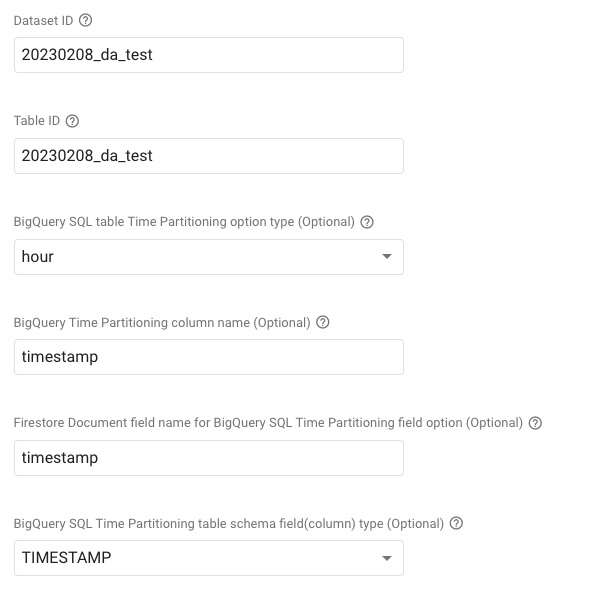
The above configuration, should create a partitioned table based on the timestamp field, perhaps we need better documentation for this also?
Using hour / timestamp / timestamp / TIMESTAMP in these four fields give me this error:
"Error caught creating table Field timestamp already exists in schema"

For future reference, hour / not set / not set / omit works for me. The partitions are created and it uses the timestamp field. I have a _PARTITIONTIME virtual column too.