

 fastmachinelearning
random prediction of resnet generated by hls4ml
Thank you for your great work! I am trying to generate Resnet20 with hls4ml. I trained Resnet20 with Qkeras and transfer to hls_model. when I ran hls_model.predict, it showed random prediction and the accuracy was low. But the quantized model works well. I tried with ap_fix<32,16> and ap_fix<16,6> but it still not work.
This is my model:
from tensorflow.keras import layers
from qkeras.qlayers import QDense, QActivation
from qkeras.quantizers import quantized_bits, quantized_relu
from qkeras import QActivation
from qkeras import QDense, QConv2DBatchnorm, QConv2D
from tensorflow.keras.layers import Dropout

subtract_pixel_mean = True

n = 3


version = 1

# Computed depth from supplied model parameter n
if version == 1:
    depth = n * 6 + 2
elif version == 2:
    depth = n * 9 + 2

# Model name, depth and version
model_type = 'ResNet%dv%d' % (depth, version)


def lr_schedule(epoch):
    """Learning Rate Schedule

    Learning rate is scheduled to be reduced after 80, 120, 160, 180 epochs.
    Called automatically every epoch as part of callbacks during training.

    # Arguments
        epoch (int): The number of epochs

    # Returns
        lr (float32): learning rate
    """
    lr = 1e-3
    if epoch > 180:
        lr *= 0.5e-3
    elif epoch > 160:
        lr *= 1e-3
    elif epoch > 120:
        lr *= 1e-2
    elif epoch > 80:
        lr *= 1e-1
    print('Learning rate: ', lr)
    return lr


def resnet_layer(inputs,
                 num_filters=16,
                 kernel_size=3,
                 strides=1,
                 activation='relu',
                 batch_normalization=True,
                 conv_first=True, indx=0):
    """2D Convolution-Batch Normalization-Activation stack builder

    # Arguments
        inputs (tensor): input tensor from input image or previous layer
        num_filters (int): Conv2D number of filters
        kernel_size (int): Conv2D square kernel dimensions
        strides (int): Conv2D square stride dimensions
        activation (string): activation name
        batch_normalization (bool): whether to include batch normalization
        conv_first (bool): conv-bn-activation (True) or
            bn-activation-conv (False)

    # Returns
        x (tensor): tensor as input to the next layer
    """


    x = inputs
    if conv_first:

        if batch_normalization:
            x = QConv2DBatchnorm(num_filters,
                  kernel_size=kernel_size,
                    kernel_quantizer="quantized_bits(8,0,alpha=1)",
                         bias_quantizer="quantized_bits(8,0,alpha=1)",
                  strides=strides,
                  padding='same',
                  kernel_initializer='he_normal',
                  kernel_regularizer=l2(1e-4), name= 'fused_convbn{}_1'.format(indx))(x)
        else:
            x = QConv2D(num_filters,
          kernel_size=kernel_size,
            kernel_quantizer="quantized_bits(8,0,alpha=1)",
                 bias_quantizer="quantized_bits(8,0,alpha=1)",
          strides=strides,
          padding='same',
          kernel_initializer='he_normal',
          kernel_regularizer=l2(1e-4), name= 'conv{}_1'.format(indx))(x)


        if activation is not None:
            x = QActivation('quantized_relu(8)')(x)
    else:
        if batch_normalization:
            x = BatchNormalization()(x)
        if activation is not None:
            x = QActivation('quantized_relu(8)')(x)
        x = QConv2D(num_filters,
          kernel_size=kernel_size,
                    kernel_quantizer="quantized_bits(8,0,alpha=1)",
                         bias_quantizer="quantized_bits(8,0,alpha=1)",
          strides=strides,
          padding='same',
          kernel_initializer='he_normal',
          kernel_regularizer=l2(1e-4), name= 'conv{}_2'.format(indx))(x)
    return x


def resnet_v1(input_shape, depth, num_classes=10):

    if (depth - 2) % 6 != 0:
        raise ValueError('depth should be 6n+2 (eg 20, 32, 44 in [a])')
    # Start model definition.
    num_filters = 16
    num_res_blocks = int((depth - 2) / 6)

    inputs = Input(shape=input_shape)
    indx = 0
    x = resnet_layer(inputs=inputs)
    indx = indx +1
    # Instantiate the stack of residual units
    for stack in range(3):
        for res_block in range(num_res_blocks):
            strides = 1
            if stack > 0 and res_block == 0:  # first layer but not first stack
                strides = 2  # downsample
            y = resnet_layer(inputs=x,
                             num_filters=num_filters,
                             strides=strides,indx=indx)
            indx = indx + 1
            y = resnet_layer(inputs=y,
                             num_filters=num_filters,
                             activation=None,indx=indx)
            indx = indx + 1

            if stack > 0 and res_block == 0:  # first layer but not first stack
                # linear projection residual shortcut connection to match
                # changed dims
                x = resnet_layer(inputs=x,
                                 num_filters=num_filters,
                                 kernel_size=1,
                                 strides=strides,
                                 activation=None,
                                 batch_normalization=False, indx=indx)
                indx = indx +1
            x = keras.layers.add([x, y])
            x = QActivation('quantized_relu(8)')(x)
        num_filters *= 2

    # Add classifier on top.
    # v1 does not use BN after last shortcut connection-ReLU
    x = AveragePooling2D(pool_size=8)(x)
#     x = MaxPooling2D(pool_size=8)(x)

    y = Flatten(name = 'flattenlayer')(x)
    x = Dense(num_classes,
                    activation=None,
                    kernel_initializer='he_normal', name ='output_dense')(y)

    outputs = Activation('softmax',name='output_softmax')(x)

    # Instantiate model.
    model = Model(inputs=inputs, outputs=outputs)
    return model

model = resnet_v1(input_shape=input_shape, depth=depth)

model.compile(loss='categorical_crossentropy',
              optimizer=Adam(lr=lr_schedule(0)),
              metrics=['accuracy'])
This is how I train the model:
# Prepare model model saving directory.
save_dir = os.path.join(os.getcwd(), 'saved_models')
model_name = 'cifar10_%s_model.{epoch:03d}.h5' % model_type
if not os.path.isdir(save_dir):
    os.makedirs(save_dir)
filepath = os.path.join(save_dir, model_name)

# Prepare callbacks for model saving and for learning rate adjustment.
checkpoint = ModelCheckpoint(filepath=filepath,
                             monitor='val_acc',
                             verbose=1,
                             save_best_only=True)

lr_scheduler = LearningRateScheduler(lr_schedule)

lr_reducer = ReduceLROnPlateau(factor=np.sqrt(0.1),
                               cooldown=0,
                               patience=5,
                               min_lr=0.5e-6)

callbacks = [checkpoint, lr_reducer, lr_scheduler]

# Run training, with or without data augmentation.
if not data_augmentation:
    print('Not using data augmentation.')
    model.fit(x_train, y_train,
              batch_size=batch_size,
              epochs=epochs,
              validation_data=(x_test, y_test),
              shuffle=True,
              callbacks=callbacks)
else:
    print('Using real-time data augmentation.')
    # This will do preprocessing and realtime data augmentation:
    datagen = ImageDataGenerator(
        # set input mean to 0 over the dataset
        featurewise_center=False,
        # set each sample mean to 0
        samplewise_center=False,
        # divide inputs by std of dataset
        featurewise_std_normalization=False,
        # divide each input by its std
        samplewise_std_normalization=False,
        # apply ZCA whitening
        zca_whitening=False,
        # epsilon for ZCA whitening
        zca_epsilon=1e-06,
        # randomly rotate images in the range (deg 0 to 180)
        rotation_range=0,
        # randomly shift images horizontally
        width_shift_range=0.1,
        # randomly shift images vertically
        height_shift_range=0.1,
        # set range for random shear
        shear_range=0.,
        # set range for random zoom
        zoom_range=0.,
        # set range for random channel shifts
        channel_shift_range=0.,
        # set mode for filling points outside the input boundaries
        fill_mode='nearest',
        # value used for fill_mode = "constant"
        cval=0.,
        # randomly flip images
        horizontal_flip=True,
        # randomly flip images
        vertical_flip=False,
        # set rescaling factor (applied before any other transformation)
        rescale=None,
        # set function that will be applied on each input
        preprocessing_function=None,
        # image data format, either "channels_first" or "channels_last"
        data_format=None,
        # fraction of images reserved for validation (strictly between 0 and 1)
        validation_split=0.0)

    # Compute quantities required for featurewise normalization
    # (std, mean, and principal components if ZCA whitening is applied).
    datagen.fit(x_train)

    # Fit the model on the batches generated by datagen.flow().
    model.fit_generator(datagen.flow(x_train, y_train, batch_size=batch_size),
                        validation_data=(x_test, y_test),
                        epochs=50, verbose=1, workers=4,
                        callbacks=callbacks)

# Score trained model.
scores = model.evaluate(x_test, y_test, verbose=1)
print('Test loss:', scores[0])
print('Test accuracy:', scores[1])
**This is the config:**

hls_config = hls4ml.utils.config_from_keras_model(model, granularity='name')
hls_config['Model']['Strategy'] = 'Resource'
hls_config['Model']['ReuseFactor'] = 2
hls_config['Model']['Precision'] = 'ap_fixed<16,6>'

for Layer in hls_config['LayerName'].keys():

    if Layer == "flattenlayer":
        hls_config['LayerName'][Layer]['Strategy'] = 'Resource'
        hls_config['LayerName'][Layer]['Precision'] = 'ap_fixed<32,16>'

    if Layer == "output_dense":
        hls_config['LayerName'][Layer]['Strategy'] = 'Resource'
        hls_config['LayerName'][Layer]['Precision'] = 'ap_fixed<32,16>'

    if Layer == "output_softmax":
        hls_config['LayerName'][Layer]['Strategy'] = 'Stable'
        hls_config['LayerName'][Layer]['Precision'] = 'ap_fixed<32,16>'


hls_model = hls4ml.converters.convert_from_keras_model(model,
                                                       backend='VivadoAccelerator',
                                                       io_type='io_stream',
                                                       hls_config=hls_config,
                                                       output_dir='model_1/hls4ml_prj',
                                                       board = 'zcu102',
                                                       part='xczu9eg-ffvb1156-2-e'
                                                      ) #xcu280-fsvh2892-2L-e
I test like this:
hls_model.compile()
print("---------compile finish--------------------------")

from sklearn.metrics import accuracy_score

def plotROC(Y, y_pred, y_pred_hls4ml, label="Model"):

    accuracy_keras  = float(accuracy_score (np.argmax(Y,axis=1), np.argmax(y_pred,axis=1)))
    accuracy_hls4ml = float(accuracy_score (np.argmax(Y,axis=1), np.argmax(y_pred_hls4ml,axis=1)))

    print("Accuracy Keras:  {}".format(accuracy_keras))
    print("Accuracy hls4ml: {}".format(accuracy_hls4ml))

    fig, ax = plt.subplots(figsize=(9, 9))
#     _ = plotting.makeRoc(Y, y_pred, labels=['%i'%nr for nr in range(n_classes)])
    plt.gca().set_prop_cycle(None) # reset the colors
    _ = plotting.makeRoc(Y, y_pred_hls4ml, labels=['%i'%nr for nr in range(10)], linestyle='--')

    from matplotlib.lines import Line2D
    lines = [Line2D([0], [0], ls='-'),
             Line2D([0], [0], ls='--')]
    from matplotlib.legend import Legend
    leg = Legend(ax, lines, labels=['Keras', 'hls4ml'],
                loc='lower right', frameon=False)
    ax.add_artist(leg)
    plt.figtext(0.2, 0.38,label, wrap=True, horizontalalignment='left',verticalalignment='center')
    plt.ylim(0.01,1.)
    plt.xlim(0.7,1.)


X_test_reduced = x_test[:50]
Y_test_reduced = y_test[:50]
start = time.time()
y_predict = model.predict(X_test_reduced)
end = time.time()
print('\n model took {} minutes to run!\n'.format( (end - start)/60.))

start = time.time()
y_predict_hls4ml = hls_model.predict(np.ascontiguousarray(X_test_reduced))
end = time.time()
print('\n hls model took {} minutes to run!\n'.format( (end - start)/60.))

plotROC(Y_test_reduced, y_predict, y_predict_hls4ml, label="Keras")
resnet20_1-QKeras-Copy2.ipynb.zip
Attached is my code. I will be grateful if you could pls help me with it.

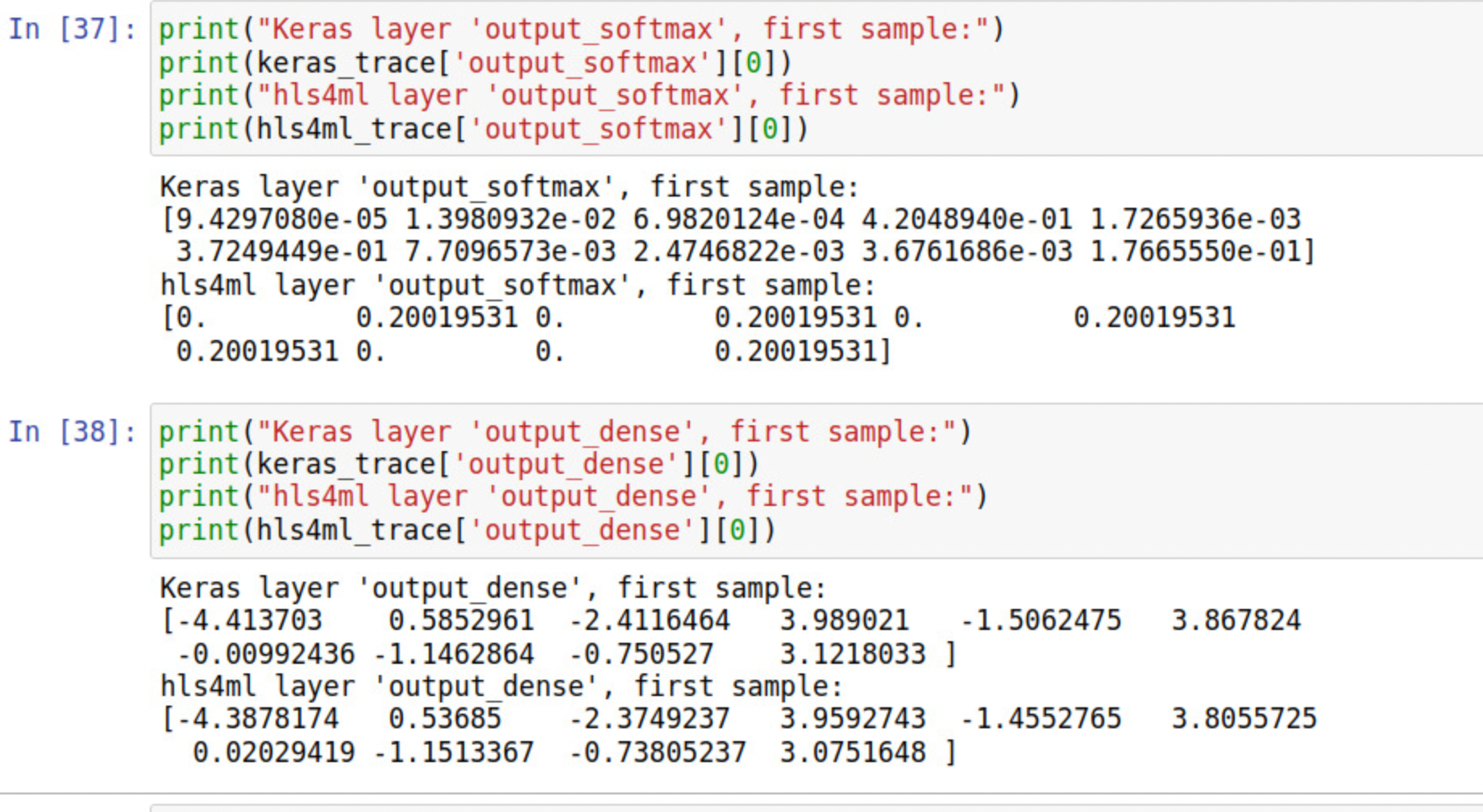
I think there might be some problem with the last softmax layer. I printed the output of "output_softmax" and it showed like the fig.
Similar issues happened on my side, What is the current solution or workaround? @liuhao-97
