

 fastapi
build.sh and deploy.sh not copying latest code
I run these two scripts below, it looks like the build.sh copies the app code. When I run the deploy command and then go inside (exec /bin/bash) the container, I can't see the code changes.
TAG=prod FRONTEND_ENV=production bash ./scripts/build.sh
DOMAIN=xxx.com \ TRAEFIK_TAG=xxx.com \ STACK_NAME=xxx-com \ TAG=prod \ bash ./scripts/deploy.sh
If I do docker stack rm xxx-com then rerun the build.sh and deploy.sh it picks up the latest code changes in app. I thought I would be able to build and deploy without removing them from the stack, since this would cause some minor downtime if I need to docker stack rm each time.
Sorry if this is just a basic misunderstanding of my docker knowledge, I'm very new to it.

I also get this when I run DOMAIN=xxx.com \ TRAEFIK_TAG=xxx.com \ STACK_NAME=xxx-com \ TAG=prod \ bash ./scripts/deploy.sh
image backend:prod could not be accessed on a registry to record its digest. Each node will access backend:prod independently, possibly leading to different nodes running different versions of the image.
I don't get that for the other images except from celeryworker:prod
Also, the image ID shown on docker ps after running deploy does not match the backend:prod image ID when I run docker images, unless I take down the stack and rebuild then deploy again.
I guess this is some kind of private registry issue.
I also get this when I run
DOMAIN=xxx.com \ TRAEFIK_TAG=xxx.com \ STACK_NAME=xxx-com \ TAG=prod \ bash ./scripts/deploy.sh
image backend:prod could not be accessed on a registry to record its digest. Each node will access backend:prod independently, possibly leading to different nodes running different versions of the image.I don't get that for the other images except from celeryworker:prod
Also, the image ID shown on docker ps after running deploy does not match the backend:prod image ID when I run
docker images, unless I take down the stack and rebuild then deploy again.I guess this is some kind of private registry issue.
Regarding the error, this just indicates, that the image can't be found in a registry but your local. This means, that you built your image locally and other nodes could not access this image. This would result in two nodes with different images. If you only have one node, you can ignore this but if you have two or more you should definitely use a registry.
Why is this only shown for celeryworker ? - > The message is only printed for updated containers, this means only your celeryworker changed and the other containers not. Change the frontend or the backend and the error will be shown for them too.
You should not run docker stack rm as this would result in a downtime and loss of the logs and other stuff, always update with the deploy script. If your code isn't updated you can add --no-cache to the build script. This will always include all changes. I did this by adding $@ to the end of the build script and provide it to build if needed.
I hope this helped, I'm on mobile and can't be as informative as I'd like to :)

@Biskit1943 thank you for your help, I'm still struggling to get this working, any more help would be appreciated.
I did the build with --no-cache flag which took a few mins, then deployed, then I exec bin/bash into the backend container and did an ls -la. It still hasn't updated the code in the app directory.
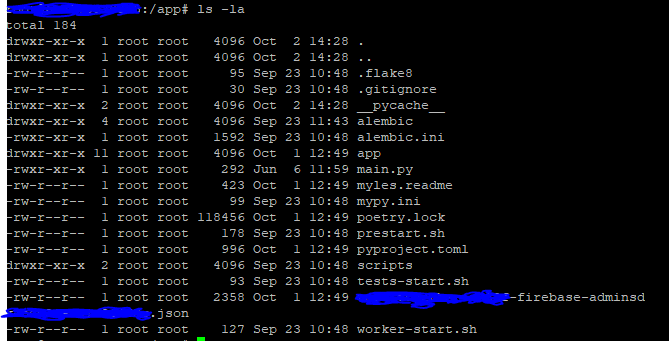
If I do ls -la outside the backend container in the host machines backend/app directory it has thisisatest.md

If I run docker images I get the following output, with the latest Image ID, which is what I thought would also show up on docker ps (on the screenshot below this one)

My backend image that is running has the Image of 50a8920aeaa6 rather than backend:prod or the ID shown on the screenshot above

Could you try to run docker service update --force <name> not sure right now but this should do a force update of the container, which should in theory deploy the latest image.
Some more testing:
Build, deploy, then docker images

docker ps

Change code, build, then docker images The previous backend and celeryworker images are still their, they have lost their repository and tag and are now <none> <none>
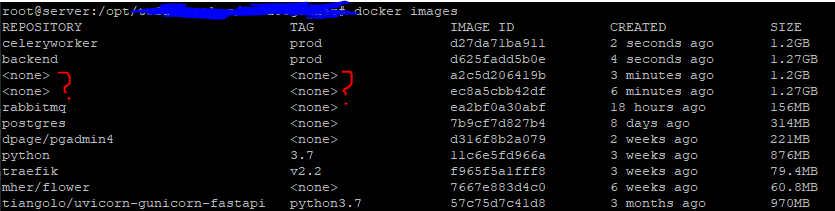
docker ps shows the following. It is now running the Image ID with the repository <none> and tag <none>, as the build has made a new image with backend:prod and I assume two images can't have the same repo:tag:

Then finally I deploy and run 'docker ps' and I'm still stuck on the image tagged with <none> <none> and latest backend:prod image isn't deployed.
docker ps

@Biskit1943 I will try the command you sent
Ok, let's recap.
You run TAG=prod FRONTEND_ENV=production bash ./scripts/build.sh to build all containers and tag them with prod
After that you run:
DOMAIN=example.com \
TRAEFIK_TAG=example.com \
STACK_NAME=example-com \
TAG=prod \
bash ./scripts/deploy.sh
You should see your STACK_NAME with docker stack ls and can see all running containers with docker stack ps STACK_NAME
Please make sure that you don't have the stack running with docker-compose up. I think you got things messed up by using docker-compose up to deploy the stack otherwise it won't be possible that the container is deployed with tag <none>...
I think this is the same issue that is described here https://github.com/moby/moby/issues/31357, regarding docker stack deploy not updating to the latest image. This does not seem solved.
In the end I worked around it by adding these lines to the end of scripts/deploy.sh (add any other services you need).
docker service update --force ${STACK_NAME}_backend
docker service update --force ${STACK_NAME}_frontend
A cleaner solution would be to tag the images incrementally and deploy a different tag on every update.
