

 fastapi
Encrypted request body and Swagger: How document and make use of 'try it out'
Description
We are using FastAPI to create an endpoint that receives rsa encrypted data in the request body. The body consists of binary data (not a json). We are able to implement the functionality we want, but are struggeling with the documentation and testing in swagger-ui.
What we tried so far
We implemented it along the FastAPI documentation using the starlette Request to access the body:
from fastapi import FastAPI, Body, Request

app = FastAPI()

@app.post(path='/use_request')
async def use_request(request: Request):
    encrypted_body = await request.body()
    #decrypt body content and do stuff
    return 'something'
The endpoint works (e.g. when using it with Postman), but the usage of the body is not documented in Swagger, and we cannot use Swagger to "try it out" as the body binary file cannot be uploaded anywhere:
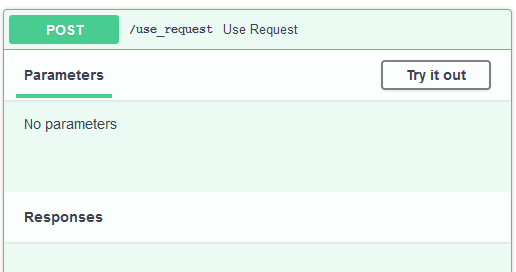
According to swagger-ui, we can set the request body content as application/octet-stream and can then upload a binary file in swagger-ui.
We tried to define the Body as a function parameter with media_type="application/octet-stream":
from fastapi import FastAPI, Body, Request

app = FastAPI()

@app.post(path='/use_body')
def use_body(encrypted_body: bytes = Body(..., media_type="application/octet-stream")):
    #decrypt body content and do stuff
    return 'something'
This results in swagger-ui with the desire documentation and ability to upload a binary file for testing:

When using this endpoint structure (with Postman or via swagger-ui), we run into the following error:
{
    "detail": "There was an error parsing the body"
}
Question
How can we both use the testing and documentation functionality of swagger-ui/openapi with our encrypted data?
Is there a way to get the unprocessed body content using FastAPIs Body()?
Environment
- OS: Linux / Windows
- FastAPI Version: 0.60.1
- Python version: 3.7.7

Not sure if this is a perfect answer, but one thing I suggest is looking at doing the decryption of the body with a pydantic validator. Look for example at the root validators section: https://pydantic-docs.helpmanual.io/usage/validators/#root-validators. In that example the values input would be encrypted and you could return a decrypted dictionary for example.

Thank you for your reply @jjbankert ! I looked into what you proposed, but did not succeed unfortunately. For me there seems to be no way to feed the pydantic model bytes that are not encapsulated in a json. This is a minimal example of what I tried:
from fastapi import FastAPI, Body, Request
from pydantic import BaseModel,  root_validator

app = FastAPI()

class DecryptModel(BaseModel):
    """Model that takes care of body decryption."""

    @root_validator(pre=True)
    def decrypt_body(cls, values):
        #decrypt body here
        return values


@app.post(path='/use_pydantic')
def use_body(decrypted_body: DecryptModel = Body(...)):
    #do stuff
    return 'something'
When I try to send bytes, I get the same error as described above:
{
    "detail": "There was an error parsing the body"
}
The root_validator is only entered when I send the body as a json (e.g. sending {"key":"value"}.
It also seems impossible to send data as a normal string, because a json is expected:
When sending a string like "test", it returns the following error:
{
    "detail": [
        {
            "loc": [
                "body",
                0
            ],
            "msg": "Expecting value: line 1 column 1 (char 0)",
            "type": "value_error.jsondecode",
            "ctx": {
                "msg": "Expecting value",
                "doc": "test",
                "pos": 0,
                "lineno": 1,
                "colno": 1
            }
        }
    ]
}
For me it seems that FastAPI at some point uses pydantic DecryptModel.parse_raw(body_data) as this produces the same error.
The latter error might also be more a pydantic problem here, as I did not find a way to feed a model with a string that cannot be parsed as a json.
Is there any way to receive binary body data without validation of any sort? Especially without attempting to decode it as a json? Something like
from fastapi import FastAPI, Body, Request

app = FastAPI()

@app.post(path='/get_body')
def get_body(raw_body:bytes = Body(...)):
    #decrypt body content and do stuff
    return 'something'
@tiangolo I am still stuck with the problem described above.
Essentially my question is: Is it possible to receive the whole body without any validation as a parameter? (no pydantic validation, no preprocessing, simply the raw data as e.g. bytestring)
Is there a flag like blow: (example not working)
@app.post(path='/get_body')
def get_body(raw_body:bytes = Body(... , validation=False)):
    #decrypt body content and do stuff
    return 'something'

Did anybody figure out how to solve this? I have the same problem here...

You can use pydantic root_validator with pre=True flag to decrypt your request
After this your validator will return argument to input base model. All thanks to root validator
@root_validator(pre=True)
def decrypt(cls, values):
    output = base64.b64decode(values.get("key_in_raw_json_request"))
    cipher = AES.new(key.encode("utf-8"), AES.MODE_ECB)
    return json.loads(unpad(cipher.decrypt(enc),16))

The solution by @kalmastenitin above is good if only a few of your request types need to be decrypted. But if you need a more general solution to encrypt/decrypt all or most incoming/outgoing messages, you will want to create FastAPI middleware or maybe a dependency. Middleware is quite powerful. It applies to the whole API and allows manipulating raw incoming and outgoing messages without any pydantic validation. Dependencies are simpler and more limited, but can be applied to single routes or path functions.
