

 fantaisie-software
Add "Show in Folder" to File menu and TabBar popup
This PR adds a simple "Show in Folder" AKA "Open File Location" action to the File menu and the TabBar popup menu.
It's a quick way to locate a source file (or project PBP file) in your OS's explorer.
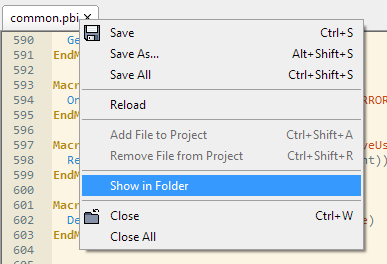
Notes:
- On Windows and Mac, it should open the Explorer/Finder with the file auto-selected. :warning: On Linux it just opens the folder. Maybe somebody on Linux could implement auto-selecting the file, if possible.
- I called it "Show in Folder", open to other suggestions
- Menu item automatically enabled/disabled when appropriate
- It can be assigned a keyboard shortcut, but defaults to none

I checked if there is a way to auto-select the file for Linux but I couldn't find an option for this in the popular file managers. I still think the feature is useful though even without the file selection on Linux.
But I would like to see this feature harmonized with the right-click menu in the Project panel (see ProjectPanel.pb) for better consistency. Specifically I would suggest these changes:
- Name the option "Open in (explorer name)" like in the Project panel (or rename the one in the Project panel if you prefer "Show in")
- Change the event handling in the Project panel to also use the new function to auto-select the file so we have the same behavior in both instances

On Linux, you need to install the "xdg-utils" package. Since this is a popular package, it is usually always bundled with Linux. At least I never installed it separately.
` CompilerSelect #PB_Compiler_OS
CompilerCase #PB_OS_Windows

	RunProgram("explorer", "/Select, " + GetPath$, "")

CompilerCase #PB_OS_Linux

	RunProgram("xdg-open", GetPath$, "")
CompilerEndSelect `

I called it "Show in Folder", open to other suggestions
That sounds right to me, and it's how I've seen similar menus named in other editors.
