

 facebookarchive
Focus behavior with custom decorators is not working properly
Do you want to request a feature or report a bug?
Report a bug
What is the current behavior?
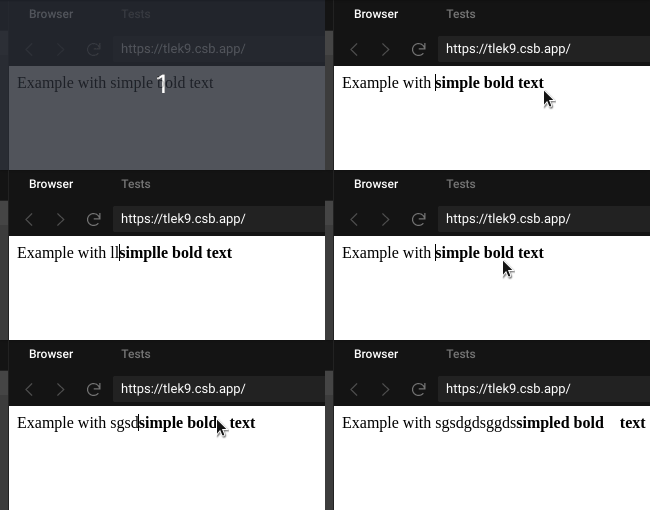
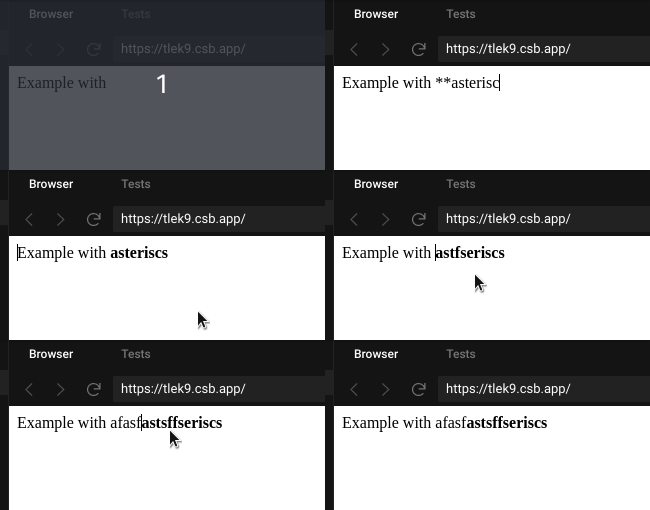
When the cursor is positioned on top of a custom decorated element and you try to type, the focus moves to the beginning of the element.
If the current behavior is a bug, please provide the steps to reproduce and if possible a minimal demo of the problem.
https://codesandbox.io/s/draftjs-with-decorators-tlek9?file=/src/index.js
In this example, I have a custom decorator that is rendered for bold text. The bold style can be applied with double asteriscs or with ctrl/cmd + B.
When you try to type over a styled text, the cursor moves unexpectedly to the beginning.
What is the expected behavior?
You should be able to modify the decorated text without the cursor moving from its current position.
Which versions of Draft.js, and which browser / OS are affected by this issue? Did this work in previous versions of Draft.js?
"draft-js": "^0.11.7" "react": "^16.10.2", "react-dom": "^16.10.2"

I believe this happens because you do not render children in your component. The complication comes from you trying to replace the double asterisk text with the asterisks stripped out. I'm not sure if this is the maintainers' preferred approach, but to accomplish this behavior you can add a handleBeforeInput that retrieves the text preceding the cursor, combines it with the pending input, checks that against your regex and then replaces that range using Modifier.replaceText. You'd also have to do this when creating the initial state from text and in handleBeforePaste. It can get complicated quickly, so there's a good chance this isn't the idiomatic way to approach the problem.

