

 facebook
[DevTools Bug]: Hide logs during second render in Strict Mode not working
Website or app
https://codesandbox.io/p/sandbox/sharp-cache-627m6x?layout=%257B%2522sidebarPanel%2522%253A%2522EXPLORER%2522%252C%2522rootPanelGroup%2522%253A%257B%2522direction%2522%253A%2522horizontal%2522%252C%2522contentType%2522%253A%2522UNKNOWN%2522%252C%2522type%2522%253A%2522PANEL_GROUP%2522%252C%2522id%2522%253A%2522ROOT_LAYOUT%2522%252C%2522panels%2522%253A%255B%257B%2522type%2522%253A%2522PANEL_GROUP%2522%252C%2522contentType%2522%253A%2522UNKNOWN%2522%252C%2522direction%2522%253A%2522vertical%2522%252C%2522id%2522%253A%2522clozd8em0000a356itqsl0kki%2522%252C%2522sizes%2522%253A%255B70%252C30%255D%252C%2522panels%2522%253A%255B%257B%2522type%2522%253A%2522PANEL_GROUP%2522%252C%2522contentType%2522%253A%2522EDITOR%2522%252C%2522direction%2522%253A%2522horizontal%2522%252C%2522id%2522%253A%2522EDITOR%2522%252C%2522panels%2522%253A%255B%257B%2522type%2522%253A%2522PANEL%2522%252C%2522contentType%2522%253A%2522EDITOR%2522%252C%2522id%2522%253A%2522clozd8elz0003356ivqwmdxyv%2522%257D%255D%252C%2522sizes%2522%253A%255B100%255D%257D%252C%257B%2522type%2522%253A%2522PANEL_GROUP%2522%252C%2522contentType%2522%253A%2522SHELLS%2522%252C%2522direction%2522%253A%2522horizontal%2522%252C%2522id%2522%253A%2522SHELLS%2522%252C%2522panels%2522%253A%255B%257B%2522type%2522%253A%2522PANEL%2522%252C%2522contentType%2522%253A%2522SHELLS%2522%252C%2522id%2522%253A%2522clozd8elz0007356ijh3woekp%2522%257D%255D%252C%2522sizes%2522%253A%255B100%255D%257D%255D%257D%252C%257B%2522type%2522%253A%2522PANEL_GROUP%2522%252C%2522contentType%2522%253A%2522DEVTOOLS%2522%252C%2522direction%2522%253A%2522vertical%2522%252C%2522id%2522%253A%2522DEVTOOLS%2522%252C%2522panels%2522%253A%255B%257B%2522type%2522%253A%2522PANEL%2522%252C%2522contentType%2522%253A%2522DEVTOOLS%2522%252C%2522id%2522%253A%2522clozd8elz0009356ielu54js9%2522%257D%255D%252C%2522sizes%2522%253A%255B100%255D%257D%255D%252C%2522sizes%2522%253A%255B50%252C50%255D%257D%252C%2522tabbedPanels%2522%253A%257B%2522clozd8elz0003356ivqwmdxyv%2522%253A%257B%2522id%2522%253A%2522clozd8elz0003356ivqwmdxyv%2522%252C%2522activeTabId%2522%253A%2522clozd92m7006s356idh5hwnfk%2522%252C%2522tabs%2522%253A%255B%257B%2522id%2522%253A%2522clozd8ely0002356ikf2d5bsz%2522%252C%2522mode%2522%253A%2522permanent%2522%252C%2522type%2522%253A%2522FILE%2522%252C%2522filepath%2522%253A%2522%252FREADME.md%2522%257D%252C%257B%2522type%2522%253A%2522FILE%2522%252C%2522filepath%2522%253A%2522%252Fsrc%252FApp.tsx%2522%252C%2522id%2522%253A%2522clozd92m7006s356idh5hwnfk%2522%252C%2522mode%2522%253A%2522permanent%2522%252C%2522state%2522%253A%2522IDLE%2522%257D%255D%257D%252C%2522clozd8elz0009356ielu54js9%2522%253A%257B%2522tabs%2522%253A%255B%257B%2522id%2522%253A%2522clozd8elz0008356i67rphcjv%2522%252C%2522mode%2522%253A%2522permanent%2522%252C%2522type%2522%253A%2522TASK_PORT%2522%252C%2522taskId%2522%253A%2522dev%2522%252C%2522port%2522%253A5173%252C%2522path%2522%253A%2522%252F%2522%257D%255D%252C%2522id%2522%253A%2522clozd8elz0009356ielu54js9%2522%252C%2522activeTabId%2522%253A%2522clozd8elz0008356i67rphcjv%2522%257D%252C%2522clozd8elz0007356ijh3woekp%2522%253A%257B%2522tabs%2522%253A%255B%257B%2522id%2522%253A%2522clozd8elz0004356ilbgf4wub%2522%252C%2522mode%2522%253A%2522permanent%2522%252C%2522type%2522%253A%2522TASK_LOG%2522%252C%2522taskId%2522%253A%2522dev%2522%257D%252C%257B%2522id%2522%253A%2522clozd8elz0005356inhy8tftq%2522%252C%2522mode%2522%253A%2522permanent%2522%252C%2522type%2522%253A%2522TASK_LOG%2522%252C%2522taskId%2522%253A%2522build%2522%257D%252C%257B%2522id%2522%253A%2522clozd8elz0006356iz11synx2%2522%252C%2522mode%2522%253A%2522permanent%2522%252C%2522type%2522%253A%2522TASK_LOG%2522%252C%2522taskId%2522%253A%2522preview%2522%257D%255D%252C%2522id%2522%253A%2522clozd8elz0007356ijh3woekp%2522%252C%2522activeTabId%2522%253A%2522clozd8elz0004356ilbgf4wub%2522%257D%257D%252C%2522showDevtools%2522%253Atrue%252C%2522showShells%2522%253Atrue%252C%2522showSidebar%2522%253Atrue%252C%2522sidebarPanelSize%2522%253A15%257D
Repro steps
check console logs while turning on the 'hide logs during the second render in Strict Mode' in react dev tools. it's console logging 'rendering' twice
How often does this bug happen?
Every time
DevTools package (automated)
No response
DevTools version (automated)
No response
Error message (automated)
No response
Error call stack (automated)
No response
Error component stack (automated)
No response
GitHub query string (automated)
No response

I'm trying to debug it, there's a problem with it's rendering two times.

I'm trying to debug it, there's a problem with it's rendering two times.
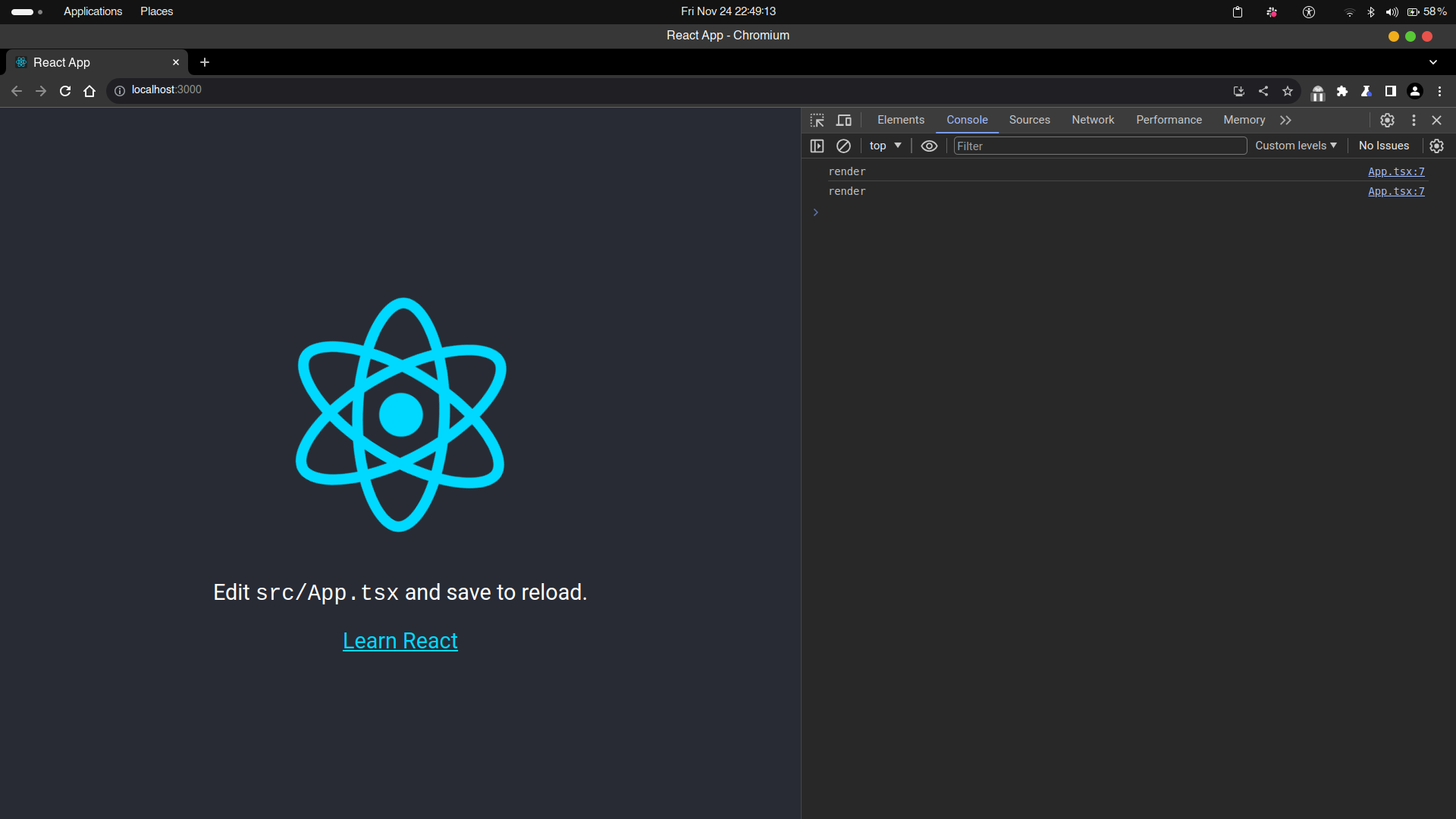
because of the strict mode
What do yo mean? Strict mode is supposed to that. Do one thing. Create a new react app using vite or cra. Write a console log is useeffect in app.tsx. Then turn on the 'hide logs during the second render in Strict Mode' in react dev tools and check
Yes, I know that but why ?
According to the new documentation, it is supposed to do that. check this documentation and read carefully NOTE part of the document
https://react.dev/reference/react/StrictMode#enabling-strict-mode-for-entire-app
Yes i understand that. but can you read my issue carefully. i am talking about the react dev tools which is an extension available in chrome to debug react apps. there's a feature in it : 'hide logs during the second render in Strict Mode' which when turned on hides the second console logs during re-render . check the attached screenshot
check this note from the docs: Note If you have React DevTools installed, any console.log calls during the second render call will appear slightly dimmed. React DevTools also offers a setting (off by default) to suppress them completely.
According to the new documentation, it is supposed to do that. check this documentation and read carefully NOTE part of the document
https://react.dev/reference/react/StrictMode#enabling-strict-mode-for-entire-app
Yes i understand that. but can you read my issue carefully. i am talking about the react dev tools which is an extension available in chrome to debug react apps. there's a feature in it : 'hide logs during the second render in Strict Mode' which when turned on hides the second console logs during re-render . check the attached screenshot
check this note from the docs: Note If you have React DevTools installed, any console.log calls during the second render call will appear slightly dimmed. React DevTools also offers a setting (off by default) to suppress them completely.
According to the new documentation, it is supposed to do that. check this documentation and read carefully NOTE part of the document
https://react.dev/reference/react/StrictMode#enabling-strict-mode-for-entire-app
ohh Okay now, I get it. It means when we Hide the log it should not be rendered a second time, but that functionality not working. Is it right?
Yes i understand that. but can you read my issue carefully. i am talking about the react dev tools which is an extension available in chrome to debug react apps. there's a feature in it : 'hide logs during the second render in Strict Mode' which when turned on hides the second console logs during re-render . check the attached screenshot
check this note from the docs: Note If you have React DevTools installed, any console.log calls during the second render call will appear slightly dimmed. React DevTools also offers a setting (off by default) to suppress them completely.
According to the new documentation, it is supposed to do that. check this documentation and read carefully NOTE part of the document
https://react.dev/reference/react/StrictMode#enabling-strict-mode-for-entire-appohh Okay now, I get it. It means when we Hide the log it should not be rendered a second time, but that functionality not working. Is it right?
Yes, that's right. check the original bug report and tags

It works on Chrome version 127.0.6533.89 64-bit.
But it doesn't work on Firefox, I checked two versions: Firefox Developer Edition 129.0b9 (64-bit), and Firefox 128.0.3 (64-bit).

I tried it's working on React 19.
In React 18, when strict mode is enabled, it seems that console in the useEffect are not being override.
Below is the source code of React 19. the setIsStrictModeForDevTools(true) means console will be dim.
https://github.com/facebook/react/blob/ba6a9e94edf0db3ad96432804f9931ce9dc89fec/packages/react-reconciler/src/ReactFiberWorkLoop.js#L3727-L3736
