

 facebook
Screen mirroring (airplay) is broken
Description
The IOS screen mirroring feature is broken when a native alert is displayed. The alert will only appear on the mirroring screen and not on the Iphone, preventing any interaction with it.
Occurs on IOS
The minimal reproduction uses expo managed, but ejecting won't solve the issue.
React Native Version
0.71.7
Output of npx react-native info
OS: macOS 13.3.1 CPU: (8) arm64 Apple M1 Pro Memory: 102.20 MB / 16.00 GB Shell: 5.9 - /bin/zsh Binaries: Node: 16.13.2 - ~/.nvm/versions/node/v16.13.2/bin/node Yarn: 1.22.17 - ~/.nvm/versions/node/v16.13.2/bin/yarn npm: 8.1.2 - ~/.nvm/versions/node/v16.13.2/bin/npm Watchman: 2023.02.13.00 - /opt/homebrew/bin/watchman Managers: CocoaPods: 1.11.3 - /opt/homebrew/bin/pod SDKs: iOS SDK: Platforms: DriverKit 22.4, iOS 16.4, macOS 13.3, tvOS 16.4, watchOS 9.4 Android SDK: Not Found IDEs: Android Studio: 2020.3 AI-203.7717.56.2031.7935034 Xcode: 14.3.1/14E300c - /usr/bin/xcodebuild Languages: Java: 18.0.1.1 - /usr/bin/javac npmPackages: @react-native-community/cli: Not Found react: 18.2.0 => 18.2.0 react-native: 0.71.8 => 0.71.8 react-native-macos: Not Found npmGlobalPackages: react-native: Not Found
Steps to reproduce
- Start the project on your phone
- Start mirroring on a compatible screen like your Macbook screen
- On your phone, press the alert button.
-> The alert will only be shown on the mirroring screen but not on the phone
Snack, code example, screenshot, or link to a repository
https://github.com/Chayuan/expo-screen-mirroring-issue

| :warning: | Newer Version of React Native is Available! |
|---|---|
| :information_source: | You are on a supported minor version, but it looks like there's a newer patch available - 0.71.10. Please upgrade to the highest patch for your minor or latest and verify if the issue persists (alternatively, create a new project and repro the issue in it). If it does not repro, please let us know so we can close out this issue. This helps us ensure we are looking at issues that still exist in the most recent releases. |
![github-actions[bot] avatar](https://avatars.githubusercontent.com/in/15368?v=4 "Published by a pub.dev verified publisher")
Edit : We were able to resolve the issue with airplay by reverting this commit.
Edit 2 : Upgrading to react-native 0.71.10 does not fix the issue.
Edit : We were able to resolve the issue with airplay by reverting this commit.
Edit 2 : Upgrading to react-native 0.71.10 does not fix the issue.
Cc: @cipolleschi

Hi @Chayuan, thank you for opening the issue. To properly investigate the issue, we would need a repro with an app created with the CLI, not with expo.
Could you double check that by:
- creating a new app with the CLI
- moving your
App.jsin the newly created app - airplaying and clicking the button The issue is still there? With that setup, we can work something out.
I don't think that reverting https://github.com/facebook/react-native/commit/0c53420a7af306d629350e1244e8e2ccae08a312 is a good long term solution as we introduced it to support the SceneDelegate approach with is the standard for modern iOS apps.

Hi @cipolleschi, thanks for the answer.
Here is the minimal reproduction using the cli, I can confirm the issue is still there.
Thanks! I hope to find some time this or next week to look into that. 👍

I see :( is there any plan to work on this soon-ish? It would help a lot to know an estimation for timeline
Thanks! I hope to find some time this or next week to look into that. 👍
@cipolleschi Did you manage to find some time to look into this issue?

Could you provide a repro for this using React Native vanilla, and with this template? I saw that the provided repro above is using Expo, and that's not good for me.
Could you provide a repro for this using React Native vanilla, and with this template? I saw that the provided repro above is using Expo, and that's not good for me.
Updated this repo using the mentioned template and find the reproduction steps here.
I had a look at the issue recently but I couldn't test it properly as I don't have any mirroring enabled device at home or in the office. However, we don't do anything specific with React Native to interact with AirPlay. Can you check how a native app which just display an alert interact in that scenario?
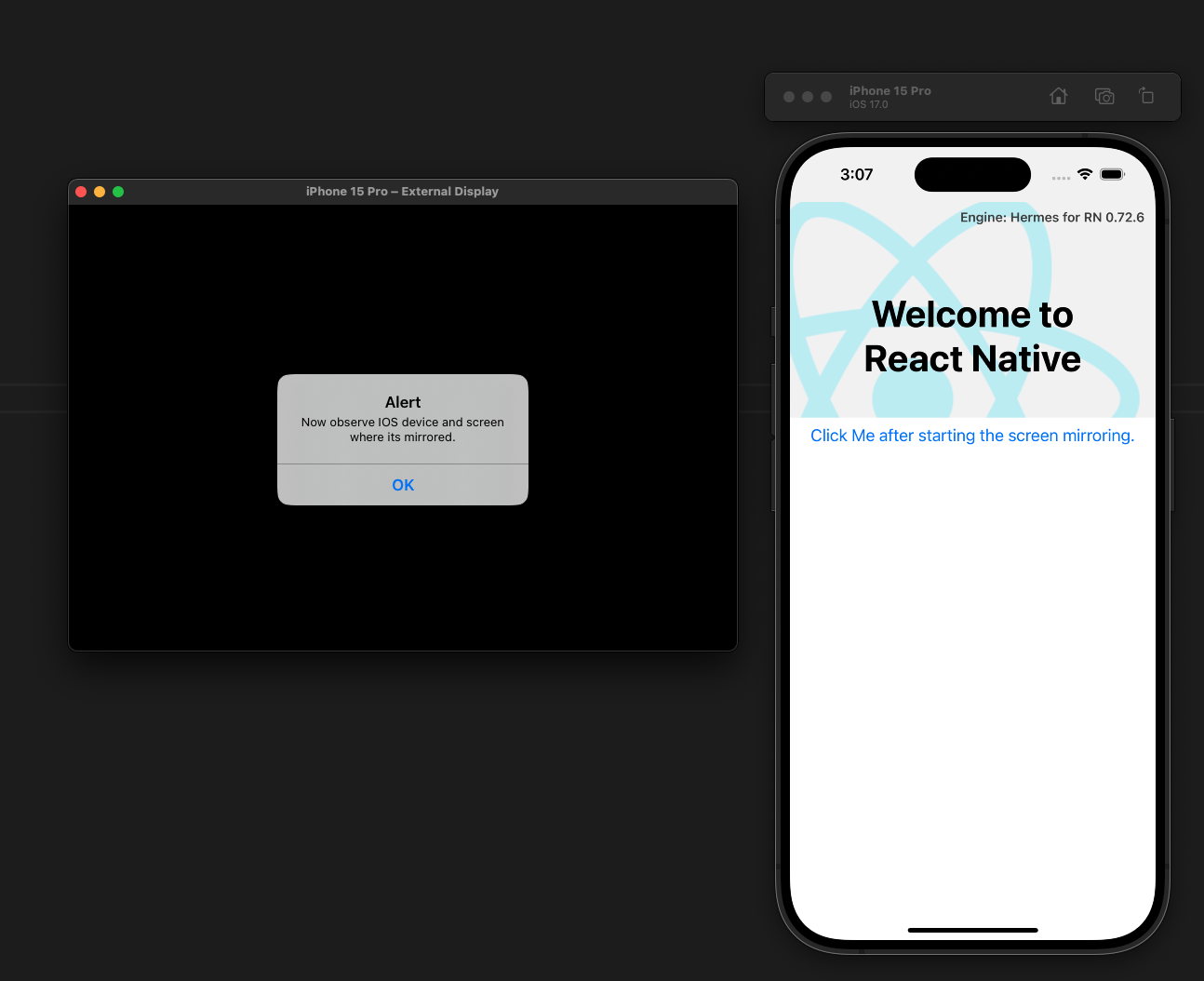
One thing I noticed with external screens is that the alert is presented in that screen:
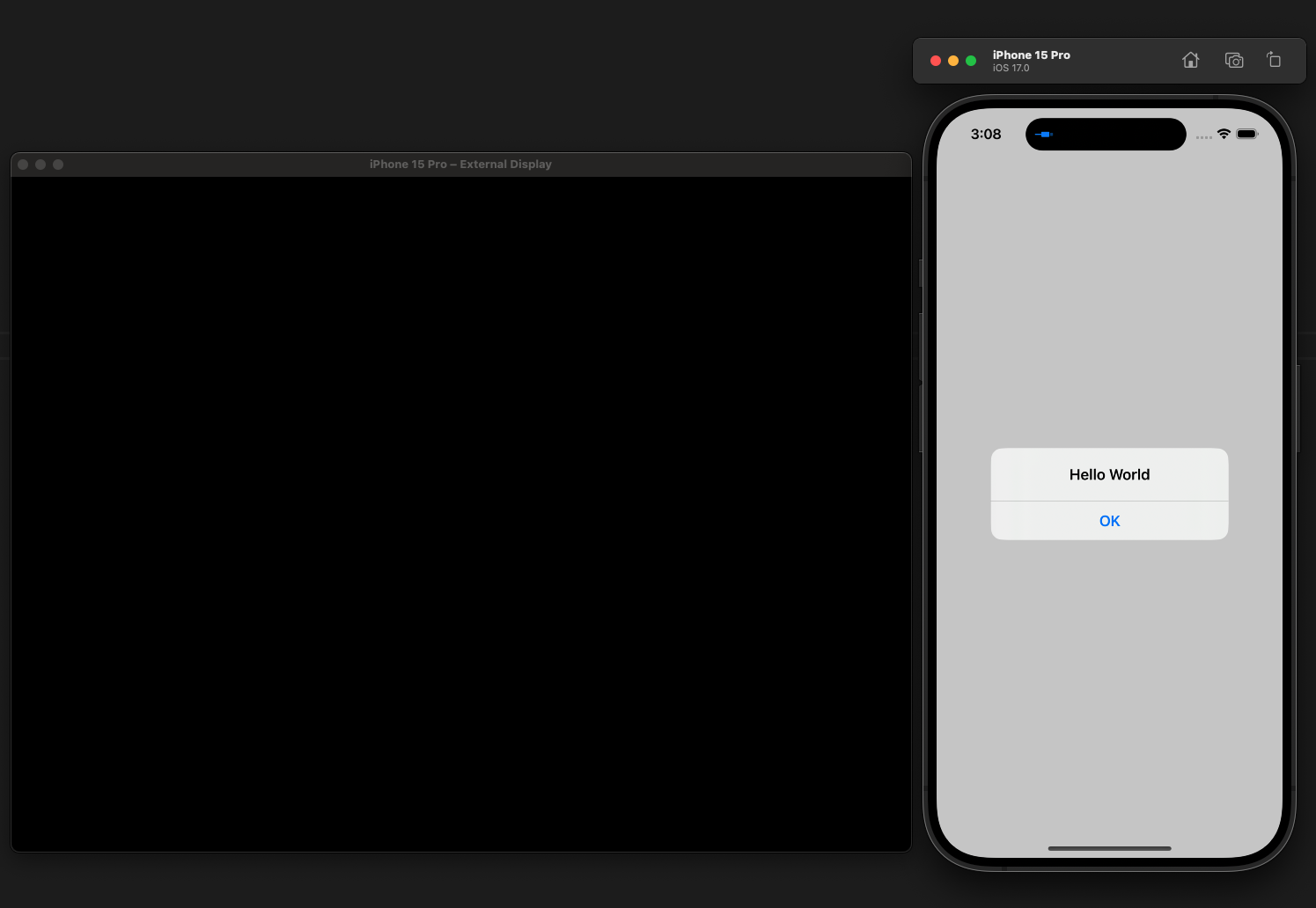
While a Native App seems not to present the same behavior:
This difference can be due to how React Native handles the Screens. With two screens, we can choose which one to use with the UIScreen APIs.
However, while mirroring, we should still have a single Screen, so I don't think this is super relevant.
I had a look at the issue recently but I couldn't test it properly as I don't have any mirroring enabled device at home or in the office. However, we don't do anything specific with React Native to interact with AirPlay. Can you check how a native app which just display an alert interact in that scenario?
One thing I noticed with external screens is that the alert is presented in that screen:
While a Native App seems not to present the same behavior:
This difference can be due to how React Native handles the
Screens. With two screens, we can choose which one to use with theUIScreenAPIs. However, while mirroring, we should still have a single Screen, so I don't think this is super relevant.
Thanks for looking into it, I have checked the alerts with native apps and it's working without an issue.
FYI: This issue does not occur in react-native version 0.71.0.
This issue is stale because it has been open 180 days with no activity. Remove stale label or comment or this will be closed in 7 days.
This issue was closed because it has been stalled for 7 days with no activity.